

Claims go out electronically, remittances come back as 835s, and your front desk still spends its mornings on hold with payers. That’s a useful place to start looking for the next automation project.
The 2025 CAQH Index, covering 2024 transactions, found that U.S. healthcare avoided $258 billion in administrative costs through electronic transactions. It estimated another $21 billion in annual savings available from automating the remaining manual work across the industry.
Your practice’s opportunity needs its own baseline. Count the phone eligibility checks and denial follow-ups, then measure the hours and collectible revenue tied to those queues.
Topflight Apps has spent 10+ years building healthcare automation. For an automated medical billing system, we start with the workflow that has a clear owner and enough repeatable work to measure a return.
How do you automate medical billing?
Start with eligibility verification and pre-submission claim edits, then expand to ERA 835 posting and exception routing. To decide how to automate medical billing at your practice, pilot one workflow and compare first-pass yield and staff time against its baseline. Keep billers responsible for exceptions and follow-up on payer decisions.
Can medical billing be automated?
Yes. You can automate routine checks, claim submission, payment posting and work-queue routing. Your team still reviews uncertain coding, appeals and payer edge cases.
Top takeaways
- Automated medical billing works best when you can trace an improvement to a specific queue. UW Medical Center’s published case recorded a clean-claim rate increase from 84% to 92% and a denial reduction of more than half.
- In a March 2024 interview, Community Medical Centers reported 22% and 18% reductions in 2 targeted denial categories during its first 6 months of using an Experian Health tool.
- Begin with a bounded pilot. Track first-pass yield and days in A/R alongside the total staff time spent handling that workflow.
- Compare your existing platform’s configuration with a custom integration, including ongoing maintenance and the control you need over payer-specific rules.
Table of contents
- An overview of the medical billing process
- Medical billing automation software: categories and examples
- Benefits of medical billing automation
- Is AI replacing medical billers?
- Real-world automation success stories
- Key features of medical billing automation
- Key technologies driving medical billing automation
- Regulatory requirements and continuity priorities for billing automation in 2026
- Medical billing automation by practice type
- Ready-made vs. custom medical billing automation solutions
- How to roll out billing automation: pilot, baseline, measure
- Challenges of medical billing automation
- Building custom medical billing automation with Topflight Apps
- Cost and ROI of medical billing automation
An overview of the medical billing process
A typical medical billing process crosses several desks before a practice gets paid. Each handoff needs a complete record and an owner for the exceptions.
The 9 stages below show where a billing team can change its own workflow:
- Collect patient demographics for new patients.
- Check patient insurance eligibility.
- Assign diagnosis and treatment codes after the encounter.
- Prepare a superbill with an itemized list of services.
- Prepare and submit the insurance claim to a clearinghouse or payer.
- Follow the payer’s medical claim adjudication process.
- Track and reconcile the insurance payment.
- Settle deductibles, coinsurance and copayments using the ERA or EOB.
- Bill the patient and track the payment.
AI medical coding companies focus on the coding stage. The rest of the workflow also needs reliable data transfer and exception handling.
What can be automated in medical billing?
This map is our practical planning guide for medical billing automation. “Established” means the task can use existing transaction standards or repeatable rules; your payer coverage and source data still decide readiness.
| Workflow | Approach | Practical readiness | Human exception | Measure |
|---|---|---|---|---|
| Patient demographics | Digital intake, required-field rules and identity matching | Established with consistent patient records | Resolve duplicate identities or conflicting details | Registration correction rate |
| Insurance eligibility | Eligibility verification (270/271) through payer or clearinghouse connections | Established where the payer returns usable coverage data | Check ambiguous benefits and plan changes | Manual eligibility touches per visit |
| Diagnosis and treatment coding | Rules-based validation plus AI-assisted code suggestions | Conditional on specialty-specific validation and reviewer capacity | Confirm clinical context and coding judgment | Coder minutes per chart and correction rate |
| Superbill and charge capture | EHR feeds, templates and completeness rules | Established with consistent encounter documentation | Resolve missing services or conflicting modifiers | Late or missing charges |
| Claim preparation and submission | Claim scrubbing and 837 claim submission | Established with maintained payer edits | Review unusual edits and rejected transactions | Clean claim rate and first-pass yield |
| Payer adjudication follow-up | Status transactions or APIs; RPA where a stable payer portal is the available route | Follow-up can be automated; adjudication belongs to the payer | Handle clinical review, appeals and missing responses | Days awaiting a response |
| Insurance payment tracking | 835 ERA auto-posting, reconciliation and underpayment detection | Established for supported remittance formats | Investigate unmatched payments or contract variances | Auto-posting rate and unresolved balances |
| Patient responsibility | ERA/EOB rules to calculate and route patient balances | Established when benefit and remittance details are complete | Resolve disputed responsibility and adjustment codes | Balance correction rate |
| Patient billing and collection | Statements, reminders, payment links and balance reconciliation | Established with consent and communication controls | Handle disputes, financial assistance and payment plans | Patient collection rate and response time |
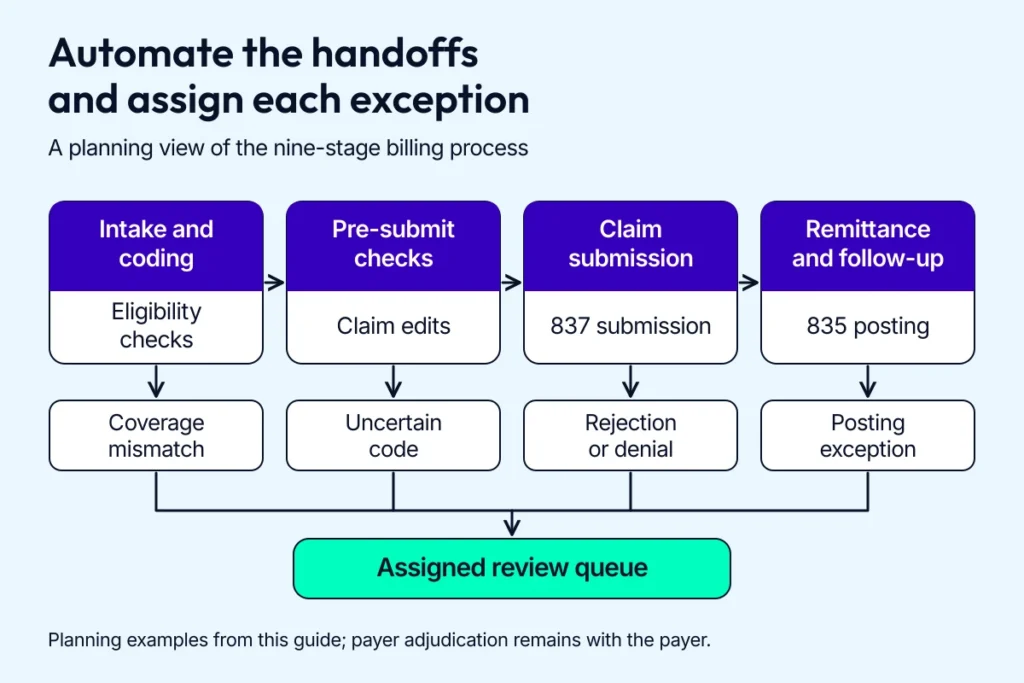
Give each exception an owner before increasing the automated volume.
Billing accuracy starts upstream. Pair the map with medical record automation and a defined data contract for EHR in medical billing.
Automated medical billing processes also need a feedback loop: denial reasons should reach the team maintaining pre-submission rules. For the full workflow across departments, see healthcare revenue cycle management automation.
Medical billing automation software: categories and examples
Choose medical billing automation software for the queue you want to change. A practice platform, a clearinghouse, a coding model and a payer-call agent cover different parts of the job, so compare products within their category.
Ask each vendor to demonstrate your payer mix and a real exception from your workflow. The demo should show who receives a failed task and how you export its audit record.
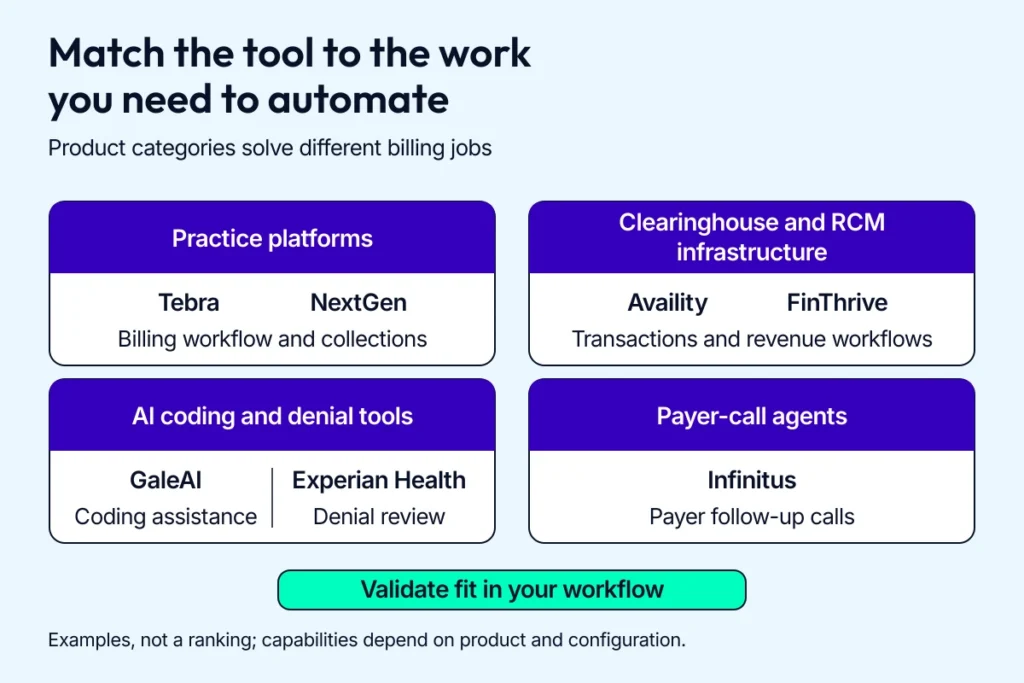
Compare a supplier against the task you need to automate and the systems around it.
Practice platforms handle everyday billing operations
Tebra (formerly Kareo)
Tebra supports independent-practice billing with eligibility checks, claim submission, remittance posting and patient payments. Start here when your existing team needs connected billing workflows within a practice platform.
NextGen Healthcare
NextGen Healthcare combines practice management with billing tools, including claims management and A/R reporting. Check the product edition and interfaces your practice actually uses before treating its feature list as an implementation scope.
Some products you’ll encounter are separate components for a custom pipeline. The Amazon Comprehend Medical API is discussed in the NLP section; payer connectivity and payment handling need their own software.
Clearinghouse and claims tools connect you to payers
Availity Essentials Plus covers payer-facing work such as eligibility, claim management and prior authorization. FinThrive is another claims-management option; its UW Medical Center case is discussed below.
Evaluate payer enrollment and transaction coverage first. Then test claim scrubbing and rejection handling with the files your clearinghouse will receive.
AI coding and denial tools need local validation
See our guide to AI medical assistant development for the full build.
GaleAI supports AI-assisted coding. Experian Health’s AI Advantage addresses denial risk and denial management.
For either category, check the review queue and how the vendor measures accuracy on your specialty and payer mix. Coding suggestions and denial scores need acceptance criteria before they affect live claims.
Payer-call agents take on phone follow-up
Infinitus provides AI agents for payer calls, including benefit verification and prior-authorization follow-up. Check which call types it supports and how it hands an unresolved conversation back to your staff.
When comparing automated medical billing software, include the cost of exceptions and implementation. Ask for a written scope covering 4 items:
- Supported transactions and payers, including your highest-volume plans.
- Integration work and the source data each connection needs.
- Review and escalation responsibilities for failed tasks.
- Recurring charges, usage limits and export rights.
Benefits of medical billing automation
Measure the effect of automating your medical billing system in the reports your billing manager already uses.
Fewer human errors and higher first-pass yield
Pre-submission rules catch missing identifiers and code mismatches before claims leave the practice. AI-assisted checks can add clinical context, with a review queue for uncertain suggestions.
Compare first-pass yield before and after the pilot, using the same claim cohort. Keep code corrections visible so an apparent improvement doesn’t hide extra reviewer work.
Related: Healthcare app development guide
Payment posting and tracking with fewer manual touches
A medical billing solution can match remittances to claims and assign unmatched payments to a named owner. Measure the share posted automatically and the time taken to clear the remaining queue.
Related: Healthcare payment system integration
Compliance evidence follows each transaction
An automated healthcare billing system needs access controls and a usable audit trail. Configure logs to record who submitted a claim and where a failed payload went, while controlling the PHI copied into error records.
Related: HIPAA-compliant app development guide
Lower operating costs need measured time savings
Count total staff hours across the workflow, including exception review. A task that runs automatically but produces an hour of cleanup has shifted the administrative burden to another queue.
Medical billing automation for healthcare providers can release time for complex claims or patient support. Keep that capacity separate from cash savings until overtime or another actual expense falls.
Patients get clearer estimates and statements
Coverage checks support patient estimates before a visit, while payment tools help you send statements and reconcile balances. Explain the assumptions behind an estimate and route disputed balances to your staff.
Track billing inquiries and statement corrections. Those figures tell you whether the new workflow is easier for patients to use.
Is AI replacing medical billers?
AI can assist with routine coding suggestions and denial-risk review. Medical billers still own the decisions that need clinical context or payer judgment.
That changes the workday: a biller can review the cases needing attention while software gathers documents or checks claim fields. Build the handoff around specific responsibilities:
- Validate uncertain coding and documentation before submission.
- Review appeals and resolve payer-specific exceptions.
- Handle patient disputes and explain balances.
- Check model errors and escalate a workflow that stops meeting its acceptance criteria.
A pilot should measure both the routine work removed and the new review work created. Track days in A/R to check the effect on payment timing, and set your staffing plan from the observed workload.
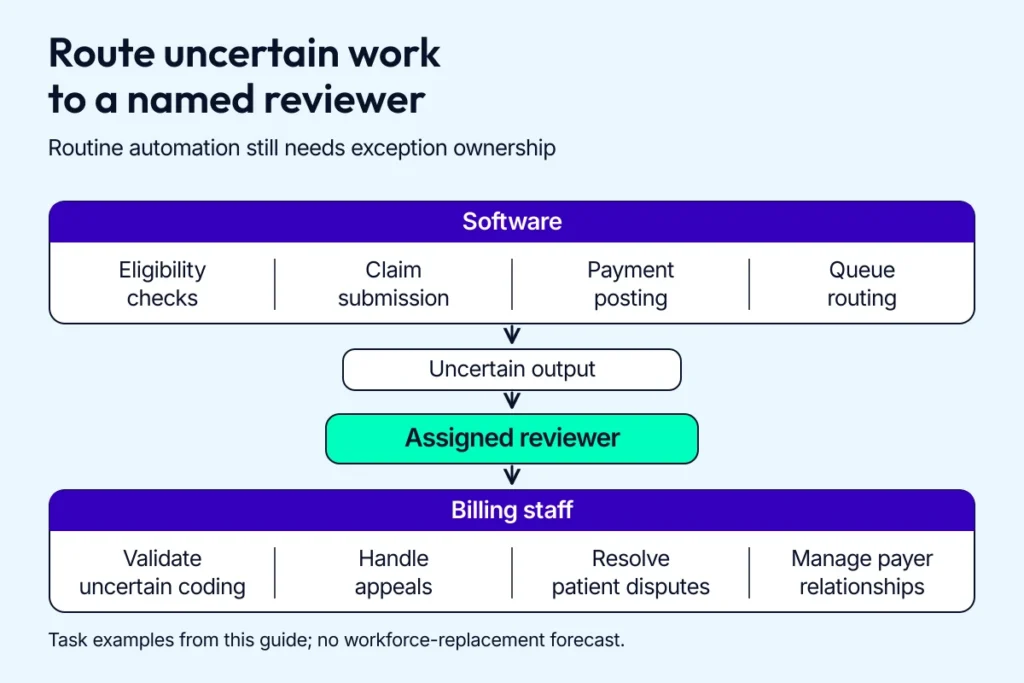
Keep review responsibility clear when software output is uncertain.
Real-world automation success stories
Use these cases to choose a pilot measure, then compare it with your own baseline. The figures are provider and vendor reports from specific implementations.
Prior authorization automation reduced staff time
The 2020 CAQH Index reported an 80% reduction in staff time per prior authorization at Cleveland Clinic compared with payer web portals. That result came from the early pilot with PriorAuthNow.
A later CAQH CORE case study compared 21,456 automated diagnostic-imaging authorizations with 58,739 processed without automation from June 2020 through February 2021. The 80,195 total includes both groups. The workflow used X12 278 transactions and CORE operating rules, with API connections to Epic.
- Overall decisions arrived 6.7 days sooner with automation.
- Cases requiring peer-to-peer review cleared 11 days sooner.
Cases needing additional clinical information cleared in 6.5 days with automation versus 10.8 days without it, a 4.3-day difference. Staff still supplied the clinical documentation.
Claim scrubbing and submission improved UW’s clean claims
FinThrive’s UW Medical Center case reports a clean-claim rate increase from 84% to 92% and a denial-rate reduction of more than 50%. Average days from claim to export fell 33%.
Payment posting automation cleared a paper backlog
In U.S. Bank’s Payment Consolidator case, a health system with 8 hospitals auto-posted over 90% of payments previously keyed by hand. Payments posted 4 to 7 days faster.
Commerce Healthcare’s 2019 case describes a Midwest children’s hospital where paper EOBs made up 10% of its remittance mix. Its healthcare lockbox converted 99% of that paper stream into ERAs.
AI-powered coding automation found more billable codes
GaleAI identifies CPT codes in seconds. Our GaleAI case study reports up to 15% higher provider revenue and 97% less time spent on coding.
During a 1-month audit, GaleAI found 7.9% more billable codes than human coders. The platform uses natural language processing (NLP) and optical character recognition (OCR), with connections to EHRs.
Denial management systems gave staff time back
In a March 2024 provider interview, Eric Eckhart, patient financial services director at Community Medical Centers of Fresno, described a gradual rollout of Experian Health’s denial-risk scoring through its existing clearinghouse. The case report recorded these changes during the first 6 months:
- 22% fewer commercial-payer CARC 197 denials for missing precertification or authorization.
- 18% fewer Medicaid-payer CARC 109 denials for claims sent to the wrong payer.
Eckhart reported that the improvements eliminated more than 30 hours of weekly follow-up work, freeing staff for additional appeals.
Key features of medical billing automation
Choose features that connect the front desk to the billing queue. Whether you run in-house or with medical billing services, make the transaction status and its exception owner visible to both teams.
Eligibility verification
Use 270/271 eligibility lookups to check coverage and benefit details before the visit. Route incomplete responses and conflicting plan information to staff before using the results in patient estimates.
Integration with existing systems
Map how records move between your EHR and PMS, then document the clearinghouse connection. Agree on patient and plan identifiers before testing the interfaces.
Define how data moves through webhooks and queues, and make repeated requests safe to retry.
Test each connection against versioned APIs in the vendor sandbox. Watch for changed payer responses after each release.
Give clearinghouse integration an owner and documented service levels. In healthcare RCM automation solutions, track missing acknowledgements and unmatched payments so staff can investigate failures before claims age.
Claim submission
Validate claims before submission. Rule-based scrubbing validates:
- ICD-10 and CPT codes
- modifiers
- NPI and Tax ID
- payer-specific edits
Then it generates EDI 837 claims in batches or on demand. Automated medical billing solutions for hospitals need complete claim fields before submission.
Payment tracking
Use 835 ERA auto-posting to match payments to claims, with underpayment detection for contract variances. CARC and RARC codes explain adjustments and related details, including patient responsibility, contractual adjustments and denial reasons.
Map each exception to a work queue and an owner. Apply the same reconciliation controls when you partner with medical billing services.
Reporting and analytics
Track clean-claim rate and first-pass yield by payer, then connect denial reasons and days in A/R to the staff who can act on them. Group results by workflow to show which automation solutions in your RCM playbook are improving those measures.
Key technologies driving medical billing automation
In medical billing automation software development, choose the mechanism that fits the task and its available connection. Rules and APIs handle structured transactions; models need a separate validation and review process.
Robotic process automation (RPA) in medical billing
RPA in medical billing handles repeatable screen-based tasks when a usable API isn’t available. Payer portals, batch downloads and status checks are common candidates.
- Use RPA bots for deterministic flows with stable screens and observable results.
- Give each bot limited access, a maintained version and an exception queue that reaches a person.
RPA in healthcare needs a maintenance owner from the first sprint. A payer can redesign a portal or change a login flow, leaving a queue stalled until someone fixes the bot.
Monitor successful task completion as well as errors. When a reliable payer API becomes available, compare the maintenance cost of the bot with the cost of switching that workflow.
AI and machine learning for claim processing
ML can score denial risk before submission and suggest codes or modifiers. Start in shadow mode, compare the suggestions with reviewer decisions, then set acceptance thresholds before live use.
Track false positives and missed errors by payer and specialty.
Natural language processing for documentation
NLP extracts structured information from clinical notes for coding review or a prior-authorization packet. Keep the supporting text visible so a reviewer can check each suggestion against the encounter record.
Amazon Comprehend Medical is an NLP API that detects entities in clinical text and links them to medical ontologies, including ICD-10-CM and RxNorm.
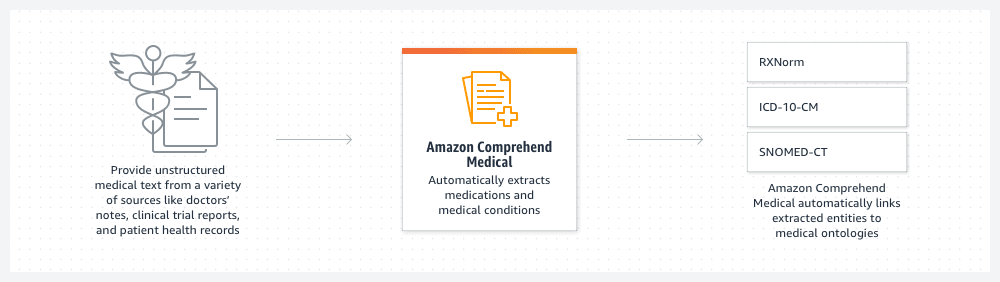
Clinical entity extraction supplies structured information that still needs workflow validation.
| Input | Extracted information | Linked ontologies |
|---|---|---|
| Unstructured medical text from doctors’ notes, clinical trial reports and patient health records | Medications and medical conditions | RxNorm, ICD-10-CM and SNOMED-CT |
Use the extracted entities and ontology matches as inputs to a reviewed workflow. CPT-code selection, claim submission and remittance handling need their own components; adjudication remains with the payer.
Choose the vocabularies your workflow actually needs, then test confidence thresholds with approved clinical examples. Route low-confidence spans to a reviewer with the source passage attached.
Optical character recognition for paper claims
OCR extracts fields from paper EOBs and other scanned records. Pair it with validation and duplicate checks before using those fields for posting or submission.
- Maintain document templates and versions.
- Set confidence thresholds and checksum rules.
- Send uncertain fields to a verification worklist.
- Control the PHI copied into processing logs.
AI agents in medical billing
AI agents for medical billing can coordinate a follow-up across several steps: read the claim record, gather missing details, contact a payer, and return the result to a work queue. Give the agent a specific task and a limit on what it can change.
RPA bots follow a fixed sequence; an agent can choose its next permitted step from the information returned.
Infinitus describes automated payer calls for benefit verification and prior authorization follow-up. Evaluate a vendor on the exact workflow you’re buying, including the information returned and the cases sent back to staff.
Before an agent can act, set its boundaries:
- Give it access only to the records and payer accounts needed for the task.
- Require human authorization for sensitive actions, such as changing a code or submitting an appeal.
- Keep an audit trail of the source information, actions taken, payer responses, and reviewer decisions.
- Verify completion against the payer’s acknowledgement or record; send conflicting or incomplete responses to a person.
Start with one follow-up queue. Measure confirmed task completion and the staff time needed to correct or finish each case before you expand access.
Regulatory requirements and continuity priorities for billing automation in 2026
Give each regulatory workflow and claim route a named owner. A failed transaction needs to reach someone who can act.
CMS-0057-F: track 2026 requirements and prepare for 2027 APIs
CMS-0057-F covers Medicare Advantage organizations, state Medicaid and CHIP fee-for-service programs, Medicaid managed care plans, CHIP managed care entities, and qualified health plan issuers on federally facilitated exchanges. Check your payer mix against those groups when planning connections.
Operational requirements generally began in 2026, including specific reasons for denied prior authorization requests and public reporting of prior authorization metrics. Covered payers have decision limits of 72 hours for expedited requests and 7 calendar days for standard requests, with federally facilitated exchange QHP issuers excluded from those limits. The final rule’s prior authorization requirements cover non-drug items and services.
API requirements generally begin in 2027. The final rule sets January 1, 2027 for Medicare Advantage and state Medicaid/CHIP fee-for-service programs, rating periods beginning on or after that date for Medicaid/CHIP managed care, and plan years beginning on or after it for exchange QHPs. The Prior Authorization API supports requirements discovery and request/response exchange; decisions that need clinical review still take time.
Keep 270/271 eligibility, 837 claims, and 835 remittances in your billing interfaces. CMS-0057-F’s FHIR provisions add prior authorization and data-exchange workflows alongside those transactions.

Check the covered payer and its applicable start date before planning the integration.
Good faith estimates under the No Surprises Act
The uninsured/self-pay good faith estimate duty began in January 2022. Build the workflow around whether the patient will use insurance for the care and when they request or schedule it.
CMS gives these timing rules for uninsured/self-pay estimates:
| Trigger | Estimate timing |
|---|---|
| Care scheduled 3-9 business days ahead | Within 1 business day after scheduling |
| Care scheduled 10 or more business days ahead | Within 3 business days after scheduling |
| Estimate requested before scheduling | Within 3 business days after the request |
| Care scheduled 0-2 business days ahead | No scheduling-based entitlement to a good faith estimate |
Capture self-pay status at intake, generate itemized expected charges, and keep evidence of delivery. Patient estimates for people using insurance need their own benefits and contracted-rate logic.
Test clearinghouse redundancy before an outage
The Change Healthcare cyberattack disrupted claims and payments in 2024. CMS told Medicare contractors to expedite clearinghouse changes and accept paper claims when providers needed that route.
Prepare a backup route while your primary connection is working:
- Confirm payer enrollment and whether the alternate route shares the primary route’s upstream clearinghouse.
- Trace a test claim through its acknowledgement and claim-status response.
- Test remittance retrieval and reconciliation, including checks for duplicate submissions after service returns.
- Assign the person who approves failover and the staff who monitor claims awaiting a response.
Keep the test results and rerun the checks when enrollment or routing changes.
Related: Change Healthcare alternatives
Medical billing automation by practice type
Your setting determines which billing workflow to automate first.
Hospital billing automation solutions
Automate charge capture across hospital service lines, DRG/APC grouping and prior-auth coordination. Route denials by originating unit and feed recurring issues back into coding rules.
- Department-aware edits and dashboards (surgery, radiology, ED, and anywhere else charges originate)
- Late-charge prevention and CDM governance hooks
- Worklists ranked by recoverable dollars
Ambulatory practice automation
Use same-day edits and real-time estimates to catch billing issues before checkout. Point-of-service prompts help staff request copays and coinsurance during the visit.
Use scheduling to prepare authorization packets, collect missing demographics and flag plan changes before check-in. Assign queues by role and keep the workload manageable for your front-desk staff.
Specialty clinic billing systems
Specialty clinics handle complex modifiers, medical-necessity narratives, biologics and implant tracking, and global periods. Use payer-specific playbooks and documentation templates to make those cases easier to review.
- Prior-auth kits auto-assembled from specialty templates
- Inventory and lot capture tied to claim lines
- Modifier validation against NCCI/MUE rules
Telehealth billing automation
Capture consent, place-of-service and time-based coding records during the call. Attach documentation and supporting images asynchronously so the claim includes the evidence needed for payer review.
Use scheduling and video events to capture who took part and where the encounter happened, along with its duration. Verify POS and modifiers against the applicable payer rules before submission.
Ready-made vs. custom medical billing automation solutions
To automate medical billing with your current platform, start by checking what it can configure. Custom medical billing automation becomes worth evaluating when a repeatable gap has a measurable cost and the practice needs control over how it’s fixed.
Off-the-shelf solution: configure existing workflows
Buying gives you an existing product and a vendor responsible for its core releases. It’s a sensible starting point for standard billing workflows, provided your payers and current systems are supported.
Test fit before signing:
- Can you use the interfaces and data exports your EHR already supports?
- Which specialty rules can your team configure, and which require a vendor release?
- What do enrollment, implementation, support and usage charges add to the quote?
- Can you export your rules and audit history if you change vendors?
Custom-developed billing system: fund ownership and maintenance
A custom solution gives you control over the workflow and its release schedule. You also fund testing and support when a payer changes its interface or your rules need an update.
Build when that control solves a documented gap: specialty-specific charge capture, a missing connection or a billing workflow you’re selling as a product. Budget for its lifetime operating cost alongside the initial development work.
Related: Health insurance verification automation and its role in custom billing systems.
How to vet an automation partner
Ask for measurable results from comparable payer workflows and speak with the operations lead who delivered them. A partner should explain its PHI handling and the roadmap control you’ll retain.
- HIPAA safeguards and BAA terms that cover the actual services used.
- SOC 2 evidence relevant to the systems in scope.
- Secure defaults, access reviews and a named incident owner.
- A delivery cadence with written acceptance criteria and rollback plans.
- Owner-level visibility into workflow KPIs and recurring costs.
Follow a failed job through the proposed design. An OCR service can hold an intermediate image. A retry queue can hold a claim payload, and an error trace can capture the record that broke the parser.
Before you scope medical billing automation, ask the partner to show you where PHI lands when a job fails and how each copy is retained or deleted. Check the proposed retention and deletion controls against your PHI data map.
How to roll out billing automation: pilot, baseline, measure
Start medical billing automation with a workflow your team can measure from intake through payment. Pick an owner and a bounded pilot before you commit to a wider rollout.
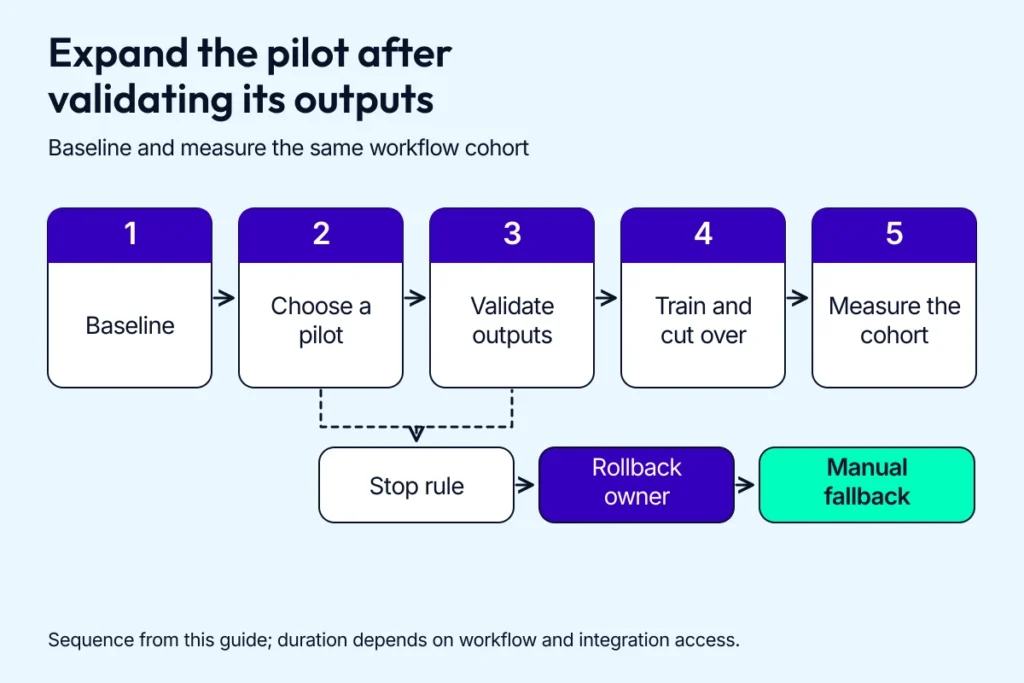
Agree on a stop rule while the pilot is still small enough to reverse.
If the pilot needs a custom application, our guide to make a medical app covers the separate software delivery process.
Step 1: baseline the workflow before changing it
Record claim volume and payer mix for a comparable period, then measure first-pass yield and days in A/R. Follow the work all the way through denial management and payment posting so a faster submission doesn’t hide a growing queue downstream.
For an automated medical billing pilot, also record total staff hours across the selected workflow. Include exception handling and rework, then assign each measure to someone who can act on it.
Step 2: choose a pilot you can stop safely
One service line or a stable payer cohort gives you a usable comparison. Agree on the pilot boundaries:
- Which claim types enter the new workflow, and which still need manual handling.
- What triggers a pause, who can stop processing and how staff return to the existing workflow.
For custom integration work, ask a healthcare app development company to scope the connection and exception handling against your actual systems. Keep that scope tied to the pilot’s billing outcome.
Step 3: validate outputs before expanding access
Compare the new workflow with your current process before allowing it to change claims or post payments. Check routine cases alongside payer rejections, duplicate submissions, missing fields and unmatched remittances.
For AI medical billing solutions, start with suggestions that staff can inspect. Set acceptance thresholds and a reviewer queue, then record false-positive and false-negative rates. Keep the data used to evaluate outputs separate from training data.
Step 4: train staff and stage the cutover
Choose super users from the people who’ll handle the new queues. Give billers, front-desk staff and coders role-based playbooks that show where an exception lands and who owns the next action. Keep the playbooks and super users available after cutover.
Run a parallel window, then agree on a cutover date and rollback conditions. Review failures daily during the first week. Taper to weekly operations reviews when the workflow settles, and retire the workarounds people no longer need.
Related: Medical billing software development covers discovery, prototyping and delivery when the rollout requires a custom product.
Step 5: measure the same cohort after rollout
A medical billing automation scorecard needs stable definitions. Keep the pre-pilot denominator and compare like-for-like locations, specialties and payers.
| Measure | Action when it worsens |
|---|---|
| Clean-claim rate and first-pass yield | Inspect the failed edits and confirm which stage each metric measures. |
| Denial mix by payer and reason | Update the relevant pre-submission rule and check the next cohort. |
| Days in A/R | Find the payer or queue holding up cash and assign follow-up. |
| Cost per claim and coder minutes per chart | Include review time and rework before deciding whether the change saves effort. |
Monitor model drift separately when AI changes an output. Keep a medical billing automation change only when the pilot meets its agreed success criteria and the team can handle the remaining exceptions.
Challenges of medical billing automation
Fully automated medical billing still leaves staff with payer exceptions and compliance decisions. Budget for that work as you choose the workflow and supplier.
Cost and ROI depend on the work around the software
Your budget includes EHR/PMS and clearinghouse connections, rule packs, data cleanup and staff time during go-live. Underfunding eligibility checks or ERA auto-posting can leave expensive rework after the software starts running.
Test the budget by payer and specialty, track days in A/R, and give the pilot a payback target and a decision date.
Overcoming integration complexity requires tested handoffs
Each interface needs a named owner and a failure route. Use a mediated layer between the EHR, PMS and clearinghouse, and test the transaction path your practice actually uses:
- 270/271 eligibility inquiries and responses.
- 837 claim submission and payer acknowledgments.
- 276/277 claim-status inquiries and responses.
- 835 remittances and payment reconciliation.
Check the adapters against vendor changes, and make retries safe for claims already sent. A payer timeout should create a visible exception with an owner; duplicate billing is an expensive way to discover that the retry worked.
Data quality errors need an upstream owner
Registration errors and mismatched identifiers follow a claim into every later queue. Validate the fields that repeatedly cause your denials:
- Patient and plan identifiers
- NPI and Tax ID
- Authorization references
- Codes and modifiers
Feed payer denial reasons back into those checks. Track the source of each correction so staff can fix the intake process that produced it.
Staff adoption depends on usable exception queues
Walk through a rejected claim with the biller who’ll handle it. If the new queue adds a screen or hides the reason for the rejection, fix that workflow before expanding the pilot.
Compliance controls must cover failed jobs too
Map failed-job PHI stores and retention rules before production access, then apply these controls:
- Limit access by role and keep credentials in a secrets vault.
- Encrypt PHI-bearing stores and record access in audit trails.
- Check vendor and subprocessor boundaries against the required BAAs.
- Keep release evidence and an SBOM with the software you deploy.
Where they fit, we use Specode’s reusable HIPAA-compliant components for authentication and logging. We also use them for PHI-safe storage. Your deployed workflow still needs controls that cover its actual data paths.
Building custom medical billing automation with Topflight Apps
Custom medical billing automation makes sense when your payer rules or existing systems require work that a product can’t cover within a workable budget. We scope the integration and measure the billing result before expanding the build.
Our healthcare automation expertise starts with measured coding results
The founders of GaleAI brought us a proof of concept. We delivered its MVP v1 in 1,100 engineering hours. The performance figures above are the reported outcomes of that coding product.
Topflight Apps’ medical billing technology stack follows the workflow
We connect clinical data through FHIR R4 and HL7 v2 and billing transactions through X12, including 270/271, 276/277, 837 and 835. Versioned adapters and replay-safe queues keep each handoff testable when an EHR or payer changes its interface.
- Rules handle explicit payer edits; NLP and ML suggestions start in shadow mode with human review thresholds.
- AWS, GCP or Azure use HIPAA-eligible services, with PHI storage and access boundaries checked for the deployment.
- Model cards and drift monitoring accompany replay tests and rollback controls.
- Field-level encryption and least-privilege access accompany audit logs, an SBOM and release evidence.
We also test clearinghouse connections and payer exceptions before the first production claim.
Ownership gives you control over later changes
We compare roadmap control and maintenance costs with configuring your existing platform.
We track clean-claim rate and first-pass yield alongside recovery rates and denial velocity. That connects revenue cycle management automation to the outcomes your operators and investors need to assess.
Clients we’ve engineered products for have raised more than $188 million in follow-on funding. For your practice, the useful next step is a scoped workflow and a measurable pilot.
Cost and ROI of medical billing automation
Medical billing automation cost depends on the workflow and the connections around it. Price the ongoing operation alongside the initial purchase or build.
Buying: SaaS pricing models change the cost as volume grows
Ask suppliers which unit you’ll pay for and what sits outside the quote. Medical billing automation software can be priced several ways:
| Pricing model | What drives the bill | What to check |
|---|---|---|
| Percent of collections | The collections included in the contract’s billing base | Covered services, collection definitions and minimum charges |
| Per claim | Claim volume and the transactions counted as billable | Resubmissions, eligibility checks and transaction fees |
| Per provider | Contracted provider seats or provider-level subscriptions | Part-time providers, additional users and volume limits |
Add implementation and integration fees, staff training and ongoing support to the comparison. Request a quote using your actual payer mix and monthly volume so you can compare automated medical billing software on the same scope.
Building: custom automation budgets price a scoped MVP
Topflight’s existing estimates below cover an automation MVP. A full billing platform has a broader product scope; our medical billing software development guide covers that build.
| Scope | Cost | What it covers |
|---|---|---|
| Rules-based automation | $80,000 to $120,000 | Eligibility checks, claim scrubbing, EDI 837 submission, ERA 835 auto-posting and clearinghouse integration |
| AI/ML at the core | $150,000 to $200,000 | The rules-based scope plus code suggestion, denial prediction and NLP over clinical documentation |
AI-dependent features also need suitable training data and a monitored review process. Scope those costs alongside the rules and integrations you’ll maintain.
How to calculate your ROI without counting the same gain twice
The following example uses hypothetical buying and configuration costs for one billing workflow. It illustrates the arithmetic; replace each input with your measured pilot results and supplier quote.
| Monthly pilot measure | Before | After |
|---|---|---|
| Comparable submitted claims | 10,000 | 10,000 |
| First-pass yield: claims paid on the initial submission | 90% (9,000 claims) | 94% (9,400 claims) |
| Denial rate for the same matured claim cohort | 8% (800 claims) | 5% (500 claims) |
| Observed total staff hours, including exceptions and rework | 600 hours | 480 hours |
Use consistent definitions and enough follow-up time for the claims to mature. The first-pass yield and denial measures describe the same workflow, so calculate the cash result from reconciled collections across that cohort.
Assume the reconciliation confirms $6,000 in incremental monthly collections after refunds and variable collection costs. Count that total once: it already includes any collection benefit associated with the improved first-pass yield and denial rate.
For this example, assume $2,000 in monthly operating costs and $30,000 in one-time implementation costs. At a steady $4,000 monthly net benefit, the annual recurring net benefit is ($6,000 − $2,000) × 12 = $48,000.
First-year net ROI = ($72,000 in cash benefit − $24,000 in operating costs − $30,000 in implementation costs) ÷ $54,000 in total first-year costs × 100 = 33.3%. Simple payback = $30,000 ÷ $4,000 = 7.5 months, once the pilot reaches that steady monthly benefit; add ramp-up time when planning the calendar.
The 120 staff hours released each month create capacity for exceptions or other work. Include a dollar labor saving when payroll, overtime or contractor spending actually falls, and check that the same saving hasn’t already been included in your cash total.
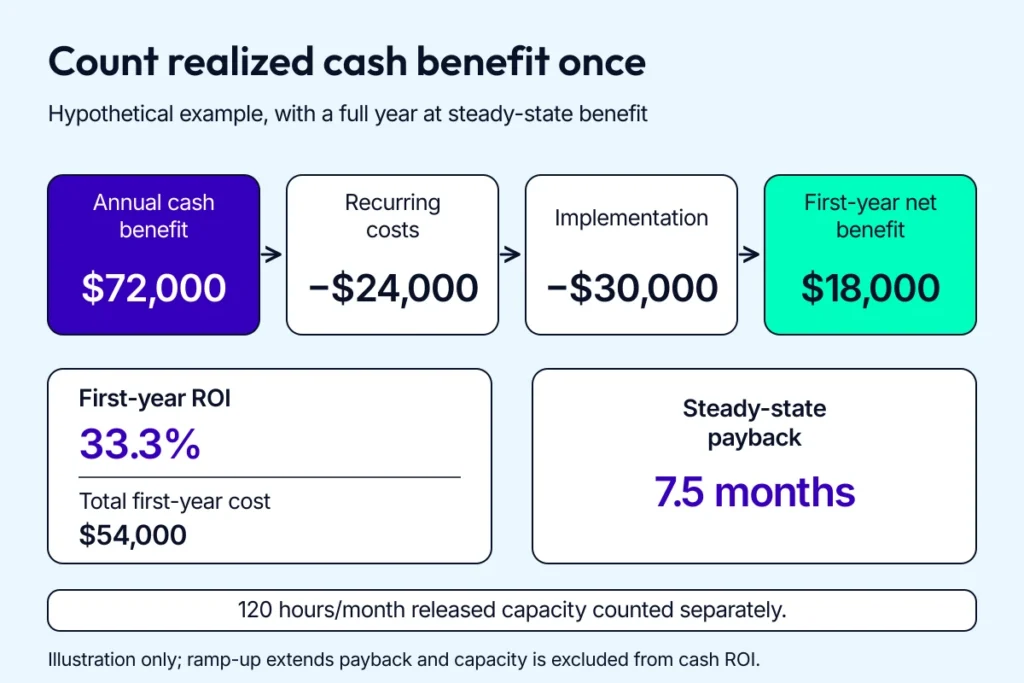
The payback estimate starts at steady-state benefit and lengthens during ramp-up.
If you want to automate medical billing through a scoped custom web or mobile workflow, get in touch with our experts to review the integration requirements and pilot measures.
[This blog was originally published on 29 June 2022 and has been updated for more relevant content]
Frequently Asked Questions
What are the top trending features in medical coding solutions?
AI/ML-assisted code suggestions and pre-submission validation are useful starting points. Review low-confidence output and track coder minutes per chart alongside correction rates.
Should I build a custom medical billing solution or get a SaaS subscription instead?
Buy when an existing product covers your payers and workflow at an acceptable total cost. Evaluate a custom build when a repeatable gap needs its own integration or rules, and include the cost of maintaining it.
Is there a tech stack recommended for creating an automated billing solution?
Choose a stack that connects to your EHR and clearinghouse, with transaction monitoring and access controls your team can maintain. FHIR or HL7 can support clinical data exchange; X12 handles core billing transactions such as 837 claims and 835 remittances.
How much does it cost to build an automated healthcare billing system?
Our narrower automation MVP estimates are $80,000 to $120,000 for rules-based workflows and $150,000 to $200,000 with AI/ML at the core. A complete medical billing software platform has a different scope; ongoing support and operating costs are separate.
How do I automate medical billing and coding?
Map your workflow, then pilot eligibility checks and pre-submission edits before expanding to code review or ERA auto-posting. Keep people on exceptions and measure first-pass yield and days in A/R against the same baseline cohort.
What is the ROI of medical billing automation?
Calculate the collectible cash improvement and actual cost reductions, then subtract recurring and implementation costs. Report released staff hours separately as capacity; historical case results, including Community Medical Centers’ provider-reported 22% and 18% targeted-category reductions, need local validation.
How long does medical billing automation implementation take?
A bounded pilot depends on its interfaces and testing scope. Huron reports an 8-week Cleveland Clinic implementation for EHR-based claim edits and registration eligibility processing.
Can medical billing be automated?
Yes. Routine eligibility checks, claim submission, payment posting and queue routing can be automated. Keep a reviewer responsible for uncertain coding and payer exceptions.
Is AI replacing medical billers?
AI assists with routine coding suggestions and denial-risk review. Billers still validate uncertain output, handle appeals, resolve patient disputes and manage payer relationships.
What is RPA in medical billing?
RPA uses software bots to carry out repeatable billing tasks in existing screens, such as retrieving claim status from payer portals. Give each bot an access policy, a maintenance owner and a monitored exception queue.