

The biggest HIPAA Security Rule overhaul since 2003 is closing in on finalization, with HHS targeting May 2026 and a 240-day compliance clock built in. Encryption at rest, MFA, annual penetration testing, and network segmentation all shift from “addressable” to mandatory once the final rule lands.
Why this matters beyond audit prep: building HIPAA-compliant apps is what protects patient trust and your next enterprise deal. Hospital procurement teams ask about your security posture before signing, and a mobile app HIPAA compliance story that boils down to “we’ll fix it later” loses them.
Treat a HIPAA-compliant app as a business asset worth real budget. The HIPAA best practices below cover what to bake in from day one, so your medical app launch skips the surprise rework, the security review drama, and the awkward “we found an issue” emails six months later.
Table of Contents
- What is HIPAA and why does it matter for app development?
- Key HIPAA terms for app teams
- Essential HIPAA compliance standards for healthcare apps
- What information is protected under HIPAA?
- Secure storage requirements for healthcare data
- Managing risks and responding to security incidents
- When does your app need to be HIPAA compliant?
- HIPAA-compliant app development best practices
- 5 steps to make a HIPAA-compliant app
- Core capabilities of a HIPAA-compliant app
- Tech stack to develop a HIPAA compliant mobile app
- HIPAA-compliant solutions by app type
- Official HIPAA compliance resources for app developers
- How much does it cost to build a HIPAA-compliant app?
- The cost of ignoring HIPAA compliance
- How to evaluate a HIPAA development vendor?
- Why choose Topflight for HIPAA-compliant app development
- Topflight’s experience in HIPAA-compliant app development
What is HIPAA and why does it matter for app development?
HIPAA matters for app development because the rules underneath it just moved. OCR is rewriting parts of the Security Rule for the first time in a decade, and a Privacy Rule update was added and then vacated inside 14 months. Old summaries are stale.
HIPAA’s biggest update in a decade is in flight
HIPAA, the Health Insurance Portability and Accountability Act, has been around since 1996. The last major overhaul was the 2013 Omnibus Rule, which is why so many teams still talk about “HIPAA” like it’s stuck in the 2010s.
The part that matters most for HIPAA app development, the Security Rule, is now in the middle of an overdue refresh. On January 6, 2025, HHS/OCR published a Notice of Proposed Rulemaking (NPRM) to modernize the Security Rule for current cyber threats (proposed, not final).
HIPAA also gets narrower “surgical” updates. HHS issued a final Privacy Rule update focused on reproductive health information in April 2024 (effective June 25, 2024), with most requirements originally set for December 23, 2024. A June 18, 2025 federal court order vacated most of that rule. The practical takeaway when developing a HIPAA compliant app: verify the current OCR status before you update policies or notices, because old summaries go stale fast.
The five rules every HIPAA compliant app has to satisfy
You won’t need to read the 100-something pages of legislation yourself. HIPAA breaks down into five rules that together describe what a health app needs for security, plus the procedures covered entities must follow to keep patient data safe:
- Privacy Rule: national standards for protecting PHI and patients’ rights over their own health information.
- Security Rule: administrative, physical, and technical safeguards for electronic PHI (ePHI); the rule you’ll touch most when you build a HIPAA compliant app.
- Breach Notification Rule: covered entities and business associates must notify affected individuals, HHS, and sometimes the media when unsecured PHI is exposed.
- Enforcement Rule: how OCR investigations, compliance reviews, resolution agreements, and civil money penalties work.
- Omnibus Rule: the 2013 update that extended HIPAA obligations directly to business associates and tightened breach and enforcement provisions.
Together, these rules form the backbone of the HIPAA requirements any HIPAA compliant mobile app development project needs to satisfy.
OCR is the agency that enforces HIPAA (and is rewriting it)

OCR is the agency that comes knocking if someone files a complaint about your app or a breach triggers a compliance review. They investigate complaints and negotiate corrective action plans. Civil money penalties land when covered entities or business associates fall short.
OCR also publishes extensive HIPAA guidance for professionals and resolution agreements, useful reading if you want to see what real enforcement looks like when figuring out how to build a HIPAA compliant app. They’re the ones modernizing the Security Rule too: the January 2025 NPRM came from OCR.
Key HIPAA terms for app teams
Three terms come up in every HIPAA app development scoping call: PHI, covered entity, business associate.
Protected health information (PHI): any identifiable health detail
PHI is any individually identifiable health information. HIPAA kicks in the moment your app touches it, including:
- a patient’s physical or mental health or condition
- the fact that health care was provided to them
- payment details for that care
Covered entities: the regulated providers and payers
Covered entities are the organizations HIPAA regulates directly: clinics, private practices, individual providers, healthcare plans, clearinghouses, and insurers. They carry the full compliance burden.
Business associates: everyone handling PHI for a covered entity
Business associate is any person or organization that handles PHI on behalf of a covered entity. In an app build, that’s your healthcare app developer, your cloud host, your analytics provider, and any subprocessor down the chain. BAAs cover the legal end of that relationship (see Organizational Requirements and BAAs below).
HIPAA compliance application development is end-to-end PHI handling. Every place you collect, store, process, or log PHI lands on the audit list.
On a HIPAA compliance app development project, map PHI flows early. Treat audit evidence (logs, encryption keys, BAAs, and access reviews) as engineering deliverables with owners and ship dates. Pick BAA-eligible vendors before they touch PHI.
Essential HIPAA compliance standards for healthcare apps
HIPAA splits security requirements into three safeguard types: technical, physical, and administrative. As a healthcare app developer, our team handles the technical side on most builds. The physical and administrative work stays on your side when you’re developing a HIPAA compliant app, since you’re the covered entity or business associate touching PHI in the real world.

Technical safeguards: what your developer handles
Technical safeguards cover encryption, secure connections, access controls, audit logging, and key management. Anything technology-related that protects PHI sits in this bucket.
Schedule a periodic security audit (at least annually and after major releases) to validate encryption, access controls, audit logging, and key rotation against your HIPAA threat model.
Physical safeguards: facilities, devices, and disaster recovery
Physical safeguards limit who can touch the servers and devices that store or move PHI. That covers facility access controls at your data center, full-disk encryption on every device, current firewall and anti-malware on the network perimeter, and documented disposal procedures for old drives.
Document and test a disaster recovery plan that covers encrypted off-site backups, defined RTO/RPO for PHI systems, annual restore tests, and failover runbooks validated in tabletop exercises.
Administrative safeguards: the policy and people layer
This is the policy and people layer of HIPAA: written policies and procedures, workforce training, privacy practices notices, and the sanctions you apply when staff break the rules. Train staff and track adherence with quarterly drills, attestation logs, and corrective actions that tie back to your written policies.
Qualified HIPAA app developers handle the physical and technical safeguards. The administrative work stays with you. When you’re building a HIPAA compliant web application, a team that’s done this before saves you months of finding out which administrative gaps OCR actually cares about.
Organizational requirements and BAAs
HIPAA defines who must comply and how they connect. Covered entities (providers, plans, clearinghouses) and business associates (your app developer, your cloud provider, your analytics vendor, anyone else handling PHI on a covered entity’s behalf) each carry their own obligations.
Key points for app teams dealing with HIPAA compliant software development:
- When it applies: If a vendor will create, receive, maintain, or transmit PHI on your behalf, they’re a business associate. Before any PHI flows, you must sign a business associate agreement (BAA) with that vendor.
- Who this typically includes: Your healthcare app developer and cloud service provider when they process patient data for you.
- What the BAA does: Formalizes each party’s duties for safeguarding PHI and breach handling; it complements your administrative safeguards (policies, training) and anchors the operational side of compliance.
- How it fits with other safeguards: The BAA sits alongside technical (encryption, secure connections) and physical safeguards (controlled facility access, protected infrastructure) already outlined here.
Related: Comprehensive Guide to Medical Billing Automation
Minimum safeguards checklist before you ship
Use this as a final audit checklist before you ship. Each row is the minimum any HIPAA compliant app needs in production.
| Safeguard | Minimum requirement | What it looks like in practice |
|---|---|---|
| Technical | Encryption in transit and at rest | TLS 1.2+ for all PHI traffic; AES-256 for stored PHI and backups |
| Technical | Access controls and unique user IDs | Role-based permissions, MFA for privileged accounts, automatic session timeout |
| Technical | Audit logging and monitoring | Immutable logs of PHI access, retained per policy, reviewed on a schedule |
| Technical | Integrity controls | Checksums/signatures to detect unauthorized PHI alteration |
| Technical | Secure authentication | Strong password policy, MFA, credential rotation for service accounts |
| Physical | Facility access controls | PHI-hosting infrastructure in BAA-covered data centers with badge/biometric entry |
| Physical | Workstation and device security | Full-disk encryption, screen locks, MDM on any device touching PHI |
| Physical | Media disposal | Documented procedure for wiping or destroying drives, backups, and decommissioned devices |
| Physical | Network perimeter | Firewall, intrusion detection, and current anti-malware across PHI systems |
| Physical | Disaster recovery | Encrypted off-site backups with defined RTO/RPO and tested failover runbooks |
| Administrative | Written policies and procedures | Current HIPAA policies covering privacy, security, breach response, and sanctions |
| Administrative | Workforce training | Onboarding plus annual refreshers with attestation logs |
| Administrative | Risk analysis and management | Documented risk assessment refreshed annually and after major releases |
| Administrative | Incident response and breach notification | Tested runbook aligned with the 60-day notification clock |
| Administrative | BAAs with every vendor touching PHI | Signed BAA before any PHI flows; inventory reviewed quarterly |
If you can produce evidence (logs, signed BAAs, training records, test results) for every row above, you’re in good shape when OCR comes calling.
Also Read: Hospital Management Software Development
What information is protected under HIPAA?
PHI is anything individually identifiable that a covered entity or business associate stores or transmits. When you build HIPAA compliant apps, that breaks into three field categories:
Clinical and treatment data
- diagnoses and treatment notes
- lab results, imaging, prescriptions, and vital signs
If a clinician would put it in the chart, it’s PHI.
Demographic and identifier fields
- name, address, birth date, social security number
- admission date, discharge date, service date, date of death
- photos and biometric identifiers
- phone, fax, email, and IP address
The Privacy Rule lists 18 specific identifiers. If your app stores any of them next to a health detail, that field is PHI.
Payment and insurance data counts as PHI too
- credit cards and account numbers used for medical billing
- health plan IDs, group numbers, member IDs, and beneficiary numbers
- claim numbers and medical record numbers
The link to care is what makes payment data PHI. Plain ecommerce charges without medical context are just commerce.
Mark PHI fields in your schema before you write the first access query. That’s the prerequisite for everything else.
De-identified data falls outside HIPAA. If you strip the 18 identifiers (or use the Expert Determination method), the data can flow to research or analytics pipelines without a BAA covering it.
Secure storage requirements for healthcare data
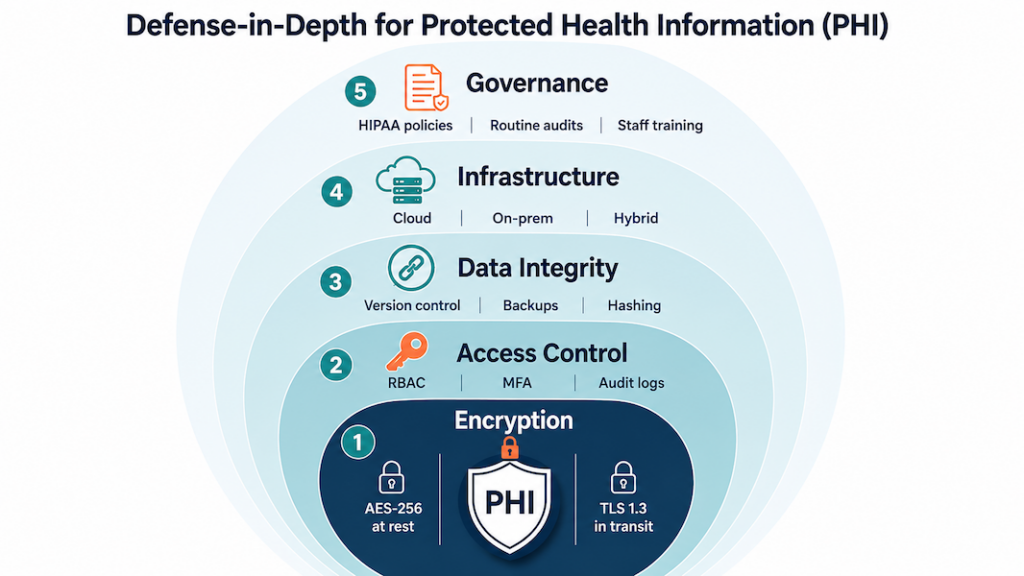
Storage is where most HIPAA app development projects lose ground in audit prep. The list of items to verify: where PHI actually lives, whether the storage vendor’s BAA covers every region you deploy in, how backups stay encrypted across recovery scenarios, and who can decrypt what.
What’s actually at stake when storage fails
Patient trust takes years to build and one OCR notice to break. A storage failure shows up in the next deal’s due diligence, in your AppStore privacy disclosures, in the email you have to send affected patients, and in next year’s insurance premiums. The fix is layered access controls, BAA-eligible cloud storage, regular key rotation, and quarterly policy reviews on the calendar. Treat secure storage as a recurring engineering responsibility.
Database controls that survive an OCR audit
Effective database management for a HIPAA compliant app rests on four controls:
- Role-based access so only authorized personnel touch the database
- Routine audits to detect irregularities and unauthorized access attempts
- Redundancy and replication to prevent data loss during system failures
- Schema-level PHI tagging so security tooling knows which columns matter
Cloud, on-prem, or hybrid: pick the BAA path you can defend
The three storage paths for HIPAA-compliant app development:
- Cloud (AWS, Azure, GCP healthcare offerings) with built-in encryption, BAA coverage, HIPAA-eligible services, and managed key services
- On-prem when you need direct control over hardware and a hospital-IT-friendly procurement story
- Hybrid when sensitive workloads stay on-prem but compute and analytics live in the cloud
For most builds we ship, BAA-covered cloud wins on speed-to-audit and operational cost. On-prem is the right call when an enterprise customer’s procurement requires it; the security delta is smaller than vendors claim.
Integrity and confidentiality: two different problems, two different controls
Integrity asks whether PHI changed without authorization; confidentiality asks whether unauthorized people saw it. They need separate controls.
Database-level controls (checksums, append-only audit logs, version-controlled schema changes, and validation tests on every migration) handle integrity without blockchain’s operational tax. For confidentiality, the basics are encryption at rest and in transit, role-based access, and field-level masking for partial-PHI views. The harder part is keeping the access list current as your team grows:
- new joiners default to read-only
- elevated access requires written justification
- permission audits go on someone’s quarterly checklist
- offboarded staff lose access the same day
Backups inherit both problems. Encrypt and version them. Test that you can actually restore from them on a schedule.
Encryption at rest, in transit, and in the key vault
For data at rest:
- AES-256 on PHI tables and backups
- Encrypted volumes at the storage layer (S3 SSE, EBS encryption, Azure Storage Service Encryption, GCP CMEK)
- Field-level encryption on the most sensitive columns like SSN and payment data
Rotate encryption keys on a schedule, store them in a managed KMS with audit logs, never let production keys touch a developer laptop, and require approval for any manual key access. The third-party rule: if a vendor stores PHI on your behalf, their key management policy is your problem too.
For data in transit:
- TLS 1.2+ on every PHI-bearing connection (no HTTP fallback)
- Certificate pinning for mobile apps where it makes sense
- Mutual TLS for service-to-service traffic in PHI-handling backends
- HSTS headers and modern cipher suites on every public endpoint
Managing risks and responding to security incidents
Strong storage and encryption only hold up if you actively hunt for weaknesses and have a plan for the day something goes wrong. OCR asks for your risk analysis document first in any investigation, and your breach response gets audited against the 60-day notification clock.
The risk analysis OCR asks for first
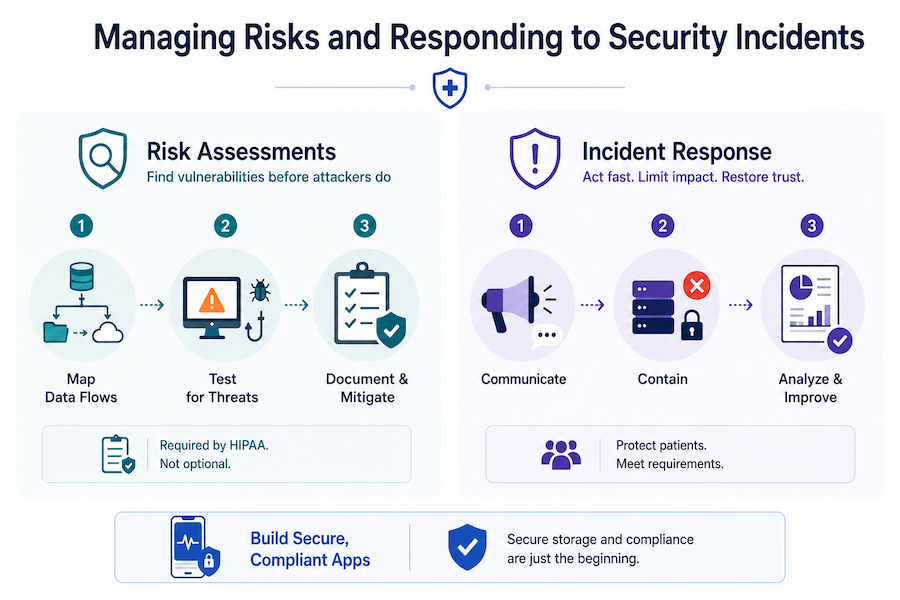
A useful risk analysis covers the whole PHI surface. Run these steps on a yearly cadence and after every major release:
- Map every PHI data flow from intake to backup, and mark the spots where it crosses trust boundaries
- Test for the threats that actually hit healthcare apps: SQL injection, credential stuffing on patient portals, phishing aimed at clinical staff, and OAuth misconfigurations on third-party integrations
- Document each risk you found, the control you chose, and what you accepted (with the rationale on paper)
Under HIPAA, the risk analysis is a Security Rule requirement. OCR asks for the document first in any investigation; missing it is its own finding.
Incident response: the plan you test before you need it
Breaches happen even on well-built apps. A working incident response plan has these moving parts:
- A communication plan that names who calls affected patients, who notifies HHS, who handles press, and who briefs the board
- Containment runbooks that isolate compromised systems in minutes
- Forensic preservation steps so OCR (or your insurer) can trace what actually happened
- Post-incident review with corrective actions that land back in your written policies
Test the plan twice a year with a tabletop exercise. Untested plans fail when you need them most.
Building in the health and wellness space? Our guide to health and wellness app development covers the design and compliance patterns specific to that segment.
When does your app need to be HIPAA compliant?
Two questions come up in scoping every HIPAA mobile app development project:
- Does HIPAA apply to health data that patients add to mHealth apps on their own?
- Are there cases where an app developer doesn’t need to comply with HIPAA rules?

The answer to both depends on whether PHI flows on behalf of a covered entity. Six scenarios show where the line sits.
Scenarios where HIPAA doesn’t apply
Scenario #1: standalone wellness tracker
A user downloads the app from the App Store and populates it with her glucose data from a personal glucometer.
HIPAA compliance: not required, since no PHI is created, received, maintained, or transmitted on behalf of a covered entity or business associate.
Scenario #2: patient-directed EHR export into a third-party app
A patient exports the details of his disease from his clinic’s EHR and imports this data into an m-health app to manage it there.
HIPAA compliance: not required, since no covered entity is involved in this mobile development case.
Scenario #3: consumer weight and calorie app with patient-sent reports
Following her doctor’s advice, a patient downloads an app from the App Store to manage her weight and calorie intake and send reports from the app to her doctor.
HIPAA compliance: not required, since no electronic protected health information (PHI) is transmitted on behalf of a covered entity.
Scenario #4: third-party app with patient-authorized EHR sharing
A patient gets an app to manage his chronic condition from the App Store. He then sets up the app to share his health data with his clinic’s EHR (the app does not belong to the clinic but has an interoperability arrangement to securely share patient data with it).
HIPAA compliance: not required, since the app does not handle PHI on behalf of a covered entity or business associate.

HIPAA may not apply, but you’re not off the hook in 2026. Even if these scenarios don’t create PHI “on behalf of” a covered entity or business associate, consumer health apps are now squarely in scope for:
- the FTC’s Health Breach Notification Rule (updated in 2024) and its enforcement against health apps that share sensitive health data for advertising without proper notice or consent
- the very real risk of ad pixels and SDK leakage from websites and apps
- a growing patchwork of state consumer health privacy laws (e.g., Washington’s My Health My Data Act took effect in 2024)
In practice: “HIPAA not required” shifts you to a different rulebook. The FTC and state AGs still care.
Scenarios where HIPAA applies
Scenario #5: provider-owned RPM app integrated with the clinic’s EHR
A patient downloads a clinic’s remote patient monitoring app from the App Store. All health data that the patient enters automatically syncs with the clinic’s EHR system.
HIPAA compliance: required.

Scenario #6: health plan member app for claims and records
A patient gets her health plan’s app from the App Store to manage her claims and health plan records.
HIPAA compliance: required.
The five questions that decide if HIPAA applies
Run through this checklist for your own HIPAA compliance app development project:
- PHI handling on behalf of a covered entity: does your HIPAA app developer (or any vendor in your stack) create, receive, maintain, or transmit PHI on behalf of a covered entity or business associate? If yes, HIPAA applies.
- Sponsor of the app: is the app commissioned, branded, or distributed by a clinic, health plan, provider, or clearinghouse? Provider-owned apps sit inside HIPAA scope by default.
- Integration with clinical systems: does the app sync with an EHR, claims platform, or provider portal as part of its core function? Automatic provider-side sync almost always pulls you into HIPAA.
- User control over data sharing: do patients fully control whether their data leaves the app, with no backend pipeline to a covered entity? Full user control usually keeps you outside HIPAA.
- Vendor chain: cloud hosts, analytics, messaging, and AI APIs that touch PHI on your behalf each need a BAA. One missing BAA pulls the whole stack out of compliance.
Decision check: If anyone in your app’s data chain creates, receives, maintains, or transmits identifiable health information on behalf of a covered entity or business associate, you’re doing HIPAA development. Every step of how to build a HIPAA compliant mobile app has to account for it. If none of those conditions apply, you’re likely outside HIPAA, but still on the hook for FTC and state health privacy laws (see above).
HIPAA-compliant app development best practices
HIPAA’s 114 pages don’t hand you a list of best practices or specific encryption methods. The law has stayed largely intact since 2013 because it stays general by design. Here’s a typical example of what you get:
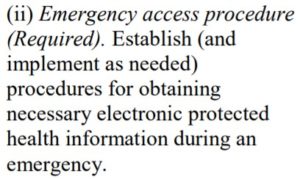
That’s the entire emergency access guidance. The operational questions a real implementation has to answer go untouched: what counts as an emergency, what the access procedure looks like in code, whether you need a backdoor for authorized personnel, and how that differs from non-emergency access by the same staff.
Related: How to Make a Medical App
So read HIPAA for the direction it points and fill in the implementation yourself. These are the moves we apply on every HIPAA app development engagement, grouped into four buckets you can hand to your engineering team.
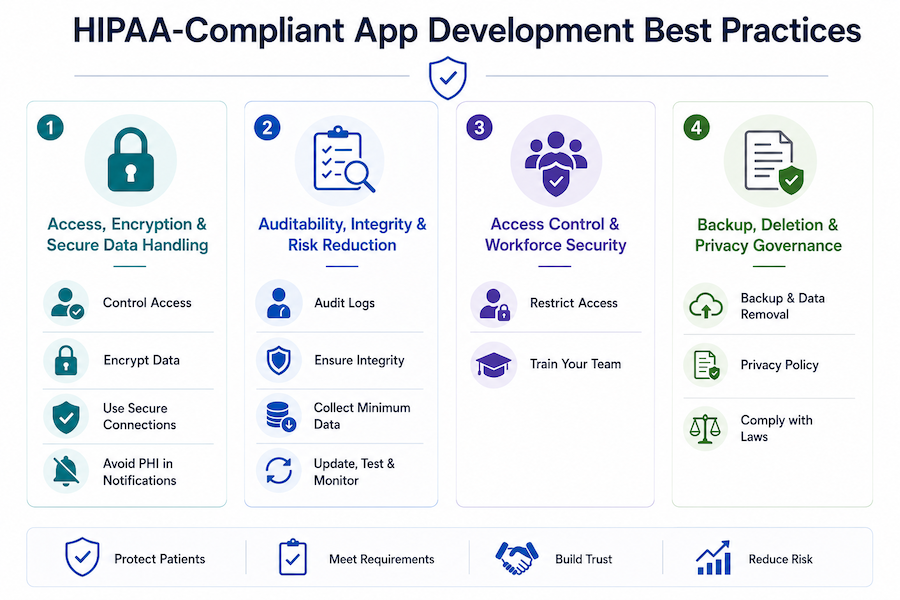
Daily mechanics: access, encryption, and how PHI moves
The everyday work of keeping PHI locked down: who can read it, how it’s encrypted, and how it travels.
Restrict PHI access to authorized users and software
Two layers protect PHI: authentication on the user, and a permission system that limits what each authenticated user can see and do. Standard user authentication mechanisms:
- Biometric authentication
- 2-factor authentication
- Automatic log-off after inactivity
Role-based permissions matter as much as the auth mechanism itself. Most provider staff don’t need full access to consumer health information all the time, so don’t grant it by default.
Encrypt PHI at rest and in transit
HIPAA doesn’t name an algorithm. We default to AES 256-bit, OpenPGP, and S/MIME, all open-source and well-vetted. Key management matters as much as algorithm choice: rotate keys on a real schedule, store them outside the application database, and audit who can access the rotation flow.
All PHI-related data gets encrypted at rest and in transit when developing a HIPAA compliant app. Internal traffic counts. Dev environments that touch production data count.
Send PHI only over HTTPS with current TLS
Encryption at rest doesn’t save you if the transport layer is open. HTTPS plus current TLS for everything the app sends or receives that touches PHI. Confirm your HIPAA app developer is using current TLS versions, not deprecated ones like TLS 1.0 or 1.1, when building a HIPAA-compliant mobile app.

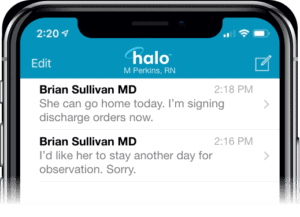
Keep PHI out of notifications, email, and SMS
Push notifications, emails, and text messages travel through channels you don’t control. Treat them as public. Use generic prompts only (“you have a new message”). Strip identifying details, clinical content, and anything that would be a problem if someone read it off a lock screen.
Audit trails, integrity, and shrinking the blast radius
Safeguards that prove PHI hasn’t been tampered with, catch problems early, and limit the damage when something does go wrong.
Tag every PHI action with a unique user identity
Audit controls in HIPAA come down to one principle: every read and write of PHI is attributable to a specific user. That means unique IDs (no shared accounts for the night shift), timestamps on every action, and logs you can pull and search when OCR asks for them six months from now.
Use tamper-evident storage and append-only audit logs
PHI shouldn’t be modifiable by unauthorized actors, and when changes do happen, you need a clean trail showing who changed what, when, and why. The “move your EHR to blockchain” pitch is mostly unrealistic for HIPAA compliance application development. What actually works:
- Append-only audit logs
- Tamper-evident storage (WORM and immutable backups)
- Role-based access on writes
- Routine log review, not just log collection
If you do use blockchain, use it to anchor audit hashes or verify provenance. Don’t run your EHR or EMR on chain.
Related: How to Make a Blockchain Application
Collect the minimum and skip caching PHI on the device
Only gather information that affects app’s performance or the patient’s clinical experience. Avoid caching PHI on the device, and don’t store geolocation beyond state-level unless the use case genuinely demands it.
Related: How to create an on-demand pediatric app
Pen-test and patch on a real schedule
Maintenance is part of the compliance posture. Schedule vulnerability assessments and penetration tests, and treat the findings as work items that go on the sprint board. The network and infrastructure shift as the app scales, and the security practices have to shift with them. Run a security audit at least annually; quarterly is closer to baseline for any app handling PHI at meaningful volume.
Workforce security: tooling and training
Who gets in, and whether the people with access know what they’re doing.
Make MFA, RBAC, and audit trails the floor for access management
Access management is where most HIPAA programs concentrate, and rightly so. Multi-factor authentication on every account, role-based access controls scoped to actual job functions, and audit trails on every privileged action. Teams routinely under-invest in the audit trail because it doesn’t show up in product reviews. It will show up in your first OCR conversation.
Train the workforce on what the security stack can’t catch
Phishing, social engineering, lost devices, and unsanctioned tools are categories your stack won’t fully catch on its own. Standing workshops on PHI handling and phishing recognition cut down the kinds of violations that drive a real share of OCR settlements. Run them at onboarding and again annually, and document attendance and adherence. That paperwork is what OCR asks for when something does go wrong, and it’s a meaningful piece of your incident response posture.
Backups, deletions, and the policy layer
The policy and paperwork side: how you preserve healthcare data, how you delete it, and what you tell regulators and users about both.
Build backup and remote wipe before launch
If your secure storage is on Google Cloud or AWS, the backup configuration is your responsibility. The cloud provider runs the infrastructure; you handle schedule, retention, and run the restore tests. Set this up before launch, and fold a disaster recovery plan into the same configuration pass.
Patients also need to be able to wipe their personal health information from the system, including remote removal of PHI from a lost mobile device. Build that flow during initial development. Retrofitting it later is harder than it looks because PHI ends up in more places than you expected: caches, logs, analytics events, exported reports.
Write the privacy policy as a working document
The privacy policy is the document patients and regulators read first. Make it transparent about what confidential information you collect, who you share it with, and what access controls sit around it.
The same document anchors your long-term monitoring strategy for HIPAA-related aspects of the app. If the policy claims something the app doesn’t actually enforce, that gap is the audit finding.
Layer GDPR and CCPA on top of HIPAA
HIPAA is the floor for healthcare data in the US. International users bring GDPR with them. California residents bring CCPA. Each adds requirements around data usage disclosures, consent management, and secure handling of medical information that HIPAA alone doesn’t address. Map the overlap before you ship to a new region; the implementation surface for global healthcare operations is bigger than a single privacy policy.
5 steps to make a HIPAA-compliant app
The practical sequence for building a HIPAA compliant app, whether it’s a chatbot or a doctor’s appointment app, comes down to five workstreams. Each one carries real engineering hours and its own paper trail. Get a clinician or compliance lead into the room early; they catch the practical gaps an engineering-only review will miss every time. Here’s how we sequence the work on a custom developed app.
The five steps at a glance:
- Step 1. Pick HIPAA-eligible infrastructure and sign the BAA
- Step 2. Keep PHI in its own database
- Step 3. Encrypt at rest and in transit, with keys managed outside the app
- Step 4. Run external audits and pen tests before launch, then on cadence
- Step 5. Make monitoring, logging, and incident readiness core product

Step #1: pick HIPAA-eligible infrastructure and configure the rest yourself
HIPAA-as-a-service is a misnomer. When teams ask for a “HIPAA-as-a-service backend,” they usually mean HIPAA-eligible infrastructure under a signed BAA, configured correctly. “Configured correctly” is doing all the work in that sentence. The cloud vendor gives you in-scope services and contract terms. You still implement access controls, logging, encryption, retention, and incident response. AWS spells it out clearly: PHI should only touch HIPAA-eligible services under the BAA.
Common starting points, all BAA-capable:
- Major clouds: AWS, Google Cloud, and Azure. Stay inside each vendor’s HIPAA scope; not every service on the platform is in-scope.
- Managed HIPAA hosting: Aptible markets HIPAA-ready infrastructure with a BAA on production plans. Helpful when you don’t have a dedicated DevSecOps function. It still isn’t a substitute for your own policies and app-layer controls.
- Privacy and compliance tooling: TrueVault sits in the privacy ops and data governance layer. Good for consent flows and policy management. Different category than running your full HIPAA backend stack.
Step #2: keep PHI in its own database
PHI lives in its own database, separate from the rest of your app data. Mixing the two forces you to encrypt and decrypt every byte the app touches, which slows performance and makes audit scoping harder than it needs to be. A dedicated PHI store also gives you a clean surface for stricter access management, scoped backups, and the secure storage controls HIPAA cares about.
Step #3: encrypt at rest and in transit, with keys managed outside the app
Encrypt PHI at rest (on devices and in cloud storage) and in transit (between the app, your services, and your servers). The key-management discipline matters as much as the algorithm choice:
- strong managed keys
- documented rotation schedule
- keys stored outside the application database
- crypto validated in CI
- key custody documented
Keep PHI out of logs, push notifications, SMS, and emails. This is also the step where you work through the access-and-encryption practices in the checklist above.
Step #4: run external audits before launch, then on a real cadence after
External audits before launch are where most teams find out which of their controls actually work. Hire a third party that runs healthcare-specific penetration tests and HIPAA risk assessments, and get them in before the soft launch. Findings become real items on the sprint board; you fix, retest, and document the result. After launch, set a cadence: annual at minimum, quarterly closer to baseline for any HIPAA-compliant app handling PHI at volume. External auditors look for evidence that someone outside the build team has stress-tested the controls, which is the piece internal QA can’t generate on its own.
Related: How to implement a DevOps plan
Step $5: Monitoring, logging, and incident readiness are core product features from day one
The app keeps evolving after launch, and so do the threats. Build the monitoring and logging into the product itself. Ops bolt-ons after the fact create the gaps that show up during an audit. The practical scope:
- PHI access tracked at the user level, with alerts on anomalous patterns
- logs structured for search, so you can answer OCR questions in hours instead of weeks
- a documented incident response plan that names the people, the channels, the escalation path, and the breach-notification clock
- periodic re-evaluation of the security stack on a real schedule
This is the step that turns compliance from a launch event into a steady-state posture.
Companion practices: risk, architecture, and access
Risk assessment is a repeatable process, scoped to your actual data flows
A formal, repeatable risk process keeps audits from turning into ghost-chasing. You scope it app-wide here, then reuse the same bones across the lifecycle. The work breaks down into four moves:
- map PHI flows end-to-end (intake, storage, analytics, exports), and list every third party that touches PHI
- use OCR’s Security Risk Assessment model for the evidence layer: threats, likelihood, impact, mitigation, residual risk
- run pen tests scoped to the actual data flows you mapped, with generic vulnerability scans as the floor
- document the compensating controls, the exceptions, and the timelines
Auditors look for that paper trail. They want to see informed decisions captured in real time. That’s the standard, and most teams underestimate how much of the audit conversation rides on it.
Security architecture is a blueprint you keep revisiting
You revisit the architecture diagram on a steady cadence: every quarter, when you add a vendor, when you ship a new integration, and after every incident. Four design pillars carry most of the weight:
- PHI segregation by design: separate databases or buckets, minimal caching, no PHI in logs or notifications. Mirrors Step 2.
- HIPAA-eligible infrastructure: cloud with backups, redundancy, and a clear shared-responsibility line. Know which side of that line you’re on for every control.
- Operational guardrails: incident response procedures, immutable audit logs, versioned data changes, and a disaster recovery plan with documented restore tests.
- Interoperability surfaces: HL7/FHIR payload hygiene, least-privilege service accounts, and contract tests on every external integration.
The architecture is also where you encode the responsibility split between your team, your vendors, and your covered-entity partners. Get that map wrong and the audit conversation gets ugly fast.
Access control is where HIPAA becomes visible to users and auditors
Most of your other HIPAA controls live in the backend. Access control is the one your users actually feel, and the one auditors test first. The baseline is role-based access control with scoped permissions for staff and patients, unique IDs everywhere, automatic log-off after inactivity, and session timeouts. Layer MFA or biometric user authentication on top where the risk justifies it, with secure session management and no PHI in tokens.
Audit every access action that matters: who accessed which record, when, and where you can capture it, why. Alert on anomalous patterns so issues surface in real time. The same minimization rules from earlier apply at the edge of the system. Keep PHI out of notifications, emails, and SMS, and mask where the workflow allows.
Related: How to build a healthcare chatbot
The shortest path to build a HIPAA compliant mobile app: pick a HIPAA-eligible backend, separate PHI from the rest of your app data, encrypt everywhere, validate with external audits, and make logging and monitoring core product features from day one.
Core capabilities of a HIPAA-compliant app
Every HIPAA-bounded app we audit needs the same five capabilities running at once. None are exotic. The failure mode is having all five present in the spec and only three tested under real conditions. Here’s what each capability actually has to do when you build HIPAA compliant apps.
Encrypt everywhere, on current versions
PHI gets encrypted at rest (cloud and local device storage) and in transit (between client, services, and any third parties on the data path). AES-256 is fine as the standard. What catches teams is version discipline elsewhere in the stack: a deprecated TLS version lingering in a dependency is a finding waiting to happen. Audit the versions actually running in production. The architecture doc is usually out of date.
Build to HL7 and FHIR from day one
Patient data conforms to HL7 v2 or FHIR R4 wherever records leave your system. For covered entities, the requirement goes beyond interoperability. The Privacy Rule expects amendments and shared records to move through secure digital channels, and standards-based exchange is how that happens at scale. Standards also keep your app usable inside the healthcare systems your customers already plug into.
Related: SMART on FHIR app development
Emergency access that’s rarely used and always works
HIPAA expects an emergency access procedure for situations where normal credentials can’t reach the data fast enough. Build it as a separate code path with stronger logging than the normal one, since every emergency-access event gets reviewed. The hard part is the test cadence. The feature only matters when something has already gone wrong, so it has to be exercised on a schedule even when nothing’s wrong.
Authentication enforced at every PHI endpoint
User authentication is the gate every other control depends on. The components are unsurprising:
- MFA on staff accounts
- biometric or strong-password options for patients
- unique user IDs (no shared service accounts)
- automatic log-off after inactivity
The implementation question worth catching in code review: does every PHI-touching endpoint actually check the session, or are some of them assuming the gateway already handled it? Both layers, every endpoint.
De-identification that lets research happen without exposing patients
A HIPAA-compliant app should make it easy to strip identifying fields from PHI and produce datasets safe for research, clinical trials, and product analytics. HIPAA recognizes two paths to de-identification:
- Safe Harbor: remove the 18 specified identifier categories
- Expert Determination: a qualified statistician certifies that re-identification risk is acceptably low
Pick the path that fits your data, document it, and treat re-identification as a recurring test. The underlying dataset shifts over time, and old determinations stop applying.
Tech stack to develop a HIPAA compliant mobile app
For HIPAA compliance mobile app development, pick tools you can sign a BAA with, keep PHI out of logs and notifications by default, and design for separation of identifiers and clinical measurements from day one. Auditors test what runs in production. Logo lists don’t count.
Our default HIPAA-eligible stack, layer by layer
| Layer | Proven options (BAA-friendly) | Why it fits HIPAA | Build notes and pitfalls |
|---|---|---|---|
| Mobile front end | iOS (Swift/SwiftUI), Android (Kotlin/Jetpack), React Native | Mature security APIs, OS-level crypto, MDM support | No PHI in push payloads or URLs. Use Keychain/Keystore; biometrics through the OS; short sessions; auto log-off after inactivity. |
| API layer | Node.js (NestJS/Express), Python (FastAPI/Django) | Mature middleware for auth, rate-limit, audit | Enforce least-privilege scopes; scrub requests and responses; contract tests for FHIR/HL7 mappings. |
| Identity and access | Auth0 Enterprise HIPAA, AWS Cognito, Azure AD B2C | MFA, anomaly detection, BAA coverage | Keep PHI out of tokens; rotate keys; align RBAC with real app roles (patient, proxy, clinician, admin). |
| Database (PHI store) | PostgreSQL on AWS RDS / Azure / GCP | Encryption at rest, backups, audit extensions | Separate schemas or tables for identifiers vs clinical data; row-level security on every joined view. |
| Object storage | S3 / Azure Blob / Google Cloud Storage | Versioning, lifecycle, server-side encryption | No PHI in object names or CDN headers; use signed URLs with short expiry; client-side encryption for sensitive files. |
| Event and audit log | OpenSearch/ELK, AWS CloudTrail/CloudWatch | Forensic-grade trails | Capture who, what, when, why; WORM storage; redact PHI fields from log entries. |
| Messaging and notifications | Twilio HIPAA, Vonage HIPAA, in-app inbox | BAAs, delivery SLAs | Keep PHI out of SMS and email; use deep links; apply consent and retention rules; document opt-out flows. |
| Video and telehealth | Agora (HIPAA), Twilio Programmable Video | Media encryption, BAAs | Recording off by default; explicit consent required; store encrypted recordings with retention policies. |
| Interoperability | FHIR (R4/R5) via SMART on FHIR, Mirth/NextGen Connect | Standards-based, least-privilege data exchange | Test FHIR resources end-to-end; map only required fields. |
| Secrets and keys | AWS KMS, Azure Key Vault, GCP KMS | Centralized key custody and rotation | Isolate app and env keys; enable automatic rotation; document key ownership for audits. |
| CI/CD and policy | GitHub Actions (self-hosted), AWS CodeBuild, Azure DevOps | Controlled build and deployment pipeline | No PHI in build artifacts; SAST and DAST gates on; block merges on crypto or audit misconfigurations; PHI-safe fixtures in test environments. |
| Monitoring and IR | Datadog HIPAA, native Azure/AWS tools | Detection and response with audit evidence | PHI-safe log policies; IR playbooks for breach containment with quarterly drills. |
What V1 needs, and nothing more
Here’s the lean cut when you’re working out how to build a HIPAA compliant app without over-engineering the first release:
- Native iOS/Android (or React Native) plus FastAPI or NestJS
- Auth0 HIPAA (or AWS Cognito) for auth and MFA
- RDS Postgres for identifiers, with a separate PHI measurements table or bucket
- S3 with signed URLs, no PHI in filenames
- OpenSearch audit index (WORM) plus CloudWatch metrics
- Twilio or Agora HIPAA for comms and video
Each component above maps to one of the five steps from earlier. The stack is what those steps look like once they’re running in production.
Architecture patterns that actually cut HIPAA risk
- Data minimization by design: collect only what drives care or billing; block PHI from logs, analytics, and crash reports.
- Scoped interoperability: exchange just the FHIR resources you need; keep service accounts least-privilege.
- Evidence as deliverable: audit logs, BAA matrices, key-management docs, and the incident response playbook all ship with owners and dates attached at build time.
Get these patterns in place early and you can develop a HIPAA-compliant mobile app whose audit posture holds up as the user base grows.
HIPAA-compliant solutions by app type
Compliance work changes with the app type. Threat model and paperwork both shift with the workflow. Below are the per-app-type translations of the HIPAA checklist into concrete implementation choices we’ve shipped against.
Telemedicine: risk concentrates at the session edges
Live video and asynchronous chat push the risk surface to the edge, where people screen-record, forward, and forget to log out. The build implications:
- Sign a business associate agreement with every video and messaging vendor before any PHI flows.
- Encrypt in transit (TLS) and at rest; keep PHI out of logs, push notifications, and email.
- Recording off by default; if enabled, require explicit consent and document retention and deletion rules.
- Least-privilege roles for clinicians and admins; short session timeouts and auto log-off.
- Audit logging on every meaningful event: join, leave, message access, file access, setting change.
- Minimize third-party trackers and analytics SDKs. OCR has explicit guidance on online tracking technologies, and telehealth pages are exactly where users reveal health intent.
SMS and email reminders are the easiest place to mess this up. Treat them as public channels and never put PHI in them.
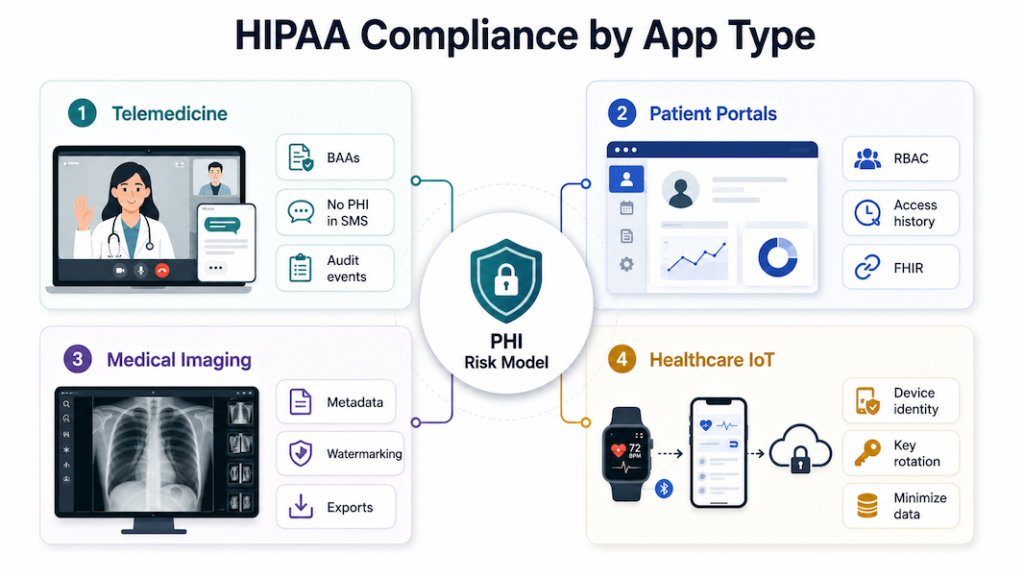
Patient portals: HIPAA’s patient-rights provisions are the product
Patient portals are where the Privacy Rule turns into UI. Under HIPAA, patients have to be able to control who accesses and shares their data, request their full record on demand, and ask for corrections that propagate across providers through secure digital channels. Portals also juggle identity, proxy accounts, and long-lived data, so scoped access and transparent trails matter from day one.
- Role-scoped RBAC (patient, proxy, staff) with MFA and automatic log-off, plus device revocation when a phone goes missing.
- Patient rights wired into the product: export on request, amendment workflows, and a visible access history.
- Encryption at rest and in transit; no PHI in tokens or URLs; sensitive fields masked in the UI.
- Interop: clean HL7/FHIR payloads and least-privilege service accounts, with contract tests on every external integration.
- No marketing pixels or analytics trackers on authenticated portal pages. OCR’s online tracking technologies guidance is explicit: anything exposing PHI to a third party without a BAA is a breach.
Notifications stay generic. Direct users to sign in to view the details.
Medical imaging: every file is PHI and every URL is a leak path
Images are PHI. Storage, naming, and sharing all create leakage paths faster than someone can say “forwarded WhatsApp.” Imaging apps need:
- encryption on storage and transfer, with images and reports segmented into separate buckets or stores
- strict access controls and immutable audit trails, with watermarking or download controls where the workflow supports them
- no identifiers in filenames, URLs, or CDN headers; metadata scrubbed on exports when required
- standard formats for exchange, with documented retention and deletion windows
Log viewer opens and exports the same way you’d log chart access. Auditors look for this and notice when it’s missing.
Healthcare IoT: telemetry IS the linkage
Every IoT device ties a physical sensor to a person. The first design pass maps that linkage end to end, then minimizes it everywhere the data flows:
- Map device, app, and cloud PHI flows; collect the minimum data necessary for the use case.
- Device identity management with key rotation, plus secure boot and update paths.
- TLS for transport, tiny on-device caches, wipe on logout or device loss, and protected backups.
- No PHI in push or SMS; surface alerts in-app instead.
- Sign a business associate agreement with every vendor processing patient-linked telemetry before ingestion.
“Anonymous” telemetry routinely becomes identifiable once you add timestamps and location. The moment that merge happens, you’re handling PHI. Build the classification into the data pipeline so it triggers automatically.
Official HIPAA compliance resources for app developers
OCR, FTC, and the HHS Office of the National Coordinator for Health IT (ONC) built three online tools that tell health app developers which laws apply to what they’re shipping. When you set out to make a HIPAA compliant app or build a SaMD app, and the lines between HIPAA, the FTC Act, and FDA software-as-medical-device rules aren’t obvious, start here.

Start with the FTC’s mobile health apps interactive tool
A decision-tree walkthrough from the FTC. Answer a sequence of questions about what your app does, what data it touches, and who it shares with. The tool returns the federal regimes that apply: HIPAA, the FTC Act, the FTC’s Health Breach Notification Rule, the FDA’s medical device regulations. Run it before you architect anything. Open the mobile health apps interactive tool.
ONC’s SRA tool doubles as audit-ready evidence
Free, downloadable tool from ONC and OCR that walks small and mid-sized providers (and their vendors) through a HIPAA Security Rule risk analysis. The security risk assessment tool produces a written report you can hand to auditors. A documented risk analysis is itself a Security Rule requirement, and the report you generate here is the artifact OCR wants to see.
Verify covered-entity status with HHS guidance
HHS’s reference for figuring out whether your organization (or your client’s) is a covered entity under HIPAA. The covered entity guidance includes flowcharts and examples for providers, health plans, and clearinghouses. Useful when a client insists “we’re not really covered” and you need to sanity-check that claim.
If you’re exploring LLM add-ons for summarization or intake, bookmark our guide on ChatGPT HIPAA compliance for architecture and control patterns that won’t blow up your risk model.
How much does it cost to build a HIPAA-compliant app?
Budgets for a HIPAA-compliant app vary widely depending on scope, stack, and whether you’re designing compliance in from day one or bolting it on later.
Most HIPAA-compliant builds land between $60K and $190K
Pinning down app development costs is messy in general, and developing a HIPAA-compliant app from scratch makes it messier. Scope changes the answer, so HIPAA application development budgets swing accordingly. Our HIPAA-compliant apps typically land between $60,000 and $190,000, and picking an experienced HIPAA-compliant mobile app development partner is the main lever for keeping that number from running away.
A HIPAA-as-a-Service option runs around $2,000 per month, which makes sense for teams that want BAA-eligible infrastructure without owning it. If you’re building a telehealth solution, our Agora.io partnership covers a real discount on the video infrastructure side.
OCR’s Security Rule modernization is rewriting the cost baseline
Scope is the biggest lever. A single-feature MVP and a multi-tenant platform with EHR integrations live in completely different budget brackets. Industry-wide, two cost benchmarks are worth knowing.
The old number you’ll still see quoted is “$8.3B/year” and “$35k per physician”. That figure is widely disputed and appears to be misattributed, traceable to a Ponemon estimate that wasn’t actually measuring HIPAA compliance spend.
The current benchmark comes from HHS/OCR’s proposed HIPAA Security Rule modernization: roughly $9B in first-year implementation costs across regulated entities, plus about $6B per year in recurring costs in years 2–5 (proposal, not final). In plain English: the regulatory baseline is getting more prescriptive, and the cost of “we’ll catch up later” is climbing with it.

Retrofit costs more than designing HIPAA in upfront
When building an MVP, our default is to wire in HIPAA-related plumbing even when the v1 isn’t touching PHI. Most healthcare apps end up needing it eventually, and adding it later costs more than building it in upfront.
The expensive things to retrofit:
- Encryption at rest and in transit
- Audit logging across PHI access events
- Role-based access control and account separation
- BAA-eligible cloud and third-party infrastructure
Bolting any of these into a shipped product means rework on parts of the app already in production.
Related (Other blogs about apps that require HIPAA Compliance):
- Women’s Health Tracking App Development
- How to Make a Hospital Management Software: A Complete Guide
- How to Build a Meditation App Like HeadSpace or Calm
- Remote Patient Monitoring App Development
- Healthcare App Design Guide
- EHR/EMR Development Guide
- Building a Mental Health Chatbot
The cost of ignoring HIPAA compliance
Skip parts of the regulation while you build a HIPAA-compliant app, and the budget hit runs six or seven figures. Building HIPAA compliant apps is a legal obligation, and OCR’s recent enforcement record shows what cutting corners costs.
Related: App Development Costs: The Complete Breakdown
Regulatory penalties are only part of the risk
The fines grab headlines, but they’re one line item on the actual cost of non-compliance. Credibility, enterprise sales cycles, and patient trust all take a hit long before the settlement is signed. Two cases give you the shape of the damage.
Aetna Life Insurance Company had to settle for a $1,000,000 fine with OCR, following 3 data breaches, only one of which had to do with digital malpractice: they let Google and other search engines index health plan-related documents.
Related: Insurance App Development Guide
Metropolitan Community Health Services, a nonprofit health center serving over 3,000 patients a year, agreed to pay $20,000 for not complying with the HIPAA Security Rule. OCR weighed MCHS’s mission to serve underserved patients in rural North Carolina, hence the manageable (but still unpleasant) penalty.
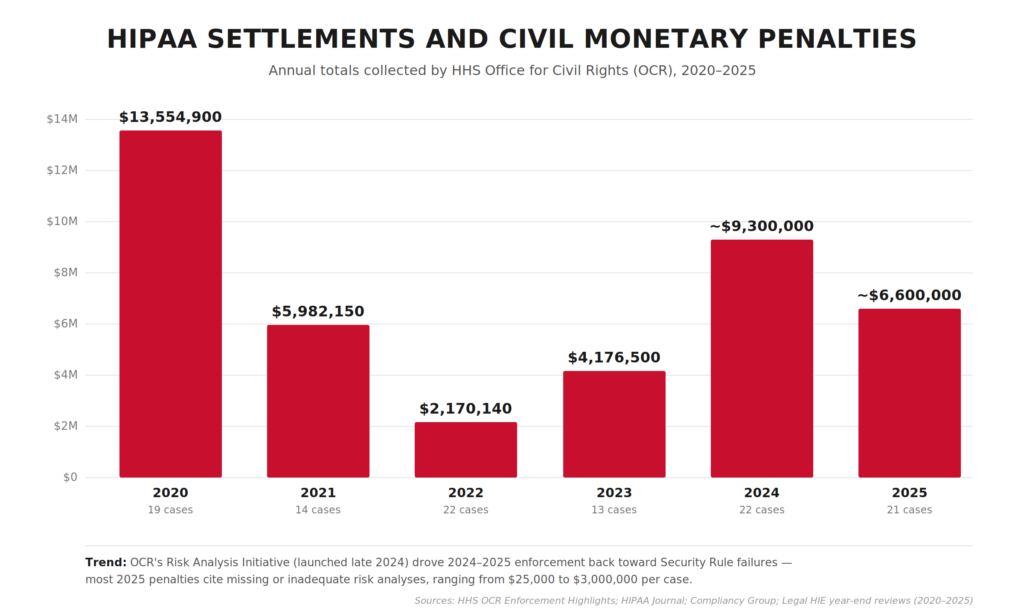
OCR’s own enforcement totals are a better reality check than “average fine” math. As of Nov 21, 2024, OCR reports 152 HIPAA enforcement cases with settlements and civil money penalties totaling $144,878,972.
Recent OCR enforcement clusters around risk analysis gaps
The pattern behind those numbers is very “modern healthcare.” Enforcement keeps clustering around the same preventable basics.
- $1.19M CMP (Dec 2024): Gulf Coast Pain Consultants, tied to Security Rule failures (see OCR’s final determination notice).
- $3M settlement (Jan 2025): Solara Medical Supplies, stemming from a phishing incident and alleged Security + Breach Notification Rule gaps.
Both cases trace back to foundational gaps: missing or outdated risk analysis, weak access control, and unprepared breach response. An annual Security Rule risk assessment surfaces exactly these failure modes.
Bake OCR-targeted basics into your release cycle before launch
App teams love to postpone these same preventable basics until “after launch.” That’s the gap OCR keeps finding.
If you’re shipping HIPAA compliant mobile apps, patient data security belongs in your first release. That means baking a documented risk analysis into your release cycle, wiring audit logging from day one, building role-based access control before launch, and rehearsing your breach response before you ever need it.
Annual HIPAA settlement and CMP totals collected by OCR, 2020–2025. After a steep drop in 2022 (following the Fifth Circuit’s 2021 decision that vacated OCR’s MD Anderson penalty), enforcement rebounded in 2024–2025 on the back of OCR’s new Risk Analysis Initiative.
How to evaluate a HIPAA development vendor?
The wrong HIPAA vendor leaves you holding a legal and reputational bag you didn’t sign up for, on top of a failed project. Before anyone touches PHI on your behalf, pressure-test a prospective vendor across three dimensions: their legal posture, their actual track record, and how they engineer security into what they ship.
BAAs are the fastest way to disqualify a vendor
The Business Associate Agreement is the single most important document in the relationship. Four questions cut through any pitch deck.
- Will they sign a BAA at all, on your paper? A vendor who only signs their own boilerplate and won’t negotiate is offloading risk onto you.
- Does the BAA actually allocate breach costs? Read the breach notification and indemnification sections carefully. Vague language here is where lawsuits live.
- Do they sub-BAA their own vendors? Ask for their vendor inventory and proof they have BAAs with every sub-processor touching PHI: cloud hosts, analytics, AI APIs, messaging providers. One missing BAA downstream breaks the chain.
- Will they name a point person for OCR investigations? The answer should not be “we’ll figure it out if it happens.”
If they hedge on any of these, the BAA conversation will drag for months. That’s your early warning.
Ask for shipped products and redacted artifacts
Anyone can say they “do HIPAA.” Ask for evidence:
- Shipped HIPAA-regulated products in production. Names of covered entities or business associates actually using the work, ideally with a reference call. Slideware doesn’t count.
- Artifacts from past projects: redacted risk analyses, sample audit log designs, incident response runbooks, SOC 2 Type II reports where applicable. If they can’t show you any documentation from prior HIPAA work, they probably haven’t done it.
- Experience with your specific workflow. A team that’s built telemedicine won’t automatically know how to wire up an EHR integration, an RPM device pipeline, a medical imaging viewer, or a pharmacy integration. Match expertise to scope.
- Reference calls with HIPAA-regulated clients specifically. General app-dev references don’t tell you what you need to know.
Drill into how they actually build
This is where paperwork meets production code. Pressure-test the engineering layer:
- Baseline expectations: encryption at rest and in transit, role-based access control, unique user IDs with MFA on privileged accounts, audit logging across PHI access events. If any of these need explaining to the vendor, walk away.
- Is a documented risk analysis part of their SDLC, or do they bolt it on as a compliance afterthought before launch?
- How do they handle secrets (keys, tokens, credentials, rotation policy) and environment separation between dev, staging, and production?
- Penetration testing and vulnerability scanning cadence: who runs it, how often, how are findings tracked to resolution, and can they share a sanitized recent report?
- Who owns security during the engagement? A named security lead beats a diffuse “everyone cares about security” answer.
These red flags should end the conversation early
Five dealbreakers worth screening for in the first call:
- Reluctance or delay around signing a BAA.
- “We use AWS, so we’re HIPAA compliant.” AWS HIPAA-eligibility is necessary but nowhere near sufficient. Amazon’s BAA covers what Amazon does, which has nothing to do with how your vendor uses it.
- No documented risk analysis process (this is the #1 OCR enforcement target in 2024–2025).
- Inability to produce a single artifact from prior HIPAA work.
- Refusal to walk through a prior breach or near-miss honestly. Everyone has them; vendors who claim otherwise are hiding something.
The right vendor will have the artifacts ready before you ask, and they’ll push back when your requirements aren’t specific enough. That’s the behavior of a team that’s been through real OCR scrutiny and wants to help you avoid it.
Topflight’s experience in HIPAA-compliant app development
For a HIPAA compliant app development company like us, it’s easier to list the apps that didn’t need HIPAA than the ones that did. Roughly 99% of our healthcare builds ship under HIPAA, so the rules are part of our daily routine.
The exceptions are fitness apps. We built Habitap and Walker Tracker without HIPAA because these apps don’t touch health data. Calories burned and steps taken don’t legally comprise PHI.
HIPAA-compliant platforms we’ve built include Medable and Smarter Symptom. Browse our portfolio for more. Reach out for questions about HIPAA-compliant video conferencing SDKs, how long it will take to build your app, BAA-eligible vendor selection, or strategy and design support around HIPAA-compliant app development.
Whether you’re a covered entity or business associate, we can help you make your app HIPAA compliant alongside the rest of the build.
Dedica Health monitors 1,100+ patients a day on our RPM build
On the device-heavy side, we’ve shipped remote patient monitoring platforms like Dedica Health, where cardiology practices monitor 1,100+ patients per day using clinically certified sensors while staying inside Medicare’s RPM and CPT guardrails. The platform:
- ingests vitals from multiple devices
- provides role-based dashboards for clinicians
- tracks Medicare RPM and CPT eligibility against each patient’s billing window
- maintains HIPAA-compliant messaging, audit trails, and incident management across AWS-hosted infrastructure
This is the pattern we bring to similar IoT/RPM builds. PHI never “wanders” in ad-hoc spreadsheets or unsecured exports. It flows through a hardened pipeline from sensor → ingestion layer → clinician UI with access control, logging, and disaster recovery baked in.
Generative AI under HIPAA: GaleAI and Mi-Life in production
We also work on AI-heavy products where HIPAA defines the architecture. The model interfaces, prompt design, storage layer, and audit-log structure all shape themselves around what PHI you can and can’t pass.
With GaleAI, we turned an AI medical coding prototype into a production platform that integrates with EHRs (Epic, Athena, and others) and identifies under-coded revenue while keeping PHI protected at every step.
On Mi-Life, an AI chatbot for disability services, we implemented a HIPAA-compliant generative AI stack:
- retrieval-augmented generation (RAG)
- de-identification of client data during processing
- re-insertion of PHI only at the edges
The system relies on secure authentication and role-based access on top of compliant hosting (e.g., Azure OpenAI/Bastion-style setups), so caregivers can query sensitive information via voice or text without exposing raw records to the model.
If you’re exploring “AI + HIPAA,” odds are we’ve already seen the edge cases you’re worried about: hallucinations, data leakage in prompts, prompt injection from user input, and structuring audit logs that pass scrutiny without over-collecting PHI.
EHR, pharmacy, lab, and imaging seams are where HIPAA risk lives
A lot of HIPAA risk lives in the seams between your app and EHRs, labs, pharmacies, or imaging systems. That’s where we spend a disproportionate amount of engineering time. Pharmacy-adjacent products in particular (eRx, fulfillment routing, refill workflows) need a pharma app development company that treats PHI boundaries as first-class architecture from day one.
- With Roundr, a mobile companion for hospital rounds, we integrated directly with Epic via FHIR/HL7 interfaces and middleware like Mirth, giving hospitalists secure on-the-go access to inpatient data, imaging, and notes while staying aligned with HIPAA requirements on mobile devices.
- On AlgoRx, a prescription e-commerce platform, we built a dynamic pharmacy integration layer with APIs like DoseSpot and fulfilment partners, plus HIPAA-compliant messaging and PHI-aware analytics so multi-pharmacy routing and eligibility logic never compromise privacy.
- For MyPaperwork, an STI testing app, we integrated lab ordering and result workflows with a mobile-first UX, adding encrypted PHI storage, strict permission controls, and auto-expiring deep links for result sharing to keep sensitive sexual health data locked down.
- On radiology projects like LnQ, we’ve integrated with multiple EHRs and PACS systems using HL7/FHIR to support on-demand radiology staffing and image review in a cloud-based, HIPAA-compliant environment.
In practice, on your project we’re reusing proven patterns for Epic, Cerner, athena, PACS, pharmacies, and labs: connectivity templates, BAA inventories, PHI minimization, and monitoring.
When we talk about HIPAA-compliant app development services, the work is designing and proving an end-to-end system across devices, AI models, EHRs, pharmacies, labs, and imaging. PHI stays controlled, auditable, and ready for scrutiny from compliance officers, investors, hospital IT, and OCR auditors alike.
Related Articles:
- A Guide to Development a Medical Website
- How to Start a Healthcare Startup
- Guide to Developing a Medical IoT Application
- Mental Health Application Development
- A Definitive Guide to Telemedicine Development
- Blockchain in Healthcare Application
- How to Create a Medication Reminder Application
- Guide to Building an On Demand Pediatrics Application
- Virtual Nurse App Development Guide
- The Best Patient Scheduling Softwares Untangled
[This blog was originally published on 11/4/2020, and has been updated for more recent data]
Frequently Asked Questions
Does a mental health application need to comply with HIPAA?
Yes. Psychotherapy notes also need the patient’s written consent before they can be shared.
Is HIPAA required only for telemedicine apps?
No. HIPAA applies to any healthcare software that handles PHI on behalf of covered entities or business associates, telemedicine or otherwise.
What is the best tactic for speeding up HIPAA-compliant application development without sacrificing its HIPAA compliance?
Use a HIPAA-as-a-Service stack from a major cloud vendor (Google, AWS, or Microsoft). Pre-built BAA-eligible infrastructure trims weeks from HIPAA-compliant application development without weakening the compliance posture.
Can I create a HIPAA-compliant app using only off-the-shelf solutions with minimal custom coding?
Yes. Reach out and we’ll walk you through the tool options that fit your scope.
How to make an app HIPAA compliant?
Start with a risk assessment, map all PHI data flows, and pick HIPAA-eligible infrastructure providers willing to sign BAAs. Encrypt data in transit and at rest, enforce strict access controls, log all PHI operations, and document policies and training for staff. Then validate the setup through regular audits and penetration testing.
What is PHI?
PHI stands for Protected Health Information: any individually identifiable health information handled by a covered entity or business associate. It covers a patient’s physical or mental health condition, the fact that healthcare was provided to them, payment details for that care, and identifiers tied to those records (name, address, birth date, SSN, medical record number, photos, biometrics, phone, email, IP address, and similar). Once any of this data can be linked to a specific person, HIPAA’s Privacy and Security Rules apply.
When do I need a BAA?
You need a Business Associate Agreement (BAA) whenever a vendor will create, receive, maintain, or transmit PHI on your behalf, before any PHI actually flows. That typically means your cloud host, analytics provider, messaging/email service, AI API, and any sub-processor in the chain. No BAA, no PHI: if a vendor won’t sign one (or won’t sign on terms that allocate breach responsibility clearly), they shouldn’t be in your stack.