

How to create EHR software for your clinical workflow?
EHR software development starts with choosing a path: deploy a ready-made product, extend an open-source application, integrate with an existing EHR, or build a custom platform. Map your clinical workflow and data migration needs before choosing modules, then prototype with the people who’ll use the system. Production timing depends on interface access, migration quality, clinical validation, and the scope you commit to.
- Our EHR development cost estimates are around $100,000 for an integration project and $150,000-$200,000 for a web prototype.
- A mid-level system starts around $400,000, while the full-platform scope described below can reach $1 million; broader programs can exceed that figure.
- For planning, we estimate 6-9 months for a scoped MVP and 12-18 months for a full EHR development project, subject to customer approvals and technical dependencies.
- Our Epic integration guide estimates $50,000-$200,000 and up, with 6-12 months to first production go-live, depending on sites, read/write scope, and approvals.
An EMR primarily supports one practice’s records, while an EHR is designed to share patient information across organizations.
Switching an EHR changes daily clinical work. Patient registration edge cases resurface and staff need training. Care coordination has to keep working while you move patient health information.
In KPMG’s 2025 Healthcare CEO Outlook, published in February 2026, 75% of 110 healthcare leaders surveyed globally rated EHRs as very important to digital transformation over the next 3 years; another 19% rated them important. The report also identifies cybersecurity and data protection risks as healthcare systems expand.
EHR application development includes the work around the chart: data migration, interoperability, training, and ongoing support. Those responsibilities shape how you make an electronic health record system that staff can use and your team can operate.
Top takeaways:
- Before you build an EHR system from scratch, check whether a focused app can use the records and interfaces you already have. Price the integration path against the access and approvals your customer can actually provide.
- A full EHR/EMR platform needs role-specific workflows for clinicians, patients, and admin staff, with web and mobile clients where each role needs them.
- Rapid prototyping earns its keep in EHR development by testing an EMR system’s features against a practice’s daily work before you commit engineering time.
Table of contents:
- 1. What's the difference between EMR and EHR
- 2. Benefits of EHR systems
- 3. Build, buy, or integrate? Choosing your EHR path
- 4. Must-have features of a modern EHR system
- 5. Types of EHR systems
- 6. Complete EHR software development roadmap: step by step
- Step 1: Plan migration and interoperability first, or pay for them twice
- Step 2: Map core modules before you scope features
- Step 3: Nail functional requirements before code starts
- Step 4: Bake compliance in from day one
- Step 5: Design system architecture
- Step 6: Choose technology stack
- Step 7: Create custom UI/UX for clinical workflows
- Step 8: Integrate APIs and third-party services
- Step 9: Implement data security, encryption, and backup measures
- Step 10: Test against real clinical chaos
- Step 11: Stage the launch before you flip the switch
- Step 12: Phase the rollout and tailor training by role
- Step 13: Post-launch is where the product actually gets good
- 7. 2026 regulatory requirements for new EHRs
- 8. How much does it cost to build an EHR system?
- 9. Working with an EHR software development company
- 10. Selected EHR/EMR integration projects
What’s the difference between EMR and EHR
An EMR primarily holds the clinical record within one practice or organization. An EHR is designed for a broader record that can follow a patient across care settings; successful sharing still depends on the interfaces and permissions you implement.
Epic and Cerner products cover overlapping capabilities. Define your scope through the workflows and exchange capabilities in this EHR vs EMR comparison:
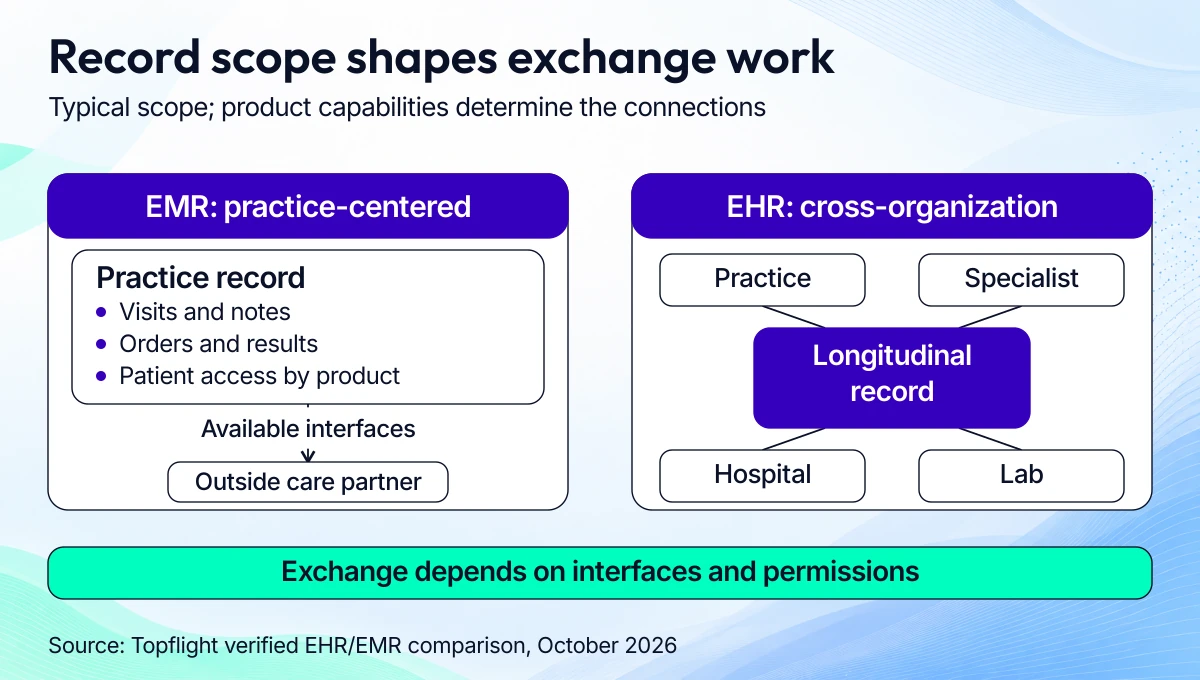
Scope the outside connections and access permissions alongside the record workflows.
|
Feature |
EHR (electronic health record) |
EMR (electronic medical record) |
|---|---|---|
|
Definition |
A digital health record designed for use across the patient’s care team. |
A digital medical record primarily used within one practice or organization. |
|
Scope |
Supports continuity of care across settings, including referrals and outside results. |
Centers on the practice’s visits, diagnoses, treatment plans, and clinical history. |
|
Interoperability |
Cross-organization exchange is part of the intended scope; available interfaces and partner workflows determine what moves. |
Can exchange data through interfaces, though the main workflow remains within the practice. |
|
Patient access |
Can provide portals and access to information from connected care settings. |
Can include a portal and patient access; these capabilities depend on the product and configuration. |
For healthcare app development, cross-provider interoperability adds patient matching, consent handling, and reconciliation to your scope. EMR software development for one clinic starts with documentation and order workflows; specify each outside connection when deciding how to create EMR software.
ONC’s EMR and EHR definitions draw the same practice-versus-care-network distinction. In either case, the system holds patient health information and needs access controls and an audit trail.
A typical EHR system includes patient registration; problem lists, allergies, medications, and immunizations; visit notes and results; and care plans with tasks the care team can follow.
Benefits of EHR systems
An EHR can reduce duplicate entry, support coordinated follow-up, control access to clinical information, and supply data for quality reporting. EHR benefits depend on the workflow you configure and the staff using it.
Measure the changes against your current process: medical record automation earns its keep when a routed result or a reminder closes a real task.
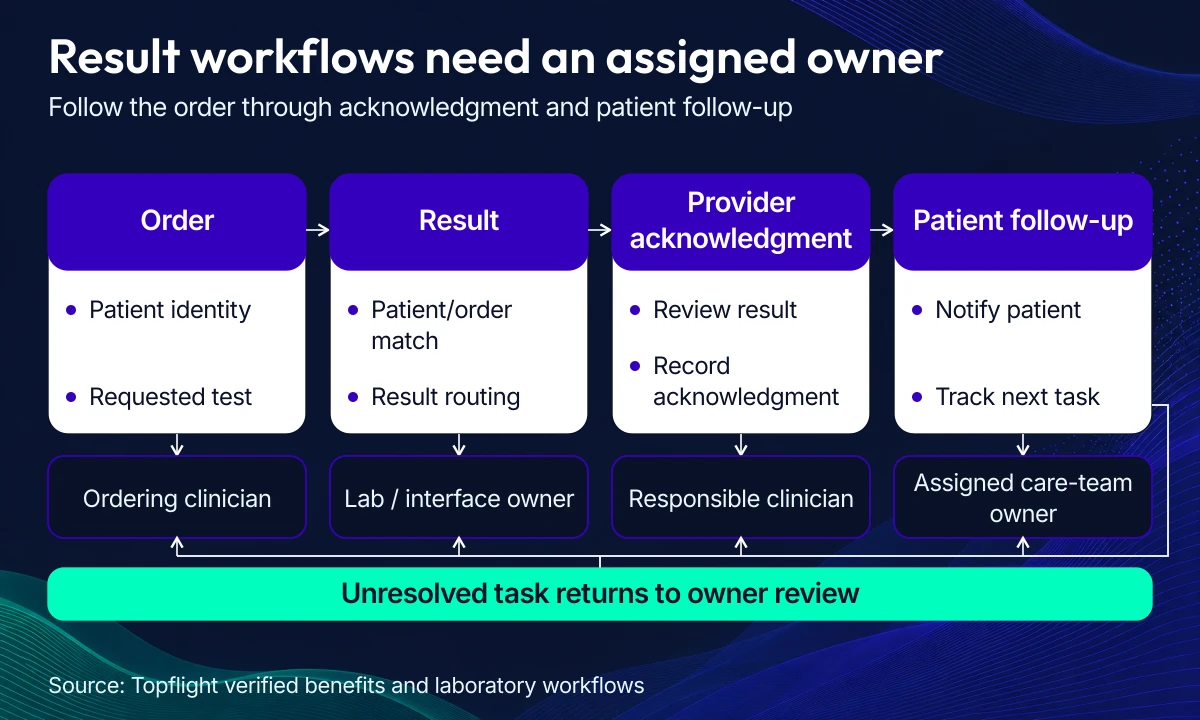
Assign review and follow-up ownership when you scope result exchange.
- Efficiency: chart context and automatic routing can reduce duplicate entry and manual handoffs.
- Patient care: visible history and assigned follow-up tasks help clinicians act on missing context and overdue care.
- Costs: reconciled orders can reduce duplicate tests and rework; complete documentation helps limit revenue-cycle misses.
- Coordination: shared problem lists and care plans give referring and receiving teams a consistent handoff.
- Security: role permissions and audit trails make access easier to control and review, with encryption configured for the data flows.
- Decisions and engagement: structured data supports clinical decision support, quality reporting, reminders, and patient self-service.
Build, buy, or integrate? Choosing your EHR path
Choose the path that covers your clinical workflow and leaves your team able to operate the result. Before you build EHR software, compare a vendor deployment, custom build, open-source foundation, and existing-EHR integration against the same requirements; our guide to choosing an EHR system can help with vendor evaluation.
|
Path |
Best fit |
Control and ownership |
Cost and time basis |
|---|---|---|---|
|
Ready-made deployment |
The product already covers your clinical and administrative workflows. |
The vendor owns the product roadmap; you own deployment decisions and your contracted data-access arrangements. |
Use vendor quotes plus migration, interfaces, rollout, and recurring fees. Timing depends on sites and deployment scope. |
|
Custom build |
Your workflow requires control over the record model and application behavior. |
Define code and data rights in your contracts; your team owns maintenance and the product roadmap. |
Use the scoped build estimates below, then price integrations and operating responsibilities. Our planning range is 6-9 months for an MVP, 12-18 months for a full build. |
|
Open-source foundation |
An existing application covers enough of your workflow to justify extending it. |
You control deployment and changes within the project’s license terms and must maintain your extensions. |
Price the fit review, customization, hosting, upgrades, and support. Reuse savings depend on the selected release and the gaps you find. |
|
Existing-EHR integration |
The current EHR remains the record system and you need a focused companion workflow. |
You control your app; the EHR vendor and customer control interface access and available operations. |
Price read/write scope, interface approvals, and site rollout. The around-$100,000 integration tier is a planning example; complex projects need separate estimates. |

Confirm workflow fit and ownership before pricing the path.
Implementing an out-of-the-box EHR system
Buying works when the existing product fits your practice and its interfaces support your other systems. Ask the vendor to demonstrate your actual workflow, including corrections and downtime recovery.
|
Pros |
Cons |
|---|---|
|
|
Developing a custom EHR system
Custom EHR software development gives you control over clinical workflows and product changes. Custom EMR software development can stay focused on a single practice’s records, provided you explicitly scope the outside interfaces it needs.
|
Pros |
Cons |
|---|---|
|
|
EHR custom software development can tailor patient record management and clinical decision support to a practice. You still need an owner for each interface and an operating budget for the finished product.
Building on an open-source EHR foundation
OpenEMR is an electronic medical record and practice-management application. OpenMRS is an open-source electronic medical record platform; either can provide an application base when its workflows fit your setting.
HAPI FHIR provides Java FHIR libraries and server building blocks. Plan separately for charting, prescribing, billing, and the clinical user experience when you use it as interoperability infrastructure.
- Test the selected release against your core workflows and required interfaces.
- Review its license and extension obligations, including how you’ll distribute changes.
- Inspect code quality and security updates; estimate the effort needed to keep your changes compatible with upgrades.
- Check any certification requirement against the exact product version and configuration you intend to deploy.
Reuse can reduce implementation work when the application already covers your needs. Budget for customization and long-term support after the fit review; a project’s certification claim needs a separate check for your deployed configuration.
Integrating with an existing EHR
Build a companion app when the existing EHR already holds the clinical record and your product adds a focused workflow. Confirm patient identity, accessible data, write-back permissions, and customer approval requirements before estimating the build.
Our Epic EHR/EMR integration guide estimates $50,000-$200,000 and up, with 6-12 months to first production go-live depending on scope. The Allscripts EHR integration guide covers a different vendor environment; get access and workflow evidence for the system your customer actually uses.
Our EHR integration services cover interface planning and implementation for these companion workflows.
For deployment costs, use our EHR cost guide alongside your quotes. Price each deliverable separately: deploying a vendor product brings different recurring costs from an integration project or new platform.
Must-have features of a modern EHR system
The 6 core EHR modules are clinical documentation, e-prescribing, laboratory exchange, revenue cycle management, patient portal and messaging, and clinical decision support with quality reporting. Scope each module’s exchange standards and operating measures against the visits you’ve chosen to support.

Use this default custom-EHR MVP example to prioritize the first clinical workflow and stage optional modules.
Choose the first EHR/EMR modules around a measurable workflow benefit and a realistic integration scope.
| Priority | Modules |
|---|---|
| Start here in the MVP | Patient records and charting, appointment scheduling, patient messaging, basic e-prescribing |
| Plan for v2 | Lab integration, billing and RCM, clinical decision support, advanced analytics |
| Optional polish | Custom report builder, themed portal skins |
| Avoid in early builds | Wearables and IoT, blockchain ledger, voice transcription (DIY), custom CDS rules engine |
Clinical documentation module development
Start with SOAP/APS/OCT notes, reusable templates, smart phrases, and vitals. Structured fields need SNOMED CT and LOINC mappings, with ICD-10 capture where the workflow calls for it.
- Editing: autosave, offline edits where needed, version history, concurrent-edit conflict handling, e-signatures, and a full audit trail.
- Exchange: FHIR Encounter, Observation, Condition, Procedure, Composition, and DocumentReference; map the required USCDI elements and define CDS Hooks insertion points.
- Access: field permissions, break-glass access with reason capture, minimum-necessary views, and PHI redaction for analytics exports.
- Measures: note-closure time, coding accuracy, template reuse, and addendum frequency.
Review copy-forward behavior and duplicate Observations during clinical testing. Free-text accumulation and stale templates make later reporting harder.
E-prescribing system integration
Support prescription creation, changes, cancellations, and refills. Add eligibility and formulary checks, interaction and allergy screening, prior authorization, and pharmacy-directory updates where required.
- Standards: NCPDP SCRIPT, RxNorm/NDC, and FHIR MedicationRequest, Medication, and MedicationStatement.
- EPCS: plan prescriber identity proofing, two-factor authentication, token management, audit records, and clock-drift checks.
- Measures: track prescription delivery and renewal turnaround; review the reasons for overriding hard stops.
Test EPCS and cancellation flows through the move from test to production. State-specific prescribing requirements and partner cutover procedures belong in the release checklist.
Laboratory information system integration
Laboratory integration needs order entry and specimen labels, results ingestion, abnormal-result routing, delta comparisons, attachments, and send-out tracking. Use HL7 v2 OML/ORU and LOINC mapping where the lab requires them; FHIR ServiceRequest, DiagnosticReport, and Observation cover the API model.
- Reconcile incoming results to the right patient and order, then track provider acknowledgment and patient notification.
- Measure turnaround time and unmatched results. Check acknowledgment of abnormal findings against your service-level targets.
Validate local compendium codes and LOINC mappings for each lab. PDF or DICOM references and differing lab conventions need explicit handling during normalization.
Revenue cycle management components
Connect charge capture and ICD-10-CM/CPT/HCPCS coding assistance to eligibility checks, claims submission, payment posting, and denial follow-up.
|
Workflow |
Exchange model |
|---|---|
|
Eligibility |
X12 270/271; FHIR Coverage |
|
Claims and responses |
X12 837; FHIR Claim and ClaimResponse |
|
Payment and benefit records |
X12 835 ERA posting; FHIR ExplanationOfBenefit |
Separate staff duties and tokenize PHI in exports. Version payer rules and test clearinghouse edge cases. Include quick visits with missing superbills and payer-specific bundling in your test cases.
Track first-pass acceptance, days in accounts receivable, denial rate, and clean-claim processing time. These measures expose missing documentation and failed payment loops.
Patient portal & messaging
A patient portal connects appointments and results to secure messages, intake, e-consent, telehealth access, and payments. Define proxy access for children and adults who need caregiver support.
Use SMART on FHIR/OAuth2 and the EHR’s patient-access APIs, with required disclosures mapped to USCDI. Plan identity proofing and duplicate-account resolution before patients start using the portal.
The access and inbox design needs:
- multi-factor authentication and session limits
- message retention rules
- teen privacy and proxy-access controls
- minimum-necessary staff views and assigned message triage
Measure activation, message response time, no-shows, and intake completion. Patient-access requests also need a defined review process when clinical concerns affect disclosure.
Clinical decision support & quality reporting
Use alert rules and order sets in clinical work, with registries and care plans tracking care gaps. MIPS, HEDIS, and eCQM reporting each need their own measure definitions and data mappings.
- Standards: CDS Hooks and CQL, plus FHIR Measure/MeasureReport, PlanDefinition, and Library.
- Governance: alert severity, fatigue monitoring, post-deployment review, and controlled rule changes.
- Measures: alert acceptance, override reasons, measure pass rates, and documented gap closures.
- Validation: compare rule versions across environments and remove stale rules; check measure logic against specialty-specific workflows.
AI features need a review workflow before chart write-back
Build AI features as reviewable steps in the chart workflow. AI in EHR automation can draft documentation and organize chart context, with clinicians responsible for reviewing clinical content before it becomes part of the record.
An ambient AI scribe needs dependable audio capture and speaker separation, followed by a draft in the practice’s note format. Show recording status and give staff a way to stop capture or continue documenting when audio quality fails.
For summarization, keep the encounter dates and links to the source notes or results beside the generated text. Distinguish current medications from historical entries and surface conflicting chart information for review.
Coding assistance should pair each suggested code with the documented evidence supporting it. Route suggestions to an authorized reviewer before they reach the billing workflow, and measure unsupported suggestions alongside missed codes.
The NIST generative-AI risk profile provides a framework for risk-based evaluation. For an EHR workflow, use these design controls:
- Capture and consent: check recording and privacy requirements for each jurisdiction and record the required consent. Define retention for audio and transcripts.
- Source traceability: let reviewers inspect the transcript segment or chart entry behind a generated statement and record their corrections.
- Error evaluation: test omissions, invented facts, negation errors, medication mistakes, and speaker confusion across the specialties and patient groups you support; review failures after model or prompt changes.
- Controlled PHI use: approve vendor data flows, restrict access, and specify storage locations, deletion, subprocessors, and whether data can be reused for model training.
When HIPAA applies, assess the vendor arrangements and safeguards against HHS cloud guidance. Define how rejected outputs and expired recordings are removed while retaining the audit evidence your workflow needs.
Map the chart lifecycle explicitly: draft, clinician review, signed record, and later addenda. Use idempotent write-back and version checks so a retry can’t duplicate a note or overwrite a clinician’s correction.
ONC’s predictive DSI source-attribute and risk-management requirements apply when the intervention is supplied as part of a module certified to § 170.315(b)(11). Its developer Q&A explains that note generation can qualify when it supports decision-making, so assess the function and certified-module relationship before setting the regulatory scope.
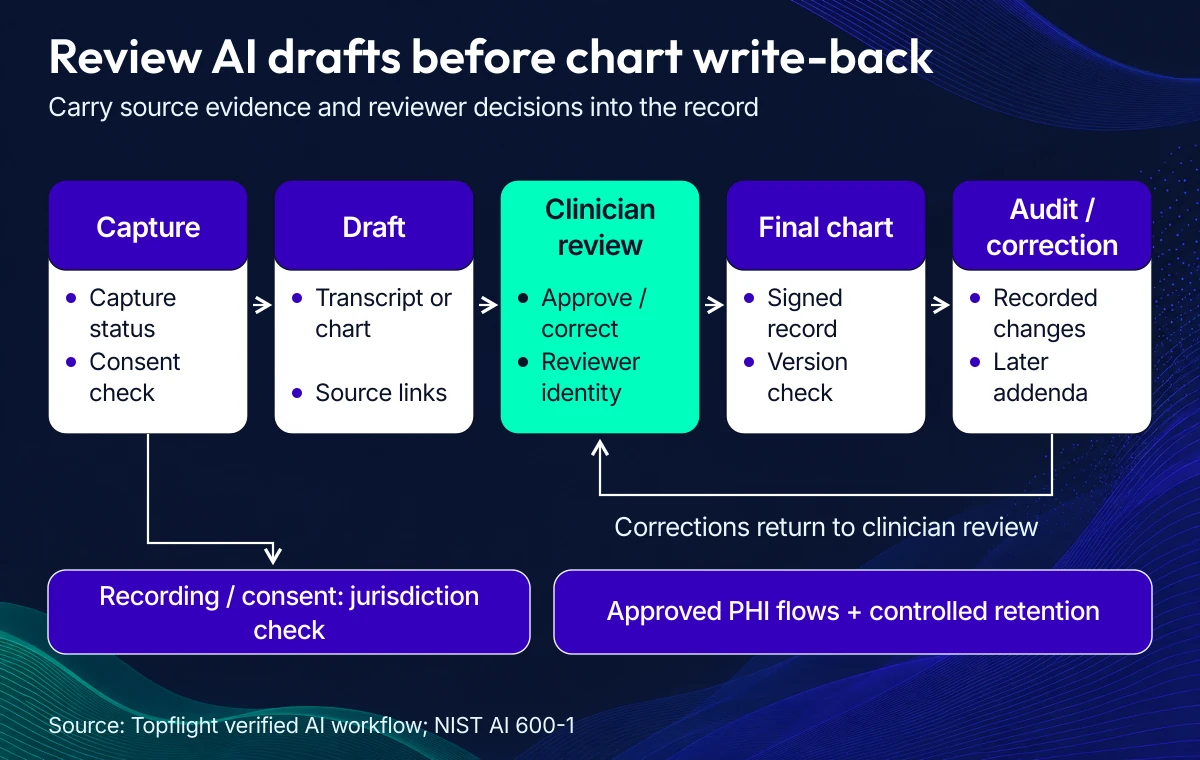
Record reviewer decisions and correction history alongside the clinical content.
Types of EHR systems
EHR systems serve 4 overlapping clinical profiles: primary care, specialty practice, hospital, and ambulatory care. Choose the clinical workflow profile before designing the record model; primary care is also ambulatory, and a hospital network can include specialty clinics.
Hosting is another scope choice. A cloud-based EHR still needs the clinical workflows and interface agreements below, along with defined responsibilities for access controls and recovery, including backups.
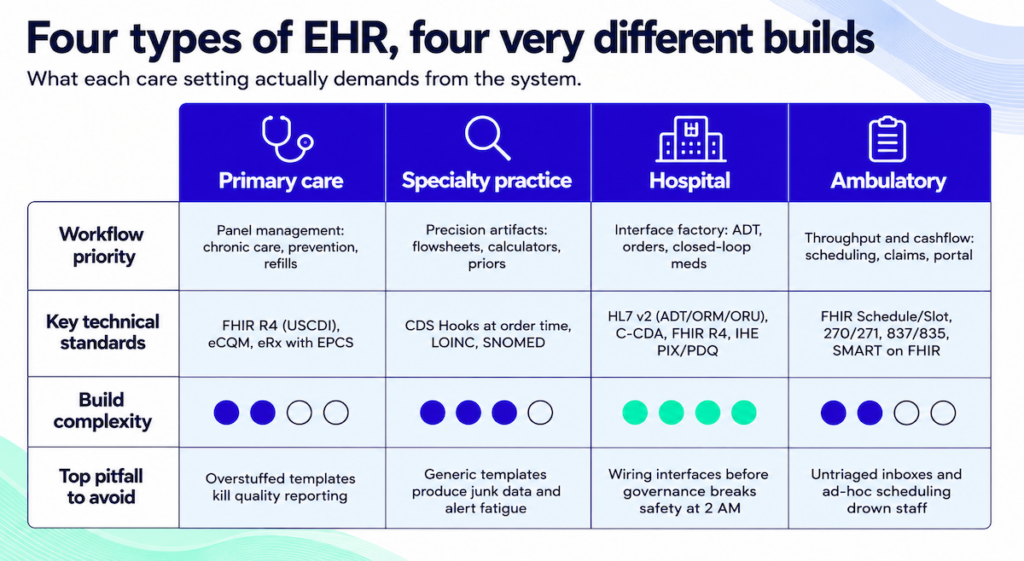
The care setting determines which workflows and interface standards need the most attention.
|
EHR type |
Priority |
Key standards |
Indicative build complexity |
|---|---|---|---|
|
Primary care |
Panel management |
FHIR R4, eCQM, eRx |
Medium |
|
Specialty practice |
Precision clinical artifacts |
CDS Hooks, LOINC, SNOMED |
Medium-high |
|
Hospital |
Cross-department interfaces |
HL7 v2, C-CDA, FHIR R4, IHE PIX/PDQ |
Highest |
|
Ambulatory |
Throughput and cashflow |
FHIR Schedule, 270/271, 837/835, SMART on FHIR |
Medium |
Complexity is relative to the workflows shown. Site count and outside interfaces can change the estimate for any type. Migration quality adds another dependency.
Primary care EHR development
Primary care needs panel management for chronic disease follow-up and preventive care alongside refills and same-day visits. Put the last A1C and blood-pressure trend where clinicians can use them during the visit. Show overdue care gaps beside them.
- Visit flow: connect vitals to assessment and orders, with chronic-care templates that pull recent Observations.
- Follow-up: use registry views and eCQM dashboards, with care plans tied to assigned tasks.
- Data boundaries: use FHIR at the API edge and map required USCDI data. Support EPCS where prescribing scope requires it.
- Inbox: define renewal triage and quick actions, with family proxy-access policies.
Test template length against real visits. Excessive free text makes quality reporting and chart review harder.
Specialty practice EHR systems
A specialty EHR needs the clinical detail that changes decisions: laterality in orthopedics, regimen tracking in oncology, trimester context in obstetrics, and validated behavioral-health screeners. Map flowsheets and calculators before designing notes and order sets.
For imaging workflows, support order routing and a PACS viewer with prior studies beside current images. Map structured impressions to LOINC/SNOMED where appropriate; behavioral-health and substance-use workflows need explicit consent and data-segmentation decisions.
- Specialty flowsheets with CDS Hooks at order time
- Coding semantics for laterality and staging, with device detail where needed
- Narrow sharing scopes for sensitive notes and results
- Clinical testing of templates and alert rules with the specialty team
Hospital EHR implementation
Hospital EHR implementation depends on reliable admissions, transfers, and discharges, with orders and results reconciled across departments. Plan the work across 4 areas:
- Interfaces: use HL7 v2 ADT/ORM/ORU for messaging and C-CDA for document exchange. Add FHIR R4 for APIs and SMART apps.
- Identity and access: use SAML/OIDC single sign-on and IHE PIX/PDQ patient matching. Capture the reason for break-glass access in the audit trail.
- Clinical operations: define downtime and read-only modes. Cover barcode medication administration records and escalation for critical results and device alarms.
- Reporting: eCQMs and service-line dashboards with controlled access to PHI.
Agree on interface ownership and downtime runbooks before go-live. Test how medication and result workflows recover after an outage or shift change.
Ambulatory EHR solutions
Ambulatory workflows connect the visit to documentation and payment. Eligibility checks before the visit and self-check-in can remove manual steps when the staff workflow supports them.
- Scheduling: FHIR Schedule/Slot/Appointment, provider-calendar templates, reminders, and portal access.
- Billing: real-time eligibility through 270/271, estimates at check-in, 837/835 claim and payment loops, and denial feedback into documentation templates.
- Patient access: secure messaging, e-consent and intake, proxy access, and SMART on FHIR add-ons for focused workflows.
- Measures: cycle time, attendance, first-pass claim acceptance, and message response time.
Assign inbox triage and scheduling-rule ownership before launch, then review the measures with clinical and admin staff. Use that evidence to adjust templates and capacity.
Complete EHR software development roadmap: step by step
A complete EMR software development project runs through 13 phases, from migration planning to ongoing support. Start with the clinical workflow and its external systems when deciding how to create EHR software.
When planning how to create an electronic medical record system, put testing and validation ahead of final launch preparation. That sequence applies when deciding how to build an EHR system from scratch or extend an existing foundation.
The 13 phases of how to build an EHR system, at a glance:
| Step | Description |
|---|---|
| Step 1: Get data migration plan | Prepare your EHR to absorb legacy data without loss and talk to external systems via FHIR and HL7. |
| Step 2: Identify core modules | Define essential modules: patient records, scheduling, billing, eRx. Prioritize MVP features so the build stays lean. |
| Step 3: Get key requirements | Gather user-specific requirements and validate them against real clinical and administrative workflows before code starts. |
| Step 4: Ensure compliance | Determine HIPAA obligations, customer certification requirements and security evidence before architecture decisions lock in. |
| Step 5: Design system architecture | Map data flow through backend services and security layers. Match the UI and core feature architecture to agile rhythms. |
| Step 6: Choose technology stack | Pick backend, frontend, database, and hosting technologies that fit your team’s skill set and compliance scope. |
| Step 7: Create custom UI/UX | Build user-centered designs from real workflows. Prototype with clinical users and refine until the UI fits how they actually work. |
| Step 8: Integrate APIs, etc. | Add connectivity to labs, pharmacies, telehealth, and wearable data through secure APIs and an event-driven architecture. |
| Step 9: Implement data security | Apply HIPAA-compliant encryption and access control. Automate backups so patient data survives a hardware failure. |
| Step 10: Testing and validation | Run functional, load, security, and penetration tests. Simulate edge cases against real clinical environments. |
| Step 11: Prepare for launch | Finalize documentation and run readiness checks. Coordinate the go-live as one rehearsed handoff. |
| Step 12: Phased roll-out, train staff | Deploy the system gradually and tailor training by user role. Both decisions cut go-live friction. |
| Step 13: Support and maintenance | Monitor feedback and ship regular updates. Keep the EHR in step with regulations as they change. |
Testing runs throughout development; Step 10 is the final system and clinical validation gate.
Step 1: Plan migration and interoperability first, or pay for them twice
Tackle data migration and interoperability in phase 1. Bolt them on later and the cost compounds. It’s a two-track job: absorbing legacy data from previous systems, plus making the new EHR talk to other platforms in the healthcare ecosystem.
That includes planning for:
- Legacy data cleanup and validation
- Mapping historical records to new data models
- Choosing interoperability protocols (e.g., FHIR, HL7)
- Establishing connections to labs, imaging systems, pharmacies, and even health information exchanges (HIEs)
If your EHR can’t talk to the systems your partners and clinicians already rely on, adoption stalls.
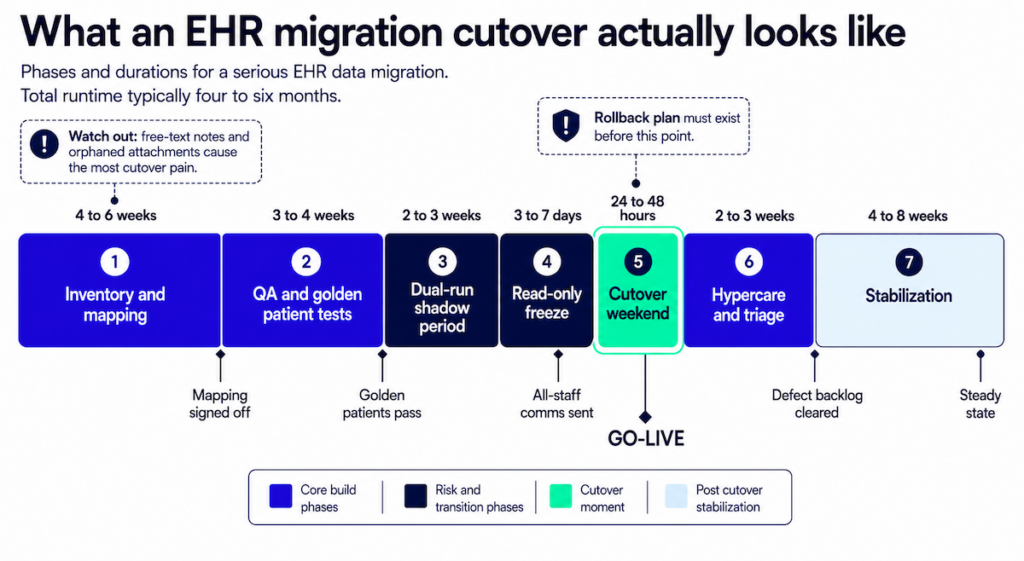
Use this illustrative migration sequence to plan reconciliation, cutover and recovery work.
| Phase | What happens | Duration |
|---|---|---|
| 1. Inventory and mapping | Catalog every source system and map fields to the target model | 4-6 weeks |
| 2. QA and golden patient tests | Validate mappings end-to-end against known records | 3-4 weeks |
| 3. Dual-run shadow period | Both systems live, output compared | 2-3 weeks |
| 4. Read-only freeze | Legacy locked to reads so the delta stops moving | 3-7 days |
| 5. Cutover weekend | Final load and go-live | 24-48 hours |
| 6. Hypercare and triage | Staffed support, exception buckets worked down | 2-3 weeks |
| 7. Stabilization | Back to normal operations | 4-8 weeks |
| Total | Inventory through stabilization | 4-6 months |
The migration durations above are an illustrative planning sequence. Source-system condition, record volume and clinical validation determine the actual schedule; phases can overlap.
Data migration
Migrating existing patient records into a new system is a foundational step in building EHR software. Every detail has to survive the move so continuity of care and regulatory compliance (HIPAA, audit trails, data retention) stay intact.
Most teams already keep patient data in some system. EMR software development has to move that data into the EHR without loss. Plan caching at the same time.
On mobile, cache patient data so offline edits don’t get lost. When the device comes back online, the app has to upload those edits and pull changes entered by other team members, while protecting against overwrites and data loss.
APIs
API integration is what makes an EHR interoperable. It moves data between labs, pharmacies, imaging centers, and third-party services in real time. That’s what keeps clinical workflows running.
APIs handle EMR interoperability: moving data (e.g., lab results) between platforms in the right formats, then processing it where it’s needed. That’s where FHIR by HL7 and other data standards (CPT, DICOM, CCD) earn their keep.
Specode‘s AI-assisted toolkit supports API integration scaffolding for EHR/EMR systems.
APIs do the heavy lifting in EHR custom software development. They pull patient visit data, manage medication lists, sync treatment plans across platforms, and trigger e-prescriptions back to pharmacies.
Step 2: Map core modules before you scope features
Before you design an EHR system, map out the core modules. What has to exist day one, what can wait. The modules are the backbone of your clinical and administrative workflows.
Some of the most common modules to consider:
- Patient records and charting
- Appointment scheduling
- Lab and imaging integration
- Billing and insurance handling
- E-prescriptions
- Communication tools (internal chat, patient messaging)
- Reporting and analytics
- Role-based access control
You won’t need them all upfront. Identifying the initial core is what makes the MVP work.
See Must-have features of a modern EHR system for the full breakdown.
EHR builds are multi-app from day one
EHR system development almost always means building a suite: patient portals, clinician dashboards, and admin panels. Each one supports unique workflows and needs its own secure data access.
During the EHR development strategy workshop, walk through who’ll use the system and map the applications each role needs.
Nurses and doctors fill in patient details and look up vitals. Front-office staff, administrators, IT, and management use the system too, often on different devices.
The question becomes: how do we fit all of that into a single EHR platform? How do we create EMR software that works equally well for all users on smartphones, desktops, and tablets?
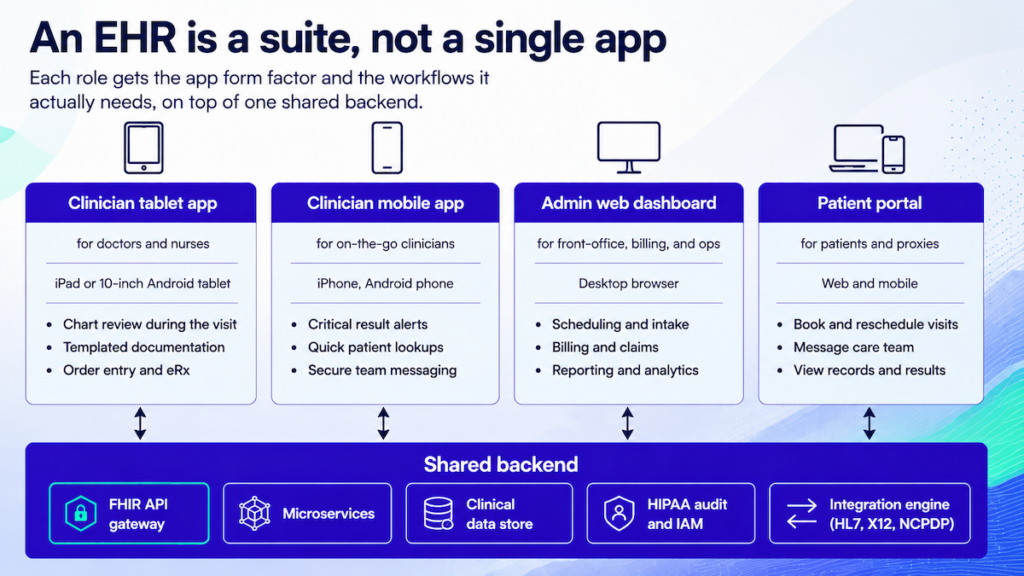
Role-specific applications can share data and access controls while supporting different clinical tasks.
The simple answer: you build multiple applications for different use cases. Its shared backend supports the user-facing applications:
- multiple front-ends (that’s how developers refer to apps we, users, interact with)
- APIs layer
- security mechanisms
- back end with databases
Related: Complete Guide to Building a Healthcare App
For example, a role-specific EHR platform can include:
- a tablet app suited to doctors and nurses
- a smartphone app for clinicians on the go
- a web dashboard for administration and management
- a patient portal for self-service tasks
When you build your own EHR software, you can ship independent applications for each user role and keep clinical data in sync across them.
Your MVP defines what comes first
When creating EHR software, a tightly scoped MVP keeps you lean. You validate the critical features in real healthcare environments first: patient charts, scheduling, lab orders, e-prescriptions.
A clinic, private practice, hospital, or telehealth provider may benefit from every module that makes up an EHR system. Pick the modules with the strongest ROI first.
See the MVP module-priority diagram and table in the features section.
Related: MVP App Development: Everything You Need to Know
Our preference is to begin with a single app for doctors and nurses (the interface adapts based on user role) plus another for admins. Even then, trim features to the bare minimum that moves a real number, for example:
- faster test results from labs
- built-in e-prescribing
- on-the-go access to patient medical history
- secure clinician-patient messaging
Once metrics confirm the value, you’ll keep improving on the MVP, drawing funds from cost savings or new revenue. Start with our minimum viable product healthcare guide. Ship the smallest workflow that proves clinical value, then use observed behavior to guide the next iteration.
The MVP question and your call on where to start belong to the strategy step.
Step 3: Nail functional requirements before code starts
Before any code is written, you’re defining how the EHR supports patient care, clinical documentation, billing, and compliance reporting. The goal: a sharp, reality-checked picture of what your EHR must do, for whom, and why. Every design and engineering decision downstream traces back here.
3 parts:
Assessment
Start with your current pain points. What workflows are inefficient? Where do you lose time or data fidelity? Where are clinicians and admins complaining loudest?
Scope definition
Once the gaps are clear, define which features are must-have versus nice-to-have. Set boundaries too: what won’t your EHR do in v1?
Business case
Tie functional needs back to measurable outcomes: readmission rates dropping, billing accuracy climbing, appointment cycles shortening, clinical documentation time falling. These anchor your MVP and long-term roadmap in ROI logic, since wishlist thinking doesn’t survive contact with the build.
Match the product vision to clinical workflows and financial viability.
For EHR system development, research the workflows and delivery constraints first. Answer these questions:
- Who’s actually using this EMR system?
- What’s the end goal for implementing an EHR?
- Are there target dates for delivery?
- How do I measure success?
Use the answers to define project scope. The strategy session usually closes with:
- lean canvas (just a clever word for business plan/model)
- high-level, prioritized feature list
- approximate diagram of the EHR’s architecture
- rough timeline and milestones
When planning EHR system design, the system has to fit your healthcare organization’s workflows. Every role that’ll touch it matters: whether you’re looking to create an EMR system or build an EHR platform, administrative staff and doctors need different functions.
At Topflight, we prefer to help you form your strategy, sometimes starting with a napkin sketch.
We’d take you through a discovery process and help shape your EHR vision around specific ROI metrics.
Carry your reasons for building the EHR system and its component outline into compliance planning. EMR software development needs that groundwork.
Related: How to Build a Medical Startup
Step 4: Bake compliance in from day one
Define regulatory applicability before you commit to the build. Your customers’ programs and the functions your product performs determine the certification and privacy work.
- Map covered-entity and business-associate relationships, PHI flows and HIPAA compliance responsibilities.
- Confirm whether customers require ONC Health IT Certification and which modules or criteria are in scope.
- Record applicable state privacy obligations and any medical-device qualification in your target markets.
- Assign owners for security evidence, vendor contracts and customer-required SOC 2 or ISO 27001 work.
Security and HIPAA compliance
Use the 2026 regulatory requirements for new EHRs section to check applicability and current rule status. Carry the resulting requirements into your architecture, acceptance tests and operations.
Our HIPAA-compliant application development guide covers the implementation work. Patient privacy controls must follow the data through exports and third-party services as well as the clinical screens.
Step 5: Design system architecture
Architecture is where EHR system design splits in two: the screens clinicians touch and the data plumbing underneath. EHR system development depends on both decisions; getting either wrong adds cost to every feature that follows.
Core features: UX meets system logic
One thing easy to miss when designing an EHR system: check with your developers whether a screen is too complex to build cleanly. They call it technical UX validation.
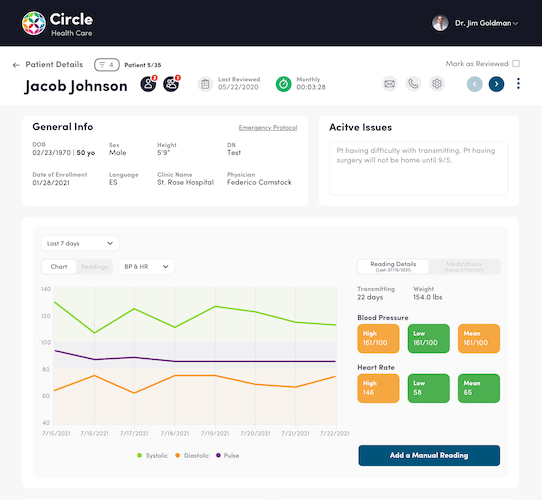
Test the clinical-record screen against the tasks clinicians need to complete.
Ask developers to find a cleaner way to build the feature, then choose the version that ships on time and works for the user role it’s built for.
Clinical screens need testing against the tasks each role performs. Watch clinicians enter orders and resolve exceptions in a prototype, then measure completion time and errors before you add more controls.
EMR software design has to work for both sides: the doctors clicking through patient visits up front, and the scheduling, billing, reporting, and privacy modules running underneath. When your EHR and EMR software development process bakes usability into the interfaces, medical staff stop fighting the tool.
Data architecture: blueprint for information flow
Your EHR software development needs data architecture that survives HIPAA audits and talks cleanly to outside systems: labs, payers, claims clearinghouses, and health information exchanges.
You’re deciding how patient data moves across modules: appointments, billing, e-prescriptions, lab tests, and clinical notes. Pick a relational database like PostgreSQL or document-based storage like MongoDB. Either way, build in HIPAA audit logging and role-based access from the first sprint. Retrofitting those is expensive.
Plan real-time sync between front-end clients and backend services, especially if you need offline mode for clinical environments with patchy connectivity. And design for FHIR and national network integrations now, even if you won’t turn them on until later.
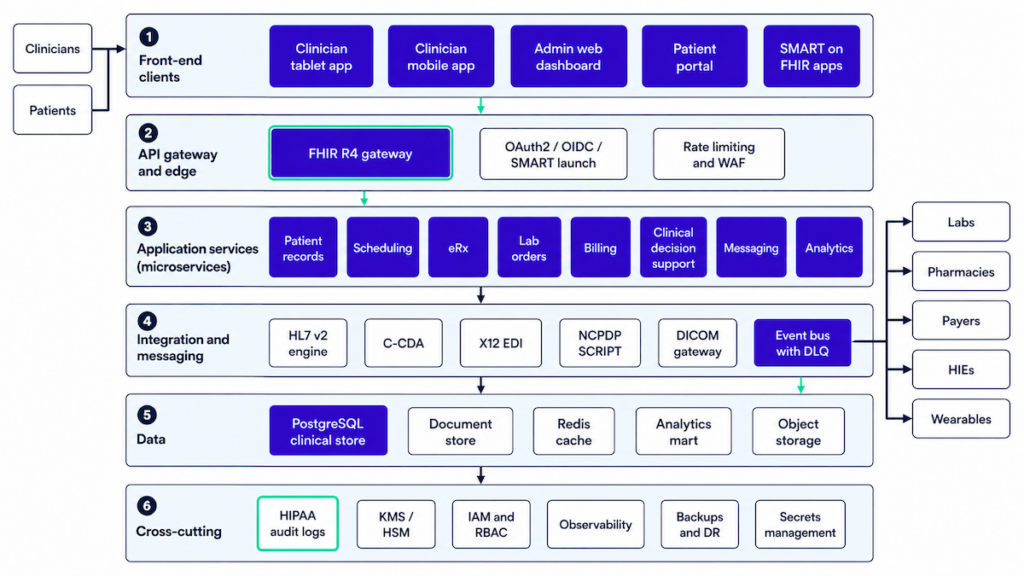
Choose data and service boundaries your team can operate and validate.
Architecture that fits agile
Use short design and development iterations to test each workflow with the people who’ll use it.
Related: Agile App Development: Building Winning Products
Agile means iterations on the design and every step that follows. Iterations don’t stop at release either, since the products that survive keep growing as users and the market shift.
The agile approach sets up the team composition and tooling you’ll need to sustain an EHR past launch.
Step 6: Choose technology stack
Your tech stack decisions shape delivery speed, reliability under load, HIPAA safeguards and the work needed to maintain the system. Pick well and your engineers stop fighting the tools every sprint.
Stack and team composition
In EHR custom software development, your stack has to match what your team can actually ship. The choices boil down to four layers: front-end, back-end, database, and APIs. For each, pick the version your engineers have shipped to production before. Allow time for learning and debugging when your team adopts an unfamiliar framework.
Building an EHR system needs people accountable for these roles. Team size and role overlap depend on the scope:
- front-end devs (iOS/Android/React, depending on the apps you’re shipping)
- full-stack back-end developer for core logic, database, and security work
- dedicated API developer
- QA engineers
- UX/UI designer
- product manager
- project manager
Product manager and project manager are different jobs. The product manager makes sure your vision lands with the healthcare app developers building it. The project manager owns the day-to-day mechanics of getting it shipped.
Stack choices follow team skills and what the EHR product actually has to do. A typical set:
- Front-end: React (web), React Native or Flutter (mobile) for cross-platform speed.
- Back-end: Node.js, Django, or .NET. Pick based on the load you expect and what your team has shipped before.
- Database: PostgreSQL or MongoDB. Structured vs. flexible schemas, depending on how your clinical data is modeled.
- APIs: REST or GraphQL. FHIR compatibility is non-negotiable for EHRs that need to talk to outside systems.
AWS, Google Cloud and Azure have services that can support HIPAA-bounded deployments under appropriate contracts and configurations. Your team still owns the risk analysis and safeguards. For AI features, plan a self-managed model-serving path or a managed endpoint with approved data-use terms before you design the data pipeline.
Where emerging tech earns its place
Modern EHR platform development pulls in AI, wearables, real-time alerts, and tighter telehealth integration. Require a measurable workflow benefit before adding a vendor or device feed.
Start with patient records and charting, e-prescriptions and the reporting your users need. Evaluate advanced features against the workflow you intend to ship:
- AI and machine learning for parsing medical records, flagging high-risk patients, supporting clinical decision-making, and catching missed allergies or medication conflicts
- IoT and wearables that feed the EHR with patient vitals in real time
- Telemedicine integrations
- A consortium ledger only where an agreed multi-party trust and governance requirement justifies its additional engineering cost
Related: IoT App Development Guide and Blockchain in the Healthcare
Also Read: How to Build a Wearable App for iOS and Android
Integrations like e-prescriptions and lab tests cut real friction from clinical workflows. Adding chat for inter-staff communication or a mental health tracking module widens what the system can do across different healthcare settings.
Evaluate ambient scribes, automatic handwriting recognition, and AI-based imagery analysis for their effect on the provider EHR experience.
Tech stack for building EMR/EHR software
Match the stack to production experience on the team. Ask a .NET, Node or Python team to show the clinical interfaces and operational tooling they’ve already shipped.
Related: How to choose the right tech stack for your application
Require tested interfaces with your existing systems and a clear plan for data ownership between modules. Choose service boundaries around the team’s operating capacity and the workload; a modular application can be a sound starting point.
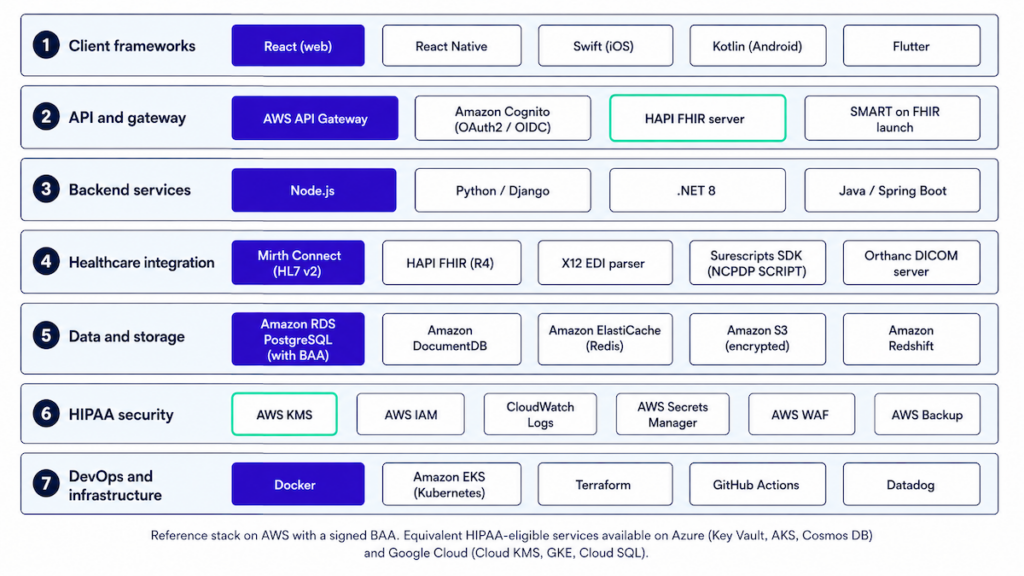
Choose supported components that fit the team’s release experience and required clinical interfaces.
FHIR-based EHR development
- Modeling: Map clinical data to FHIR resources (Patient, Encounter, Observation, Condition, MedicationRequest, etc.) with a clear profile/version strategy and validation on write.
- Auth and app model: OAuth2/OIDC plus SMART on FHIR launches (EHR-to-app and standalone). Token scopes follow the minimum-necessary principle.
- Patterns: Native FHIR store vs. FHIR façade over internal models, with eventing (subscriptions and webhooks) to decouple modules.
Common trap: pushing “everything as FHIR” through internal layers slows ops. Use FHIR at the API boundaries and let your internal domain models stay clean.
Cloud vs. on-premise EHR architecture
A cloud deployment can use managed infrastructure and security services. Customer requirements, existing systems and operating capacity can also justify an on-premise or hybrid EHR architecture. Check the services and contracts available for your chosen environment:
- BAAs
- KMS/HSM
- private VPCs
- regional controls
- autoscaling
- managed databases
Design backup and recovery around agreed RTO/RPO targets, data-location constraints and tested failure scenarios. The bill there includes hardware lifecycle, patch windows, HA/DR complexity, physical security, on-call rotation, and spares. Hybrid setups (edge devices or hospital data centers feeding cloud analytics) sit in between, with strict egress controls and audit replication.
Budget for egress, logs, backups, and observability when you use a “lift-and-shift” deployment.
Interoperability standards implementation
- Clinical: HL7 v2 (ADT/ORM/ORU) for messaging, C-CDA for documents, DICOM for imaging, and FHIR R4 at the API edge for USCDI compliance.
- Rx: NCPDP SCRIPT and EPCS, plus directory sync and cancellation/change flows tested end-to-end.
- Billing: X12 270/271 eligibility, 837 claims, and 835 ERA posting, plus a payer rules cache with versioning.
- Quality: eCQMs/QRDA or FHIR Measure/MeasureReport to support MIPS-compliant EHR systems without bolt-ons.
- Pitfalls: Silent version drift across partners is the recurring failure mode. Build contract tests using the production payloads partners actually send. Include cases beyond vendor-provided happy-path samples to check for version drift.
EHR data migration strategies
- Inventory: Source systems, tables, documents (PDF/DICOM), and code sets. Decide authoritative sources per domain before writing any mapping code.
- Mapping and QA: Deterministic mappings plus exception buckets, with count reconciliation and clinical “golden patients” run end-to-end.
- Cutover: Dual-run window, read-only freeze plan, rollback checklist, comms to clinical ops, and a post-go-live defect triage queue ready to staff.
- Privacy: De-identify lower environments by default and tokenize PHI for analytics.
Handle free-text notes and orphaned attachments before the weekend go-live to keep that cleanup out of post-launch workflows.
Security & compliance baseline
- Controls: Role scopes, break-glass with reason capture, field-level permissions, immutable audit trails, key rotation, secrets management, and two-factor authentication.
Combine technical controls with the operational processes below to prepare for audits:
- Processes: Vendor BAAs, incident playbooks, backup/restore drills that actually prove RPO/RTO, and least-privilege IAM enforced through code review.
- Evidence: Centralized logs, alerting on PHI access anomalies, quarterly access reviews, and deploy gates that block on privacy checks.
Build all 3 layers into the first release so you can prepare the evidence as you go.
Observability & operations
Use request-ID propagation and structured operational telemetry to trace failures in PHI workflows. Keep clinical content and credentials out of routine logs; audit patient-record access through a controlled, purpose-built audit trail. SLOs come next: define your SLIs around the metrics that matter:
- latency
- error rate
- message backlog
- integration partner availability
Wire alerts into your on-call rotation with runbooks attached. For resilience in HL7/FHIR/X12 pipelines, the patterns that hold up under load are circuit breakers, idempotent consumers, and DLQs with retry logic. Run chaos days against non-prod environments to find the failure modes before your customers do.
Reality check: Ask an EHR integration company to show these patterns in previous projects delivered by its healthcare software architecture experts. Avoid vendors who deflect integration questions into a vague “integration phase” later. For RFPs using “ONC-certified EHR developers,” ask for evidence of modules shipped through the applicable ONC Certification Criteria for Health IT. ONC certifies products and modules.
Step 7: Create custom UI/UX for clinical workflows
UI design in an EHR comes down to one job: take friction out of clinical workflows. The best interfaces disappear into the work, and clinicians stop thinking about them. That’s the bar.
Why doctors complain about EHRs
Good UI and UX in EHR custom software development cut clinician fatigue and speed up patient data access. Legacy systems do the opposite: every feature buried two clicks deeper than it should be.
Doctors and nurses encounter billing-focused workflows throughout their working day. Many EHR systems were built around the billing department, which makes routine clinical tasks harder.
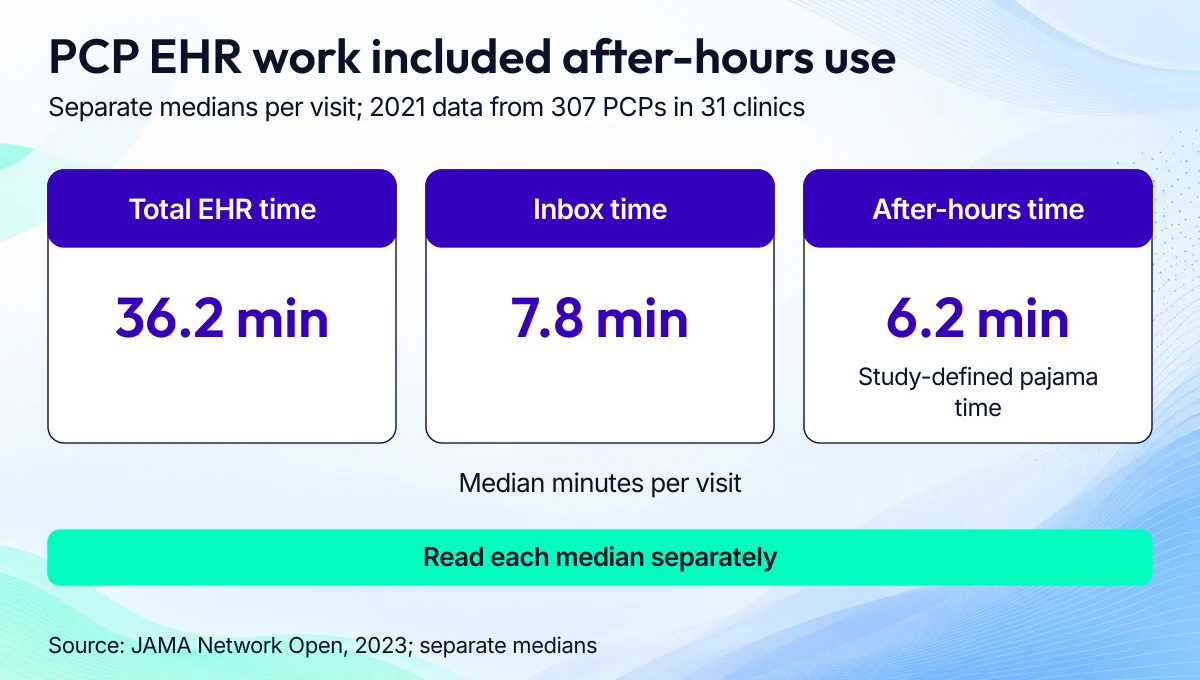
Time the full clinician workflow when setting usability targets.
A 2023 study of 307 primary care physicians across 31 clinics reported separate per-visit medians of 36.2 minutes of total EHR time, 7.8 minutes of inbox time and 6.2 minutes of after-hours time using 2021 activity data. Read each median separately; these measures do not form a mutually exclusive time split.
Related: The Ultimate Guide to UI/UX Design and Healthcare App Design
Custom EMR development changes that equation. You can design distinct front ends for different user roles, so the EMR software doesn’t get in their way.
From user flows to prototypes
Designers start by mapping what each user role actually does day to day. The output is a set of flowcharts showing the cleanest path through the software for each role.
Low-fidelity designs
From those flows come rough mockups, also called low-fidelity wireframes. Picture sketching application screens on a napkin, except in Figma.
Figma (which we use too) is popular because it lets designers wire all the screens together. Static mockups start responding to taps and gestures, which turns the wireframe into a clickable prototype.
Lately our team goes straight from design to code using Figma’s built-in handoff tools. Where the project allows, we prefer a fast coded prototype over a clickable mockup.
High-fidelity designs
Turn the rough prototype into a high-fidelity version, where the graphics match what users will see in the app. Iterating on rough wireframes first is faster and cheaper than re-rendering polished screens every revision.
Validate with real clinical users
We test the interactive prototype with clinical users before committing to the full build. Their working environment exposes problems a kickoff meeting can miss.
We use tools like usertesting.com to gather feedback and tighten the prototype before we build EHR software.
Test prototypes with real clinical users: doctors, nurses, medical assistants, and admin staff. Their feedback surfaces bottlenecks that don’t show up in planning meetings.
Step 8: Integrate APIs and third-party services
Your EHR has to plug into the services clinicians already use: e-prescriptions, lab orders, telehealth platforms, patient intake forms, and the rest of the stack at the practice. Integration quality usually determines whether the EHR actually gets adopted or quietly gathers dust.
API-first or pay for it later
An API-first EHR architecture means every core function, from patient record retrieval to appointment booking, is available through documented endpoints. The payoff comes when you layer on new features later without ripping into the core.
Support the data exchange standards your future integrations will require: FHIR (Fast Healthcare Interoperability Resources) and HL7. Skipping either closes off the providers and national networks that demand compatibility with their existing clinical systems.
Common third-party integrations
Connecting an EHR system to the outside world starts with a handful of named providers: Surescripts for eRx, Twilio or Zoom for Healthcare for telehealth, and the lab networks (LabCorp, Quest) your clinicians order through. Each saves real time in workflows that would otherwise stay manual.
Typical EHR integrations:
- E-prescription platforms (e.g., Surescripts)
- Lab and diagnostic systems
- Telehealth providers (e.g., Zoom for Healthcare, Twilio)
- Payment processors for billing modules
- Scheduling tools (both internal and external-facing)
- Wearable and IoT devices to feed real-time vitals
- CRM and patient engagement tools
Once you start piping reminders and recall outreach, you’ll want a clean EHR CRM integration pattern. Skip it and you end up rebuilding a call center inside your EHR.
These services come with SDKs or APIs your EHR development team has to integrate and keep maintained over time. Vendor APIs change; budget for that.
Webhooks aren’t optional
Your EHR application development needs webhooks and real-time event triggers from the start. They’re how lab result alerts reach the ordering doctor before the patient does, and how vitals from a wearable trigger a callback when blood pressure crosses a threshold.
Step 9: Implement data security, encryption, and backup measures
When developing HIPAA-compliant EHR software, security has to be baked in from day one. Encryption, backups, access controls, and audit logging all show up in the OCR investigation when something goes wrong. Patient trust shows up earlier than that.
Lock data down by role
Set up role-based access controls so users only see what they need for their job. Record patient-data access and security events in an audit trail that protects sensitive content. Cover the basics: session timeouts, brute-force protection, anomaly alerts on access patterns, and forced re-auth on sensitive routes.
Encrypt everything, keys included
Choose current, approved transport and storage encryption configurations, with managed key rotation and access policies. Check HIPAA responsibilities and the service-specific BAA; the cloud provider’s eligible service list alone doesn’t establish compliance.
Backups you’ll actually need to restore
Automate encrypted, offsite backups with clearly defined RPOs and RTOs. Run restore tests regularly. The worst time to find a broken backup strategy is during an actual incident.
Step 10: Test against real clinical chaos
Stress-testing matters when you’re building EHR software. QA should test the workflow failures clinicians encounter, including partial results and concurrent edits.
Quality assurance from the start
Testing runs alongside development. Run automated tests on each new version before shipping. QA engineers should also test failure cases in clinical workflows.
Related: QA Guide: Steps, Tools, Best Practices and More
Go beyond basic QA during EHR development
System validation should include:
- Functional testing (do features work as expected?)
- Regression testing (did recent changes break anything?)
- Load testing (can it handle real-time usage from multiple users?)
- Security testing (do controls behave correctly under expected and adversarial use?)
You should also test edge cases, like poor Wi-Fi, outdated devices, simultaneous data edits from different roles, or partial sync failures, to mimic real clinical environments.
Include clinical validation
Finally, validation must involve real end users: physicians, nurses, billing admins, and front-desk staff. Their hands-on feedback during final testing rounds will surface workflow friction points that automated tests can’t catch.
Step 11: Stage the launch before you flip the switch
Before launching your new EHR system, you need a controlled rollout strategy, compliance checks, a fully briefed support team, and a tested rollback plan. Patient care and operational safety depend on the go-live going well.
Get your launch checklist in order
Make sure you’ve covered critical pre-launch checks:
- Confirm role-based access is correctly configured
- Validate all third-party integrations (eRx, labs, scheduling) are stable
- Ensure performance under expected user loads (especially during peak hours)
- Review HIPAA compliance touchpoints, including logging, backups, data retention, and audit trails
Verify that the go-live version includes the stakeholder-approved changes and that the rollback plan is ready.
Timing the launch and team coordination
Launch publicly once the readiness checks and clinical handoff are complete.
Pick a low-traffic day for go-live. Make sure your devs, QA, product team, and on-call ops are all on standby. Assign a point person to triage post-launch feedback and hotfix requests in real-time.
Rehearse the handoff with clinical users so they know how to reach support and use the fallback workflow.
Step 12: Phase the rollout and tailor training by role
A phased rollout and targeted training help staff adopt the system. Include both in your EHR implementation plan.
Roll out in stages
Start with a controlled group like a single department or clinic, before scaling across the organization. This lets you validate workflows, uncover edge cases, make adjustments, and gather first-wave feedback without overwhelming your staff or support team.
Once the pilot proves stable, you can extend rollout site-by-site or team-by-team, gathering real-time feedback at every stage.
Don’t skip the training
Even the cleanest UI won’t help if staff don’t understand it. Build training programs tailored to each user role, physicians, nurses, admins, billing teams. Include:
- Hands-on sessions
- Role-specific cheat sheets
- Shadowing workflows in real scenarios
- In-app guided tours
Set up dedicated support channels during rollout to answer “how do I…?” questions quickly.
Step 13: Post-launch is where the product actually gets good
Post-launch, your team should keep iterating on the EHR software based on real user feedback. Regular updates, issue resolution, feature improvements, and security patches keep the system in step with healthcare needs as they shift.
Support and iteration
After launch, you’ll keep shipping new features, improvements, bug fixes, and EHR software updates.
If “optimization” to your org means “we’ll revisit it next quarter,” steal a real playbook here: EHR Optimization
Plan for a retainer team to handle this phase after the initial EHR implementation.
Feedback loops and product evolution
Establish ongoing feedback channels with your users: monthly surveys, quarterly check-ins, in-app feedback tools, or office-hours sessions. Clinical workflows evolve, and your EHR should too. When the real pain is adoption and performance, you’re often better off planning an EHR upgrade than a rebuild.
Assign a product owner or clinical informatics lead to translate user feedback into real updates. Prioritize updates that reduce friction, improve performance, meet new compliance standards, or address security gaps.
Ongoing EMR software development needs a steady exchange between the engineering team and clinical users. Give someone responsibility for turning workflow problems into testable changes.
2026 regulatory requirements for new EHRs
Set the regulatory scope around your customer’s programs, the product’s functions and the data you handle. For US EHR development, the main decisions are certification criteria, HIPAA responsibilities, exchange obligations and applicable state law.

Record applicable requirements and rule status before setting release acceptance criteria.
ONC certification follows the module and customer program
The ONC Health IT Certification Program is voluntary, while customer programs can require certified technology. An ONC-Authorized Certification Body certifies health IT products and modules against specified criteria. Verify the product version and certified scope before relying on a supplier’s claim.
HTI-1 made USCDI v3 the baseline for applicable certification criteria from January 1, 2026. Use the current ONC Certification Criteria for Health IT when defining acceptance work; a reference to the older Cures Update alone doesn’t establish what your release must support.
ONC is the current agency name following the March 2026 HHS change. Older rule documents may still use ASTP/ONC.
Clinical decision support needs a defined certification boundary
The decision support interventions criterion, §170.315(b)(11), includes source-attribute and risk-management duties for predictive DSIs supplied as part of a certified module. Record who supplies the intervention and which functions are covered.
Ambient note generation can support clinical decision-making. Assess the scribe’s actual behavior and its relationship to the certified module before deciding which duties apply. The ONC developer Q&A explains that boundary.
Information blocking and TEFCA have different scopes
Information-blocking actors include healthcare providers, developers offering certified health IT, and health information networks or exchanges. Their duties depend on the actor’s knowledge standard and the applicable exceptions. Map requests to the defined electronic health information scope, which extends beyond a FHIR API’s resource set.
HTI-2’s TEFCA framework is voluntary under that rule. Participation brings contractual obligations. Decide whether a QHIN connection fits your customer’s exchange requirements and account for those obligations in the interface design.
HIPAA safeguards depend on your data and vendor chain
Apply HIPAA Security Rule responsibilities to covered-entity and business-associate arrangements. Define permitted PHI uses across hosting and AI vendors, then carry that scope into access controls and retention policies.
A HIPAA-eligible cloud service and a BAA still require a risk analysis and suitable configuration. HHS cloud guidance describes the obligations that remain with the customer and provider.
As of October 2026, the HIPAA cybersecurity overhaul remains a proposal. Separate current obligations from proposed changes when you set release gates. Strengthen authentication, encryption and recovery controls based on risk while tracking the rule’s final status.
Check release dates against criterion deadlines
HTI-4 became effective October 1, 2025. Its affected prescribing and prescription-benefit criteria have separate transition dates: the relevant SCRIPT 2023011 transition is due by December 31, 2027, and real-time prescription benefits enter the Base EHR definition January 1, 2028. Check the criteria that apply to your modules.
HTI-5 is proposed as of this review. Keep pending revisions in a change register and update acceptance criteria after final requirements are established.
State privacy and medical-device scope need their own checks
Review the jurisdictions where users and patients are located. More protective state privacy rules can remain applicable alongside HIPAA, and consumer-health laws have their own data exemptions. Document the specific data flow and exemption instead of applying one rule to every adjacent app.
For an ambient recording feature, build consent around applicable recording law and the clinical workflow. Washington’s private-conversation recording law is one state-specific example to check.
For EU deployment, determine whether any module has a medical-device intended purpose. MDCG software guidance distinguishes record storage and transfer from modules with a medical purpose. That qualification determines whether the medical-device conformity route applies.
How much does it cost to build an EHR system?
Topflight’s EHR development cost estimates start around $100,000 for a scoped integration, $150,000-$200,000 for a web prototype, and $400,000+ for a mid-level system. A full enterprise platform can reach $1,000,000 in the scope shown below; broader programs can exceed that figure.
These are planning estimates for defined deliverables. Confirm the workflows, interfaces, migration scope, and production requirements before treating a tier as your budget.

Use these 2025 estimates for the defined build scopes, then budget deployment and ongoing support separately.
|
Tier |
Planning estimate |
Scope behind the estimate |
|---|---|---|
|
Integration project |
~$100,000 |
Connect an existing EHR to a clinical app, with agreed data flows and sites. |
|
Web prototype |
$150,000-$200,000 |
Demonstrate selected workflows in a working web system, without mobile clients. |
|
Mid-level EHR |
$400,000+ |
Build a multi-role platform with the agreed core modules. |
|
Full enterprise platform |
Up to $1,000,000 for this planning scope |
Build a full module set and multi-app suite with enterprise interfaces; additional sites or requirements can increase the total. |
A custom EMR build, a vendor deployment, and a focused app carry different costs. Our EHR implementation cost guide covers deployment work such as migration and training; our Epic EHR pricing guide covers vendor ownership costs.
The VA example shows why lifecycle scope matters. In February 2025 testimony, GAO cited VA’s January 2019 estimate of $16.1 billion and an independent October 2022 estimate of $49.8 billion for EHR modernization. The latter included a 13-year implementation phase and 15 years of sustainment; the original near-$10 billion contract covered a different scope, and GAO called for an updated lifecycle estimate.
EHR development cost by module
Price each module against the interfaces and clinical work it needs. Adding a module to an existing EHR and building that module into a new platform require different work, so these drivers are more useful than a price assigned to a module name.
|
Module |
Cost drivers |
Dependencies to settle before estimating |
|---|---|---|
|
Clinical documentation |
Specialty templates, concurrent editing, chart versioning, and signing workflows. |
Clinician-approved note lifecycle, terminology mappings, permissions, and source records for migration. |
|
E-prescribing and EPCS |
Prescription workflows and network onboarding; controlled-substance functions add identity and authentication work. |
Network agreements, prescriber proofing, applicable state rules, and production testing. |
|
Laboratory interfaces |
Number of labs and feed formats; order/result matching and abnormal-result routing. |
Lab access, compendium mappings, patient matching, and acknowledgment rules. |
|
Revenue cycle management |
Claims and remittance handling; payer-specific exceptions and denial workflows. |
Clearinghouse contracts, coding rules, payer test windows, and finance reconciliation. |
|
Patient portal |
Web/mobile scope, proxy access, messaging, and payments. |
Identity proofing, disclosure policies, staff inbox ownership, and payment-provider access. |
|
Clinical decision support and quality reporting |
Rule content and measure calculations; evaluation and change control for each clinical use. |
Clinical owners, terminology/data quality, applicable certification criteria, and release approval. |
Team and timeline depend on the release scope
Assign accountable roles before you set a date. Our 6-9 month MVP and 12-18 month full-build ranges assume an agreed scope and available clinical reviewers; migration and external approvals can extend the schedule.
|
Tier |
Accountable roles |
Timeline basis |
|---|---|---|
|
Integration project |
Integration engineer, security owner, clinical workflow owner, and QA lead, with a contact at each EHR site. |
For Epic production integrations, our planning range is 6-12 months to first go-live, depending on read/write scope and site approvals. |
|
Web prototype |
Product/clinical owner and designer, supported by application engineering and QA. |
Agree a demonstration date from the selected workflows, then estimate production hardening separately. |
|
Mid-level EHR |
Clinical/product lead and application team, with named owners for migration, security, interfaces, and validation. |
6-9 months for a bounded MVP; expanding the module set or migration scope adds work before full deployment. |
|
Full enterprise platform |
Clinical governance and product leadership, with engineering, security/compliance, migration, QA, and operations owners. |
12-18 months as an initial build estimate; rollout across sites and external approval windows need their own plan. |
The Epic integration guide puts production integration at $50,000-$200,000+ depending on scope. That range explains the variation around our $100,000 integration example; each site’s access and write-back requirements shape the work.
Ongoing costs need named owners
Budget for ownership through the life of the system. Vendor fees and cloud bills are only part of it: someone has to keep interfaces working and answer the clinic when a release breaks a workflow.
- Certification: the product/compliance owner tracks applicable criteria and budgets testing, then checks what each product change requires for certified modules.
- Hosting: the operations/security owner budgets infrastructure, backup and recovery testing, monitoring, and security reviews.
- Interfaces: the integration owner maintains contracts and mappings. That owner also budgets vendor upgrades and tests each site’s changes.
- Support: the service owner funds incident response and staff training, with a clinical owner approving workflow changes.
For a focused patient or clinician app, use our healthcare app development cost guide to compare the smaller application scope with the platform estimates above.
Related: App Development Costs: The Complete Breakdown
Working with an EHR software development company
Choose a team that can show how its work survived production use. Ask your EMR software development company for evidence in 5 areas before you commit:
- Shipped interfaces: ask which EHRs and sites the team connected. Request data-flow details and evidence of production approval.
- Migration evidence: ask for mapping decisions and reconciliation results, including how exceptions were resolved before cutover.
- Clinical validation: ask who tested the workflows and how the team recorded safety findings and release acceptance.
- Security ownership: ask who controls access and maintains BAAs and vendor agreements. Confirm who responds to security incidents.
- Operations: ask who monitors interface failures and supports upgrades, and what the clinic does during downtime.
Our EHR development work covers scoping, custom builds, integration, and migration. We bring healthcare delivery experience and document the decisions behind clinical workflows and audit trails; certification applies to the software modules you build and submit.
A prebuilt foundation can reduce repeated work on authentication, audit, consent, documentation, and the patient portal. The time saved depends on how closely those modules fit your workflows and how much adaptation they need.
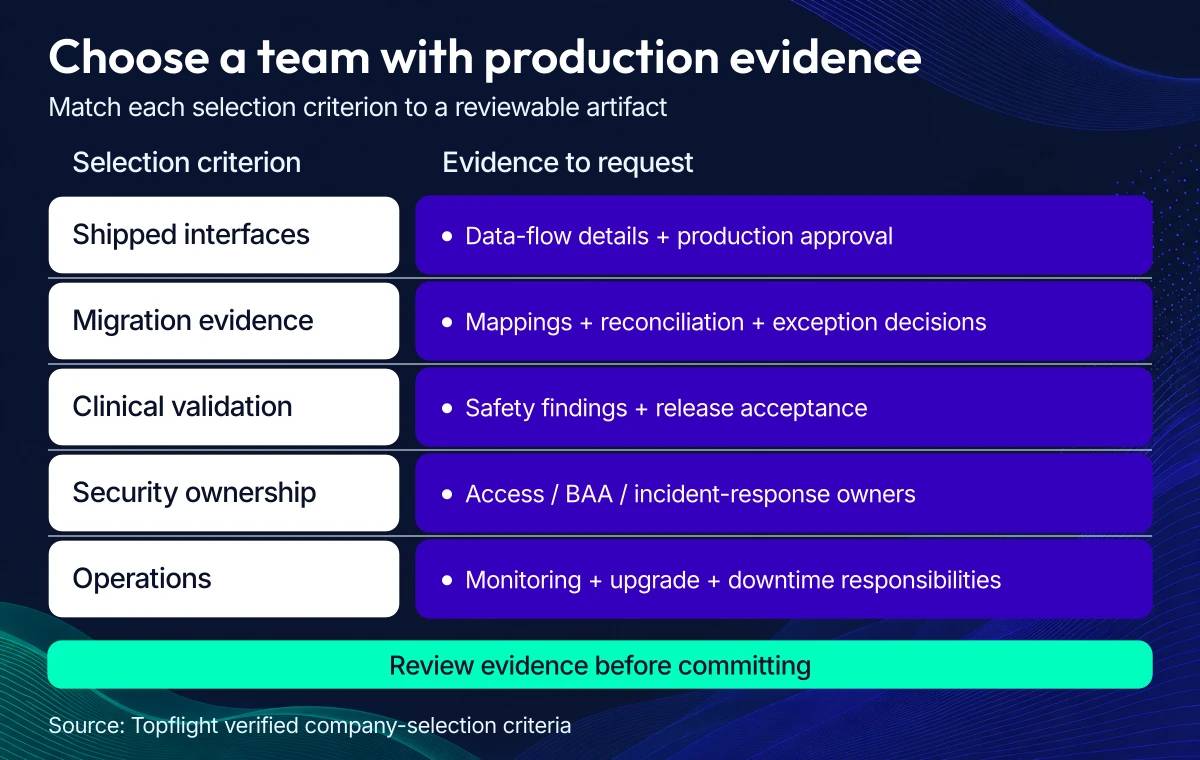
Request artifacts from real deployments before signing a development contract.
Our reuse approach keeps common controls together across modules:
- Shared authentication and audit controls sit alongside consent policies that apply across modules.
- FHIR/HL7 interfaces handle external exchange while internal models follow the product’s clinical scope.
- Migration playbooks use golden patients and exception buckets to check cutover readiness.
- BAAs, immutable audit, least-privilege access, and PHI-aware logging have owners from the first release.
Many healthcare teams start by connecting an existing EHR to a new clinical app. That path keeps the existing record system in place while the team develops the missing workflow.
Check out our EHR integration services
A broader replacement EHR needs a longer build and rollout plan. A tightly scoped clinical-data product can have a smaller first release, with the budget and timing tied to the workflows it actually supports.
Selected EHR/EMR integration projects
Selected work includes Dedica’s RPM platform with clinical records, GaleAI’s coding integrations, Epic teleradiology and census workflows, and a Cerner/LIMS clinician dashboard.
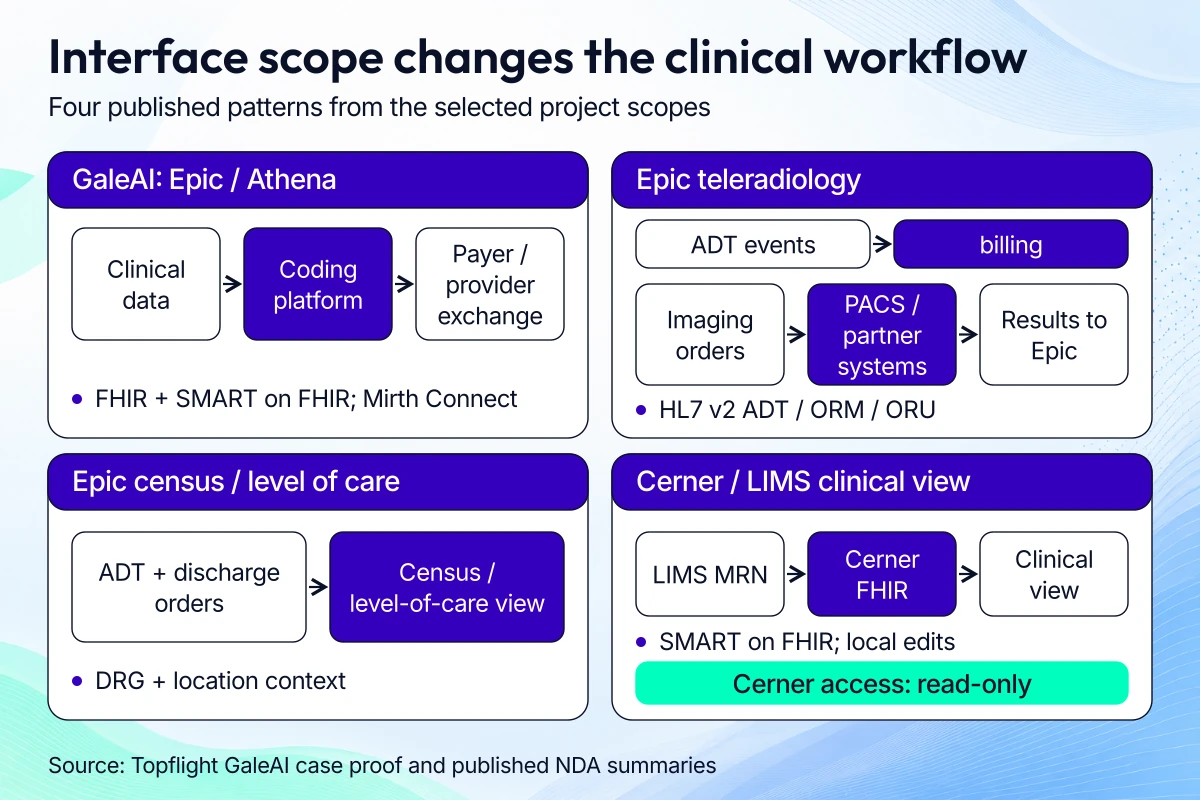
Validate data direction and write-back scope for each interface before estimating the build.
Dedica: RPM platform with clinical records
For Dedica, we built an RPM platform with clinical-record functionality for a cardiology practice. Our founder account, published July 2, 2024, reports a $300,000 ARR deal after the client added a SaaS subscription model.
Dedica’s RPM MVP v1 took 600 hours over 5 months. The wider work described in that account totaled 1,200 hours over 8.5 months, covering prototyping and design, development, digital strategy, and testing.
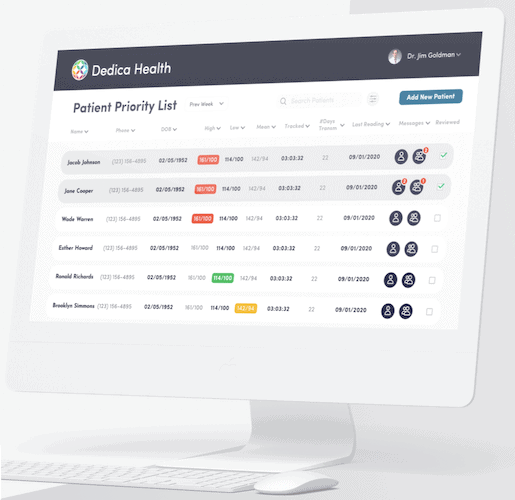
Dedica demonstrates RPM and clinical-record delivery within the scope described in the case study.
#1. GaleAI: medical coding through Epic and Athena
The GaleAI case study names Epic and Athena integrations, with FHIR and SMART on FHIR support. Mirth Connect supported interoperability work, including pre-authorization data exchange linking the coding platform with payers and providers.
Our medical-billing account, published in 2025 and updated in 2026, reports a 97% reduction in coding time and potential revenue increases of up to 15%, also covered in the EHR integration project overview. These are reported GaleAI case figures; the effect in another deployment depends on its coding baseline and clinical workflow.
#2. Epic EHR integration: teleradiology workflow across facilities (NDA)
A hospital group needed radiologists to read studies remotely while keeping order/result exchange consistent across multiple PACS and partner sites. We connected ADT events to billing and routed imaging orders to downstream systems; solicited results then returned to Epic.
Interfaces/standards used: HL7 v2 ADT, ORM, ORU; PACS integrations; Epic messaging to downstream systems.
#3. Epic EMR integration project: census & level-of-care dashboards (NDA)
For an operations vendor, we built an executive and care-team view of inpatient census and level of care, driven by Epic ADT feeds and discharge orders. The dashboards brought DRG context and location signals into bed-board and ED-to-inpatient workflow decisions.
Interfaces/standards used: HL7 v2 ADT (demographics/service level/location), ORM (discharge orders), DRG coding.
#4. Cerner + LIMS + hospital systems: imaging & lab data in a unified app (NDA)
A non-profit chain needed a clinician dashboard that brought imaging and lab context together. We used SMART on FHIR authentication with Cerner and retrieved patient data from Cerner FHIR using MRNs sourced from the in-house LIMS; the searchable, editable app kept changes local and used read-only access to Cerner.
Interfaces/standards used: SMART on FHIR (Cerner), FHIR R4 resources, HL7/LOINC mapping for observations, LDAP for internal SSO.
Our EHR automation work starts with the tasks clinical staff need to finish. We scope the data access and workflow changes, then validate the release with the people using it.
More on edge computing for healthcare and what it can do for your system’s performance.
Whether you decide to make EMR or build EHR software from scratch, define the first release around a clinical workflow you can test. Reporting, scheduling, real-time clinical decision support, and prescriptions each need their own acceptance criteria.
If you have $100,000-$200,000 for IT automation, use discovery to identify a bounded project and check its interfaces before committing to a build.
Related Articles:
- HIPAA Compliant App Development
- Patient Portal App Development Guide
- SMART on FHIR App Development
- How to build a doctor’s appointment application
- How to develop a hospital management system
- Guide to collecting healthcare data
- How to create a telehealth application
- E-Prescription App Development Guide
- EHR for Medical Billing
- Surescripts Integration: Main Steps
[Reviewed and Updated: October 2026]
FAQ
What's the difference between EHR and EMR?
An EMR centers on records and workflows inside a practice; an EHR supports sharing a patient’s longitudinal record across organizations. Either can include a patient portal or interfaces, so check the product’s exchange capabilities; cross-organization use requires consent handling and identity matching, with audit coverage for each exchange.
Can you help us integrate third party software with our EPIC/Cerner/AllScripts EHR?
Yes, we build SMART on FHIR apps and HL7 v2 interfaces for EHR-connected workflows. We scope each vendor and site separately for authentication, data mapping, write-back permissions, and production approval; the selected projects above cover Epic and Cerner work, and GaleAI’s public case study names Epic and Athena.
How long will it take to create EHR software from scratch?
Our planning estimate is 6-9 months for a bounded MVP and 12-18 months for a broader custom build. Those ranges assume an agreed release scope and available clinical reviewers; allow for migration work and vendor/site approval delays before committing to launch.
What's the biggest mistake you can make with EHR development?
Committing to a full module set before proving the first clinical workflow is an expensive mistake. Settle migration and interface access during discovery, then use a bounded clinical pilot to choose the next release’s scope and validation needs.
What technology stack do you recommend for building an EHR system?
React or React Native on the front end can pair with Node or Python services and Postgres, depending on your team and workflows. HAPI FHIR provides Java FHIR server/library building blocks for interoperability; Mirth Connect can handle HL7 v2 interfaces. Choose hosting eligible for your HIPAA arrangement and assign owners for the BAA, configuration, risk analysis, and operations.
How much does it cost to build an EHR system?
Our scoped estimates are around $100,000 for an integration, $150,000-$200,000 for a web prototype, $400,000+ for a mid-level EHR, and up to $1,000,000 for the full-platform scope described above. A broader enterprise build can exceed that figure, so price workflows and interfaces first, then budget for deployment and recurring support, including migration.
Do I need ONC certification?
You need certified technology when your customers’ programs or procurement requirements call for it; the ONC Health IT Certification Program is voluntary. An ONC-Authorized Certification Body certifies health IT products/modules, so scope the criteria for the software you supply. A companion app’s certification needs depend on its role and customer requirements, even when the host EHR is certified.
How do I build my own EHR?
To decide how to develop EHR software for your own practice, use the first users’ workflow and data needs to choose a ready-made product, an open-source foundation, a custom build, or an existing-EHR integration. Then prove interface access and migration quality, and validate a bounded pilot with clinical users before extending the release.
What are the top 3 EHR systems?
For US acute-care hospital evaluation, Epic, Oracle Health, and MEDITECH are useful vendors to compare. The KLAS report published May 14, 2026 covers buying decisions from January-December 2025, and its full market-share dataset requires access. Choose against your specialty workflows and interface needs; a hospital-market comparison gives you limited guidance for an ambulatory practice. For a build-versus-buy decision, check whether the vendor’s workflows and available interfaces cover your scope before funding a replacement.
Can I build an EHR on open-source software?
Yes, OpenEMR or OpenMRS can provide an EHR foundation if their workflows and licensing fit your product. HAPI FHIR provides interoperability building blocks, so plan the clinical application work and review maintenance ownership and security; verify the exact product version/configuration before relying on any certification claim for a customized deployment.