

Technical review: Francesco Mantovani, CTO of mobile development at Topflight
Companion app development gets expensive once real users arrive. The first things to break are the cloud bill, battery life, the permissions flow, and the AI nudge that fires at 3:00 a.m.
We’ve learned how to build a companion app that survives growth and yearly OS releases by shipping apps for light therapy devices, RV surge protectors, cardiology remote monitoring, and workplace step challenges.
What is a companion app, and what does it take to build one?
A companion app is the phone or watch app that controls a connected device and turns its data into something a person can act on. Building one means getting BLE pairing and background sync right on iOS and Android, plus HIPAA when you build it for a provider. A standard-profile, single-device version takes 3 to 9 months.
Key takeaways
- Users experience most connected devices through the companion app.
- Scale problems show up first in sync design and cloud costs, and every OS release brings a new regression risk.
- Healthcare raises the bar twice: HIPAA applies when you build for a provider or health plan, and FDA oversight starts when the app controls a medical device or analyzes its data.
- Budget for the hardware work. A single-device BLE companion app with a standard profile starts around $40,000 to $60,000, plus about $9,000 per device integration.
Table of Contents
- What companion app development is and why it matters for businesses
- Real-world use cases for companion apps across industries
- Key benefits of developing a companion app
- Technical considerations in companion app development
- Building a companion app that holds up as it grows
What companion app development is and why it matters for businesses
If a connected device is the sensor, the companion app is where the person meets it: the setup screen, the dashboard, the alert, the history.
The core purpose of a companion app
A companion app is a mobile or watch app that controls a piece of hardware or reads its data.
Familiar examples:
- Fitness bands and smart rings turn raw heart rate and sleep data into daily scores and trends.
- Dexcom’s Follow app alerts family members or caregivers when glucose runs high or low.
In healthcare, remote patient monitoring apps stream vitals to care teams and trigger a check-in when readings drift, and connected inhalers log each dose so clinicians can see adherence between visits.
The term also covers phone software paired with a service or a screen, like Starbucks’ ordering app or iPhone’s Apple TV Remote, and the same engagement logic runs through educational app development. This guide sticks to hardware.
The companion app types common in IoT app development each get hard somewhere different.
Types of companion apps by function
|
App type |
Common use case |
Example |
What gets hard |
|---|---|---|---|
|
Controller app |
BLE control of hardware |
Smart lock, thermostat |
Pairing and reconnect reliability across phone models |
|
Monitor app |
Health or fitness data visualizer |
Glucose tracker, fitness band |
Gaps in background sync on iOS and Wear OS |
|
Notification hub |
Alerts from hardware |
Fall detector |
Delivering alerts while the app is suspended |
|
Sync and storage layer |
Cloud mirror for device logs |
Wearable activity history |
Data volume, storage cost and HIPAA scope |
|
Learning or guidance companion |
Coaching, nudges, education |
Meditation assistant |
Personalization that respects quiet hours |
How companion apps improve the user experience
A watch screen is too small for a week of blood pressure readings. A companion app covers what the device can’t:
- Room for charts and long-range history.
- Fewer taps to the actions that matter, like sharing a week of readings with a doctor.
- Context from more than one device, such as step count read against sleep.
- Timely alerts, like a high heart rate during sleep.
In healthcare, what the app does also decides its FDA status. FDA’s policy on device software functions treats an app that controls a connected medical device or analyzes its data as a device software function. An app that only transfers, stores, or displays device data is generally outside device regulation.
A general wellness companion app can usually stay outside FDA oversight if it sticks to wellness claims. Past that line, medical device companion app development follows a stricter path through FDA classification and clearance.
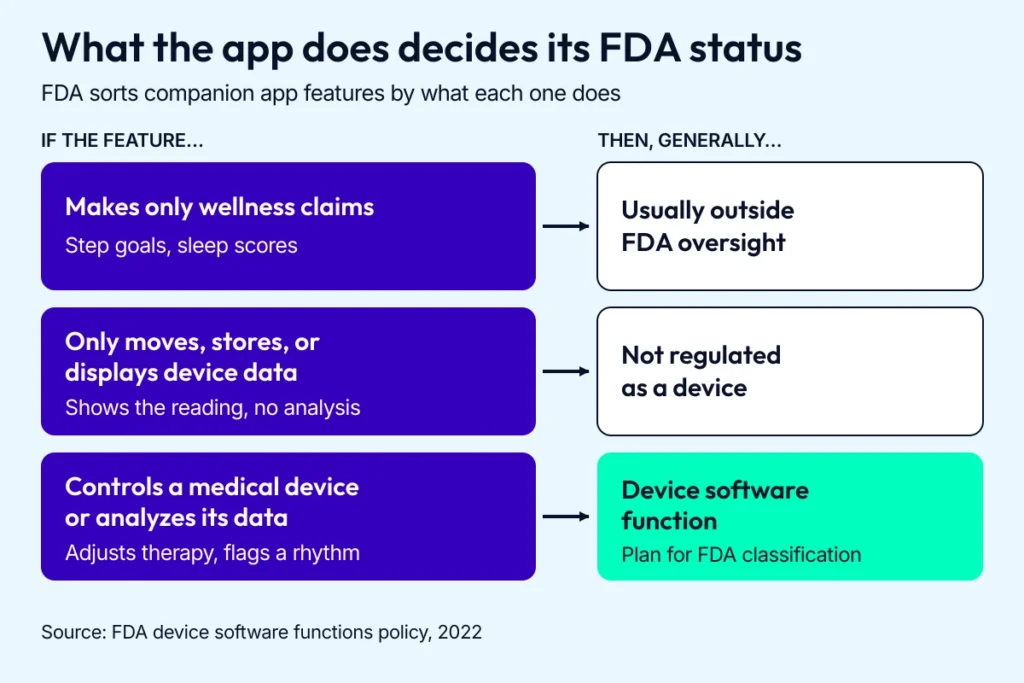
Map every planned feature to a row before you write the regulatory strategy.
Related: HIPAA Compliant App Development Guide and medical device software development
Companion apps vs standalone mobile applications
A standalone app is self-sufficient and talks to no external hardware, like a meditation platform or a diet tracker. A companion app is built around its hardware and gets its data from it.
Apple has allowed watch-only and independent watch apps since watchOS 6, so a watch app no longer needs an iPhone app to install or run. Plenty of health apps pair with an iPhone app anyway, for setup, heavier processing, or secure storage.
Here’s where first-timers risk rejection: a medication reminder app asking for HealthKit heart rate data it never uses. Apple’s App Review Guidelines (5.1.1) tell apps to request only the data relevant to their core function, and reviewers can reject apps that ask for more.
For your business, getting companion app development right means users keep coming back after setup, and behavior change lasts past the first month.
Have a connected product and no plan for the app layer yet? Talk to our team about a companion app that keeps users as you grow.
Real-world use cases for companion apps across industries
A smart inhaler logs doses. A Galaxy Watch estimates VO₂ max on a run. Users see both numbers in a companion app. Several apps below are ours.
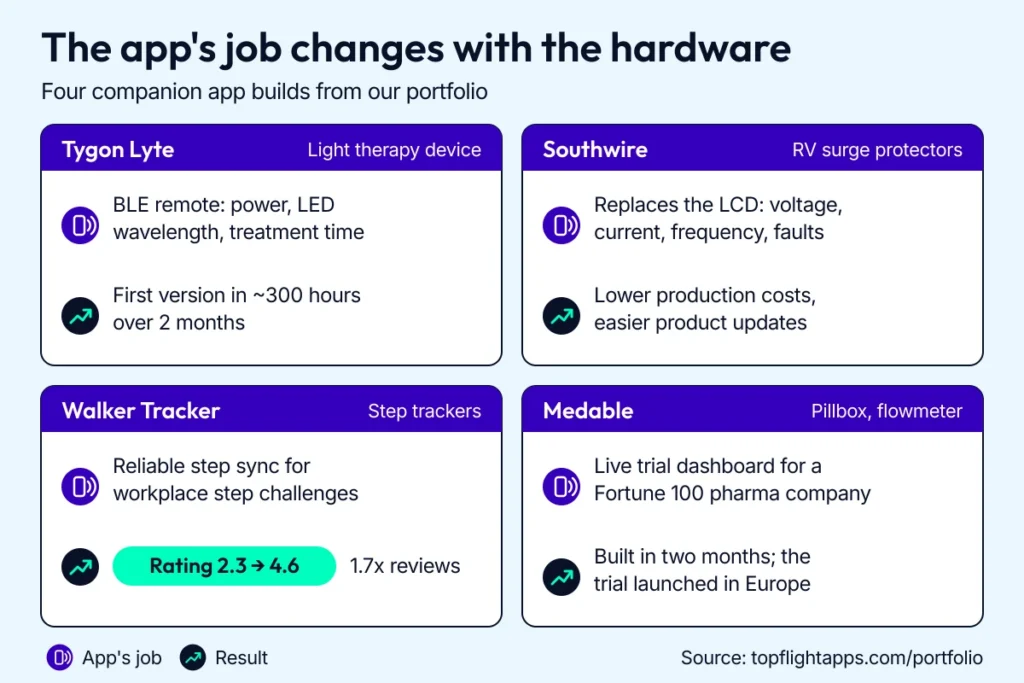
Each build solved a different problem, from replacing a hardware display to fixing the step sync that dragged down an app’s ratings.
IoT and BLE devices: smart homes and therapy hardware
At their simplest, companion apps act like remotes: Google Home and SmartThings put lighting and locks on one dashboard.
In healthcare, Bluetooth-connected devices go further:
- ResMed’s AirSense 11 pairs with the myAir app over Bluetooth for setup and comfort settings, while the machine’s own cellular connection uploads therapy data for myAir to display.
- AliveCor’s KardiaMobile 6L sends a six-lead ECG to the Kardia app over Bluetooth, and the app returns an instant rhythm analysis.
- Adherium’s Hailie sensors clip onto inhalers and log each dose over Bluetooth; the Hailie app sends missed-dose reminders.
Tygon Lyte came to us with its firmware nearly finished and no way for users to run the device. The hardware does red, blue, and infrared light therapy, UVC sanitizing, and black-light detection, and the app had to be its remote control.
We built a React Native companion app for Tygon Lyte that pairs over Bluetooth Low Energy, turns the device on, and adjusts LED wavelength and treatment duration. Three feature tours, one per device function, teach new users the hardware inside the app. We debugged side by side with the firmware team, and the first version took about 300 hours over 2 months.
We did similar work for Joovv, rebuilding its light therapy app in React Native so one app runs both legacy and new panels over BLE.
Wearables: where the phone does the heavy lifting
Wearables carry small batteries, so most of the processing happens off the wrist:
- Galaxy Watch relies on Samsung Health to store and process heart rate, sleep, and step data.
- Oura’s app turns overnight signals into a daily Readiness Score.
Some programs skip the wearable: Sword Health’s Thrive program uses computer vision in its app to watch each exercise and cue posture or pace fixes, while a physical therapist adjusts the plan.
In heart monitoring app development, your companion app turns raw sensor data into signals a clinician can use.
Sync reliability is what users judge a wearable companion app on. When we took over Walker Tracker, a workplace wellness app, its poor ratings traced back to step-sync failures and loose step counting.
We fixed the step-sync bugs and added an in-app rating prompt. The rating climbed from 2.3 to 4.6 stars with 1.7x more reviews, and Terryberry acquired Walker Tracker in 2022.
Healthcare apps: medication tracking and patient communication
Medication management is where companion apps carry the most weight. CDC survey data from 2017 to March 2020 show that 43% of US adults 65 and older took five or more prescription drugs in the past 30 days.
- Medisafe schedules doses and alerts a designated family member, a Medfriend, when one is missed.
- Bearable logs mood, symptoms, sleep, and medications, and exports reports patients bring to therapy.
- HealthSnap skips the phone: its cellular blood pressure cuffs, glucose meters, scales, and pulse oximeters send readings straight to the care team.
For RTHM, a care platform for people with Long COVID and ME/CFS, we built the patient mobile app and connected it to RTHM’s no-code physician platform. Patients track symptoms and get SMS reminders.
Through our work with Medable, we built a real-time dashboard for a remote clinical trial run by a Fortune 100 pharmaceutical company. It pulled data from a smart pillbox and a smart flowmeter.
Industrial products: when an app replaces a screen
Sometimes a companion app replaces hardware outright. Southwire’s RV surge protectors used to broadcast electrical data to an LCD display.
We built an IoT companion app for Southwire in React Native that pairs over BLE, shows voltage, current, and frequency, and warns about wiring or power faults. Auto-reconnect and connection by signal strength keep setup short at a campsite. Dropping the LCD lowered production costs and made product updates easier to roll out.
Wondering whether a companion app is worth the build? Talk strategy with us and bring your device specs.
Key benefits of developing a companion app
A well-built companion app turns a device into something people keep using. For health products, it also produces the evidence payers and providers ask for.
Cross-device sync users never have to think about
Health data now lives in two on-device stores, Apple Health and Health Connect, where apps like MyFitnessPal and Samsung Health share steps, workouts, heart rate, and sleep. A companion app that reads and writes to both keeps a user’s history in one place.
Dexcom G7 shows how far this can go. Since June 2024, its Direct to Apple Watch feature sends glucose readings and alerts from the sensor straight to the watch over Bluetooth, so users can leave the iPhone behind once it has paired the sensor. Apple Health still gets the data through the iPhone app, on a delay.
Design sync so a dropped connection backfills on reconnect, and show users when data last arrived.
New functionality for existing devices
Companion apps add capabilities the hardware can’t run alone. KardiaMobile 6L captures the ECG signal, and the Kardia app runs AliveCor’s FDA-cleared KardiaAI algorithms on each recording. It returns an instant determination (normal rhythm, AFib, bradycardia, or tachycardia) that AliveCor presents as a potential finding for a doctor to review.
In BLE app development, that split has a price: once your app analyzes medical device data, FDA oversight follows.
Engagement and long-term retention
Retention is a KPI, and the baseline is grim. A 2019 study of real-world usage data found a median 30-day retention of just 3.3% for popular mental health apps.
Activity dropped when the nudges stopped. In a three-week, 50-person pilot of My Care Hub, a diabetes app, users were active on about 11 of the first 14 days while daily push notifications ran, and about 4 of 7 days once they stopped.
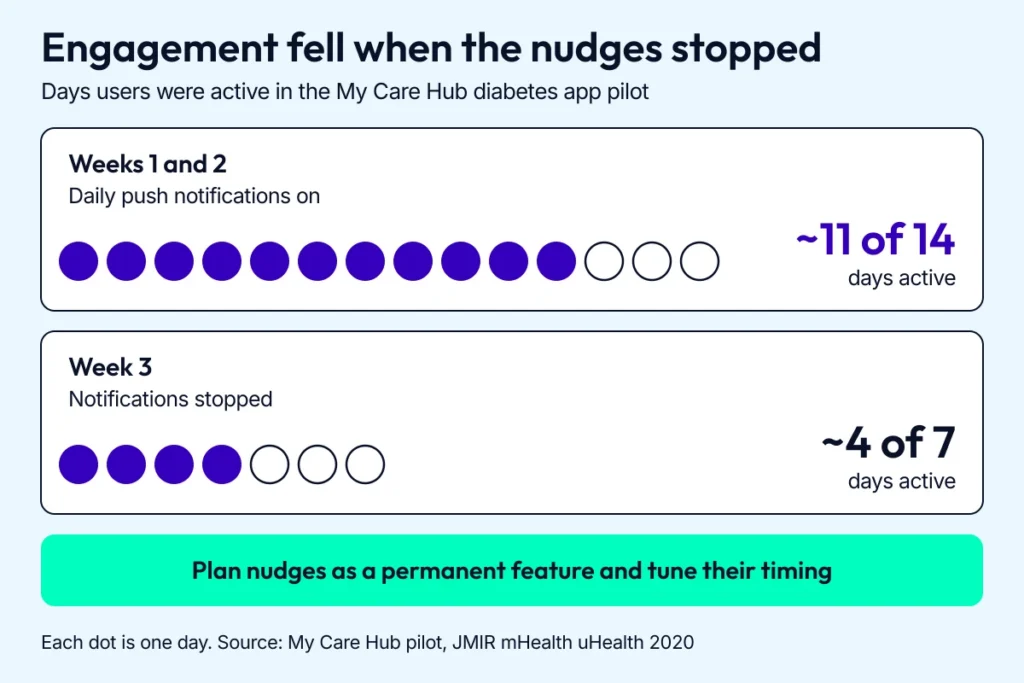
Activity was highest while daily notifications ran, so plan nudges as an ongoing feature.
What keeps people coming back:
- Personal notifications with a clear reason to open the app, capped so they never feel like spam.
- Goals and streaks tied to the device’s own data.
- Passive tracking that fills the dashboard without manual entry.
- A visible history, so a week of effort shows up as progress.
If you’re planning on-demand pediatrics app development or another consumer health product, build these mechanics in from the start.
Security, privacy, and device control
BLE has a documented attack history. BLESA (Purdue, 2020) let attackers feed spoofed data to phones reconnecting to a paired device, and SweynTooth (2020) exposed chip-firmware flaws that let attackers crash wearables and medical devices or bypass secure pairing. In BLE mobile app development, hard-coded API keys and missing certificate pinning add to those risks.
Pairing is where teams have less control than they expect. NIST’s Bluetooth security guide (SP 800-121) says Just Works pairing gives no protection against man-in-the-middle attacks, and the peripheral’s input and output capabilities decide which method gets used. So put the requirement in the hardware spec: LE Secure Connections with numeric comparison, passkey, or out-of-band pairing wherever the device allows it.
Beyond pairing, these controls hold up:
- OAuth 2.0 with rotating refresh tokens
- permission requests scoped to what each feature uses
- app-layer encryption on top of BLE’s link-layer encryption
- randomized device addresses, so a wearable’s broadcasts are harder to track
Customer feedback and coaching channels
Users want to talk back and have a chatbot or coach answer.
Lark’s conversational AI responds when members log meals, weight, blood pressure, or blood sugar, including readings from connected devices. Omada pairs a connected scale with human coaching. Once a provider is on the other end of a message thread, that thread is PHI, so plan secure messaging with the same care as the vitals feed.
Clinical outcomes and behavior change
For health products, the bar is outcomes, and published results are more modest than the marketing around them.
- Medisafe: in a 411-person randomized trial published in JAMA Internal Medicine, app users reported a small but significant gain in medication adherence at 12 weeks, though blood pressure fell about equally in both groups.
- Lark: in a peer-reviewed study of its AI-powered diabetes prevention program, members with a 12-month weigh-in kept off 4.1% of body weight on average. The authors work for Lark.
Sometimes the best companion is a text message.
For Dedica Health, commissioned by a cardiology practice replacing spreadsheets with remote care, we built a web-based remote patient monitoring platform that pulls vitals from clinically certified home sensors through the Validic API. To make onboarding easier, we postponed the patient app: patients measure blood pressure and reply to texts sent through Twilio. More than 80% of patients reach their CPT code targets, and the platform has since landed a $300,000 ARR deal as a SaaS product.
Want users still opening your app after a month? Let us guide you through the build with our companion app development services.
Technical considerations in companion app development
A reliable companion app has to live with the hardest parts of mobile development: background sync to a device on someone’s wrist, across two operating systems that change every year.
User goals and personalization needs
A HIPAA-compliant step counter and a wearable-driven engagement program are different builds. Syncing vitals to a portal puts compliance first, while keeping patients on a 12-week rehab plan puts engagement design on equal footing.
Build around what the user is trying to do, whether that’s “don’t let me miss a dose” or “get me to 10,000 steps,” with reminders that adapt to activity patterns, plus history read from HealthKit or Health Connect. Those stores hold the data; the personalization logic is yours to build, including adjustable haptics and text size for older or neurodivergent users.
Hardware and software integration challenges
On watchOS and Wear OS, every OS update can bring a BLE regression.
Francesco Mantovani, Topflight’s CTO of mobile development, puts it this way: “Treat the BLE link as unreliable by design. Every command the app sends should be safe to retry, and the phone should be able to rebuild state from the device after any disconnect. Teams that assume the connection will hold end up debugging it in production.”
BLE pairing reliability across platforms
On Android, pairing varies by phone maker, chipset, and OS version, so a connection that’s solid on one phone can fail on another. On Apple Watch, an app gets Bluetooth LE access mainly in the foreground, in background sessions like workouts, or in brief Background App Refresh windows, so an idle watch app can’t count on a live link.
Mitigations that work:
- Queue BLE commands locally, so nothing is lost when pairing drops.
- Add retry logic and Bluetooth state listeners, especially on Android.
- Expect reconnect failures after a reboot or signal loss, and make re-pairing easy.
- Test on the cheaper watches your users own, too.
Background limits and connectivity drops
Background execution rules decide how reliable sync feels. On watchOS, live Watch Connectivity messages only go through while the other side is reachable, the iPhone app can’t wake the watch app, and background transfers arrive when the system decides.
On Wear OS, Data Layer messages are best effort with no built-in retry, and the Data Layer doesn’t work at all when the watch is paired with an iPhone. Bluetooth range depends on radio design and obstacles, so plan for the link to drop when the phone stays in a locker during a workout.
Fall back to Wi-Fi where the watch supports it. Batch and retry syncs with each platform’s scheduler (WorkManager, BGTaskScheduler, SwiftUI background tasks on watchOS). These run on the system’s schedule and won’t hold a connection open, so for a live sensor session, use a connected-device foreground service on Android or a workout session on watchOS.
OS fragmentation and the cross-platform cost
Building for Wear OS and watchOS means owning two stacks: SwiftUI and Jetpack Compose, HealthKit and Health Connect.
Wear OS hardware varies too. Google tells developers to check Health Services capabilities at startup because data types differ by watch, and on Galaxy Watch, ECG and blood oxygen come through Samsung’s own Health Sensor SDK, with the consumer ECG feature requiring a Galaxy phone. Since watchOS 6, Apple allows watch-only and independent watch apps, which then handle sign-in, permissions, and sync without an iPhone app to lean on.
What helps:
- Use native SDKs for sensor access. React Native and Flutter cover shared UI and logic well, and BLE edge cases usually end up in native modules.
- Build your own abstraction layer for shared logic, and treat platform-specific code as first-class.
- Test on real Pixel Watch, Galaxy Watch, and Apple Watch hardware, and keep fallbacks for the rest.
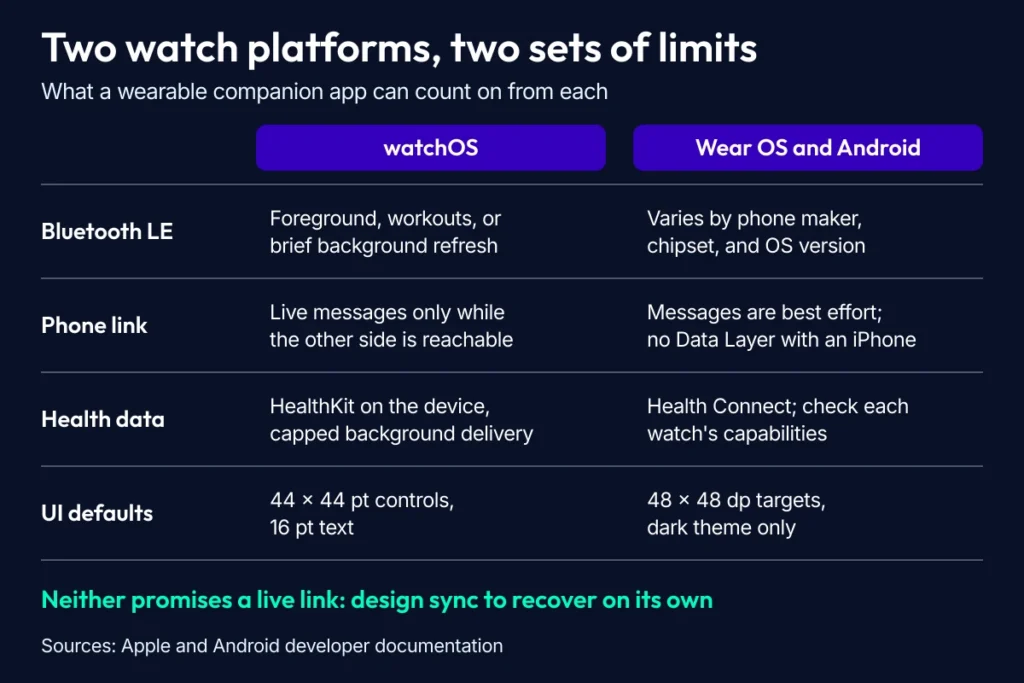
Neither watch platform guarantees a live connection, so sync has to recover without the user.
Designing UIs across devices
Liquid Glass arrived on the watch with watchOS 26, and Apple reserves it for controls and navigation. Apple’s Human Interface Guidelines recommend 44 × 44 pt controls (28 × 28 pt minimum) and 16 pt default text on watchOS.
On Wear OS, Material 3 Expressive tiles use an optional title slot, a required main slot, and an optional bottom slot for actions. Google recommends 48 × 48 dp touch targets and a dark-only theme, with tiles built on black because every lit pixel costs battery.
Glanceability rules both platforms. Apple frames watch sessions as lasting under a minute and taking a gesture or two, and Google asks for tasks finished within seconds. Put vital stats on the first screen and push history one level deeper.
For aging eyes, support Dynamic Type and aim for WCAG’s AAA contrast ratio of 7:1.
Two more accessibility habits pay off:
- Pair color with patterns or labels, and use a color-safe palette: red-green color blindness affects about 1 in 12 men of Northern European ancestry.
- Pair vibration with sound or voice for alerts, since sensitivity to vibration on the arm declines with age.
Timed steps need care too: WCAG 2.2 requires that most time limits can be turned off, extended, or adjusted. The same principles apply to medication tracking app development.
Security, privacy, and HIPAA compliance (for healthcare)
OWASP’s 2024 Mobile Top 10 lists Insecure Communication as M5 and explicitly counts Bluetooth and BLE among the channels that risk covers.
HIPAA applies based on who handles the data. Fitness data becomes PHI when a covered entity or its business associate handles it, for example when you build or run the app for a clinic under contract. Direct-to-consumer wellness apps usually fall outside HIPAA, though the FTC’s Health Breach Notification Rule can still apply, and the FTC’s mobile health apps tool walks through which laws cover your app.
Avoid storing PHI on the watch unless you have to, and when you do, encrypt it at rest.
On the backend, sign BAAs with every infrastructure vendor that stores or processes PHI; Aptible, for example, signs one for its dedicated stacks. Compliance tools like Vanta track controls and vendor BAAs, though Vanta itself doesn’t handle PHI or sign BAAs.
Security controls to build in:
- Encrypt BLE payloads end to end.
- Rotate OAuth 2.0 tokens often, especially on device wake.
- Log and audit every data sync event, and store the logs securely.
- Gate PHI behind biometrics (Face ID, Android BiometricPrompt).
Ongoing support, education, and feature updates
Every companion app needs a live update strategy from launch. Wearables pick up quirks with each OS release, and users won’t re-pair every time you drop support for a firmware version.
Over-the-air firmware updates in phased rollouts, with rollback, let you fix device bugs in the field without forcing a re-pair, so if your firmware talks to your app, plan OTA from the first release. Ship analytics and crash reporting in version 1.0, and keep in-app guided tours and onboarding current as the UI or hardware changes.
Platform details for Wear OS are in our wearable app development guide.
Want a companion app that’s secure and built to grow? Map out the blueprint with us.
Building a companion app that holds up as it grows
Plan for the day your user base, or an FDA inspector, shows up.
Designing for growth and data volume
Health companion apps now capture continuous heart rate variability, sleep stages, and glucose, and the architecture decides what all that time-series data costs.
- Batch and compress sensor data on the device (Protocol Buffers with standard compression), then convert it to Parquet in the cloud pipeline before cold storage in S3 with Athena or GCS with BigQuery.
- Keep the last 24 hours hot in a cache like Redis and aggregates warm in a warehouse like Snowflake, with every tier in a BAA-covered service if the data is PHI.
- Upload by clinical priority, so ECGs and arrhythmia alerts go before step counts or mood logs.
- Watch transfer costs. They’re billed per gigabyte, so 10x the users means roughly 10x the bill unless you throttle sync or down-sample older data.
Also Read: Healthcare App Development Guide
How AI enables health nudges and coaching
The best companion apps coach without waiting on a cloud round trip.
Run anomaly detection on the device with Core ML or LiteRT (formerly TensorFlow Lite), so a fall alert can fire on the watch even when the phone or network is out of reach. Then blend biometric patterns with weather and medication timing for nudges that fit the moment, like suggesting a later walk on a 102°F evening when blood pressure is already high.
De-identify PHI before it reaches a training pipeline. For models that ship to devices or partners, consider differentially private training such as DP-SGD, since NIST’s differential privacy guidance (SP 800-226) warns that neural networks can memorize and leak training records. The protection costs some accuracy.
Connecting with third-party platforms and APIs
You’ll integrate with Apple Health, Health Connect, a few wearable clouds, and probably several EHRs. Plan for their version changes from day one.
- Use an integration platform for EHR work. Redox offers one API to many EHRs, including Epic and Oracle Health (formerly Cerner), and Health Gorilla, a TEFCA QHIN, adds lab and imaging orders. Mirth Connect remains the build-it-yourself route, commercial-only since version 4.6 in March 2025. Our guide to medical device EHR integration covers the tradeoffs.
- Plan for rate limits and shutdowns. Google turns off the Fitbit Web API on October 30, 2026 in favor of the new Google Health API, which returns HTTP 429 once an app passes its per-user quota. Google Fit’s APIs end with 2026. Health Connect, the Android replacement, caps reads and writes and is stricter in the background, so sync through its changelog API. HealthKit keeps data on the device and caps background delivery.
- Scope OAuth tokens tightly and keep them short-lived. Verizon’s 2026 DBIR found credential abuse in 39% of breaches, counting every stage of an attack, and tied many third-party SaaS breaches to poor credential rotation and over-privileged service accounts.
- Put every external API behind an adapter, so a deprecation or a permissions change touches one module.
Ops maturity checklist
Hand this list to your dev team:
- One-click CI/CD with HIPAA checks, for example GitHub Actions to AWS Device Farm to TestFlight, with synthetic data only, since Device Farm isn’t HIPAA-eligible.
- Feature flags everywhere, firmware included, so features ship dark and turn on by cohort.
- Regression testing on beta OS releases within 48 hours of each drop, on every platform you support.
- SBOMs and vulnerability scans in the build pipeline. Since March 29, 2023, section 524B of the FD&C Act has required an SBOM in premarket submissions for cyber devices.
- Observability from day one, with OpenTelemetry and Grafana dashboards for sync success rate and BLE uptime.
- Deprecation policies with in-app alerts, giving users 90 days or more to migrate before breaking changes.
- Quarterly chaos drills that simulate BLE drops and regional cloud outages. Fallback logic you never test won’t work when you need it.
Companion app cost and timeline
Companion app cost tracks the hardware. Our BLE app development guide breaks it into bands:
- A single-device BLE companion app with a standard profile starts around $40,000 to $60,000, plus about $9,000 per device integration, and takes 3 to 9 months.
- A multi-device ecosystem with firmware updates and gateways starts around $180,000 and takes 8 to 14 months or more.
- A regulated healthcare BLE app runs $150,000 to $300,000 or more over 7 to 14 months or more.
If the app needs FDA clearance, plan roughly 9 to 14 months from regulatory strategy to App Store launch, and a 510(k) review alone adds 3 to 6 months. For HIPAA, integration, and maintenance costs in detail, see our healthcare app development cost guide.
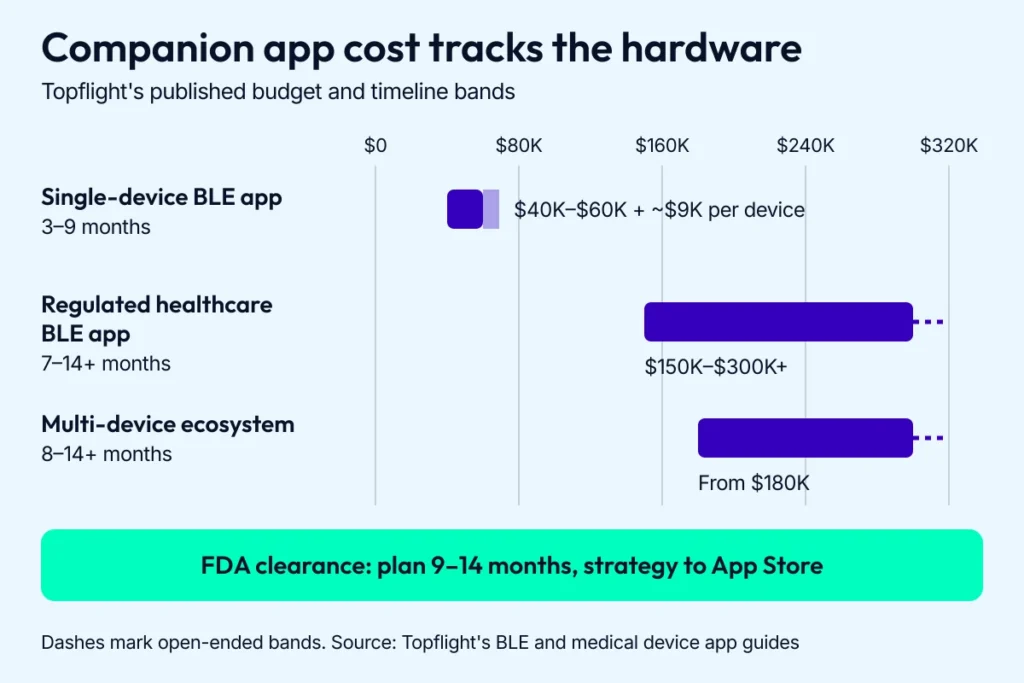
Hardware scope sets the budget band, and FDA clearance sets the calendar.
If you’re still weighing whether to create a companion app at all, start with our guide to app development costs.
We’ll help you design a companion app that grows with your users. Book a meeting now.
[Reviewed September 2026]
Frequently Asked Questions
Can a companion app work offline or without constant device connection?
Yes, if it’s built for it. A well-built companion app caches readings locally and syncs when the connection returns, so a fitness tracker can store steps and heart rate offline and upload them later. For critical features like medication reminders, offline fallback logic is essential, and the app should handle Bluetooth reconnects and failed sync retries on its own.
What's the difference between a companion app and a controller app?
A controller app is one type of companion app: it operates the hardware directly, with settings and firmware updates. Other companion apps focus on monitoring, alerts, or coaching built on the device’s data. Many healthcare companion apps do both, adjusting how a wearable behaves while tracking long-term vitals.
How do I make my companion app HIPAA-compliant?
Start with encrypted storage (AES-256), encrypted transport (TLS 1.2 or 1.3), strong authentication with MFA where you can, and role-based access. HIPAA’s Security Rule lists encryption as “addressable”; for an app handling PHI, implement it. Then add PHI handling policies: minimal data retention, audit trails, and a signed BAA with every vendor that touches PHI, including cloud storage and analytics.
Should I use a no-code/low-code platform to build my companion app?
Only if you don’t need custom BLE work or real-time sync. Most no-code platforms fall short on custom protocols and medical-grade wearables. They’re fine for early prototypes and internal tools; if you go that route, check HIPAA support and SDK extensibility first.
How long does it take to build a healthcare-ready companion app?
A single-device BLE companion app with a standard profile typically takes 3 to 9 months, and a regulated healthcare app runs 7 to 14 months or more. If you need FDA clearance, plan roughly 9 to 14 months from regulatory strategy to App Store launch. Device complexity and the number of platforms you support move the estimate most.
How can AI improve clinical outcomes in my companion app?
AI can personalize nudges and triage incoming data for clinicians, including anomalies like an irregular ECG. Used well, it flags problems in time to act without burying users in false alarms. Keep models tunable and tested against diverse datasets, and give escalations a human in the loop.
Will Apple and Google approve my app if it depends on external hardware?
Usually, yes. Apple asks for a demo video or the hardware itself when features depend on specific hardware, and an app that works with medical hardware has to provide its regulatory clearance for the regions where it’s available. On Google Play, health apps complete the Health apps declaration in Play Console, where you also give reviewers access instructions for restricted features.