

Everyone suddenly wants to build a biomarker tracking app — and on paper, it sounds simple: pipe in labs, draw some lines, celebrate “insight.” But anyone who’s been inside a real clinical workflow knows biomarker data isn’t the point. Behavior change is. And that gap between “here’s your HDL” and “here’s what to do next” is where most products quietly fail.
Biomarkers are having a cultural moment: GLP-1 programs, longevity clinics, cardiometabolic startups, self-quantifiers tracking everything except astrology signs. Employers and payers are leaning in because biomarkers tie behavior to cost. But behind the hype, there’s a sobering truth: nearly every biomarker app that shipped with flashy dashboards ended up discovering the plumbing costs more than the painting.
The winners won’t be the apps with the most colorful graphs — they’ll be the ones that reliably ingest messy lab data, normalize it across dozens of partners, frame results in clinical context, calm rather than panic patients, integrate into provider workflows, respect regulatory boundaries, and scale as data grows from days to years.
This guide is built to help founders avoid the expensive lessons others already paid for — and ship a biomarker product that can actually survive contact with clinicians, patients, and reality.
Key Takeaways
- Workflows > features. Successful biomarker apps anchor to a few high-value decisions and automate the boring parts, not overwhelm users with lab catalogs.
- Architecture is destiny. Early choices about data models, integrations, and compliance shape whether you scale… or rebuild halfway through your Series A.
- Clinical credibility beats charts. Products that translate biomarkers into action — clear context, clear next steps, low cognitive load — retain users and win trust.
Table of Contents
- Why Biomarker Tracking Apps Matter Now
- Where a Biomarker App Lives in the Healthcare Stack
- Biomarker App Use Cases
- Features of a Biomarker tracking app
- Technical Architecture of a Biomarker Tracking App
- AI and Analytics in a Biomarker Tracking App
- Security and Privacy Guidelines
- Implementation Challenges
- Business and monetization of a biomarker tracking app
- Launch a biomarker tracking app
- How Topflight approaches biomarker tracking app
Why Biomarker Tracking Apps Matter Now (And Why Most Still Disappoint)
On the surface, a biomarker product can look like just another health tracking app: users connect a lab, pull in their blood panels, and scroll through neatly graphed health metrics. But the real problem your buyers are trying to solve isn’t “prettier charts”—it’s what happens after the numbers update.

Zoom out to the macro picture: from 2013 to 2023, the share of US adults with at least one chronic condition climbed from 72.3% to 76.4%, and those living with multiple conditions rose from 47.3% to 51.4%.
Noncommunicable diseases like cardiovascular disease, diabetes, and cancer now account for about 74% of all deaths worldwide. In that world, turning routine lab results into something clinically useful is not a wellness side quest—it’s survival.
That urgency explains why everyone is suddenly poking at this space:
- Providers want tighter lab results tracking to catch deterioration earlier.
- Payers and employers see biomarkers as levers to bend cost curves.
- DTC brands want a sticky blood test tracking app that extends the relationship beyond a single test kit.
Capital follows: the global digital health market is projected to grow from about USD 427 billion in 2025 to roughly USD 1.5 trillion by 2032. Meanwhile, the remote healthcare segment alone is expected to more than triple between 2024 and 2030 as telemedicine and remote monitoring become standard infrastructure rather than pilots.
In that environment, serious biomarker tracking app development is not a niche bet; it’s where multiple growth curves intersect.
And yet, most products still disappoint the people paying for them. Common failure modes are painfully consistent:
- Data pipes in, but it never lands inside real clinician workflows.
- Users are flooded with longitudinal charts but starved of actionable insights.
- The UX leans into “biohacker toys,” while the claims quietly imply clinical decision support.
- There’s no behavioral loop that nudges toward wellness optimization over time.
The result: a lot of dashboards, very little change. The winners in this category won’t be the apps with the most granular health trends or fanciest trend analysis; they’ll be the ones that treat biomarkers as a living part of care delivery and business performance, not just another tab in a results viewer.
Where a Biomarker Tracking App Lives in the Healthcare Stack
If you want a biomarker tracking app to actually influence care (and revenue), you have to know exactly where it sits in the digital health plumbing. Otherwise, you’ll end up with another standalone “results viewer” that looks shiny in a pitch deck but never earns a place in the clinical workflow.

At the foundation are the data sources:
- Labs feeding structured values via LIS/LIMS
- EHR systems pushing clinical context (diagnoses, meds, encounters)
- PROMs and questionnaires filling in the experiential side of the story
- Wearables and at-home devices streaming biometric data
In practice, wearable technology in healthcare is what keeps the app “always on” between lab draws, turning episodic biomarker checks into a continuous picture of risk and recovery.
But data doesn’t magically flow into the app. There’s always a topology — typically:
lab → integration layer → biomarker app → clinician / patient / EHR
That middle hop is where the real healthcare app development decisions live: API integration, validation, mapping reference ranges, reconciling test naming differences, and making sure units line up (mmol/L vs mg/dL is a relationship-ending argument if mishandled).
Ownership determines everything:
- Labs own the documentation burden on tests and ranges
- Clinics own clinical interpretation and risk
- Virtual-first startups own user trust and outcomes measurement
- Employers own population-level strategy and cost savings
Each comes with different expectations for patient engagement and ROI.
Scope also matters:
- Single-condition focus (e.g., diabetes) simplifies routing and decision support
- Multi-condition care requires coordination across specialties
- Wellness “full panel” plays widen the audience — and regulatory gray zones
In other words, the “app” is actually a health dashboard anchored inside a web of clinical, operational, and business systems. Products that succeed start by placing themselves inside those workflows — not outside, begging clinicians to look in.
Use Cases First, Features Second: Designing the Biomarker Experience
Before you develop a biomarker tracking app, you need to decide whose problem it solves on a Tuesday afternoon, not which graphs look coolest in Figma.
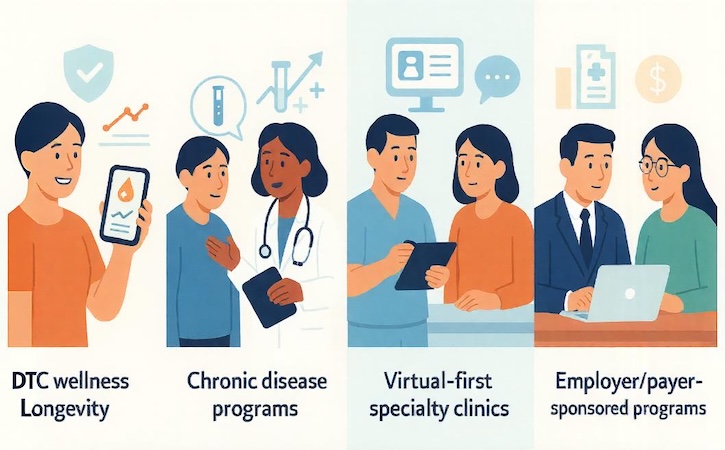
The same feature set behaves very differently in four real-world contexts:
- DTC wellness/longevity — a wellness tracking platform aimed at motivated consumers chasing energy, sleep, and “biological age.”
- Chronic disease programs — a health monitoring application wrapped around cardio-metabolic, autoimmune, or endocrine conditions where titrating meds and lifestyle changes is the whole game.
- Virtual-first specialty clinics — biomarker-anchored care plans where lab data, messaging, and visits are the product.
- Employer / payer-sponsored programs — population-level risk reduction and measurable health outcomes for a CFO who doesn’t care about step counts, only claims trends.
Each of these demands a different experience. Take the moment of, “I just got my lab results — now what?”
- In DTC, the user wants plain-language interpretation, personalized recommendations, and maybe a nudge toward a teleconsult.
- In a chronic-care context, the same results should flow straight into a queue where clinicians can use clinical decision support rules to triage who needs outreach today.
- For employers and payers, that event also feeds cohorts, dashboards, and program metrics.
Then there’s the ongoing drumbeat: “Are my markers trending in the right direction?” For consumers, you might lean into streaks, milestones, and reassuring context around normal variability — classic preventive healthcare storytelling.
For a cardiology clinic, the same trend screen is about whether this person stays on the current protocol or gets escalated. For remote patient monitoring app development, that same data might trigger tasks, alerts, and billing workflows.
On the provider side, journeys are even more constrained:
- triage incoming data
- review in batches
- escalate or adjust
- document, message, and move on
If your biomarker product makes any of that slower, it will quietly die, no matter how gorgeous the UI is.
So the job at this stage isn’t to support “everyone who cares about labs.” It’s to ruthlessly pick one or two primary use cases and design the entire experience — panels, cadence, alerting, messaging tone, and UI — around them. Features are just the exhaust.
Essential Features for a Biomarker Tracking App
When you’re scoping biomarker app development, the fastest way to burn money is to chase “wow” features before you’ve nailed the boring, clinical basics. V1 is not where you prove you can out-Figma Apple; it’s where you prove you can move the needle on care without blowing up risk.

Core V1 Must-Haves (Ship These or Don’t Ship)
At minimum, a credible product needs:
- Reliable lab results ingestion from one or two anchor partners, with idempotent imports and clear failure states.
- Normal ranges by age/sex/lab, with correct unit handling. If you can’t reconcile mmol/L vs mg/dL, you’re not doing biomarker analysis software, you’re doing fan fiction.
- A longitudinal view with solid health data visualization: trends, deltas, and a clear “is this OK?” frame, not just pretty data visualization for its own sake.
- Basic alerting for materially abnormal values or meaningful shifts, tuned per use case (e.g., tight for metabolic health, looser for general wellness).
- A simple communication loop: secure messaging, tasks, or follow-up scheduling so someone can actually act on those health insights.
- Rock-solid secure data storage and access control from day one; you don’t bolt that on later without pain.
If any of these are shaky, no one cares that you’ve got an animated donut chart.
Strategic V2+ Features (When the Core is Trusted)
Once the foundation is stable and real users are relying on it, then you earn the right to layer on:
- Wearable/device integrations (glucose, HRV, BP) to fill the gaps between lab draws and make the picture continuous.
- AI-generated explanations and summaries, with conservative claims and clear disclaimers — the sane end of AI in healthcare, not “ask the app instead of your doctor.”
- Smarter UX that turns raw data into personalized health insights and subtle “nudges” aligned with the program’s definition of health optimization.
- Multi-condition, multi-program support so you can reuse the same rails across cohorts instead of spinning up a new product per disease area.
These are force multipliers once clinicians and users already trust the baseline system.
Danger Zone: Things That Look Impressive and Quietly Kill the Product
Some feature ideas sound brilliant in workshops and absolutely wreck real-world usage:
- Hyper-granular goal engines with dozens of levers and edge-case states, built before you’ve validated one or two simple, meaningful goals.
- “Magic” AI diagnosis copy that drifts into clinical claims your regulatory posture can’t defend.
- Gamification that fights the care model — leaderboards for people with serious conditions, or streak mechanics that punish unavoidable breaks.
Choosing Biomarkers for V1 (Without Overcomplicating Scope)
If you’re building a blood biomarker tracking app, you don’t need “every lab test ever run” in version one. You need a tight starter set that reflects your core use case and keeps both UX and operations sane. Think of v1 as proving that a handful of well-chosen markers can reliably drive decisions, not as an encyclopedic reference for every possible result.
Use the matrix below as a starting point: pick one primary program, lock in a minimal v1 panel, and explicitly park the rest for phase two instead of sneaking them into scope “just in case.”
| Primary use case | V1 starter panel (ship now) | Phase 2 markers (add later) | Notes / risks if you over-scope early |
| Cardio-metabolic / GLP-1 programs | Fasting glucose levels, HbA1c, basic cholesterol (total + HDL + LDL), triglycerides | ApoB, Lp(a), insulin, advanced lipid subfractions | Too many lipid ratios and obscure metrics = patient confusion + support debt. |
| General wellness / longevity | Vitamin D, basic cholesterol panel, fasting glucose levels | Cortisol (diurnal pattern), inflammation markers (hs-CRP, etc.), micronutrient panels | Wellness users quickly drown in noise; keep v1 focused on 3–5 levers you can actually coach. |
| Hormonal clinics (e.g., TRT / women’s health) | Testosterone (total ± free), estradiol where relevant, SHBG, basic metabolic panel | Full sex hormone panel, thyroid detail (free T3/T4), prolactin | Overloading v1 with edge-case hormones without clear protocols leads to inconsistent recommendations. |
| Autoimmune / chronic inflammation clinics | hs-CRP or similar inflammation markers, ESR (if used), basic metabolic + liver panel | Cytokine panels, autoantibodies, specialty send-out tests | Many “cool” markers are expensive, slow, and hard to interpret in an app without strong clinical guardrails. |
Over time you can absolutely expand into richer hormonal, metabolic, and inflammation markers, but each addition should map to a specific question in the product: what will we do differently if this is high or low?
That discipline keeps your biomarker tracking app from turning into a lab catalog and lets you design clearer flows around testosterone or cortisol changes, cholesterol trends, or vitamin D deficiencies instead of just stacking more graphs on the screen.
Technical Architecture: From Lab Feeds to Longitudinal Health Data
Before you worry about which advanced analytics model will impress investors, you need a boring-but-bulletproof foundation. In biomarker tracking application development, data moves through five layers — and any crack in these layers eventually becomes a clinical safety issue:
Ingestion → Normalization → Storage → Analytics → App UX
Get these right, and you’ll feel like a healthcare app development genius. Get them wrong, and you’ll be debugging units and reference ranges at 2 AM while a clinician wonders why potassium suddenly shows in mmol/L instead of mEq/L.
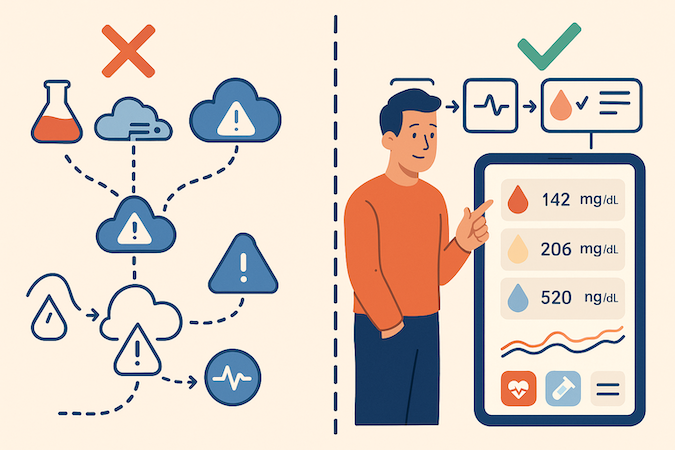
The Data Model You Must Lock Early
A scalable data layer should represent:
- Encounters — context: the why and when labs happened
- Panels — metabolic, hormonal, etc. (grouped orders)
- Individual markers — glucose, HDL, cortisol, vitamin D values, each with metadata
- Reference ranges — age/sex/lab-specific, versioned over time
- Annotations — flagging, provider comments, interpretations
Do this well and future features (trend analysis, alerts, structured follow-ups) become straightforward. Cut corners here and every feature becomes a workaround.
Integration Paths — Choose Your Pain
To pull labs into a HIPAA compliant app development workflow, you generally have three options:
- Direct LIS / LIMS feeds
Fastest access to results and metadata. Highest variability. Requires custom mapping and deeper compliance posture. - EHR-mediated connections
Cleaner operationally (EHR already reconciles many quirks), but slower and often locked behind enterprise contracts. - Aggregators (e.g., middleware, network hubs)
Speed to integration improves — until you need a marker they don’t normalize properly.
Rule of thumb: Optimize for fewer lab partners early, not every lab on Earth. This protects data privacy, reduces mapping chaos, and accelerates real-world launch.
For remote device data (CGMs, BP cuffs, scales), medical device integration software has the same considerations: either go direct (more control) or via aggregators (more speed, less fidelity).
Real-Time vs Batch: The Unsexy Truth
Founders love “real-time,” but clinicians rarely need second-by-second cholesterol. In healthcare, reliability > speed:
- Batch updates are often safer and easier to validate
- Alerts should fire when reliable thresholds are crossed — not when the feed momentarily spikes
If your app crashes because a lab sends a malformed HL7 message at midnight, nobody cares that it was “real-time.”
Auditability Is a Feature, Not an Afterthought
HIPAA compliance requires proving who saw what and who changed what:
- Immutable audit logs
- Data lineage (“this value changed due to corrected units from Lab X”)
- Versioned reference ranges (because ranges change over time)
This isn’t bureaucracy — it’s how you avoid both clinical mistakes and regulatory audits turning your roadmap into a crime scene investigation.
Founder Checklist (Print This, Seriously)
If your team can show a working plan for:
✔ Clear 5-layer data flow
✔ Normalized, versioned biomarker data model
✔ One clean integration path to start
✔ Logging + lineage from day one
…you’re ahead of 80% of biomarker products that shipped “nice charts” and discovered too late that they were built on data quicksand.
This is the foundation that transforms biomarker data from static numbers into longitudinal health intelligence — exactly what your users (and investors) are paying for.
AI and Analytics: Going Beyond Pretty Charts Without Overstepping Clinically
If you want to create biomarker tracking app experiences that feel intelligent, you don’t start with “let’s sprinkle AI on it.” You start with a few boring, high-leverage jobs that traditional UX can’t do well.
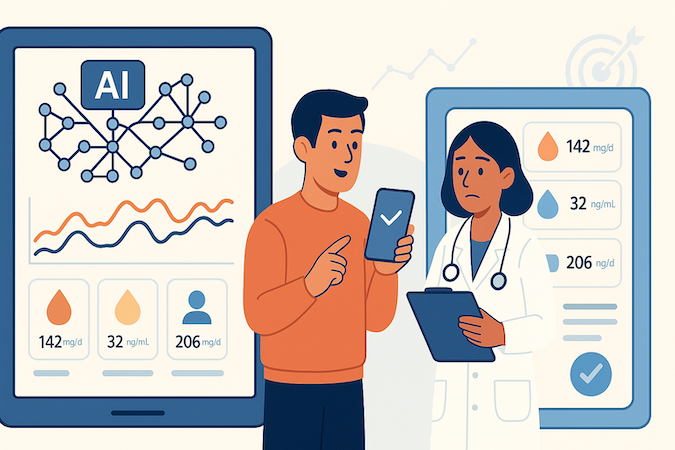
The obvious wins:
- Pattern recognition and trend scoring
Surface “this is drifting in the wrong direction” across dozens of markers and encounters, not just red/green flags on single results. This is where machine learning quietly earns its keep. - Risk stratification and queues
Use AI algorithms to rank which patients a clinician should look at first today, based on trajectory plus context (conditions, meds, recent changes). No sci-fi; just better triage. - NLP for dense reports
Turn cryptic lab PDFs into succinct, human-readable summaries with clear “here’s what changed, here’s what matters” bullets. This is one of the most practical uses of AI in healthcare right now. - Cohort comparisons and benchmarking
Help clinicians see how a patient’s biomarker trends compare to similar cohorts. That’s where predictive analytics can inform care without pretending to be the clinician.
The line you can’t cross: decision support vs diagnosis.
AI should propose questions and next steps, not definitive clinical conclusions. That means:
- Every AI insight must be interpretable and overridable
- You keep a clear record of models, data sources, and limitations
- You’re honest in the UI about what’s algorithmic suggestion vs medically validated guidance
On the regulatory side, the more your product:
- Automates decisions,
- Targets high-risk populations, and
- Makes explicit diagnostic or treatment claims,
…the faster you slide from “wellness tool with smart analytics” into SaMD territory with real regulatory overhead.
Treat AI as infrastructure for better workflows, not the hero of the story, and your biomarker tracking application development roadmap stays both useful and defensible.
Security, Privacy, and Regulatory Pathways
By the time you decide to build a biomarker tracking app, you’re not wondering whether you need HIPAA — you’re trying to avoid backing yourself into the wrong regulatory category with one careless feature or marketing claim.

1. Decide Your Posture Before You Ship a Pixel
For any serious build, assume:
- Full HIPAA posture: BAAs with lab + hosting + messaging vendors, strict PHI boundaries between environments, role-based access control, immutable logging.
- Design for subpoenas and audits: every biomarker value should have a traceable origin (lab, device, manual entry), timestamp, and “who touched what” trail.
This isn’t “security hardening later”; it’s what keeps your future roadmap from being dictated by your first enterprise security review.
2. Wellness vs SaMD: You Don’t Accidentally “AI” Your Way Into FDA
The wellness/SaMD line is mostly about claims + automation + user type:
- You’re closer to wellness if you:
- Track biomarkers, visualize trends, and support general lifestyle decisions
- Keep clinicians clearly in the loop, with AI framed as assistive
- You drift into SaMD when you:
- Claim to detect, diagnose, or recommend treatment paths
- Let AI or rules auto-trigger clinical decisions (e.g., medication changes, risk scores that drive care pathways)
Healthcare app development cost jumps dramatically once you’re in regulated territory: verification/validation, QMS, documentation, possible clinical studies. Smart teams design paths: v1 as wellness/adjacent, with a deliberate fork to SaMD later if the business case justifies it.
3. Global Footprint: Longitudinal Data Is Its Own Risk Class
Long-lived biomarker timelines (years of labs, devices, notes) are dynamite under GDPR and similar regimes:
- Data residency: know exactly which region each tenant lives in and where their data physically sits.
- Consent: explicit, revocable consent for data reuse (analytics, research, model training) plus separate flows for minors.
- Right to erasure vs audit needs: you’ll need a pattern for “logical deletion for user” while preserving enough metadata for compliance.
If you plan to sell outside the U.S., design multi-region and consent logic up front. Retrofits are brutal.
4. Compliance Artifacts You Actually Want From Day 1
Ask your healthcare app developers to build these in parallel with the product:
- A living data-flow diagram (sources, processors, storage, egress)
- A system-of-record map for each biomarker value
- Standard access-control matrix (roles vs permissions)
- A minimal risk register tied to claims and automation level
- A one-pager that states, in plain language, what this app does not do (guardrail against scope and marketing creep)
The teams that treat this as core product work, not paperwork, ship faster, close bigger deals, and have far fewer “surprise” refactors when the first hospital security team or regulator shows up.
Real-World Implementation Challenges (And How to Design Around Them)
Every founder assumes the hard part is “getting the labs in.” In biomarker monitoring app development, that’s the prologue — the real battle starts once you realize healthcare data behaves like a gremlin fed after midnight.
1. Data Quality Will Ruin Your Day (Quietly)
Labs love creativity:
- Missing values with zero explanation
- Units that flip mid-stream (mg/dL ↔ mmol/L — pick a side!)
- Markers renamed depending on equipment or lab network
- Outliers that could be a medical emergency… or a typo
Design defensively:
- Normalize at ingestion, not later
- Explicit unknown/missing states — no fake zeros
- Automated unit + range validation before values hit the UI
If it looks wrong, your users will assume the product is wrong — not the lab.
2. Multi-Lab Chaos Isn’t a Bug — It’s the Environment
Same test. Same patient. Different reference ranges because the lab switched vendors last week. And mid-product, a new lab partner joins with a completely different schema.
Your survival kit:
- Versioned reference ranges tied to lab + date
- Data lineage that explains why a value changed
- Feature-flagged onboarding of new lab interfaces
The apps that scale are the ones that assume entropy from day one.
3. Clinical Adoption Dies If You Create Work
Clinicians are allergic to:
- Alert fatigue
- Tabs that don’t match their mental workflow
- “Insights” they can’t act on
Fix it by designing for:
- Queue-based review: which 10 patients need attention right now
- Scoped alerts: only when clinical context says it matters
- One-click documentation: insight → note → care step, all in flow
If biomarker data requires heroics to use, clinics will quietly uninstall you.
4. Patients Panic Faster Than You Expect
Most “abnormal” markers are normal variation, but patients see red and assume doom.
Build:
- Plain-language explanations
- Next-step guidance instead of “¯\_(ツ)_/¯”
- Contextual reassurance (“This marker fluctuates — here’s what matters”)
Good UX prevents anxiety tickets from consuming your care team.
5. Scaling Isn’t Just “Use a Bigger Database”
The moment longitudinal data grows, so do:
- Query costs
- Latency
- Storage for historical panels + ranges + annotations
Plan cold vs hot storage early, and keep analytics computation off the main workflow path so the app doesn’t lag when someone loads 4 years of lipid history.
The takeaway: Great biomarker products win not because they ingest lab results — but because they handle chaos gracefully. Predicting these problems before your first pilot is how you earn clinician trust and keep retention sane.
Business and Monetization Models for Biomarker Platforms
Most teams sketch a biomarker tracking app, slap “$29/month” on it, and call it a business model. The reality: who pays and what they think they’re buying will shape your product more than any feature decision.
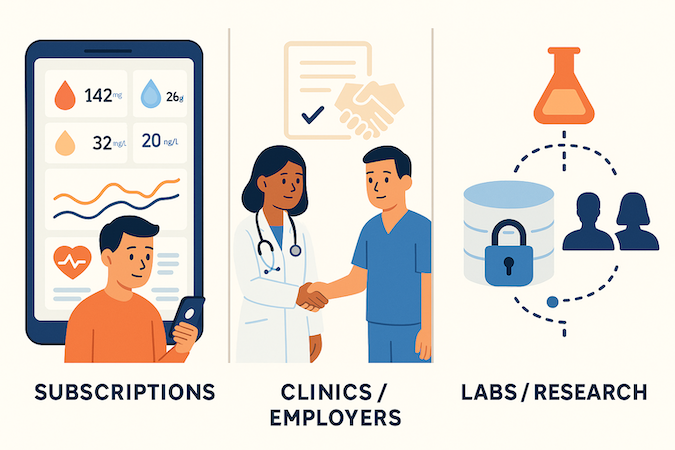
Direct-to-Consumer
Here you’re selling a relationship with one person’s body, not lab access. The workable pattern is: paid subscriptions that bundle testing cadence (e.g., 2–4 panels/year) with structured coaching or telehealth touchpoints. Pure “data viewer” plays struggle with churn unless they’re tied to a bigger ecosystem (fitness, GLP-1 programs, etc.).
B2B and B2B2C
Virtual clinics, employers, and hospital service lines don’t want “an app”; they want measurable lift in outcomes, throughput, or revenue. That usually means per-member-per-month or per-program pricing, sometimes layered on top of existing contracts.
White-label and API models can work, but only if you’re very clear whether you’re a product (opinionated UX) or infrastructure (embedded biomarker rails).
Lab / Clinic P{artnerships
The temptation is to trade discounts for minimum commitments or soft exclusivity. Be careful: the wrong deal locks you into one lab’s roadmap and makes every new integration look like “cannibalization.” Structure contracts so you can add partners without renegotiating your entire unit economics.
Data Monetization
Longitudinal biomarker datasets are catnip for research and pharma, but “we’ll anonymize later” is how you end up with ethics and legal running your roadmap. If you plan to license de-identified cohorts, you need governance, explicit consent language, and a clear story about how that value flows back to users and customers.
The punchline: design your model early enough that every roadmap decision ladders up to it. A fuzzy business strategy quietly turns into a very expensive science project.
Team, Timeline, and Build Strategy: What It Really Takes to Ship
If you treat biomarker app development like “a mobile app with some charts,” you’ll burn months and budget before you ever see a pilot. Teams that ship follow a five-phase arc and resist the urge to “do all the things” in parallel.

Phase 1: Discovery Around Real Use Cases
Pick one or two programs (e.g., cardio-metabolic, hormone clinic). Define panels, cadence, who reviews what, and what happens when a marker moves. Product + a clinical advisor own this; engineering mostly asks hard questions.
Phase 2: Architecture and Plumbing Decisions
Before pixels: choose your data model, lab integration path, authentication, and how any EHR integration will work in practice. Lock foundation so later phases aren’t refactors disguised as progress.
Phase 3: Prototype with Constrained Scope
Limited biomarkers, 1–2 lab connections, basic messaging — just the validated workflows. Prove ingestion → normalization → review → action for a very small but real population.
Phase 4: Pilot with a Tight Cohort
Weekly feedback loops. Optimize UX, reliability, and care-team fit. Ruthlessly remove anything that creates friction for clinicians or patients.
Phase 5: Scale, Automate, and Productize Learnings
Once durable, expand integrations (labs, devices, deeper EHR hooks), strengthen analytics, and automate where you’ve observed consistent behavior. Add SLAs and pricing so it’s a product, not a bespoke pilot.
The Team Shapes That Actually Ship
- Product owner who can say “no” on behalf of the business
- Senior engineer(s) fluent in healthcare data plumbing
- Clinical advisor with real decision-making authority
- Compliance/security early enough to avoid rework
- Data/ML support once analytics go beyond simple rules
Small team — but with very sharp edges.
Build vs Partner vs Extend (Pick the Right Battles)
- Build where differentiation truly lives (your clinical model + UX)
- Partner for commodity plumbing (auth, messaging, scheduling)
- Extend existing health-system stacks when they remain system-of-record
Founders who respect this sequencing don’t just launch — they scale without rewriting half their architecture when the first real clinic walks in the door.
How Topflight Approaches Biomarker Tracking App Development
Most teams start with the labs — we start with the workflows. Because if clinicians can’t use the product on a Tuesday afternoon without slowing down care, fancy features don’t matter.

Our typical engagement runs as a co-design process with clinical and product leaders:
- Frame the specific care model: what triggers action, who responds, and how quickly
- Map the smallest set of biomarkers required to deliver that value
- Stand up a prototype with real integrations and a compliant data model — early
- Pilot with a tight cohort to validate clinical fit, UX clarity, and reliability
- Scale what works: more labs, more analytics, automation where proven
We’ve repeated this pattern across remote monitoring products, lab-connected wellness platforms, and AI-assisted health insight tools — projects where compliance, integrations, and outcomes matter more than pizzazz.
That includes a remote patient monitoring platform for a cardiology practice working under Medicare RPM rules, a lab-driven longitudinal monitoring ecosystem for Long COVID and ME/CFS patients, and multiple AI tools that turn messy clinical data into coding decisions, care prompts, and remote rehab insights.
How we de-risk for founders:
- Architecture first — avoid future rebuilds
- Regulatory posture from day one — no surprise SaMD pivots later
- Integration expertise — EHR, LIS/LIMS, device data, middleware
- Pilot discipline — fast learning loops with clinicians, not “launch and pray”
The result is a product that’s not just buildable — it’s actually viable in clinical reality.
If you’re exploring biomarker tracking app development, we’d love to help you move faster, avoid the obvious traps, and launch with confidence.
Curious what this could look like for your use case?
Chat with our team — we’ll help you pressure-test your assumptions and structure your MVP so it lands with clinicians and patients on day one.
Frequently Asked Questions
What types of biomarkers can be tracked in a health app?
Most products start with blood-based markers (glucose, lipids, liver and kidney panels, thyroid, sex hormones, inflammation markers like hs-CRP), then extend into vitals and device data (HR, HRV, BP, SpO2, weight) plus patient-reported outcomes. The trick is not “how many” but whether each marker is mapped to a clear action or decision in your workflow.
How do biomarker tracking apps integrate with laboratory systems?
Typically via three paths: direct LIS/LIMS interfaces (most flexible, most work), EHR-mediated feeds (labs → EHR → your app), or third-party aggregators that normalize results across lab networks. Early on, most teams pick 1–2 lab partners and a single integration pattern, then add more once the data model is stable.
What are the key security requirements for biomarker tracking apps?
Baseline: HIPAA posture (or equivalent), BAAs with vendors, encrypted data in transit and at rest, strict role-based access control, and immutable audit logs for every PHI touch. You also want clear PHI boundaries between environments, least-privilege access for staff, and a documented incident-response and key-rotation process.
Can biomarker apps provide medical diagnoses?
They can, but the moment you cross from “decision support and education” into “diagnostic or treatment recommendations,” you’re likely in SaMD territory with FDA/EU/UK regulation, a quality system, and validation obligations. Most early-stage products stay on the decision-support side: highlight trends, stratify risk, and surface “please review” cases to clinicians instead of auto-diagnosing.
How much does it cost to develop a biomarker tracking app?
For a serious, integrated product (labs + secure backend + clinical workflows), you’re usually looking at a mid-six-figure investment over time, not a $50k prototype. Costs track with integration complexity (labs, EHR, devices), regulatory posture, and how much AI/analytics you want beyond basic trend views.
What's the typical development timeline?
A realistic path is 2–3 months for discovery and architecture, 2–3 months for a constrained prototype, and another 3–6 months for a real pilot and first production release. Trying to compress that into “one quarter to full platform” usually means cutting the very work (integration, security, pilots) that makes the product viable.
How can AI improve biomarker analysis and recommendations?
AI is most useful for pattern detection across time, risk stratification (who to look at first), summarizing dense lab histories, and comparing patients to relevant cohorts. It should propose questions and options, not silently change care plans; everything must be reviewable, overridable, and clearly labeled as algorithmic.
What are the best practices for displaying complex health data to users?
Lead with “Is this OK?” framing, not raw numbers: show normal ranges, direction of change, and whether this is expected for that person. Use trends instead of single points, progressive disclosure (simple view for patients, deeper layers for clinicians), and plain-language explanations plus next steps so the UI drives action instead of anxiety.