

At 8:05 on a Monday, the front desk has a clipboard packet, a phone photo of an insurance card, and a referral that came in by fax overnight. One staff member is re-typing all three into the EHR while the patient waits.
Digital forms fixed the typed half of that morning. Patients can enter their history in a patient portal, and the practice avoids a clipboard. The paper and the card photo still land on a human, and so does the fax. AI patient intake is the layer that reads those documents, pulls the fields, and puts them in front of staff for confirmation before anything reaches the chart.
Patient intake management starts at your front desk and ends at the confirm screen. A six-week pilot can prove the workflow on two document types, as long as you measure the fields staff correct before you remove the manual entry.
Can AI read paper intake packets and insurance cards?
Yes. The system classifies the document, extracts fields with OCR and a large language model (LLM), and sends low-confidence fields to staff for confirmation before anything reaches the EHR. The confirmation step is what makes it safe for allergies and medications before they reach the chart.
Top Takeaways:
- The remaining manual work is documents: cards, IDs, referrals, faxes, and prior records.
- Staff confirmation is the safety boundary. Treat the confidence score as a hint about what to check first.
- Start with insurance cards and IDs, then forms, then referrals.
- Measure fields corrected at confirmation. That number tells you whether the pilot is ready for the next document type.
Table of Contents:
- 1. What is AI patient intake?
- 2. Digital intake forms vs. AI intake: what each solves
- 3. How AI patient intake works, step by step
- 4. What to automate first
- 5. Where AI intake goes wrong, and how to prevent it
- 6. HIPAA requirements for AI intake
- 7. Cost, and whether to buy or build
- 8. How to roll out AI patient intake in 6 weeks
- 9. Key performance indicators for automated patient intake
- 10. How Topflight can help with AI patient intake
What is AI patient intake?
AI patient intake is software that reads intake documents, extracts the data, checks it against the schedule and existing records, and writes it to the EHR and practice management system after staff confirm the fields that matter. The documents include patient intake forms, insurance cards, a photo ID, referrals, a medical history form, a medication list, consent forms, a HIPAA acknowledgment, and prior records.
The category sits on top of digital patient intake. A form asks the patient to type. An AI intake pipeline handles what arrives as an image, a scan, or a fax. It classifies each page, pulls fields such as member ID and date of birth, then shows the source document next to the extracted values.
Patient intake management is the wider process: registration, scheduling, eligibility, history, consent, and the handoff to the chart. Patient intake automation covers the steps around the form. AI can take a slice of that work. It cannot take the accountability that sits with the practice.
Digital intake forms vs. AI intake: what each solves
A digital form is a better clipboard. It moves the patient’s typed answers into a structured record, which removes re-keying for the fields the patient completes. It does not help with the insurance card the patient photographs in the parking lot or the referral fax that arrives from another practice.
| Dimension | Digital intake forms | AI intake |
|---|---|---|
| Input | Patient types into a web form, portal, or kiosk | Paper packets, card photos, IDs, faxed referrals, prior records, plus form data |
| What it removes | Clipboards and re-keying of typed answers | Re-keying of everything else |
| Handles messy input | No | Yes, with confidence scores and a confirm step |
| Typical gaps | Patients who don’t finish forms, referrals from other offices, records that arrive after the visit | Low-quality scans, handwriting, and fields the model reads with low confidence |
| Best fit | Any practice | Practices with high referral, fax, or paper volume |
Most patient intake forms still stop at the fields the patient types. Most practices need both channels because the two cover different inputs. If you already have a portal, you have a head start. You are adding a document reader and a confirm screen to a workflow you already run.
The practical difference shows up at the confirm screen. A form produces data the patient entered. An AI pipeline produces data a machine read, with a confidence score and a link to the source document. Staff need to see both before they trust it.
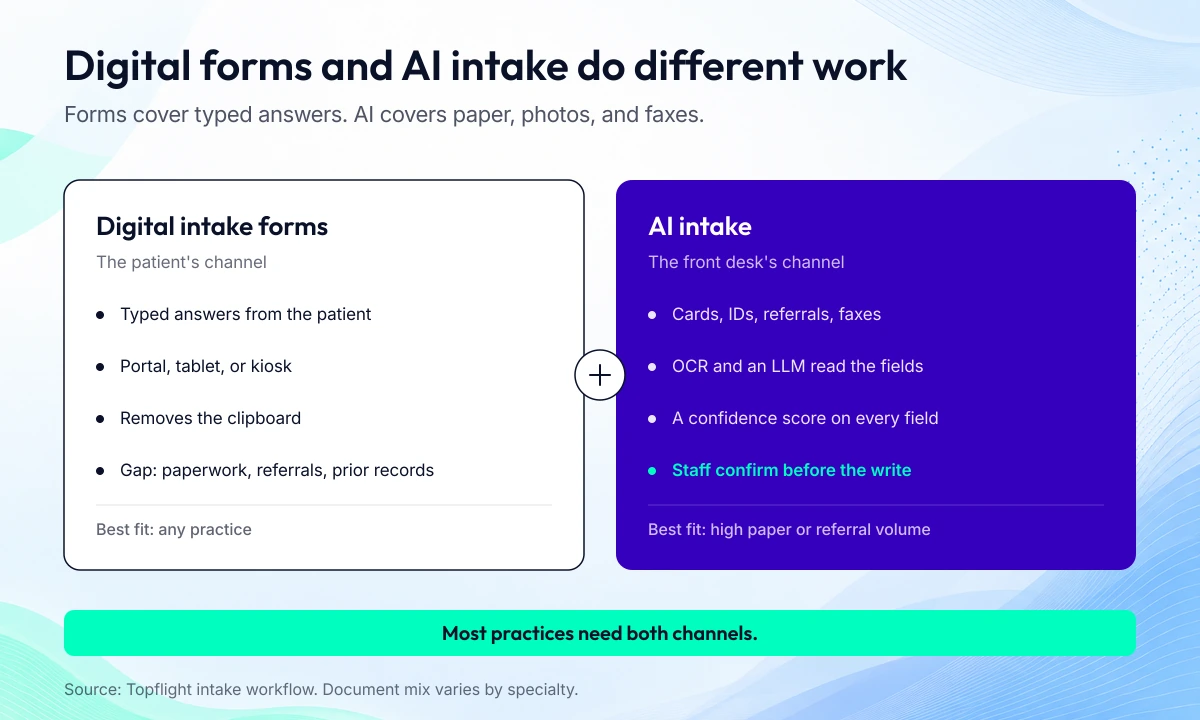
Forms collect typed answers; AI intake reads the documents that still arrive as paper, photos, and faxes.
How AI patient intake works, step by step
The pipeline has seven steps. Each one has a failure mode. The confirmation step is the one that keeps a reading error out of the chart.
- Capture. Documents arrive from the portal, a tablet or kiosk, a scanner, an e-fax, or a photo texted to the front desk.
- Classify. Document classification identifies each page: card, ID, referral, history form, or prior record.
- Extract. Field extraction uses OCR and a large language model (LLM) to read the values. Each field gets a confidence score. Handwriting recognition is improving, but low-confidence handwriting should go to staff.
- Validate. Data validation checks the values against the schedule and the existing patient record, then runs an eligibility check (X12 270/271).
- Confirm. Staff review flagged fields and the high-risk fields in a side-by-side view of the document and the extracted data.
- Write. Confirmed values go to the EHR and practice management system through a FHIR API or the vendor API, with HL7 where the EHR requires it. This is the same handoff covered by EHR interoperability and the broader work of medical record automation. If you’re connecting to Epic, our guide to how to integrate with Epic covers the handoff, and FHIR is no longer optional explains why the API matters.
- Follow up. Missing information triggers an automatic text or portal request. Medical chatbot development covers the conversational version of that follow-up.
Never write allergies or medications to the chart without a staff confirm step, and keep identity fields behind the same check, however high the confidence score. A wrong allergy or a merged patient record is a safety event. Treat it like one.
Eligibility carries its own weight. CAQH counted 31.5 billion eligibility checks in 2023, 51% of medical transaction volume. It put the savings from moving them electronic at $11.7 billion. The 2024 CAQH Index has the breakdown.
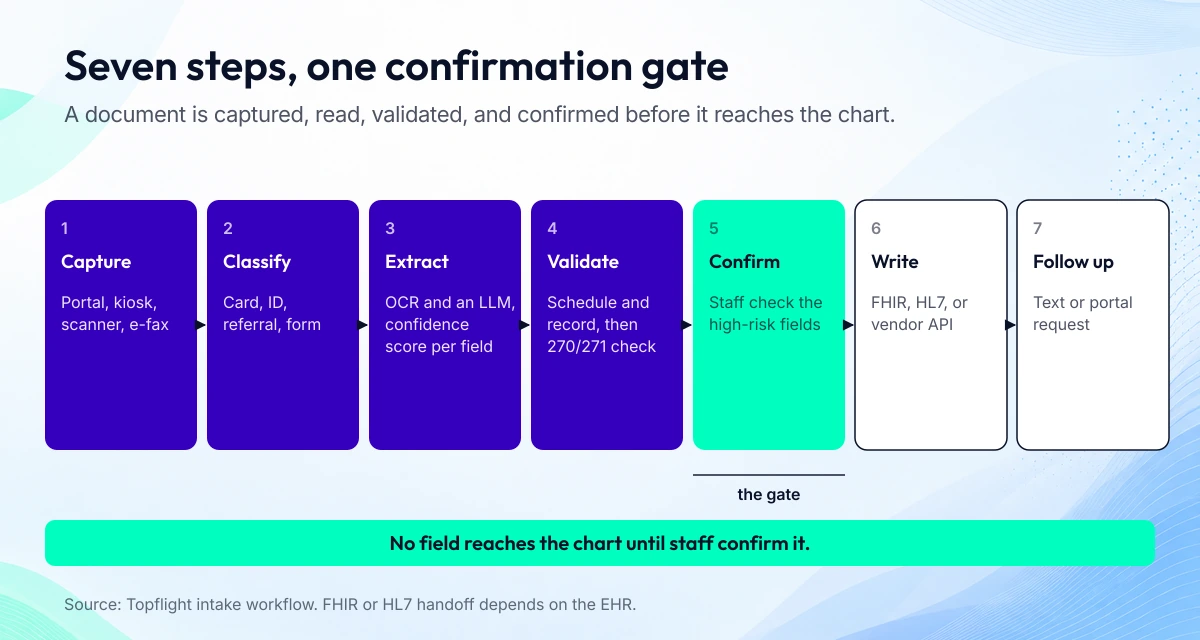
Seven steps move a document from the front desk to the chart; staff confirmation sits between extraction and the write.
What to automate first
Rank the work by volume and risk. Insurance cards and photo IDs come first: every new patient has them, and a wrong member ID is easy to catch at the confirm screen. Demographic and medical history forms come second. Referral faxes come third. Prior outside records come last because they are the hardest to read and the least standardized.
Start with cards and IDs. A pilot that reads cards and forms will cover most of the front desk’s document volume without touching the messy referral pile. Once the correction rate on cards is stable, add referrals. Save prior records for a second phase; the ai medical record summary work is a different pipeline.
Volume matters more than novelty. A document type that arrives twice a week will not pay back the integration work. Count the packets before you pick the pilot. If most of your paper is referrals, start there, even though cards are easier.
Where AI intake goes wrong, and how to prevent it
Most failures are document-quality or workflow failures. The model is rarely the weak link on a clean scan.
- Blurry photos. Prompt a retake at capture, before the image enters the queue.
- Handwriting. Route low-confidence fields to staff; don’t let the model guess.
- Duplicate patient records. Set patient matching rules and a deduplication review before go-live.
- Wrong insurance plan. Run an eligibility check before the visit so the claim doesn’t fail later.
- Non-English forms. Use multilingual intake and a staff review path for languages the model handles poorly.
- EHR integration gaps. Use a FHIR API, HL7, or an integration engine such as Mirth Connect.
- Staff adoption. Train on the confirm screen; that’s where staff will spend their day.
- Older patients. Keep a staff-assisted path and a kiosk option; don’t force a phone-only workflow.
This is the same pattern as clinical workflow automation elsewhere in the practice: pick the high-volume step, confirm the output, then expand. If staff re-keying is still part of your front desk’s day, we can review the document mix and tell you which two types to automate first. Book a call.
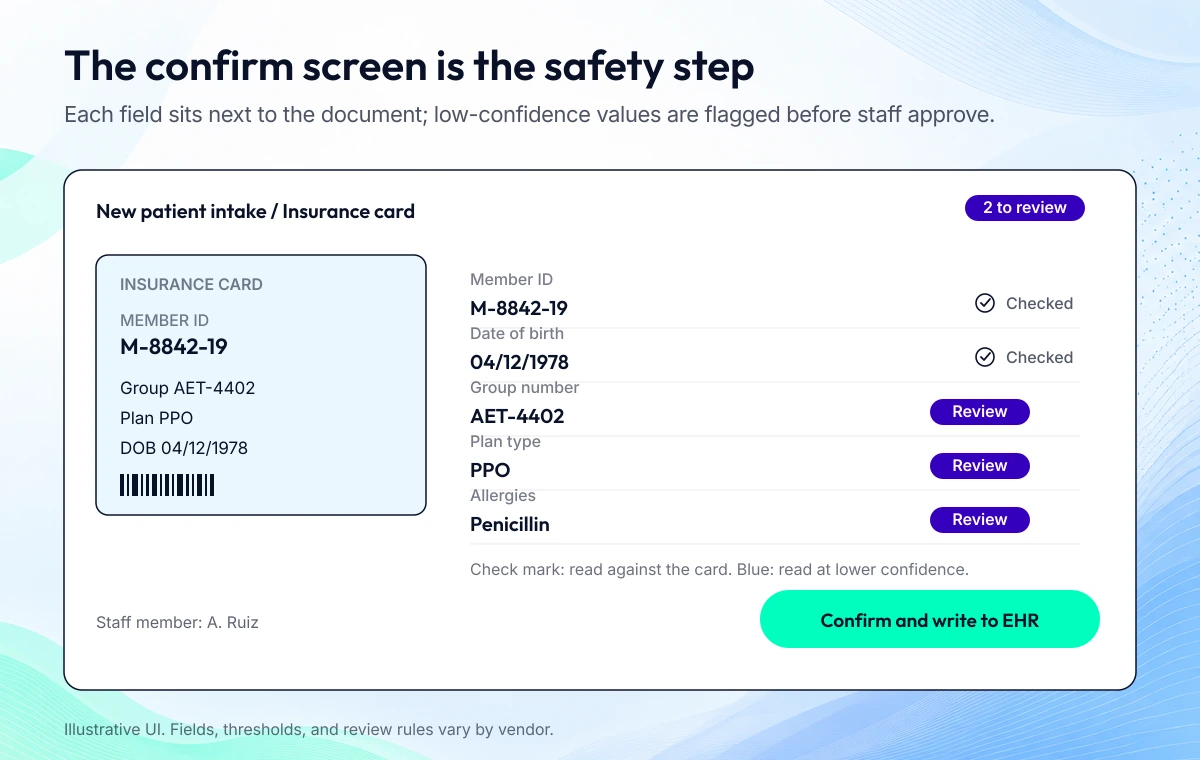
The confirm screen pairs each extracted field with the source document, so staff can check the member ID without opening another tab.
HIPAA requirements for AI intake
Intake documents are PHI from the moment they’re captured, including a photo texted to the front desk. HHS expects reasonable safeguards whenever PHI moves electronically, and a texted photo is no exception. The compliance work starts with the vendor chain.
- Every service that touches the document needs a BAA: capture, OCR, the LLM, storage, messaging. If a vendor won’t sign one, it doesn’t go in the pipeline. The HHS business associate guidance is the reference.
- The minimum necessary standard applies to what you extract and who can see it. Don’t pull the full history if the scheduler only needs eligibility.
- Set a retention rule for the images. Decide how long they stay after extraction, then delete them on a schedule.
- Keep an audit log of who confirmed each field and when. Staff confirmation is a control, and controls need evidence.
Consent capture and the HIPAA acknowledgment belong in the same audit trail. A HIPAA compliant AI setup is a configuration. The BAA, the retention rule, and the audit log are the parts an investigator will ask for. If you’re building the app layer yourself, build a HIPAA-compliant app covers the controls on your side.
Cost, and whether to buy or build
Budget the whole pipeline. The license is one line. The initial cost includes the platform or build, the EHR integration, scanners or tablets, training, and the staff time to label a test set. The ongoing cost includes the subscription or per-document fee, support, maintenance, and the minutes staff spend on the confirm screen.
The confirm screen is the line item most pilots miss. A cheap extraction model that flags 40% of fields for review can cost more in staff time than a better model with a higher license fee. Measure correction rate before you compare proposals. Staff time is the cost that scales; in MGMA’s March 2026 poll, eligibility and prior authorization took 45% of practice phone time.
| Option | Best fit | Watch-outs | What you own |
|---|---|---|---|
| Intake platform (Phreesia, Notable, Kyruus) | Multi-site practices that want forms, scheduling, and intake in one place | Per-location pricing and the depth of the EHR connection | Configuration only; the vendor keeps the code |
| EHR-native intake module | A single EHR and a standard specialty | Limited document types and a slow release cycle | Your data; the vendor keeps the pipeline |
| Outsourced data entry | Low volume or a temporary backlog | PHI handling, the BAA, and turnaround time | The contract |
| Custom pipeline | Unusual documents, several EHRs, or high referral volume | Build time, model maintenance, and the confirm screen | The code and the model operations |
Custom makes sense when you have unusual document types, specialty forms, several EHRs, or high referral volume. For a single-specialty practice on one EHR, an EHR-native module or an intake platform will get you to a pilot faster.
Registration errors become claim denials. The medical billing automation side of the revenue cycle is where the payback shows up: fewer wrong member IDs, fewer eligibility surprises, fewer reworked claims.
How to roll out AI patient intake in 6 weeks
A six-week pilot is enough to prove the confirm screen works on your documents. It is not enough to automate every document type.
- Week 1: count intake documents by type and measure staff minutes per new patient.
- Week 1: collect a test set from the practice’s own past documents, de-identified where possible.
- Weeks 2 to 3: build capture, extraction, and the confirm screen for the top two document types.
- Week 4: run alongside the front desk. Staff still enter data; compare the system’s output.
- Week 5: staff confirm the system’s output instead of typing. Track fields corrected.
- Week 6: set accuracy thresholds for each field and add the next document type.
The gate between week 4 and week 5 is the correction rate. If staff correct more than a small share of fields, fix the capture or the extraction before you remove the manual entry. A pilot that saves time on cards but creates a second review queue for referrals has not proved the workflow. If you’re building in-house, our guide to how to develop EHR/EMR systems covers the integration work.
Key performance indicators for automated patient intake
Track a small set of numbers before the pilot and every week after. The point is to see whether the confirm screen is reducing work or moving it.
| KPI | What it tells you | How to read it |
|---|---|---|
| Staff minutes per new patient | Total labor to get a chart ready | Baseline, then trend. A drop without a rise in corrections is the win. |
| Check-in time | Time from arrival to ready | Compare by document type; cards should move fastest. |
| Fields corrected at confirmation | Share of extracted fields staff change | Watch the trend by field. Identity and insurance fields first. |
| Intake completion before the visit | Share of patients who finish before arrival | A completion drop means the new step is too long. |
| Registration-related claim denials | Denials tied to bad demographic or insurance data | Track monthly; the financial payback shows up here. |
| Patient throughput | Patients processed per clinic day | Only meaningful if staff minutes don’t rise. |
| Patient satisfaction | Survey score at check-in | A faster visit should show up; a second queue will show up too. |
The new metric is fields corrected at confirmation. It tells you whether the model is ready for the next document type better than raw extraction accuracy, because it measures the work staff actually do. A shorter wait time can lift the patient experience, but it won’t fix a no-show rate that comes from scheduling.
How Topflight can help with AI patient intake
We build document-reading intake pipelines with a staff confirm step. We test them on your own documents before launch, connect them to your EHR and practice management system, and deploy inside your cloud account. You own the code. We price the build at a fixed scope.
If you want to see what AI intake would save your front desk, book a call and bring a sample of your intake packet. We’ll tell you which two document types to start with, and which ones to leave alone for now. Book a call.
Digital forms were step one. They moved the patient’s typed answers into the record and removed the clipboard. The documents that still arrive as paper, photos, and faxes are step two.
AI can read them. It should not write them to the chart without a person confirming the fields that matter. Start with cards and IDs, measure corrections, and add document types only when the confirm screen holds up.
Related Articles:
- AI medical record summary: what it changes for intake
- Clinical workflow automation: where intake fits
- Medical billing automation: from registration to claim
- HIPAA compliant AI: what the vendor chain needs
- How to develop EHR/EMR systems
Last updated: October 20, 2026
Frequently Asked Questions
What is AI patient intake?
AI patient intake is software that reads intake documents such as forms, insurance cards, IDs, referrals, and prior records, extracts the fields, and writes them to the EHR after staff confirm the values. It adds a document reader and a confirm screen to the digital forms a practice already uses.
What is patient intake automation?
Patient intake automation covers the steps around the form. That includes registration and eligibility checks, plus document capture and the handoff to the chart. AI intake automates the document-reading part; the rest still depends on your practice management system and your staff.
How is AI intake different from digital intake forms?
Digital forms collect what the patient types. AI intake reads what the patient or a referring office sends as an image or a scan, including faxes. Most practices need both because the two cover different inputs.
Can AI read insurance cards and photo IDs accurately?
On clean images, yes. Accuracy drops with glare, blur, and unusual card layouts, so the pipeline should score each field and send low-confidence values to staff. Always confirm the member ID and date of birth before the visit.
Can AI process faxed referrals?
Yes, if the fax is legible. The system classifies the referral, extracts the patient and practice details, and flags handwritten or low-quality pages for review. Referral formats vary widely, so this is usually the third document type to add, after cards and forms.
Is AI patient intake HIPAA-compliant?
It can be, if every vendor that touches the documents signs a BAA and the pipeline enforces the minimum necessary standard, retention rules, and an audit log. Compliance comes from those contracts and controls, not from the model itself.
Does AI intake write directly to the EHR?
For demographic and insurance fields, it can write after staff confirm. For allergies, medications, and identity fields, keep a hard confirm step. A wrong allergy or a merged patient record is a safety event. Treat it like one.
Which intake fields should staff always confirm?
Name, date of birth, insurance member ID, allergies, medications, and the referring provider. These fields carry the highest safety and billing risk, so they should never go to the chart on a confidence score alone.
How long does it take to implement AI patient intake?
A focused pilot on two document types takes about six weeks: a week to measure and collect a test set, two weeks to build, two weeks to run alongside the front desk, and a week to set thresholds. Adding more document types takes longer.
Will AI intake work for older or non-English-speaking patients?
It can, if you keep a staff-assisted path and support the languages your patients actually use. A kiosk or tablet with large text and a staff member nearby works better than a phone-only workflow for older patients. Multilingual intake needs a review step for languages the model handles poorly.