

[Updated October 2026]
Clinical workflow automation moves repetitive handoffs between the EHR, staff, and patients onto software, so work reaches the right person in seconds instead of the next shift. In 2026, healthcare workflow automation pays back fastest in patient intake, clinical documentation, and claims follow-up.
In the U.S., 71% of hospitals used AI for prediction inside their EHR in 2024, up from 66% in 2023, according to ASTP Data Brief No. 80 (Sept 2025, 2024 data). The fastest-growing uses: billing automation, up 25 percentage points, and scheduling, up 16.
The pressure points aren’t mysterious: staffing shortages, rising costs, fragmented systems, and patients who expect healthcare to work like every other service. This is what automation in healthcare looks like when it’s measured: fewer handoffs and fewer claims that die in a queue. The fastest wins come from workflow automation for healthcare that removes repetitive steps, paired with the part most teams underestimate: EHR integration.
What is clinical workflow automation?
Software that connects the EHR, staff, and patient-facing channels so repetitive care steps run themselves: intake, documentation, claims, follow-ups. People keep the exceptions.
- 12 clinical workflow examples: intake and registration, scheduling, eligibility, prior authorization, ambient documentation, coding, claims, results routing, referrals, discharge check-ins, remote monitoring, care gaps.
- 6 phases: map the workflow, pick the stack, design and integrate, pilot, deploy, measure and scale.
- 3 KPIs that prove ROI: denial rate, documentation time, turnaround time.
Top Takeaways:
- Hospitals that automate billing and scheduling are the fastest-growing users of AI in the EHR (ASTP data, 2024).
- CMS-0057-F makes prior authorization APIs mandatory by January 1, 2027 for Medicare Advantage and state Medicaid programs.
- Topflight builds found 7.9% more codes for GaleAI and cut Allheartz’s clerical time by up to 80%.
Table of Contents:
- What is clinical workflow automation?
- 12 clinical workflow examples to automate first
- Clinical workflow automation tools and technologies
- How to implement clinical workflow automation: 6 phases
- Clinical workflow automation case studies
- Common challenges and how to overcome them
- Clinical workflow automation KPIs
- What changes in 2026–2027
- How to choose a clinical workflow automation partner
- Topflight’s clinical workflow automation services
What is clinical workflow automation?
Clinical workflow automation is software that runs the repetitive steps of patient care: intake, orders, documentation, coding, claims, and follow-up. It combines rules engines, RPA, AI, and EHR integration so work moves to the right person or system without manual handoffs, cutting delays and errors. Call it healthcare process automation and you mean the same thing.
Whether you call it healthcare workflow automation or clinical workflow automation, the win is the same: fewer handoffs, fewer errors, better throughput, and a shorter time-to-bill. The biggest early payoff comes from automating repetitive healthcare administration tasks (intake, status updates, routing, follow-ups), which frees staff for the exceptions. Do that well and clinical workflow management stops being a series of fire drills.
What is a clinical workflow?
A clinical workflow is the ordered set of steps a care team runs for a patient encounter, from first contact to follow-up. In most EHRs it flows like this:
- check-in
- intake
- encounter and documentation
- orders and results
- coding and billing
- follow-up

Intake, documentation and coding pay back first; the other steps improve once that data flow exists.
Lean healthcare circles talk about the seven flows: patients, staff, information, medications, equipment, supplies, and results. Automation earns its keep wherever one of those flows stalls and a person has to push it by hand.
Clinical vs. administrative vs. operational workflows
Workflows group by who does the work and which system owns the data:
| Category | Examples | Who owns it | Typical system of record |
|---|---|---|---|
| Clinical | Intake, orders, documentation, discharge | Nursing and medical directors | EHR |
| Administrative (RCM) | Eligibility, coding, claims, denials | Revenue cycle team | Practice management + billing system |
| Operational | Scheduling, rooms, supplies, staff rosters | Operations directors | Scheduling + ERP |
| Patient communication | Reminders, intake forms, results delivery | Patient access team | Patient portal + CRM |
Why it’s urgent now
Four drivers push this from “someday” to this year’s budget. First, the cost math: U.S. health spending grew 7.2% in 2024 to $5.3 trillion, 18.0% of GDP, per CMS National Health Expenditure data, and CMS projects $5.7 trillion and 18.4% of GDP in 2025, climbing to 20.6% by 2034.
- Burnout and staffing gaps: teams run lean, and “just work harder” stopped being a strategy.
- Fragmented data: patient information lives in too many places, so without interoperability automation stalls and HIPAA risk climbs. Medical device integration matters more as care moves across settings.
- Patient expectations: scheduling and billing have to work like a bank app, or patients go elsewhere.
12 clinical workflow examples to automate first
These are the 12 clinical workflow examples that pay back fastest, with what each one automates, the systems it touches, and the KPI it moves. Workflow automation in healthcare starts with one of these, measured end to end. Pick one workflow first. Teams that automate clinical workflows one at a time see the gain before they scale.
| Workflow | What gets automated | Systems it touches | KPI it moves | Effort |
|---|---|---|---|---|
| Patient intake and registration | Digital forms, ID checks, chart prefill | EHR, patient portal | Check-in time, data-entry errors | Low |
| Appointment scheduling and reminders | Self-scheduling, reminders, no-show prediction | EHR scheduler, SMS and email | No-show rate, slot fill rate | Low |
| Eligibility and benefits verification | Payer checks, coverage and cost-share lookup | EHR, payer APIs, practice management | Claim rejection rate, front-desk time | Medium |
| Prior authorization | Rule-based submissions, status tracking, appeal prep | EHR, payer portals | Auth turnaround, denials | High |
| Ambient clinical documentation | AI scribes draft notes from recorded visits | EHR, ambient AI | Documentation time, note closure | Medium |
| Medical coding and charge capture | Code suggestions, undercoding flags | EHR, coding software | Missed codes, days in A/R | Medium |
| Claims scrubbing and denial management | Pre-submit checks, denial triage, appeals | Practice management, clearinghouse | Denial rate, recovered revenue | Medium |
| Lab and imaging results routing | Results delivered to the right provider, in-basket rules | EHR, LIS/RIS, patient portal | Result turnaround, unread results | Low |
| Referral management | Closed-loop referrals, status tracking | EHR, referral portals | Referral completion, leakage | Medium |
| Discharge planning and check-ins | Checklists, post-discharge surveys, escalation | EHR, patient app | Revisit rate | Medium |
| Remote monitoring alerts and triage | Device data routing, escalation rules | RPM platform, EHR | Response time, visit volume | High |
| Care gap closure | Gap reports, outreach campaigns | EHR, CRM, population-health tools | Gap closure rate | Medium |
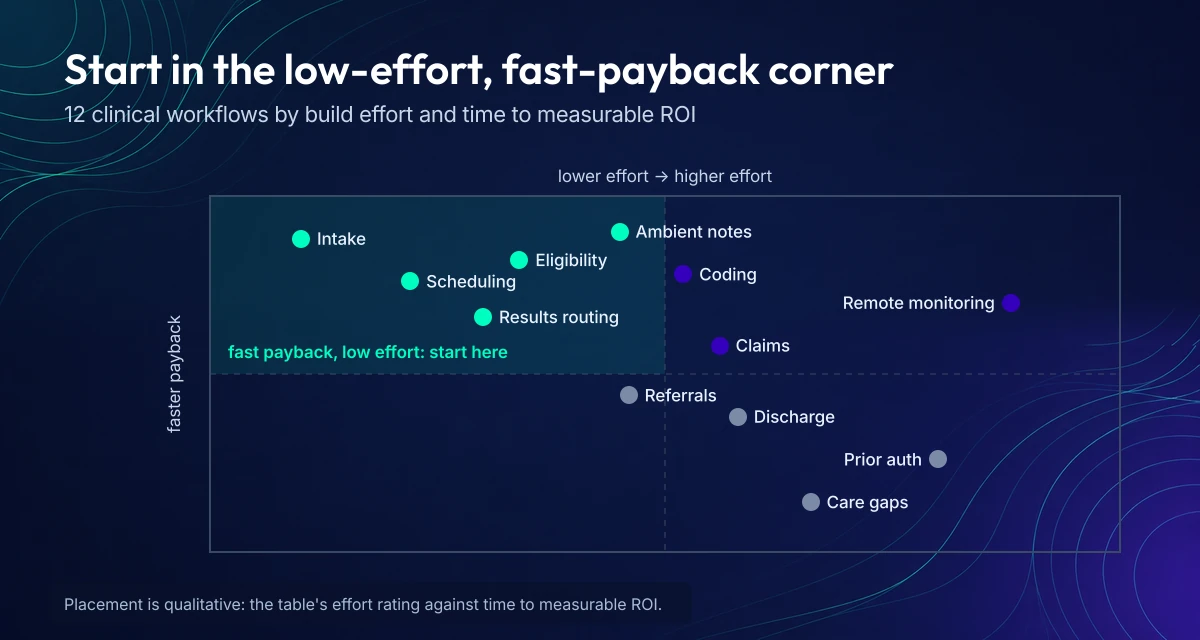
Intake and scheduling are the quickest first builds; prior auth and remote monitoring need a longer runway.
Patient intake and registration
Intake is the first workflow to automate because every downstream step reads from it. Patients fill digital forms before the visit; the data lands in the chart, checks coverage, and flags missing fields before check-in, so the front desk stops rekeying and correcting. Shorter check-ins follow, with fewer duplicate records and cleaner referrals. Our patient intake automation guide covers the build, from form design to EHR write-back. One caution: intake automation only pays if the data actually lands in the right fields, so plan the integration first.
Appointment scheduling and reminders
Self-scheduling plus automatic reminders is the cheapest workflow win in a clinic, because it removes the phone queue and the no-show at once:
- patients book, reschedule, and cancel against live slot availability;
- reminders go out by SMS and email on a schedule that cuts no-shows;
- models flag patients likely to miss, so the front desk overbooks or confirms by phone;
- waitlists fill cancellations without staff calls.
Scheduling automation pays back in weeks, and the no-show data it produces feeds capacity planning later.
Eligibility and benefits verification
Checking eligibility and benefits before the visit stops the “we billed and it bounced” loop that follows manual intake. Automation queries the payer for coverage status, deductibles, and cost share, then writes the answer into the chart where scheduling and billing can both see it. Front-desk time per patient drops, and claim rejections for “ineligible patient” fall away. The systems are already there: most payers expose eligibility APIs, and practice management platforms consume them. What’s usually missing is someone mapping the payer responses to the fields your staff actually read.
Prior authorization
Prior authorization automation turns a fax-and-phone routine into a tracked submission: the software assembles the clinical packet, submits it through the payer’s portal or API, and follows the status until a decision lands. CMS-0057-F forces the API side: prior authorization APIs must go live by January 1, 2027 for Medicare Advantage and state Medicaid programs, per the final rule, with shorter decision timeframes already in effect since January 2026. Until every payer has an API, the win is triage: route each request by payer and urgency, and escalate the ones about to time out.
Ambient clinical documentation with AI scribes
Ambient AI scribes listen to the visit and draft the note, so the clinician edits instead of transcribes. The workflow changes in two ways:
- documentation time per encounter drops, which is the number that most moves clinician burnout surveys;
- notes close the same day, so billing and follow-up stop waiting on chart completion.
A human reviews and signs every note. Our clinical notes automation article covers vendor selection and the review workflow.
Medical coding and charge capture
Coding automation suggests codes from documentation and flags the encounters where a human coder left money on the table. The numbers are the story: in a month-long audit, Topflight’s GaleAI build identified 7.9% more codes than human coders, translating to $1.14M in annual lost revenue from undercoding, at less than 1% of the revenue gained. Charge capture is where workflow automation pays for itself fastest, because the gain shows up on the P&L in one billing cycle.
Claims scrubbing and denial management
Claims automation catches the errors that cause denials before submission, then routes the denials that still happen:
- pre-submit scrub: missing modifiers, mismatched eligibility, coding conflicts;
- denial triage: each denial classified by reason and routed to the right queue;
- appeals: letters assembled from the chart, deadlines tracked automatically.
See our RCM automation article for the full loop.
Lab and imaging results routing
Results automation routes each lab and imaging report to the ordering provider, files it in the chart (see our medical record automation guide for the full records picture), and notifies the patient, with in-basket management rules that escalate abnormal values before they sit in a shared inbox. Result turnaround shortens because nothing waits for a clerk to file it, and the unread-results pile stops hiding the abnormal ones. The integration work is the same as anywhere: LIS and RIS feeds into the EHR, a routing table by provider and result type, and an escalation path for critical values.
Referral management and closed-loop referrals
Referral automation tracks the whole handoff instead of faxing into the void. The system creates the referral from the visit, sends it to the specialist with the clinical context attached, tracks whether the appointment happened, and pulls the consult note back into the chart. Closed-loop referrals stop the two failure modes: referrals that never get scheduled, and results that never come back. The KPI is referral completion, which most practices don’t measure today because there’s no system tracking it.
Discharge planning and post-discharge check-ins
Discharge automation sends the checklist, the medication reconciliation, and the follow-up appointment as one package, then checks in with the patient after they leave. The evidence: patients who activated automated check-ins in the LifeBridge Health and GetWell Loop study (JMIR Formative Research, 2021) had lower 30-day revisit rates, 17.3% versus 24.6% in general medicine and 12.8% versus 17.7% in cardiology. Alerts need monitored escalation paths, and enrollment belongs in the discharge workflow itself. Transitions of care live or die on this handoff.
Remote monitoring alerts, triage and escalation
Remote monitoring automation turns device data into a workload the care team can actually carry:
- incoming readings compared to thresholds, abnormal values routed to the right clinician;
- escalation rules that page the on-call provider instead of emailing a shared inbox;
- follow-up tasks created and tracked until someone closes the loop.
Topflight’s Allheartz build cut in-person visits by up to 50% and clerical time by up to 80%, and the Dedica Health platform monitors 1,100+ patients a day.
Care gap closure and quality reporting
Care gap automation scans the population for the gaps that cost money in value-based contracts, missed screenings, overdue labs, unfilled prescriptions, then runs the outreach. Reports build themselves from the same data, so quality reporting stops being a quarterly scramble. This one pays more in value-based arrangements than fee-for-service, which is worth knowing before you scope it. It’s also the workflow with the longest tail: the gains compound as the gap list shrinks year over year.
Compliance and research workflows, clinical trial management included, matter for later. They follow once the operational foundation above is running.
Clinical workflow automation tools and technologies
Four layers carry most clinical workflow automation: RPA for the systems without APIs, AI agents for the judgment-shaped steps, integration engines for the data plumbing, and a decision about where the workflow itself lives. If you’re comparing clinical workflow software, this is the stack to compare against.
RPA (robotic process automation)
RPA is the workhorse for rule-based, repetitive steps: copying data between systems, triggering reminders, reconciling queues, kicking off downstream tasks when a form is complete. That’s why RPA in healthcare is usually the first tool teams buy: it works with the systems already in place. Use RPA when a system has no API; use an API when it does. RPA on top of an API you already pay for is just a slower copy of the same job.
- error reduction: fewer copy-paste mistakes;
- staff time back from rote clicks, with people left on exceptions;
- quick wins that build the case for deeper automation.
AI agents and ambient AI in clinical workflows
AI shows up in three workflow jobs: ambient scribes that draft notes from visits, agents that triage intake and prior authorization requests, and agents that sort in-basket messages into routes and responses. Each one comes with a human-review step. Agentic AI earns its keep when a person stays at the send button. For AI workflow automation healthcare teams actually use, the pattern is the same: the agent drafts or routes, the human approves, the exception escalates. A draft note a clinician signs, a prior auth a nurse approves, an in-basket reply a care coordinator edits: the agent does the first draft, the human owns the send.
The other AI jobs from our conversational AI and chatbots in healthcare articles still hold: capturing structured information, answering routine questions, and guiding patients through steps, as long as the answers push data into systems instead of ending the conversation.
EHR integration: FHIR, HL7 and integration engines
Here’s where projects quietly fail: teams automate the steps without fixing the connections. If your automation can’t read and write the core systems, the EHR especially, you end up with software that still needs people re-entering data and babysitting exceptions. Treat integration as a first-class deliverable:
- define system-of-record ownership: one system owns each data element, and only it writes back;
- prefer FHIR R4 APIs where the EHR exposes them, with SMART on FHIR for app-level access, and HL7 v2 feeds for the older lab and ADT plumbing;
- where APIs are thin, an integration engine routes and transforms: Mirth Connect (commercial-only since version 4.6, April 2025), Rhapsody, or Redox;
- bake in monitoring and exception handling, plus change management so staff learn the new flow.

The automation layer routes work between the EHR, patient channels and payer APIs through one integration engine.
Epic shops get their own tooling here, from in-basket rules to the Epic Showroom for staff-facing automation. Our Epic integration guide and Epic automation article cover both.
Clinical workflow software: build, buy or extend your EHR
The build-versus-buy call for healthcare workflow software comes down to which layer already owns the workflow:
| Option | What it is | When it fits |
|---|---|---|
| EHR-native tools | Epic in-basket rules and Showroom, Oracle Health workflow tools | Workflows that live entirely inside the EHR, staff already trained on it |
| Point solutions | Scribes, prior auth, RCM tools | One workflow, deep specialty, fast start |
| Custom layer | Workflow engine over your systems | Cross-system flows, unique escalation rules, when the point solutions don’t talk to each other |
Cloud versus on-prem matters less than the integration layer and security model either way, but healthcare’s legacy systems keep some deployments on-prem longer than anyone would choose.
Low-code / no-code
Low-code platforms speed up internal tools: forms, dashboards, task routing. Healthcare adds a governance tax, so define role permissions, environments, and audit logs before the first citizen developer ships a form. Speed is a feature only while safety and compliance hold.
How to implement clinical workflow automation: 6 phases
The rollout that sticks runs the same six phases every time, with discipline in the first one and measurement in the last. The full phases:
- Map the current workflow and its bottlenecks before touching software.
- Pick the stack: rules engines, task routing, RPA, or API integration per step.
- Design the future-state workflow with exception paths and guardrails.
- Pilot in one clinic or department and measure from day one.
- Deploy in waves with role-based training and support coverage.
- Monitor failures and backlogs, then scale the patterns that hold.
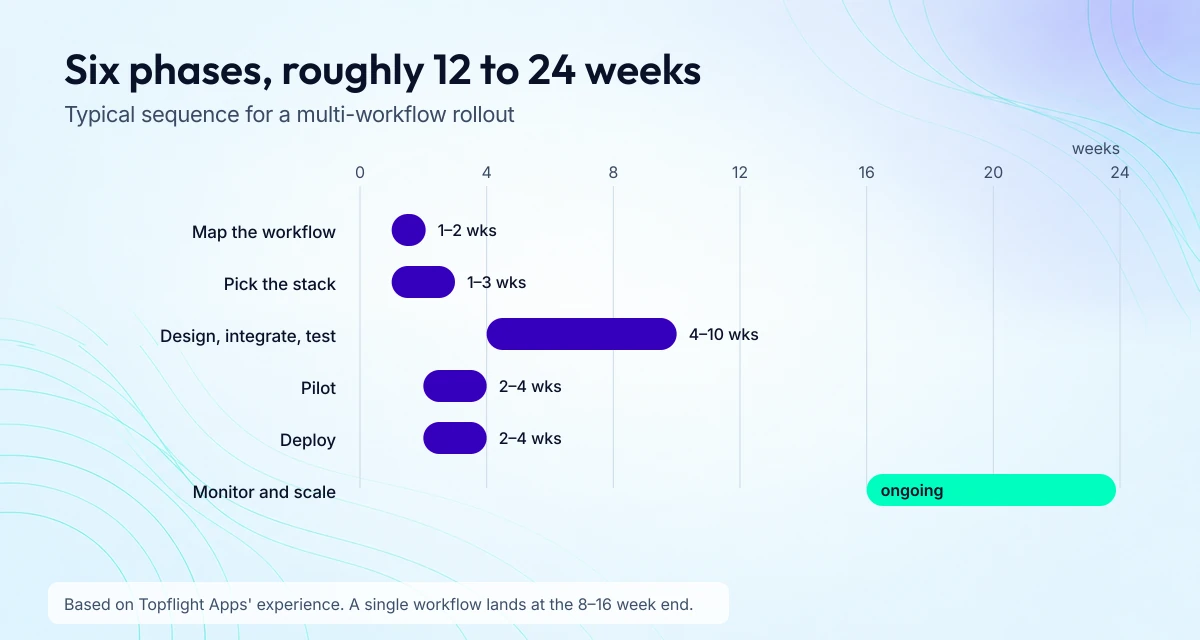
A multi-workflow rollout lands between 12 and 24 weeks; a single workflow at the fast end.
Phase 1: map the workflow before you automate
Start with workflow mapping. Pick 1–2 workflows with pain you can measure (intake to scheduling to reminders, or billing and denials), then map the current state: who does what, in which system, where data gets re-entered, where exceptions pile up. Run a time-motion study on the two or three steps that eat the most staff time, so you hold a baseline to measure against. Define success metrics upfront: wait times, throughput, error rates, denials, staff time saved. Clinical workflow optimization means removing steps before you automate them; automating a broken flow just breaks it faster.
Output: a workflow map, a bottleneck list, and a short automation hypothesis you can test.
Phase 2: technology selection and vendor evaluation
Now choose the stack without falling for shiny demos. Match problems to the right tools: rules engines for deterministic steps, task routing for handoffs, RPA where systems don’t expose APIs, analytics for visibility. Validate integration reality early: can it connect to your EHR, practice management, and billing stack, with audit logs and role-based permissions? Compliance responsibilities stay yours: vendor features help, but you own policies, configuration, and operations. And don’t skip the build-versus-buy call from the tools section above.
Output: a shortlist with a scoring rubric, integration assumptions, and security requirements.
Phase 3: design, integration and testing
Design the future-state workflow with its exception paths: what happens when eligibility fails, data is missing, a clinician overrides a recommendation. Then integrate first: APIs where possible, middleware or RPA where needed, clean ownership rules for data writes. Guardrails travel with the design:
- auditability: who changed what, when;
- least-privilege access and clear PHI boundaries;
- testing that covers the happy path plus the top ten exception cases, data integrity checks, and security validation.
Output: a production-ready workflow spec, a working prototype, and test results you can defend.
Phase 4: pilot and iterate
Pilots are controlled experiments with a small footprint. Choose a scope that proves value quickly: one clinic, one department, one workflow. Train the pilot users, build short feedback loops, and iterate fast on routing, notifications, forms, and exception handling. Track metrics from day one, especially the ones people will argue about later: time saved, reduced rework, improved throughput.
Output: a validated workflow, a punch list of fixes, and proof the change is worth scaling.
Phase 5: deployment and change management
Most “failed automation” is just ignored automation, so adoption gets built into the plan:
- role-based training, with clear “what changes for you” messaging per role;
- support coverage during rollout, staffed by people who can fix the flow in the moment;
- rollout in waves, one department at a time instead of the whole hospital in one sprint.
Output: an adoption plan, a go-live checklist, escalation paths, and clear accountability.
Phase 6: monitoring, optimization and scaling
Automation is a system you keep operating. Monitor workflow health: failures, latency, backlog, exception rates, user drop-off. Keep improving the workflow, not just the tool: remove steps, reduce handoffs, standardize data capture. Scale responsibly by replicating the pattern to adjacent use cases and reusing the integration components that already work. This is healthcare workflow management in practice: operating the system, not just installing it. If you run virtual care, fold RPM workflows in deliberately, device data ingestion, alerts, follow-up tasks, escalation rules.
Output: a reusable workflow library, stable integrations, and an improvement loop that compounds instead of resetting.
How long clinical workflow automation takes
Ranges below come from Topflight Apps’ experience with healthcare builds; a single workflow lands at the fast end, a multi-system rollout at the slow end:
| Phase | Typical duration | Who’s involved |
|---|---|---|
| 1. Map the workflow | 1–2 weeks | Ops lead, clinicians, analyst |
| 2. Pick the stack | 1–3 weeks | IT, vendor, compliance |
| 3. Design, integrate, test | 4–10 weeks | Integration engineers, QA, clinicians |
| 4. Pilot | 2–4 weeks | One clinic or department |
| 5. Deploy | 2–4 weeks | Change manager, trainers, support |
| 6. Monitor and scale | Ongoing | Ops, analytics, engineering |
Clinical workflow automation case studies
Two of these are Topflight builds; the third is an independent study published by a health system. All three show what happens when automation runs as part of a workflow management system, backed by integration work from teams that hold up on contact with the EHR.
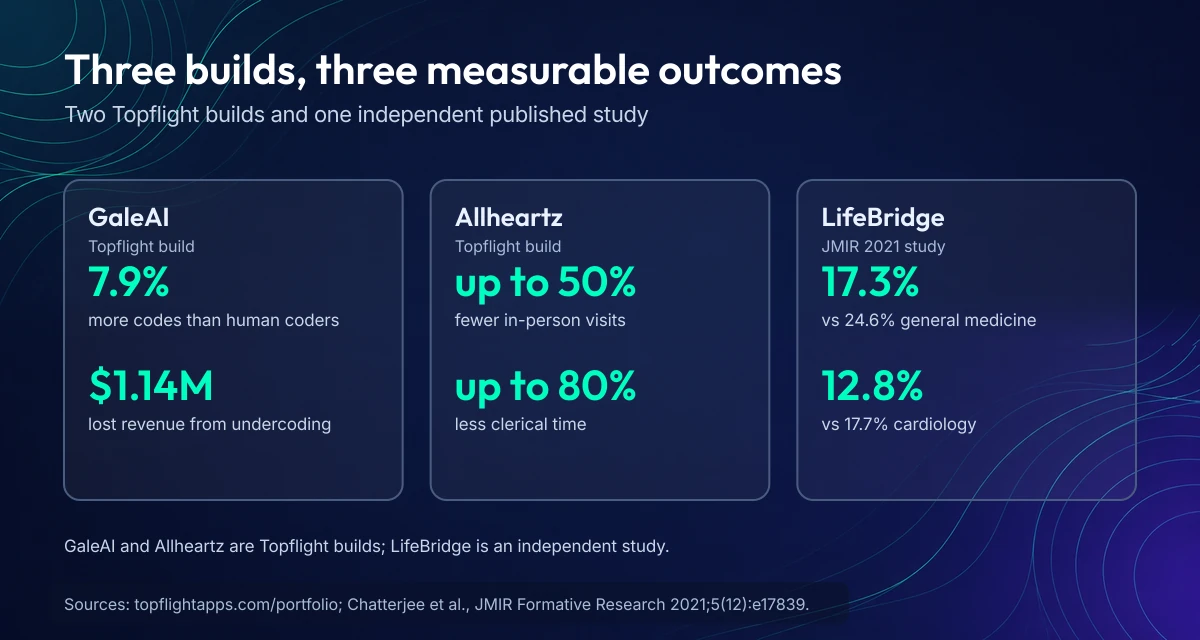
Two Topflight builds and one published study, with the outcomes each reported.
Allheartz: remote monitoring that cuts in-person visits
Allheartz is a remote therapeutic monitoring platform using computer vision for at-home assessments and clinician review. Reported outcomes: up to 50% fewer in-person patient visits and up to 80% less time spent on clerical work. The workflow lesson: automation reduced the administrative drag while giving clinicians more consistent signals, so throughput improved without anyone guessing.
GaleAI: coding automation that pays for itself
GaleAI converts clinical documentation into billing codes quickly and consistently. In a 1-month retrospective audit, GaleAI identified 7.9% more codes than human coders, translating to an estimated $1.14M in annual lost revenue due to undercoding, at less than 1% of gained revenue cost.
LifeBridge Health and GetWell Loop: check-ins that reduce revisits
LifeBridge Health implemented GetWell Loop, an automated patient engagement application with post-discharge check-in questions and a clinical dashboard. In their published study (JMIR Formative Research, 2021), patients who activated the app had lower 30-day revisit rates than non-activators: general medicine 17.3% versus 24.6%, cardiology 12.8% versus 17.7%. The operational lesson: automated check-ins only work when alerts are monitored, escalations are defined, and enrollment is part of the discharge workflow, they built an EHR interface for auto-enrollment.
Lessons learned and best practices
- Integrations decide outcomes. When you integrate health apps with Epic EHR, you can auto-enroll patients and push data into the right queues instead of re-entering it.
- Start with one metric that hurts. Wait times, denials, revisits: pick a number leadership can’t ignore.
- Treat data transitions like projects. An EHR data migration plan keeps automation from amplifying bad or duplicated data.
- Human-in-the-loop isn’t optional. The strongest systems route exceptions and flag risk, but people still own decisions, especially in clinical workflows.
Common challenges and how to overcome them
Healthcare is full of edge cases, legacy systems, and humans who’ve been burned by “transformations” before. These are the failure modes that show up most often, and how to handle them.
Staff resistance and adoption
Staff adopt automation when it makes their day visibly easier, and quietly route around it when it doesn’t. What works:
- engage end-users early and co-design the future workflow with the people who do the work;
- make training role-based: front desk, nurses, coders, and providers each get their own version;
- pilot first, so staff experience the new flow cutting their workload;
- communicate the “why” in plain language: fewer duplicate steps, fewer interruptions.
Integration with legacy systems
Most automation projects fail on the data plumbing. Three moves de-risk it:
- define data ownership: for each element, decide which system is the source of truth and who may write back;
- map the data: field mapping, normalization, and exception logic for missing or duplicate values;
- design for failure: alerting and dashboards for integration errors, so staff don’t learn about them from angry patients.
The full mechanics live in the EHR integration section above.
HIPAA, security and operational risk
A workflow that leaks PHI is a liability with a timer. Keep access least-privilege by role, track access and changes in HIPAA audit logs, and remember that a “HIPAA-ready” vendor doesn’t make your configuration safe. Our HIPAA compliant app development article covers the full checklist.
AI errors, alert fatigue and human review
When the automation is wrong, the fix has to exist before launch. Decide when humans must review each AI output, how overrides work and who may exercise them, and how you detect drift or bad outputs over time. Log every override: audit logs are what turn “the AI did it” into a reviewable event. On the alert side, clinical decision support done without tuning ends in alert fatigue, where every alert gets dismissed including the important ones.
How much does clinical workflow automation cost?
Costs come from Topflight Apps’ experience with healthcare builds; scope decides the range:
| Scope | Example | Cost range | Timeline |
|---|---|---|---|
| Single workflow | Scheduling plus reminders | $60K–$120K | 8–16 weeks |
| Multi-workflow | Intake, prior auth, claims | $120K–$220K | 12–24 weeks |
| Custom platform | Hospital workflow automation across EHR + RCM | $220K–$450K+ | 20–40 weeks |
| Small practice | Pick 1–2 workflows end to end, buy where possible | $60K–$120K | 8–16 weeks |
| Mid-size group | One shared data model, per-site pilots | $120K–$220K | 12–24 weeks |
| Hospital system | Integration engineering, governance, change management | $220K–$450K+ | 20–40 weeks |
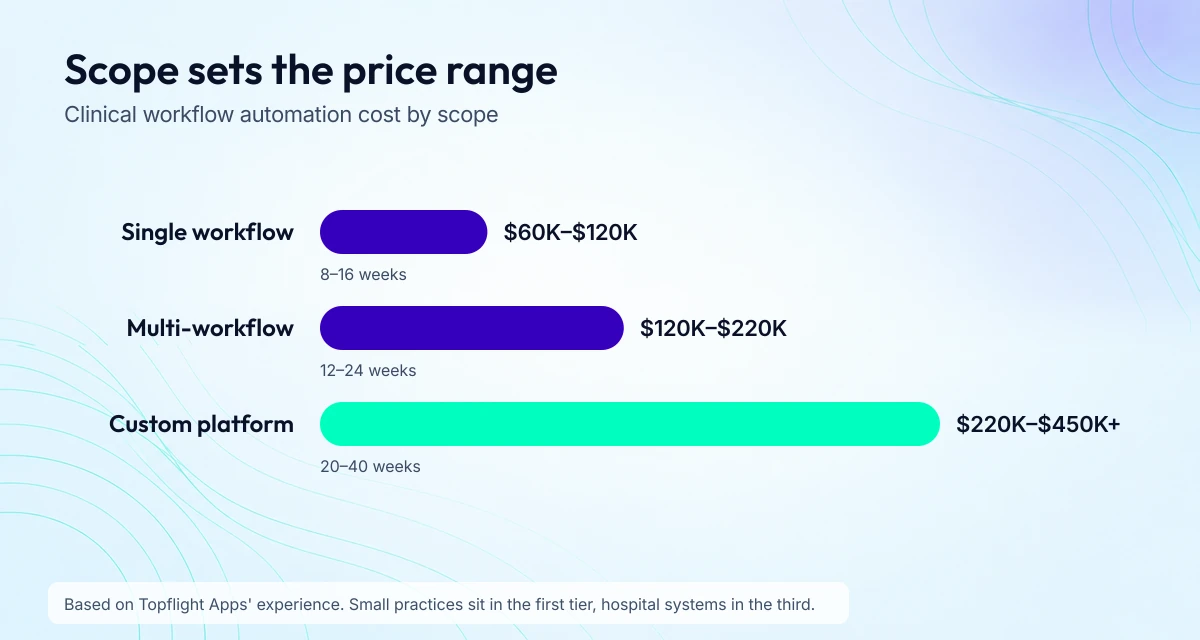
Scope sets the range: single workflow $60K–$120K, multi-workflow $120K–$220K, custom platform $220K–$450K+.
Budget for the cost of EHR implementation in the same plan; it’s the part that surprises. To prove the ROI, keep the formula on one line: (hard savings + recovered revenue + throughput value) ÷ (implementation + ops cost). The full benchmark breakdown lives in our healthcare app development cost article.
Clinical workflow automation KPIs
Track automation across four buckets at once (clinical quality, financial, operational, patient experience), because improving one can quietly break another:
| Category | KPI | How to measure | Which of the 12 workflows |
|---|---|---|---|
| Clinical quality | 30-day readmission and revisit rate | Per condition cohort, monthly | 10: discharge check-ins |
| Clinical quality | Time-to-treatment for key pathways | ED, stroke, sepsis timestamps | 8: results routing |
| Financial | Denial rate and days in A/R | Billing system reports | 3, 4, 7: eligibility, prior auth, claims |
| Financial | Recovered revenue from undercoding | Coding audit, per month | 6: coding and charge capture |
| Operational | Documentation time per encounter | EHR timestamps | 5: ambient documentation |
| Operational | Turnaround for referrals and prior auths | Queue reports | 4, 9: prior auth, referrals |
| Patient experience | No-show rate | Scheduler reports | 2: scheduling and reminders |
| Patient experience | HCAHPS and satisfaction scores | Quarterly surveys | 1, 10, 11: intake, discharge, monitoring |
For a macro sanity check, McKinsey sized U.S. payer automation at a $150 billion opportunity (Sept 2020), built from the 40% of administrative cost that automates. Philips’ Future Health Index 2026 adds the clinician view: 46% of clinicians report AI saving them 132+ hours a year, about 16 working days, and 62% of leaders say the benefits meet or exceed the costs.
What changes in 2026–2027
IoMT keeps turning device signals into next actions: thresholds trigger alerts that create tasks, each carrying escalation paths and documented follow-up. Remote monitoring stops being a dashboard and starts generating work someone owns.
Analytics keep moving from “what happened” to “what breaks next”: no-show and capacity predictions that adjust schedules, denials flagged before submission, discharge delays anticipated early.
Voice stays a workflow control: hands-free task completion and structured capture during care, cutting the context switching where errors hide.
Regulatory deadlines that force automation
CMS-0057-F sets two dates. Prior authorization APIs must go live by January 1, 2027 for Medicare Advantage organizations and state Medicaid and CHIP fee-for-service programs; managed care plans follow their rating period that starts on or after that date, and marketplace QHP issuers their plan year. The shorter decision timeframes, 72 hours for urgent requests and 7 calendar days for standard ones, took effect January 1, 2026 for the same programs. Details are in the final rule and the CMS fact sheet. Payers that haven’t automated yet are building against these dates right now.

Decision timeframes are already enforceable; the prior-authorization APIs follow a year later.
How to choose a clinical workflow automation partner
A “workflow automation partner” can mean anything from a software vendor to a team that redesigns hospital operations end to end. Pick badly and you get a polished demo, a messy rollout, and new workarounds.
| Look for | Walk away if |
|---|---|
| Talks in workflows, exceptions, and roles | “It’s easy” without asking about your workflows or integration constraints |
| Names its integration approach: APIs, FHIR/HL7, middleware, monitoring | “We integrate with everything” and no architecture behind it |
| Treats HIPAA, audit trails, BAAs, and least privilege as defaults | HIPAA buzzwords with no operational detail |
| Defines KPIs early and instruments them | Won’t commit to measurable outcomes |
| Has a change management plan and pilots before scaling | Big-bang go-live with training videos at the end |
Questions to ask
- “Walk me through your last 2–3 healthcare automation rollouts. What broke, and how did you fix it?”
- “Where does data live, and what’s your plan for workflow integration with our EHR and adjacent systems?”
- “How do you handle exceptions?” Denied claims, missing data, clinician overrides, identity mismatches.
- “What’s your approach to HIPAA and security?” BAA expectations, access controls, logging, incident response boundaries.
- “How do you prove ROI?” Ask for a sample KPI dashboard and how they measure before and after.
- “What’s the smallest pilot you’d recommend, and what would make you stop it?” A serious partner defines failure conditions.
- “What will you need from us to succeed?” SME time, data access, IT support, governance decisions.
Implementation and long-term support: where value compounds
A partner’s real value shows up after the first workflow goes live: role-based training and go-live runbooks, then monthly KPI reviews and exception reduction, with clear ownership for data changes and access reviews. Pick a partner that runs workflow automation as a long-term operating capability. That’s the difference between “we installed a tool” and “we changed how work gets done.”
Topflight’s clinical workflow automation services
Topflight has shipped clinical workflow automation across intake, documentation, remote monitoring, and revenue cycle, on Epic-connected builds included. Our clinical workflow solutions start with the workflow map, not the tech stack, because the map tells us which of the twelve examples above pays back first for your operation.
The receipts: our GaleAI build found 7.9% more codes than human coders in a month-long audit, flagging $1.14M in annual lost revenue from undercoding. Allheartz cut in-person visits by up to 50% and clerical time by up to 80%. The Dedica Health platform monitors 1,100+ patients a day. And the Epic integrations that connect those builds run on the same FHIR and integration-engine work described above.
Ready to start with one workflow and measure it? Schedule a call and bring the workflow that hurts the most; we’ll map it and tell you what automation changes.
Frequently Asked Questions
What is clinical workflow automation?
Software that runs the repetitive steps of patient care: intake, documentation, coding, claims, and follow-up. It combines rules engines, RPA, AI, and EHR integration so work reaches the right person without manual handoffs.
What are examples of clinical workflows?
Patient intake and registration, appointment scheduling, eligibility checks, prior authorization, ambient documentation, coding, claims and denials, results routing, referrals, discharge check-ins, remote monitoring alerts, and care gap closure. The full list, with what each one automates and the KPI it moves, is in the healthcare workflow examples section.
What are some examples of automation in healthcare?
Eligibility checks that run before the visit, ambient AI scribes that draft notes, claims scrubbed before submission, and remote monitoring alerts routed to the right clinician. Each one cuts a manual step a person used to own.
What is the basic EHR workflow?
Check-in, intake, encounter and documentation, orders and results, coding and billing, then follow-up. Automation works inside each step, most visibly in intake, documentation, and billing.
How does clinical workflow automation integrate with the EHR?
Through FHIR R4 and HL7 v2 APIs where the EHR exposes them, and through integration engines like commercial Mirth Connect (4.6 and later, licensed since April 2025), Rhapsody, or Redox where it does not. The automation layer needs system-of-record rules, monitoring, and exception handling from day one.
Can AI automate clinical documentation safely?
Yes, with guardrails: AI drafts, a clinician signs. Hekavor’s Mari takes the patient history before the visit and hands the physician a chart-ready note; checks catch skipped questions and hallucinated facts, patient data runs through Azure OpenAI under a BAA, and the physician reviews the note before charting.
How much does clinical workflow automation cost?
A single workflow runs $60K–$120K over 8–16 weeks, multi-workflow projects $120K–$220K over 12–24 weeks, and custom platforms $220K–$450K+ over 20–40 weeks, based on Topflight Apps’ experience. The cost section has the full scope table.
How do you keep workflow automation HIPAA compliant?
Sign a business associate agreement (BAA) with every vendor that touches PHI, keep access least-privilege with audit logs, and configure each automation’s data flows to the minimum needed. The audit question is always the same: who saw what, when, and why.