

Most EHRs feel like they were designed by someone who hates clinicians. You pay a lot, you click a lot, and somehow you still end up with work that spills into evenings—because the system stores data but doesn’t actually help you move care forward.
Here’s the shift: you don’t need to bankroll a giant engineering team to build eClinicalWorks alternative software that’s meaningfully better (for one workflow, in one setting) right out of the gate. With Claude as the reasoning layer and agents handling repeatable clinic tasks, you can ship an AI-native MVP that documents faster, routes work intelligently, and reduces admin drag—without trying to recreate every eClinicalWorks screen on day one.
| Quick question: Can you build an eClinicalWorks-style EHR without rebuilding the whole monster?
Quick answer: Yes—if you start with a workflow wedge (documentation, coding, or intake) and use Claude + agents to draft structured outputs that humans approve. For a digital health startup, the fastest path is to ship one high-impact loop end-to-end, then expand module-by-module without turning the MVP into a mini-eCW. |
Key takeaways
- Don’t rebuild eClinicalWorks—replace one painful workflow end-to-end, then expand.
- AI agents deliver value when they produce structured outputs, follow permissions, and require approvals for risky actions.
- The “hard costs” aren’t UI—they’re security, roles, auditability, interoperability, and real-world rollout.
Table of Contents
- Why Clinics Are Shopping for Eclinicalworks Alternatives
- Define Your MVP Wedge (don’t rebuild eCW)
- The AI-Native Architecture on a Lean Timeline
- Step-by-Step: Build the Core Modules with Agents
- Ensuring Compliance Without Enterprise Overhead
- Cost & Timeline Drivers
- Why Topflight for Custom EHR Work
Why Clinics Are Shopping for Eclinicalworks Alternatives
When people look for an eClinicalWorks replacement, it’s rarely because they woke up craving “innovation.” It’s because the daily experience is a grind: too many clicks to complete a simple task, too many screens that feel like detours, and too many workflows that force the clinic to adapt to the software (instead of the other way around).
Add slow-moving support and expensive add-ons, and you get the usual outcome:
- teams build workarounds in spreadsheets
- copy/paste between systems
- quietly accept that the EHR is where efficiency goes to die
A lot of this comes down to how legacy platforms think about value. They’re primarily systems of record: great at storing data, not great at doing anything with it. But clinicians and ops teams increasingly want a system of intelligence—something that can draft documentation, propose next steps, reduce back-and-forth, and make routine actions “one-and-done” instead of “click-and-confirm.”
That’s where AI agents in healthcare become more than a buzzword. The point isn’t to bolt a chatbot onto an old UI. The point is workflow automation that actually takes work off humans’ plates: pre-filling intake, routing tasks based on context, drafting responses, surfacing relevant clinical decision support at the right moment (not as a pop-up fiesta), and keeping practice management tasks from turning into a second full-time job.
If you’ve ever skimmed clinician forums or Reddit threads about eCW, the pattern is painfully consistent: “I’m spending more time feeding the system than caring for patients.” That’s the market opportunity in one sentence—and it’s why an AI-native, workflow-first alternative can win even if it starts small.
Define Your MVP Wedge (don’t rebuild eCW)
If you try to recreate eClinicalWorks feature-for-feature, you’ll end up shipping never—because “everything” is not an MVP, it’s a hostage negotiation with your own roadmap.
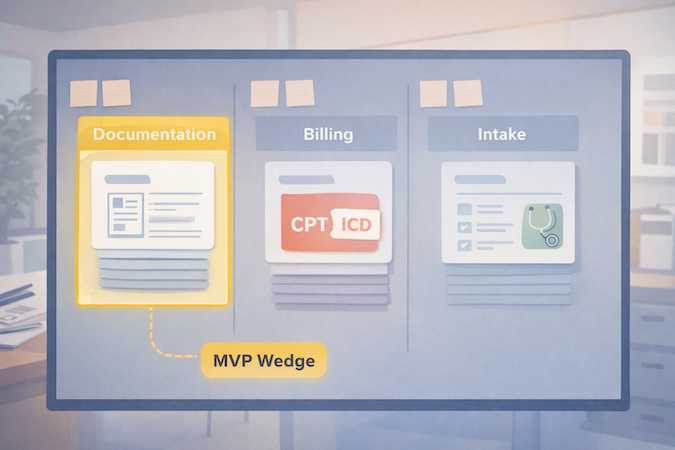
The smarter approach is to pick a wedge: one workflow where clinics feel the pain daily, where outcomes are measurable, and where you can deliver relief without rebuilding the entire universe of practice management.
A good wedge usually looks like one of these:
- Clinical documentation first: cut note time with an AI scribe that drafts structured SOAP notes, updates key fields, and routes follow-ups for review. This wins because it attacks the most expensive currency in healthcare: clinician attention.
- Billing + coding first: reduce denials by standardizing the handoff from documentation to codes (without pretending automation can replace human oversight).
- Patient-facing intake + scheduling first: a lightweight patient portal experience that collects intake, confirms insurance basics, and schedules intelligently—so front desk isn’t stuck playing phone-tag Tetris.
Your MVP wedge should be narrow enough to ship, but complete enough to be used end-to-end. The litmus test: can a clinic run this workflow for real patients without immediately falling back to old tools?
Keep scope tight with three constraints:
- One specialty + one setting (e.g., outpatient primary care, behavioral health, single-location practice).
- One main “job” (documentation or intake or coding).
- One data backbone that you’ll keep long-term (you can swap UI later; rewiring data hurts).
If you’re mapping the MVP boundary, this is the same thinking we use in how to develop an EHR system.
Done right, your first release isn’t “a new EHR.” It’s a clinically useful workflow that reduces friction today—and creates a clean path to expand into the rest of the electronic health record over time.
The AI-Native Architecture on a Lean Timeline
If you want speed and sanity, design the architecture around a simple idea: the EHR is still your system of record, but agents become the system that moves work forward. In other words, don’t make “AI” a feature. Make it a layer that produces drafts, suggestions, and structured outputs—then routes them through permissions and approvals like any other clinical workflow.
If you want more examples of where this pattern shows up in real products, our guide on AI in EHR breaks down the most practical use cases.
The Brain: Claude (and what you actually use it for)
EHR development with Claude works best when Claude is doing high-leverage cognition, not pretending to be your database. In practice, that means:
- Turning unstructured inputs (visit audio, patient messages, intake text) into structured clinical documentation (SOAP, problem list candidates, orders to consider).
- Extracting entities and normalizing them (meds, symptoms, diagnoses) into your data model.
- Producing “next step” drafts: patient instructions, referral letters, prior auth summaries—always with a review gate.
The real value of generative AI here is compression: fewer manual steps between “information appears” and “the record is updated + work is routed.” This is the practical end of generative AI in healthcare—less “chatbot demo,” more workflow compression.
The Workforce: AI Agents (small specialists, not one omniscient bot)
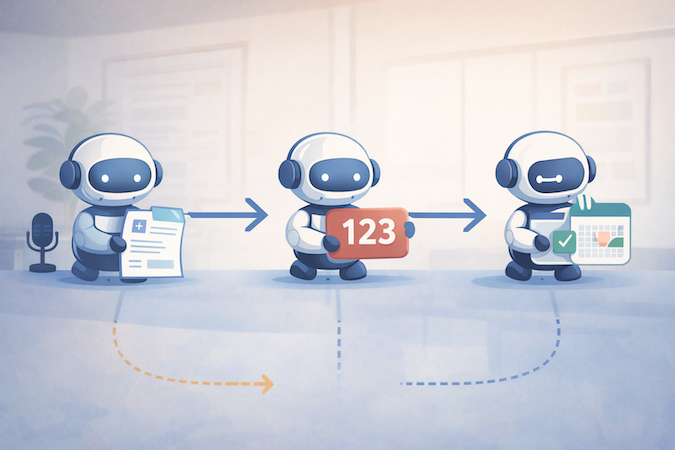
Instead of hard-coding every workflow edge case up front, you build agents that each own a narrow job:
- Scribe agent → drafts notes + proposes structured fields
- Coding agent → proposes CPT/ICD with rationale + flags missing documentation
- Intake/scheduling agent → collects info, classifies intent, routes tasks
Crucially, agents don’t “do whatever they want.” They operate behind role-based access, write to staging states, and request approval for anything that could affect billing, orders, or the chart.
The System of Record: Boring on Purpose
Your record layer should be predictable: database tables, audit logs, version history, and RBAC. This is where you keep yourself out of compliance trouble and avoid “AI spaghetti.” It also makes it easier to build fast with low-code healthcare backends (e.g., rapid CRUD, auth, row-level security), while still keeping clinical data handling disciplined.
Interop-Ready by Design (even if you don’t integrate on day one)
You don’t need to integrate with everything in v1—but you should design like you will. That means mapping your core clinical objects to FHIR standards early (patients, encounters, observations, medications), keeping identifiers clean, and treating interoperability as a product constraint, not a phase-2 fantasy. Even a simple “FHIR-shaped” internal model pays off later when you connect labs, pharmacies, HIEs, or migrate data between systems.
The punchline: this architecture lets you ship a real workflow wedge quickly—without building a brittle monolith or a magical AI blob you can’t govern.
Step-by-Step: Build the Core Modules with Agents
This is where the “AI-native” claim either becomes real… or becomes a chatbot taped to a legacy workflow. The practical pattern is consistent across modules:
- Capture input (audio/text/forms)
- Convert it into structured output (not just prose)
- Route it through a human approval step
- Write to the record with an audit trail
- Trigger the next task automatically
That’s workflow automation with guardrails—exactly what busy clinics care about.
Module 1 — AI Scribe (documentation)
Start with the highest-frequency pain: documenting the visit.
Inputs
- Visit audio (or clinician dictation)
- Quick context: visit type, patient history highlights, meds/allergies
- Templates by specialty (so output isn’t generic)
Agent output
- Draft SOAP note in clinic’s preferred structure
- Proposed problem list updates + suggested orders (as “candidates,” not actions)
- Structured fields: vitals, diagnoses, meds changes, follow-ups
Human-in-the-loop checkpoint
- Clinician reviews and signs
- Anything sensitive (diagnosis changes, medication updates) requires explicit confirmation
Failure mode to design for
- “Confident wrong” details in narrative text. Mitigation: force the agent to cite source segments (“from transcript”) for key claims, and keep edits visible.
Think of the scribe as the front door to medical record automation—it turns talk into structured data you can route.
Module 2 — Coding Agent (billing)
This is where you turn clean documentation into cleaner billing—without pretending you can fully automate reimbursement in the wild.
Inputs
- Finalized note + structured fields from Module 1
- Clinic payer mix rules and common denial reasons (configurable)
- Coding guidelines references available to the tool layer
Agent output
- Suggested CPT/ICD codes with short rationale (“because documented X/Y/Z”)
- Missing documentation flags (“time-based billing missing total time,” “MDM elements incomplete”)
- Optional: claim readiness checklist for staff
This is medical coding automation done responsibly: suggestions + rationale + “what’s missing,” not silent auto-billing. The payoff is fewer preventable denials and tighter revenue cycle management—especially for clinics where billing is a constant slow leak.
Human-in-the-loop checkpoint
- Billing staff approves codes before submission
- Any low-confidence suggestion is automatically escalated for manual review
Failure mode to design for
- Overcoding/undercoding risk. Mitigation: conservative defaults + explicit confidence + required approval.
Module 3 — “Nurse” Agent (intake + scheduling + routing)
Now you reduce front-desk load and make the patient portal feel less like a form graveyard.
Inputs
- Patient message, symptoms, or request type
- Intake form responses + basic history
- Clinic scheduling rules (visit types, durations, provider availability)
Agent output
- Smart intake that adapts questions based on answers (without practicing medicine)
- Suggested appointment type + urgency bucket + routing to the right queue
- Draft instructions (prep for visit, what to bring, how to reschedule)
This module should be explicitly positioned as “triage-lite”: it organizes and routes. It doesn’t diagnose, and it doesn’t replace clinical judgment.
Human-in-the-loop checkpoint
- Staff approves high-urgency routing
- Clinician signs off on anything that looks like clinical advice beyond basics
Failure mode to design for
- Hallucinated medical advice. Mitigation: tight response policies + constrained templates + escalation rules (“go to ER” language controlled and audited).
Put together, these three modules create an MVP that feels like a real alternative because it attacks the daily grind: documentation, billing handoffs, and patient-facing admin. And once those flows are working, expanding into the rest of practice management becomes an iteration—not a rewrite.
Ensuring Compliance Without Enterprise Overhead
Let’s address the elephant in the room: HIPAA doesn’t care that your MVP is “scrappy.” If PHI is involved, you need disciplined controls—especially when you introduce agents that can move data around quickly.
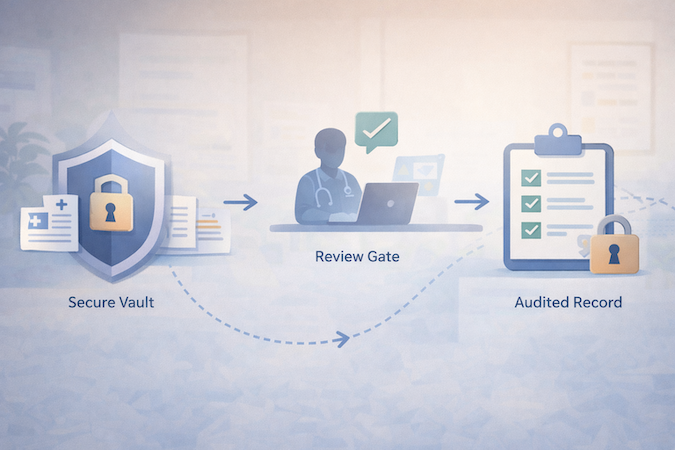
The good news: HIPAA is mostly about doing the basics consistently, not buying a truckload of “compliance products.” The AI layer just creates extra places PHI can leak (logs, prompts, tool outputs), so you design the system to minimize that blast radius.
The playbook is classic HIPAA compliant software development—the AI layer just adds new places PHI can leak.
1) Start with Signed BAAs (and treat them as table stakes, not a shield)
If you’re using hosted infrastructure and third-party services, get BAAs where required. But don’t confuse “BaaS + BAA” with “done.” A BAA helps with contractual obligations; it doesn’t fix weak access control, poor logging hygiene, or sloppy data retention.
2) Make “HIPAA Compliant AI Agents” a Design Constraint, Not a Marketing Claim
To make HIPAA compliant AI agents believable, your agents must behave like well-trained staff:
- Least privilege access: each agent gets only the data it needs for its job.
- No silent writes: agents draft into staging tables/records; humans approve before committing.
- Audit trails by default: every agent action is logged (who/what/when/why, plus inputs/outputs where appropriate).
- Controlled memory: no “remember everything forever” behavior; explicit retention rules.
3) Security Basics That Pull Real Weight (without spending like a hospital)
The highest ROI controls are boring:
- Encryption in transit and at rest (non-negotiable)
- Role-based access + strong auth (including MFA for staff)
- Row-level security / tenant isolation
- Backups + disaster recovery basics
- Environment separation (dev/staging/prod) so PHI doesn’t drift into test land
4) Prompt + Logging Hygiene (the AI-specific part people mess up)
Most early AI-EHR prototypes fail compliance because of “shadow PHI”:
- PHI ends up in app logs, analytics, error traces, or vendor dashboards.
- Prompts get stored without a retention policy.
- Tool outputs get cached in places nobody audits.
Mitigations are straightforward:
- Redact PHI from logs by default (and explicitly whitelist what’s safe to log).
- Use structured prompts that minimize free-form PHI where possible.
- Store only what you need, for as long as you need it—then delete.
If you build these rails early, compliance stops being a scary “phase 2” and becomes a natural consequence of good engineering. And that’s the real budget hack: redesigning later costs more than doing it right the first time.
Cost & Timeline Drivers
If you’ve ever scoped an EHR project, you know the punchline: the sticker shock isn’t the UI. It’s everything that comes after “it works on my laptop”—permissions, auditability, workflow edge cases, integrations, and rollout reality.
Most teams underestimate the cost of EHR implementation because the hard part isn’t screens—it’s workflows, roles, and integration reality.
The Biggest Cost Drivers (in plain English)
- Workflow scope creep
- Every specialty has “small exceptions” that turn into big engineering.
- The fastest projects police scope aggressively: one wedge, one setting, one workflow.
- Practice management depth. Scheduling and billing look simple until you hit:
- visit type rules, provider templates, cancellation policies
- fee schedules, modifiers, payer-specific quirks
- Permissions + audit + data lifecycle. This is non-negotiable for an EHR. It’s also not “AI-able” in the way note drafting is. You still need:
- role-based access
- audit trails
- retention policies
- secure environments
- Interoperability and Integrations. Even “basic” integrations balloon quickly:
- labs, pharmacies, imaging, HIEs, billing clearinghouses
Designing for interoperability early saves pain, but shipping integrations is still real work.
Where AI Compresses Time (and where it doesn’t)
AI can compress:
- drafting documentation and structured extraction
- generating consistent templates (forms, note formats, routing rules)
- automating handoffs (draft → review → finalize → route)
AI does not compress:
- security architecture decisions
- permissions modeling
- integration testing
- QA in real clinic workflows (humans will always find the weird path)
So when someone asks “what’s the cost to build an EHR?” the honest answer is: it depends less on the “EHR idea” and more on how many workflows you’re trying to replace at once, and how quickly you need interoperability and billing depth.
The practical strategy is boring, but effective: ship a wedge that creates immediate ROI (time saved, fewer denials, less admin load), then expand module by module—because nothing torpedoes an EHR build faster than trying to do everything in v1.
Why Topflight for Custom EHR Work
Building an AI-native EHR wedge is not “a GenAI project.” It’s still an electronic health record project—with clinical risk, privacy risk, and workflow risk. The difference is you now have leverage: you can ship useful functionality faster if you design the system so agents are safe, scoped, and auditable.
If you’re exploring custom EHR development, the difference isn’t “can AI generate screens”—it’s whether the system is safe, auditable, and adoptable in a real clinic.
That’s where we’re useful. Topflight has built healthcare platforms where speed matters, but failure is expensive—so we default to the boring disciplines that keep the product alive after the demo:
- Wedge-first delivery (MVP that actually ships): we help you choose the narrowest workflow that creates measurable value, then build outward. This is how mvp development stays a strategy, not a euphemism for “we ran out of time.”
- Agent guardrails from day one: permissions, staging writes, approval gates, and audit logs so agents can accelerate work without creating compliance chaos.
- HIPAA-aware architecture: data handling, logging hygiene, tenant isolation, encryption, and operational practices that support real clinics—not just prototypes.
- Interop-ready foundations: we design data models with integration in mind, so adding labs/pharmacies/other systems later isn’t a rewrite.
Our approach focuses on the boring-but-fatal details of EHR implementation: roles, permissions, data migration boundaries, and rollout.
If you’re evaluating whether to build, the real question isn’t “can AI generate screens faster?” It can. The question is whether your team can turn that speed into a system clinics trust. That’s what we optimize for—shipping an AI-native wedge quickly, then expanding into a full platform without accumulating “security and workflow debt” that explodes later.
If You’re Serious About Replacing eCW
The barrier to entry for EHR products is lower than it’s ever been—but the bar for trust hasn’t moved. Claude and agents can help you ship faster, especially if you start with a tight workflow wedge (documentation, coding, or intake) and build outward like an actual product team, not a “let’s rebuild eCW” committee.
If you’re considering an AI-native EHR MVP, the fastest next step is a short scoping session: pick the wedge, define the data model, lock the compliance boundaries, and identify the minimum integrations your first clinic can’t live without.
Want a concrete build plan and a realistic timeline for your wedge? Reach out to Topflight—we’ll help you turn the idea into a shippable roadmap.
Frequently Asked Questions
Is it really possible to build a compliant EHR MVP without a huge team?
Yes—if you define an MVP wedge with tight scope and build the system-of-record foundation properly (RBAC, audit logs, data lifecycle). AI helps accelerate documentation and workflow steps, but compliance and security still need deliberate engineering.
Why use Claude over ChatGPT for healthcare development?
Claude is typically used for strong long-form reasoning and structured writing tasks, which fits documentation-heavy clinical workflows. The bigger determinant, though, is not the model name—it’s whether you constrain outputs, add retrieval/tooling safely, and enforce review gates. (Model choice matters; architecture matters more.)
How do AI agents differ from standard automation?
Standard automation follows rigid rules (“if X then Y”). Agents can interpret context and produce drafts or decisions—then route them for approval. They’re best when the work is repetitive but context-dependent (like drafting notes or proposing codes with rationale).
Can this custom system integrate with labs and pharmacies?
Yes, but integration work should be treated as its own scope driver. The smart play is to design the data model around common standards early and add integrations when the MVP wedge proves value—rather than front-loading every connection in v1.
Is Anthropic's Claude HIPAA compliant?
HIPAA compliance is about the full system: contracts (like BAAs where required), security controls, access policies, logging/retention, and operational practices. A model can be used in a HIPAA-compliant way, but no LLM is “HIPAA compliant” by itself.