

An EHR can go live on schedule and still make daily care harder. The implementation has to hold up under real charts, peak-hour workflows, migration gaps, and the support queue after launch.
The 11-step EHR implementation process covers governance, vendor selection, migration, testing, rollout, and measured post-launch improvement.
What does a successful EHR implementation plan include?
A successful EHR implementation plan covers 11 steps in five phases: strategy and governance; requirements and vendor selection; data, configuration, and quality; training and rollout; and post-go-live improvement. It assigns owners and protects time for clinical staff. The same plan funds support after launch.
Top takeaways:
- Set decision rights, budget limits, timeline, and success measures before vendor demos begin.
- Give data migration its own owner and schedule. Clinicians decide whether to trust the new chart on day one.
- Fund role-based training before launch and support after it. Adoption keeps changing once live users meet the configured system.
- Run the same real workflows in every vendor demo and score the results before contracting.
Table of contents:
- Understanding EHR implementation
- EHR implementation readiness assessment
- EHR implementation process: 11 steps in five phases
- EHR system selection
- EHR implementation by healthcare setting
- Regulatory compliance in EHR implementation
- EHR data migration
- EHR testing framework
- EHR training and change management
- EHR rollout strategies
- Post-implementation improvement and support
- EHR implementation risk management
- Topflight’s EHR implementation experience
EHR implementation starts from a working baseline
For most U.S. hospitals and office-based practices, EHR implementation begins with a system already in use. The job is to improve exchange, daily workflow, reporting, and patient access without losing the data and controls the organization depends on.
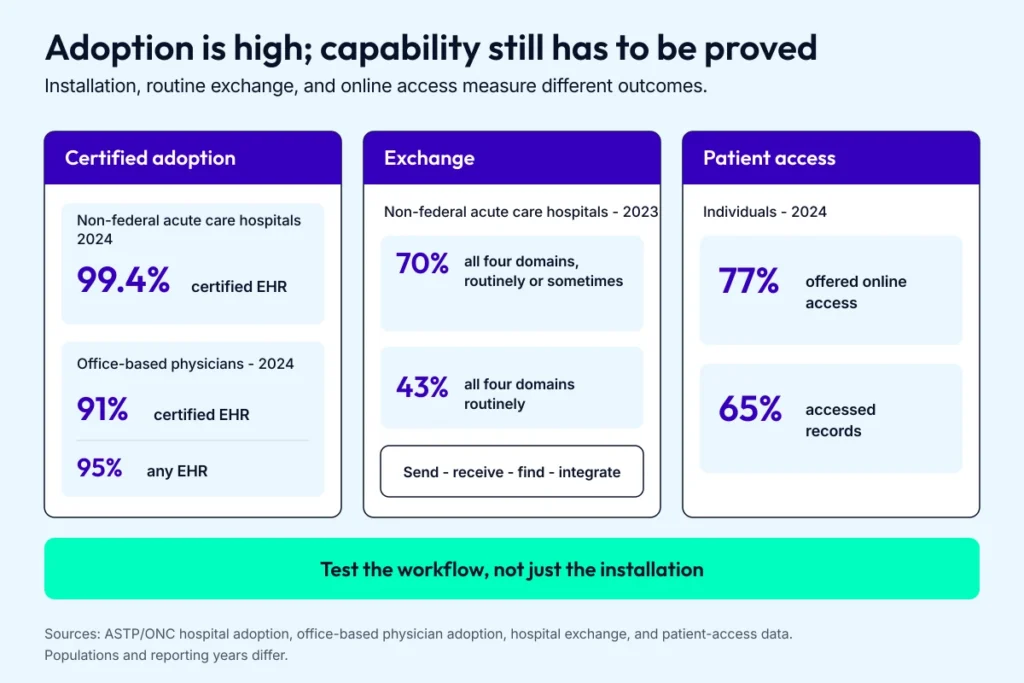
The remaining work sits between having an EHR and proving that records move, arrive, and support care.
High adoption leaves a capability gap
ASTP/ONC’s 2024 hospital data reports that 99.4% of non-federal acute care hospitals used a certified EHR. Its separate office-based physician study reports that 95% used some form of EHR and 91% used a certified EHR in 2024.
Exchange is less mature. In 2023, 70% of non-federal acute care hospitals routinely or sometimes participated in all four exchange domains: send, receive, find, and integrate. That was up from 46% in 2018, though only 43% did all four routinely in 2023. The frequency matters when outside records have to reach a clinician during care.
AI use is measurable too. ASTP/ONC’s 2024 hospital AI data reports that 71% of non-federal acute care hospitals used models embedded in or launched by their EHRs, up from 66% in 2023. The survey defined this category as statistical or machine-learning models that classify patients or produce individual risk scores.
EHR replacement has to preserve care while the system changes
Program rules follow provider type
Program requirements vary by provider type and reporting year. For an EHR implementation, map the exact CMS program, measure set, certification criteria, and regulatory obligations before writing requirements.
Workflow design determines the return
In a 2024 longitudinal cohort of 18,265 physicians, adoption of team-based documentation was associated with 6.0% more visits and 9.1% less documentation time. That gives project teams concrete workflow measures to test during rollout.
Set the business case in numbers: documentation minutes per visit, missed charges, remote-care completion, and manual handoffs.
Patient access requires separate tests
ASTP/ONC’s 2024 patient-access data reports that 77% of individuals were offered online access and 65% accessed their records. Those figures measure portal availability and use.
Information-blocking rules govern practices by defined actors that interfere with access, exchange, or use of electronic health information, subject to regulatory exceptions. Separate HIPAA right-of-access rules generally give covered entities up to 30 days to act and permit one additional 30-day extension when their conditions are met.
During EHR implementation, test result release, proxy access, patient downloads, and cross-site exchange as separate workflows.
Operational blind spots derail the plan
The same implementation risks recur because they create work after budgets and dates are fixed:
- Requirements skip departmental dependencies. They return as change orders and delays.
- Change-management staffing disappears from the budget. Super-user and at-elbow support then arrive too late.
- Teams carry duplicate or low-quality legacy data into migration. Clinicians lose trust on day one.
- Generic training reaches users before they practice their own workflow. Go-live becomes the first realistic test.
Give each risk an owner, budget line, review date, and exit criterion before configuration starts.
Scope sets the schedule and budget
Your EHR implementation timeline starts with dependencies
Build the schedule after the team has mapped these drivers:
- Count sites, departments, user roles, and decision-makers.
- Measure legacy data volume and decide what will be converted, archived, abstracted, or left read-only.
- Inventory interfaces, vendor dependencies, custom reports, and device feeds.
- Estimate configuration effort, validation work, security review, and cutover rehearsal.
- Schedule training coverage, rollout waves, at-elbow support, and the stabilization backlog.
Each dependency needs an owner and exit criterion. The slowest unresolved dependency sets the critical path, and scope changes move the date.
Your EHR implementation cost starts with components
Build the estimate from approved scope and price four groups:
- Vendor charges include licenses, implementation services, certification modules, and interface fees.
- Technical work covers migration, configuration, infrastructure changes, security validation, and device connections.
- Change work covers workflow mapping, training, cutover coverage, and at-elbow support.
- Operating costs continue after launch through support, interface maintenance, upgrades, and backlog work.
Model the productivity dip, overtime, parallel-system period, and internal staff time next to vendor invoices. Tie contingency to named risks and their probability.
A defensible EHR implementation plan shows the assumptions behind each amount and date. Carry those assumptions into the readiness assessment, the first gate in the 11-step plan.
An EHR implementation readiness assessment should expose the blockers
An EHR implementation consumes staff attention long before go-live. Score readiness while scope is still movable, then close the gaps before the vendor contract fixes the schedule.
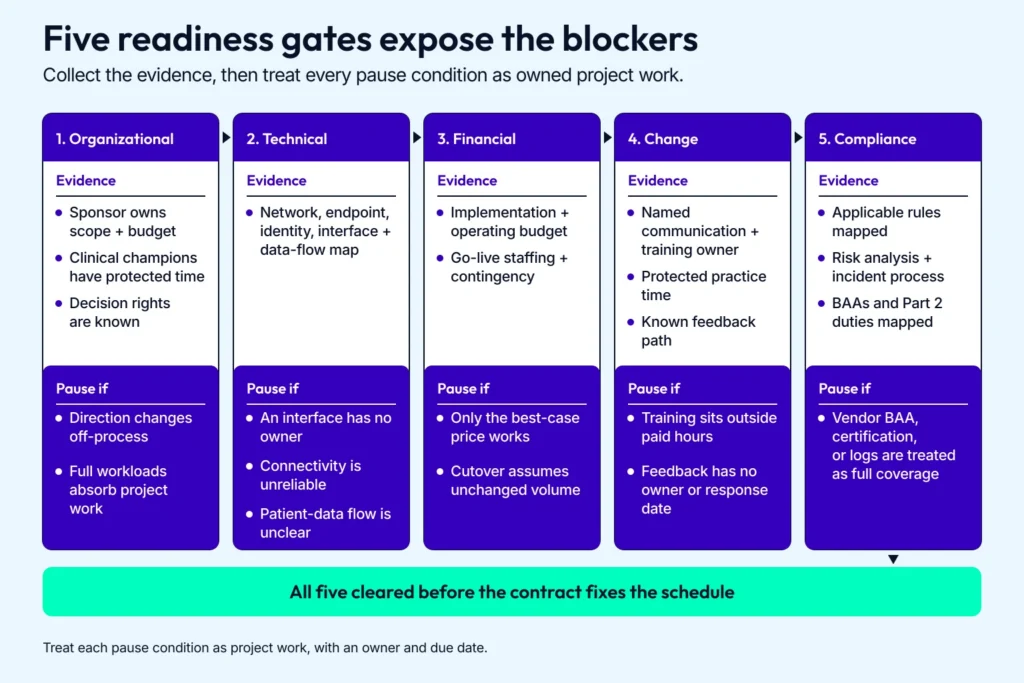
A pause condition is a funded task with an owner and due date, not a reason to push risk past contracting.
|
Readiness area |
Evidence to collect |
Reason to pause |
|---|---|---|
|
Organizational |
An executive sponsor owns scope and budget. Clinical champions have protected project time, and departments know who can make configuration decisions. |
Leadership changes direction through side conversations, or the same staff are expected to carry the project on top of full clinical workloads. |
|
Technical |
A current diagram covers networks, endpoints, identity and access controls, external systems, interfaces, and data flows. |
An interface has no owner, a location has unreliable connectivity, or the team can’t explain how patient data moves today. |
|
Financial |
The budget covers implementation, interfaces, hardware, and training, plus subscriptions, support, maintenance, go-live staffing, and a schedule contingency. |
The project works only at the vendor’s best-case price or assumes clinical volume will stay unchanged during cutover. |
|
Change |
A named owner runs communication and training. Staff have protected practice time, while policy updates, feedback, and configuration decisions follow a known path. |
Training lives outside paid hours, or feedback enters a survey with no owner or response date. |
|
Compliance |
The compliance team has mapped the rules that apply to this organization and its data. Covered entities and business associates have a current risk analysis and incident process, with BAAs where a vendor meets the business-associate definition. Federally assisted substance use disorder programs have mapped their 42 CFR Part 2 duties. |
The team assumes a vendor BAA, product certification, or audit log covers the organization’s own obligations. |
Treat each pause condition as project work, with an owner and due date. The same readiness test applies to an EMR implementation or a platform replacement. Once those gaps are closed, the 11-step EHR implementation plan can reflect how the organization operates.
Run EHR implementation as 11 steps grouped into five phases
An EHR implementation plan is easier to run when the hierarchy is visible: 11 steps grouped into five phases. The sequence moves from ownership and scope through vendor choice, data, testing, launch, and post-go-live measurement.
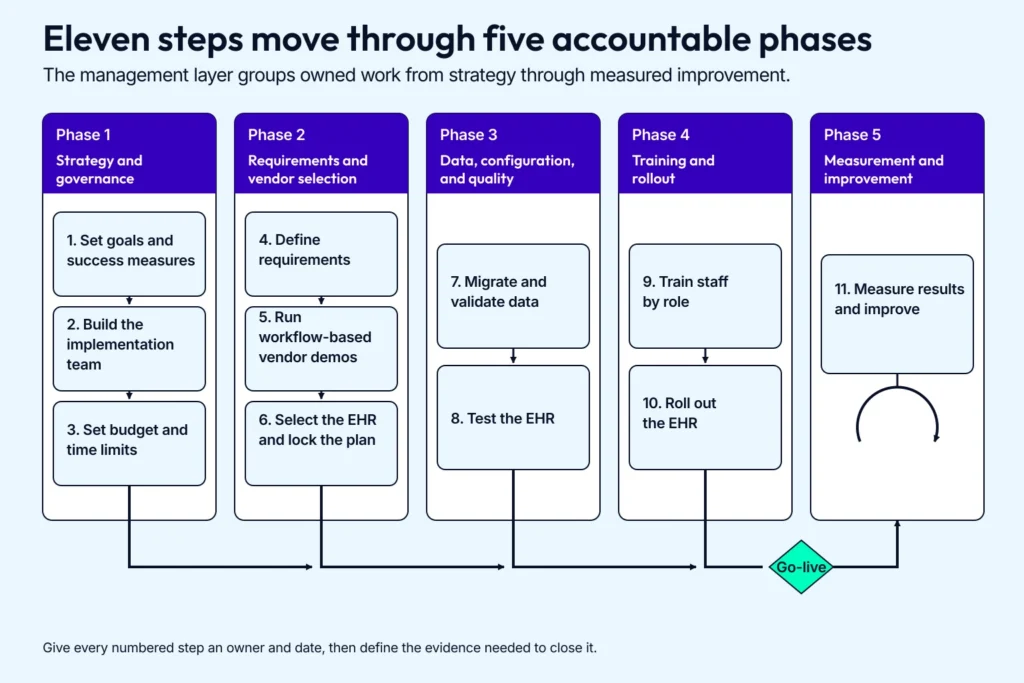
The phases create management checkpoints while the step owners supply the evidence needed to advance.
- Phase 1: Strategy and governance (steps 1-3)
- Phase 2: Requirements and vendor selection (steps 4-6)
- Phase 3: Data, configuration, and quality (steps 7-8)
- Phase 4: Training and rollout (steps 9-10)
- Phase 5: Measurement and improvement (step 11)
The five EHR implementation phases are the management layer. Give every numbered step an owner and date, then define the evidence needed to close it.
Phase 1: strategy and governance
Phase 1 sets the result and names the people who can make scope decisions. It also fixes budget and timing boundaries for the EHR implementation process.
Step 1: set goals and success measures
Name the outcomes before you look at systems. A useful baseline covers clinician time, patient access, revenue-cycle performance, and data quality. Give every measure an owner, baseline, target, and review date.
Step 2: build the implementation team
Give the EHR implementation team an executive sponsor and project manager. Assign the remaining decisions to people from the groups whose work will change:
- Clinical and operational owners define care and administrative workflows.
- Technical owners manage identity, interfaces, migration, and environments.
- Compliance and security owners map controls to the rules that apply.
- A finance owner controls the budget and benefits tracking.
Super users join as workflow experts and peer trainers with role-appropriate permissions.
Related: EHR in medical billing
Step 3: set budget and time limits
Set working limits for licenses, interfaces, migration, hardware, training, backfill, and post-launch support. Tie each cost and deadline to a named assumption. Revisit both after choosing an EHR, when vendor quotes and interface requirements replace estimates.
Phase 2: requirements and vendor selection
Phase 2 turns care workflows and reporting duties into testable requirements. Technical constraints remain visible through the vendor decision.
Step 4: define requirements
Document current and target workflows before vendor outreach. Build the requirements set from:
- user roles and access rules
- data flows and interfaces
- clinical and operational reports
- downtime and recovery needs
- hardware and support expectations
Write each requirement so the team can test it later. This turns EHR implementation best practices into testable acceptance criteria.
Step 5: run workflow-based vendor demos
Run the same realistic scenarios in every demo and use the same scoring sheet. Include clinicians and billing staff, then add security and interface owners. Review the vendor’s AI in EHR features against the data they use and the oversight your team can maintain in production.
Step 6: select the EHR and lock the plan
Choose the system, settle contract and BAA terms, confirm interface ownership, and turn the sales timeline into an EHR implementation project plan. Update the budget, staffing, dependencies, acceptance gates, and launch assumptions before configuration starts.
Phase 3: data, configuration, and quality
Phase 3 configures the system and migrates clinical data. It also proves the result under realistic conditions.
Step 7: migrate and validate data
Give EHR data migration its own owner and cutover plan. Complete five actions before accepting a wave:
- Inventory the source records.
- Clean the data selected for transfer.
- Map fields and clinical codes.
- Rehearse the transfer.
- Reconcile the result and obtain clinical acceptance.
Name the rollback trigger before the transfer begins.
Step 8: test the EHR
The EHR testing framework covers four test families:
- functional and interface testing
- performance and security testing
- downtime and recovery testing
- user acceptance testing
Technical teams verify requirements while clinical and operational users run real workflows with role-appropriate access. Super users coordinate scenarios and peer feedback because they know both the workflow and the configured system.
Phase 4: training and rollout
Phase 4 prepares staff and controls how the change reaches each site.
Step 9: train staff by role
Run role-based EHR training in the configured system, close enough to launch that staff retain the work. Use realistic patient scenarios and give super users time to coach peers.
Step 10: roll out the EHR
Choose a rollout strategy based on safety, interface dependencies, staffing, and tolerance for parallel work. Set go/no-go criteria, the support model, downtime procedures, and rollback authority before launch.
Phase 5: measurement and improvement
Go-live hands the EHR implementation process to an operating governance loop.
Step 11: measure results and improve
Capture baselines before launch, then track the measures from Step 1. Use a small scorecard covering task completion time, error rates, adoption, system performance, revenue-cycle results, and user feedback. Assign each metric an owner and a review cadence so changes lead to a measured result.
Adapt the 11 steps to your setting
These 11 EHR implementation steps are a control structure. Adjust the timing to your care model, regulatory duties, interface load, and staffing capacity.
EHR system selection should start with workflows
Selecting the EHR shapes the remaining EHR implementation plan, including its budget and schedule. The same selection discipline applies to an EMR implementation. Compare systems against work your staff performs every day, then test the claims vendors make in demos.
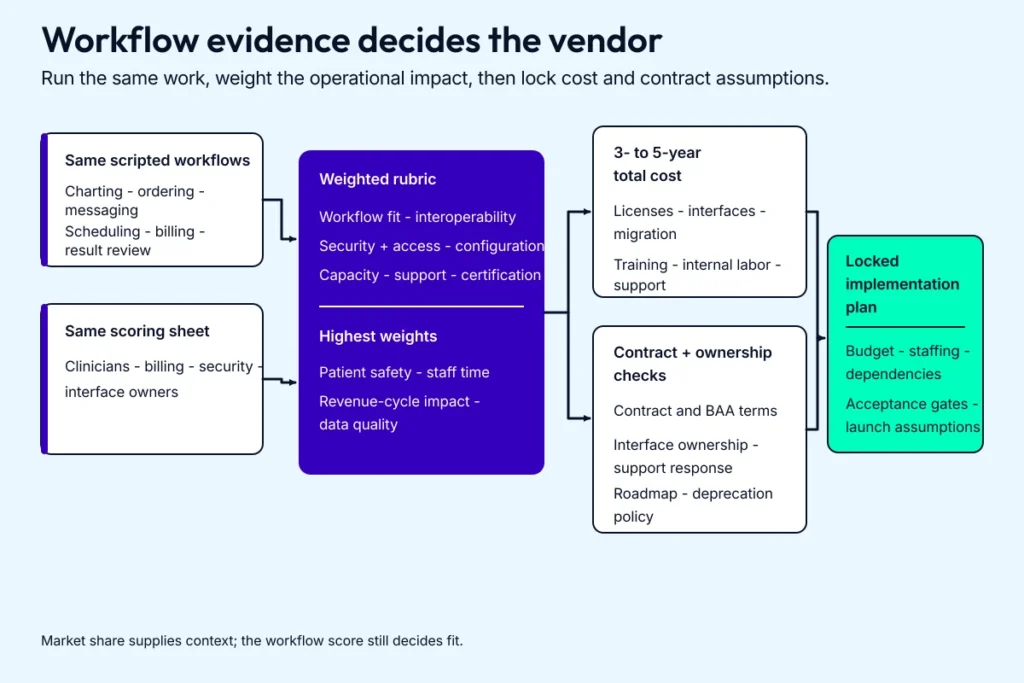
A familiar vendor is still the wrong choice when the scored workflow, ownership cost, or contract fails.
When choosing your EHR platform, test usability under real load and compatibility with the systems you already run. Estimate the capacity needed over the next 3 to 5 years. Hybrid-care teams can include the scenarios in our telehealth EHR integration guide.
Score workflow fit before features
A scoring rubric measures the work staff need to complete during a real shift. Rank each vendor on:
- Daily workflow: charting, ordering, messaging, scheduling, billing, and result review.
- Interoperability: support for labs, pharmacies, payers, HIEs, devices, and other systems in your interface map.
- Security and access: role permissions, audit logs, incident tooling, and the controls your risk analysis requires.
- Configuration: the effort needed to support specialties, sites, reports, order sets, and templates.
- Capacity: expected patient, provider, site, interface, and reporting volume over the planning period.
- Support: response and resolution times, escalation paths, training, release communication, and reference customers in your setting.
- Certification: identify the modules and criteria required by the CMS program or reporting duty that applies to you. Prove workflow fit in scripted demos, and handle HIPAA compliance through the organization’s own privacy and security program.
- Total cost: licenses, implementation, interfaces, migration, hardware, training, internal labor, and support after launch.
Related: the factors behind the cost of implementing EHR.
Use market share as context
The public ASTP/ONC 2024 hospital table uses hospital count as its denominator:
|
Vendor |
Share of non-federal acute care hospitals |
|---|---|
|
Epic |
50.8% |
|
Oracle Health (Cerner) |
20.1% |
|
MEDITECH |
15.6% |
The three vendors account for 86.5% of hospitals in that dataset. Installed base can help an EHR implementation team recruit staff and find peers with direct interface experience. Your own workflow score still decides fit.
Build the comparison matrix from real tasks
Turn intake, documentation, ordering, messaging, billing, analytics, telehealth, RPM, and CCM into testable lines such as “close a chart in X minutes” or “route a rejected claim to the correct queue.” Score native support, configuration effort, add-ons, and workarounds. Patient safety, staff time, revenue-cycle impact, and data quality carry the highest weights.
Model total cost over 3 to 5 years
Total cost of ownership should cover licenses, implementation and integration services, hardware, migration, training, internal labor, support, and release work. Add productivity loss during go-live, parallel-system periods, temporary staffing, and the time internal teams spend on governance.
Run the same cost model for every vendor. A cheaper license can still create a higher EHR implementation cost when interfaces and change work are included.
Check ownership before trusting the product roadmap
Confirm the legal owner of the product, churn in your care setting, recent acquisitions, release frequency, deprecation policy, and real support response times. Oracle acquired Cerner in 2022, so current contracts and roadmaps sit under Oracle Health. Allscripts changed its corporate name to Veradigm in 2023 after selling its hospitals and large-practice business; verify the current product owner before relying on an old comparison.
Related: our legacy-name guides to Allscripts EHR integration and the Oracle Health/Cerner versus Epic comparison.
Ready-made EHRs cover most core requirements
Start with systems that already support the care setting and required certification criteria. Epic, Oracle Health, MEDITECH, athenahealth, Altera Digital Health, Veradigm, NextGen, and CPSI/TruBridge each sell into different parts of the market. Ask for current customers whose size, specialties, site count, and interface load resemble yours.
See our guides to Epic EHR cost and Epic customization. The integration guide explains how to connect a health app to Epic EHR.
For app-level exchange, the SMART on FHIR development guide covers launch, authorization, and data-access choices.
Custom work belongs around the remaining workflow gap
Custom EHR work carries responsibility for security, release management, EHR upgrades, and long-term maintenance. Price custom work from its requirements.
A headless EHR can supply the clinical data layer and controls while your team builds a workflow-specific interface. Commercial services such as GetHealthie and open-source systems such as Medplum provide other starting points. Our guide to building an electronic health records system covers the engineering scope.
Topflight’s EHR integration services support Epic, Oracle Health, MEDITECH, and other vendors when the chosen system needs a new patient or clinical workflow.
EHR implementation changes by healthcare setting
The same EHR implementation plan creates different failure points across hospitals, small practices, ambulatory sites, and specialty facilities. Use the setting to decide where governance, configuration, testing, and support need the most weight.
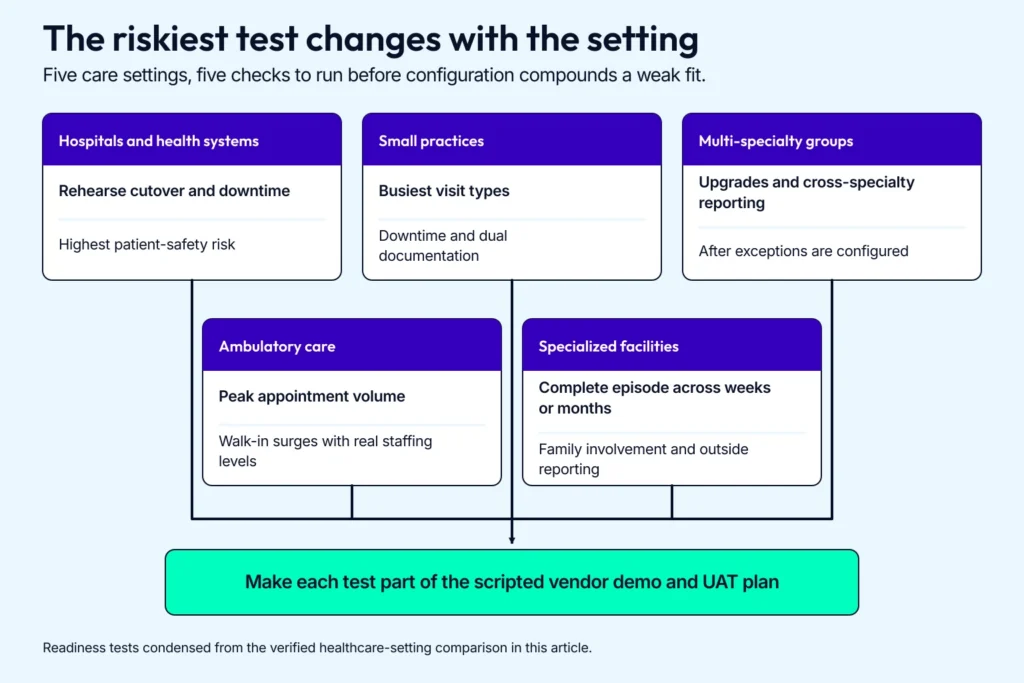
A setting-specific rehearsal exposes poor fit before configuration work compounds it.
|
Setting |
Main constraint |
Implementation priority |
Readiness test |
|---|---|---|---|
|
Hospitals and health systems |
Hospital EHR implementation has to coordinate round-the-clock operations across clinical service lines and a long interface list. |
Give a central steering group decision rights, then map PACS, LIS, RIS, pharmacy, ERP, bed management, and operating-room systems. |
Rehearse cutover and downtime with the units that carry the highest patient-safety risk. |
|
Small practices |
A small-practice EHR implementation is constrained by cash and staff time. |
Start with scheduling, charting, eRx, and billing. Choose specialty-ready workflows and support that doesn’t assume an internal IT team. |
Run the busiest visit types through the system and measure downtime and dual documentation. |
|
Multi-specialty groups |
Multi-specialty EHR implementation has to preserve specialty work without turning every department into its own product. |
Govern demographics, scheduling, orders, and documentation structure as a shared core. Permit specialty exceptions through one change process. |
Prove that upgrades and cross-specialty reporting still work after the exceptions are configured. |
|
Ambulatory care |
Ambulatory EHR implementation carries throughput risk through registration and clinical handoffs, including results routing. |
Prioritize registration and triage, lab and imaging exchange, referral handoffs, and results routing. |
Simulate peak appointment volume and walk-in surges with real staffing levels. |
|
Specialized facilities |
EHR implementation for rehab, behavioral health, LTACH, and SNF settings has to reflect different episode lengths and reporting duties. |
Configure longitudinal views, cross-discipline signatures, care plans, and the registries or reporting programs that apply. |
Replay a complete episode across weeks or months, including family involvement and outside reporting. |
Make each readiness test part of the scripted vendor demo and UAT plan, then carry the result into the EHR implementation process. This exposes a weak fit before configuration work compounds it.
Regulatory compliance in EHR implementation starts with applicability
Build one requirements matrix that names the regulated entity, data, program, jurisdiction, and evidence owner for each obligation. Review it whenever scope or vendors change, and at the start of every reporting year.

The matrix should explain why a rule applies before the team translates it into controls.
HIPAA scope begins with the parties and the data
For every provider and vendor in scope, document its HIPAA status and the reasoning behind it. A provider’s covered-entity status depends in part on transmitting health information electronically in an HHS-standard transaction. Lock that map before converting controls into project requirements.
For each ePHI flow, record the risk analysis, access roles, logging, incident handling, and recovery controls. HHS classifies encryption as an addressable implementation specification: implement it when the risk assessment finds it reasonable and appropriate, or document the rationale and an equivalent alternative that meets the standard.
Apply the minimum necessary standard where the rule requires it and account for its exceptions, including treatment disclosures between providers. Use HHS’s business-associate definition to identify the vendors and subcontractors that need a BAA.
CMS requirements split by provider type
CMS says eligible hospitals and critical access hospitals participate in the Medicare Promoting Interoperability Program, while eligible clinicians use the MIPS Promoting Interoperability performance category. The Medicaid Promoting Interoperability Program ended on December 31, 2021.
For the applicable reporting year, record the CEHRT requirements, measures, data sources, submission method, and responsible owner. Test structured capture and exchange against those specifications. Generate the required report before go-live.
Information blocking and certification are separate workstreams
ASTP/ONC’s information-blocking guidance defines the actors covered by the rule and the regulatory exceptions. For each exchange workflow, identify the actor, requested EHI, possible interference, and exception analysis.
The EHI export criterion belongs to ONC certification of health IT modules. During vendor selection and testing, confirm how the certified module exports EHI for one patient and for a patient population. Track the organization’s information-blocking duties as a separate line in the matrix.
State rules belong in the workflow matrix
Create a jurisdiction row for every state where the organization operates or treats patients. Cite the current state source for consent, retention, registry reporting, and specially protected records, then have counsel confirm how those rules change interfaces and release workflows.
GDPR starts with Article 3 scope
GDPR Article 3 applies to processing in the context of an EU establishment. It can also reach an organization outside the EU when that organization offers goods or services to people in the Union or monitors their behavior there.
When GDPR applies, document controller and processor roles, storage locations, transfer mechanisms, and rights-request workflows. Handle erasure requests through the Article 17 exceptions and the clinical record-retention rules that apply to the data.
Part 2 compliance became mandatory in 2026
HHS required compliance with the 2024 Part 2 Final Rule by February 16, 2026. If the organization is a federally assisted SUD program or another entity holding Part 2 records, map the current rule to consent, redisclosure, privacy notices, and breach workflows before migration or testing.
Capture evidence while the build is active
Keep the implementation record useful for an audit or incident review:
- Store the applicability matrix with source links and counsel-approved decisions.
- Retain each risk analysis with its vendor due-diligence and BAA record.
- Save configuration and test evidence for access, logging, exchange, reporting, and export.
- Keep training records, role approvals, change history, and scheduled review dates.
Put the matrix under change control and assign an owner to every open item. The record should connect every implemented control to its authority and review schedule.
EHR data migration needs a clinical acceptance test
Clinical acceptance is the standard for data migration in an EHR implementation. The resulting chart has to be safe and coherent. Define the migration scope and the records that stay available in the legacy system. Name the person who accepts the clinical result before cutover. An EMR implementation that replaces a legacy system needs the same controls.
If you’re migrating from a senior care solution, see our notes on EHR PointClickCare Integration, which includes data mapping and sync strategies.

A transfer is complete only after technical checks and clinicians agree that the resulting chart is safe and coherent.
Data assessment starts with an inventory
List every source that contains records needed for care, billing, reporting, or retention. That may include paper charts, legacy EHRs, document stores, imaging systems, and interface queues.
For each source, record its owner, format, volume, record age, quality, legal retention period, and target disposition. Classify the contents as migrate, archive, transform, or leave in the legacy system. This inventory sets the scope before anyone writes a mapping script.
The migration timeline starts with waves and cutover rules
A working migration plan specifies:
- the patient cohort and facilities assigned to each wave, with its included record types
- the write-stop and read-only times, plus the rollback trigger
- how long the legacy system remains available for lookup and who can access it
- who owns reconciliation during the cutover window and when each wave is accepted
Choose a full cutover or phased transition according to clinical risk and whether staffing can handle the expected data volume. Keep the legacy system available long enough to handle late discoveries under an approved retention and decommission plan.
Clean and map the data before transfer
Good EHR data migration practice fixes naming and code conventions before transfer. The mapping workbook should cover:
- the target field and data type for each source field
- code systems such as ICD-10, SNOMED CT, and LOINC
- rules for duplicates and partial records
- required-field defaults and transformation logic
- a clinical owner for exceptions and sign-off
Use ETL tools, interface engines, vendor APIs, and secure transfer channels that fit the source. Stand up the target database with access controls and backups, then move each wave with checksums and row counts. Record every transformation so the team can explain what changed.
Validation ends with a clinician opening the chart
Technical QA compares record counts, checksums, duplicates, missing fields, structural errors, and outliers. Clinical validators then open representative charts and confirm that allergies, medications, results, notes, and longitudinal context still make sense for the specialty.
Test fresh inputs separately. New orders, results, demographic changes, and document uploads should land correctly after the historical load. Track every exception through correction and retest before a wave is accepted.
Rollback planning belongs in the cutover runbook
Set the rollback trigger and decision owner, including the last safe point for reversal. Then prove two safeguards before the migration window opens:
- Keep a clean pre-transfer backup outside the migration path and complete a test restore.
- Rehearse a downtime or read-only workflow that keeps care moving while the team recovers or rolls back.
After acceptance, monitor ongoing exchange with practice management, lab, billing, and pharmacy systems. The migration closes when reconciliation is complete and the legacy decommission plan has an owner.
An EHR testing framework earns the go-live decision
Testing turns the EHR implementation process into evidence for a go-live decision. Testing an EMR implementation follows the same rule. The plan should cover clinical workflows, interfaces, failure recovery, security, peak volume, and user readiness.
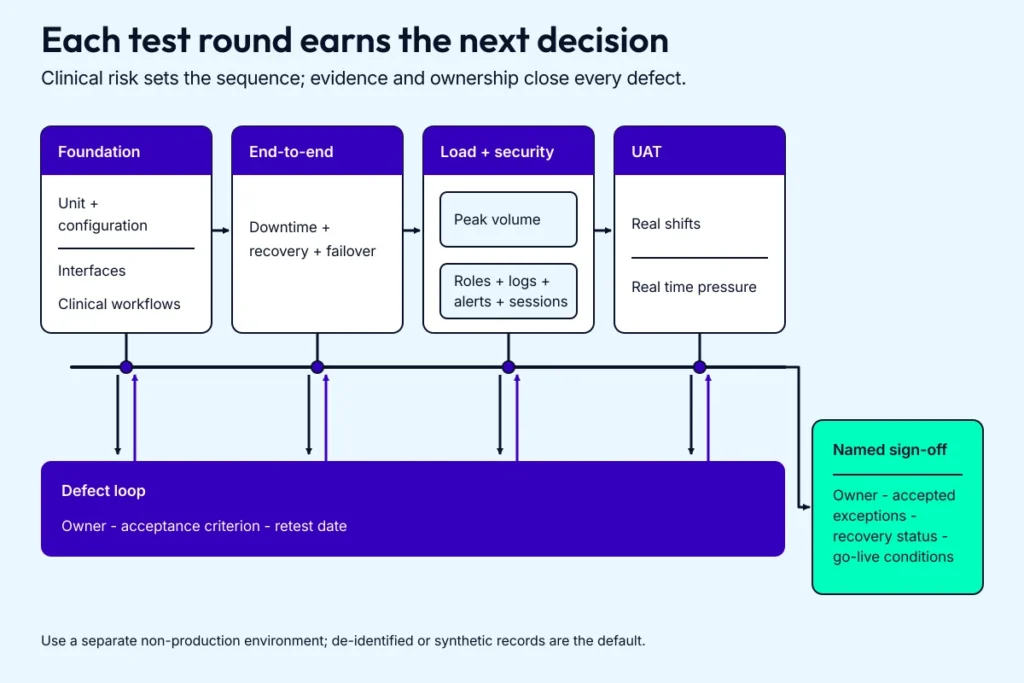
A passed round counts only after each owned defect is retested and recorded in the sign-off evidence.
Use a separate non-production environment. De-identified or synthetic records are the default when they reproduce production complexity. If a test case requires ePHI, keep that environment within the organization’s HIPAA security program and apply the safeguards identified in its risk analysis.
Sequence testing around clinical risk
Assign modules, workflows, interfaces, and user roles to each round. Within the EHR implementation process, the rounds build on one another:
- Unit and configuration tests prove each module and rule in isolation.
- Interface tests check data flow, mapping, acknowledgements, and error handling between systems.
- End-to-end tests follow complete clinical and operational workflows across the system.
- Downtime, recovery, and failover tests show what happens when a dependency breaks.
Give every defect an owner, an acceptance criterion, and a retest date. Fixing a unit defect early saves the same issue from surfacing during UAT.
Peak load and security get separate evidence
Simulate concurrent logins, documentation, orders, messages, and report jobs. Track response times, error rates, queue depth, and job completion while interfaces and batch work are running.
Security testing checks role permissions, access boundaries, audit logs, alerting, and session behavior. Test encryption in transit and at rest as part of the security design. Under current HHS guidance, encryption is an addressable Security Rule specification; the risk analysis and selected control belong in the sign-off record.
UAT should replay real shifts
Recruit clinicians, front-desk staff, revenue-cycle staff, and operations leads. Give them realistic scenarios and the same time pressure they face in clinic. Capture failed paths, confusing screens, workarounds, and task timing, then use those findings to adjust configuration and training materials.
Sign-off records the evidence and the owner
Store test plans, test cases, defect logs, retest results, and formal approvals. The sign-off should name the accountable owner, accepted exceptions, recovery status, and any condition attached to go-live.
EHR training works when practice mirrors the job
An EHR implementation plan has to reserve staff time for practice and feedback before go-live. Teach people by role and workflow, then measure whether they can complete the work they’ll do on a real shift.
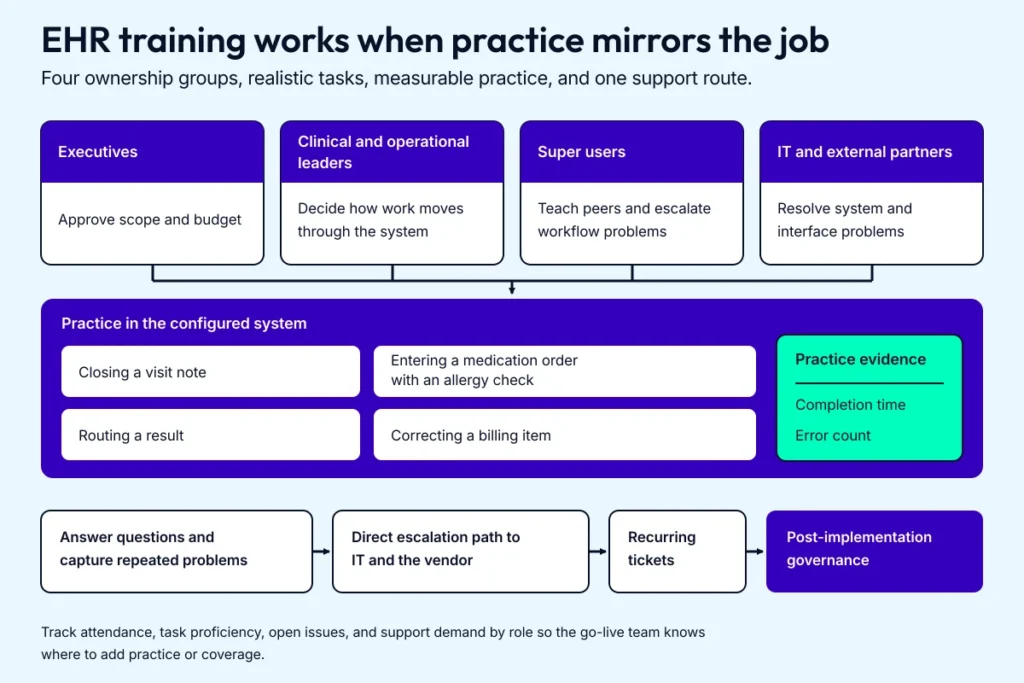
Role labels become useful when practice results and recurring problems reach the people who can change the system.
Map training to the work each role owns
Start with executives, clinical leaders, front-desk staff, billers, IT, and external partners. Assign four kinds of ownership:
- Executives approve scope and budget.
- Clinical and operational leaders decide how work moves through the system.
- Super users teach peers and escalate workflow problems.
- IT and external partners resolve system and interface problems.
A simple RACI keeps ownership visible across the EHR implementation process.
Use workflow shadowing, short interviews, ticket history, and existing SOPs to build a role-based training matrix. Split broad roles where the work differs, such as inpatient and outpatient nurses or surgeons and primary-care physicians.
Practice real work in the training environment
Mix instructor-led sessions, self-paced modules, vendor walkthroughs, and hands-on labs. Tie each module to tasks such as closing a visit note, entering a medication order with an allergy check, routing a result, and correcting a billing item.
Measure completion time and error count. Keep tip sheets, short videos, quick reference guides, and printable cheat sheets in one known location, then schedule refreshers when real questions surface after go-live.
Super users put support on every shift
Select respected clinicians and staff from each department. Give them early access, involve them in configuration and testing, train them more deeply, and provide a direct escalation path to IT and the vendor.
During go-live, place super users where they can answer questions and capture repeated problems. Send recurring tickets into post-implementation governance so the team fixes the underlying workflow or training gap.
Resistance belongs in the work queue
Find the specialties facing the most change and the teams carrying burnout or deep legacy-system habits. Give them time to surface issues, publish the response, and include them in decisions that affect their work.
Document four boundaries early:
- patient-safety requirements
- regulatory duties
- shared workflow standards
- payer or partner contracts
Track attendance, task proficiency, open issues, and support demand by role so the go-live team knows where to add practice or coverage.
EHR rollout strategies have different failure modes
Your rollout method determines how much change the EHR implementation team absorbs at once. Choose it from workflow dependencies, interface risk, staffing, support capacity, and the length of time you can run parallel processes.

No rollout method removes risk; the decision is how much change and parallel work the support team can safely carry.
Choose a rollout pattern your support team can carry
|
Method |
Works best when |
Main risk |
|---|---|---|
|
Big bang |
One site or a tightly coupled workflow needs a single cutover and the team can staff heavy go-live support. |
A defect or readiness gap reaches the full organization on day one. |
|
Phased |
Sites, specialties, or modules can move in waves while the program applies lessons between releases. |
Dual processes and cross-wave dependencies can outlive the schedule. |
|
Pilot |
A representative clinic or department can test the EHR implementation plan before wider release. |
An unusually cooperative pilot group can hide problems that appear elsewhere. |
|
Hybrid |
Some workflows need a hard cutover while other modules or locations can move in stages. |
Staff lose track of which system owns a workflow unless the boundaries and end dates are explicit. |
Set cutover rules before the first wave
Put these decisions in the rollout plan:
- go/no-go criteria and the person with authority to stop launch
- downtime, rollback, and reconciliation procedures
- staffing for at-elbow support, super users, IT, vendor teams, and incident command
- the last day each legacy workflow can accept new work
- success measures and the review date before the next wave
Use the pilot findings to update configuration and training. Record a signed go/no-go decision before the next release. Keep parallel adoption short and assign one source of truth for each workflow throughout the overlap.
Also read: A complete guide to healthcare app development
Post-implementation improvement turns tickets into a backlog
Go-live starts the operating phase of the EHR implementation process. Usage data and support tickets now show the team what to fix.

Small changes stay controlled when one group owns the backlog and checks the result after release.
Track measures people can act on
Use a short scorecard tied to the goals from Step 1:
- Clinical work: chart closure time, order corrections, inbox backlog, and documentation completeness.
- Operations: registration errors, task queues, response times, and support volume.
- Revenue cycle: clean claim rate, denials, days in AR, and missed-charge recovery.
- System health: uptime, latency, interface failures, and recurring defects.
- Adoption: task completion, workarounds, training demand, and user feedback by role.
Give each measure a baseline, target, owner, and review date. A metric without an action threshold becomes reporting overhead.
Run changes through one governance loop
Have clinical, operations, IT, and revenue-cycle leads review measures and tickets in one standing group. Publish a ranked backlog with an owner for every fix. Small configuration changes still need testing, release notes, training updates, and a result check after release.
User interviews and walk-the-floor observation belong beside the numbers. They expose workarounds and slow screens that aggregate reports miss.
Measure whether the EHR implementation is paying off
Track revenue, labor, support cost, patient-safety measures, and operational risk against the approved business case. Report the trend and the cost of each change to leadership and frontline teams. Build ROI claims from measured results in your own deployment.
Plan support as an operating function
Keep one helpdesk path, named escalation owners, a maintained knowledge base, refresher training, and a super-user network. Feed repeated tickets back into governance so the team fixes the configuration or workflow behind them.
Post-implementation work continues through upgrades, new interfaces, staff turnover, and changes in care delivery. Keep the same owners and review cadence after the project team disbands.
EHR implementation risk management needs one owner per risk
Risk management starts when the EHR implementation team turns a concern into an owned decision. Keep the register short enough to review at each project meeting and specific enough to trigger action.
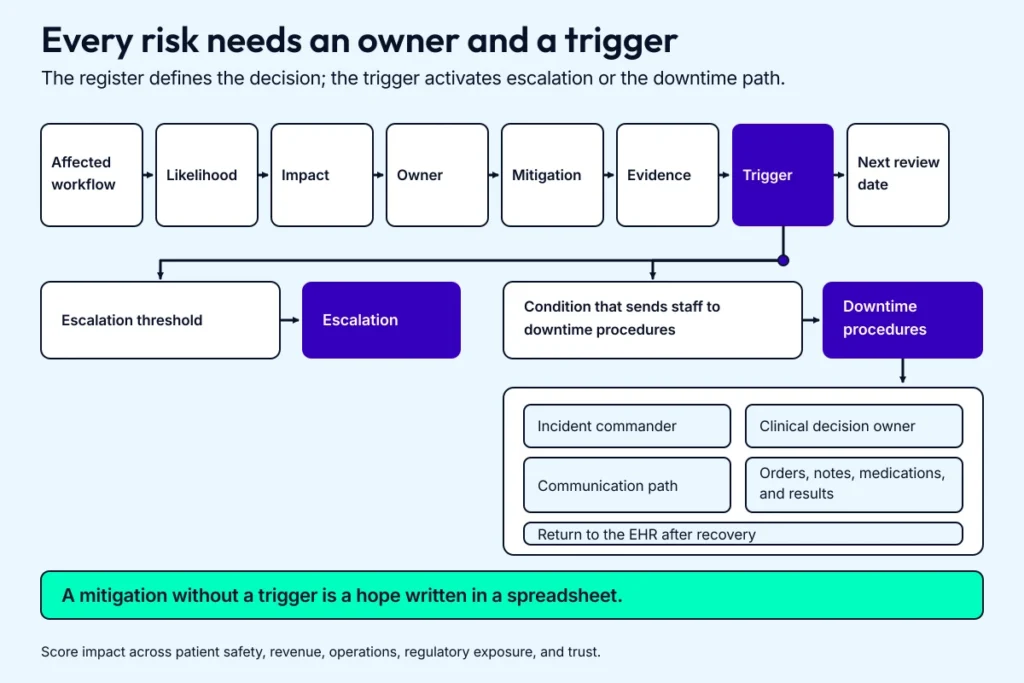
The register becomes operational when evidence tells a named owner exactly when to escalate or switch to the runbook.
Keep the risk register short enough to use
For each risk, record the affected workflow, likelihood, impact, owner, mitigation, trigger, and next review date. Score impact across patient safety, revenue, operations, regulatory exposure, and trust. Keep the register on the meeting agenda and update it when a trigger or owner changes.
Test high-impact risks early
Use pilots, migration rehearsals, interface load tests, billing parallel runs, and role-based UAT to test the assumptions with the highest impact. Tie each mitigation to evidence and an escalation threshold. A mitigation without a trigger is a hope written in a spreadsheet.
Decide the downtime path before go-live
Put these owners and decisions in the runbook:
- the incident commander and clinical decision owner
- the condition that sends staff to downtime procedures
- the communication path for staff, leadership, partners, and patients
- where orders, notes, medications, and results are captured during downtime
- how that work returns to the EHR after recovery
Run a tabletop drill before go-live. Chaos is cheaper in a conference room.
Use insurance for tail risk
Have legal and finance review cyber liability, privacy breach, and business-interruption coverage against the EHR implementation risk register. Put uptime, incident notice, recovery, service credits, and data-return duties in vendor contracts. Insurance covers catastrophic loss; the implementation plan handles the failures the team can prevent or contain.
Topflight’s published EHR implementation work focuses on the interface layer
For Roundr, a hospital rounding app connected to Epic, Topflight used FHIR, HL7v2, and Mirth. The published case study records about 700 delivery hours over nine months.
The GaleAI case reports a 97% reduction in coding time and a 15% increase in revenue. It also identified $1.14 million in revenue lost each year. Those are case-reported outcomes from an EHR-connected coding workflow. They document app and integration work around existing EHRs; hospital-wide rollout claims require different evidence.
Our healthcare portfolio includes other healthcare software and EHR integration work. For a review of your vendor, interfaces, and workflow gap, request a meeting.
Related: EHR integration services.
[Reviewed September 2026]
Frequently Asked Questions
How do you implement a new EHR system?
Use an 11-step EHR implementation plan grouped into five phases: 1) strategy and governance; 2) requirements and vendor selection; 3) data, configuration, and quality; 4) training and rollout; and 5) measurement and improvement.
What is EHR implementation?
EHR implementation is the process of planning, configuring, testing, launching, and improving an electronic health record system across a healthcare organization.
How long does it take to implement an EHR system?
An EHR implementation timeline depends on organization size, data volume, interface count, configuration work, training needs, rollout method, and post-go-live support. Build the schedule from those workstreams, then add contingency for vendor access and data cleanup.
What are the key steps in EHR implementation?
The 11 steps are: 1) set goals and success measures; 2) build the team; 3) set budget and time limits; 4) define requirements; 5) demo vendors; 6) select the EHR and lock the plan; 7) migrate and validate data; 8) test the EHR; 9) train staff by role; 10) roll out the EHR; and 11) measure results and improve. They sit inside five phases: strategy and governance; requirements and vendor selection; data, configuration, and quality; training and rollout; and measurement and improvement.
How do I choose the right EHR system for my healthcare institution?
Score each system against clinical workflows, interoperability, security, role-based access, vendor support, certification needs, and total cost of ownership. Use the score to separate requirements the platform can meet through configuration from the ones that need custom development.
What should I consider for data migration during an EMR implementation?
For an EMR implementation, inventory and clean the source data, map it to the target model, rehearse the transfer, and reconcile clinical and financial records after each run. Set cutover, rollback, retention, and recovery rules before production migration.