

The tech progress has come for elders. When everyone around is on a phone getting all sorts of things done, you’re likely to catch the same mobile bug.
Health is what’s top of mind for many older people. So senior care app development has become a hot topic among healthcare-focused entrepreneurs building for elderly patients, right there with femtech and wearables.
If you’re working out how to develop a senior care app today, the ground has moved since this guide first ran in 2022. Medicare now pays dementia care programs through its GUIDE model, and New York and California have written rules for AI companions. The build advice still starts in the same place: older users forgive a plain app long before they forgive a confusing one.
How do you develop a senior care app that older adults will actually use?
Design for accessibility first, with large text and big tap targets, and give family or clinical caregivers their own portal. Then choose the data path: a phone app, a smartwatch, or connected home devices with no patient app at all. Plan on $80,000 to $160,000 for a custom build, and if Medicare money is part of your model, sell to the practices that bill for monitoring and care management, because the app can’t bill on its own.
Key takeaways:
- Most older Americans now carry a smartphone: 78% of those 65 and older, per Pew Research Center’s 2025 survey. Health apps lagged in the University of Michigan’s last poll on them (2021): only 28% of adults 50 to 80 used one, and non-users blamed lack of interest (51%) far more often than discomfort with technology (14%).
- Accessibility now has a legal date. Providers that take HHS funding, Medicare Part B included, must meet WCAG 2.1 AA in their websites and apps from May 11, 2027 if they have 15 or more employees, and that covers the apps vendors build for them.
- Elderly care app development usually means a patient app or a connected device in its place, a standalone app for providers, and a web portal for management. Even if you only build an on-demand elderly care service app, you must create a web portal to manage it.
- A custom senior care app runs $80,000 to $160,000. For focused, well-scoped builds, AI-assisted development on our pre-built HIPAA-ready modules has brought our healthcare builds in at $25,000 to $97,000, with a $49,000 median.
- Medicare money reaches senior care software through the practices that bill for it: remote patient monitoring and chronic care management codes, plus the monthly fee CMS pays GUIDE dementia programs. Build for the clinician who bills, and capture the documentation they need.
Table of contents:
- Senior care app market overview
- Why develop a senior care app?
- Types of senior care apps
- What’s new in senior care tech for 2026
- 9 things to consider before starting elderly care app development
- Features of an elderly care app
- Compliance: a senior care app answers to more than HIPAA
- 5 steps of senior care app development
- How much does it cost to build a senior care app?
- Topflight experience in developing senior care apps
Senior care app market overview
The US is getting older fast, and most adults 50 and older want to keep aging in place at home, even as care gets pricier. That’s where software earns its spot:
|
Measure |
Figure |
Year |
Source |
|---|---|---|---|
|
Americans 65 and older |
64.6 million, about 19% of residents |
July 2025 |
|
|
Projected Americans 65 and older |
About 71 million |
2030 |
|
|
Americans turning 65 who will develop a disability needing long-term services and supports |
56% |
2022 estimate |
|
|
Median cost of assisted living |
$74,400 a year |
2025 |
|
|
Median cost of in-home care, 44 hours a week |
$80,080 a year |
2025 |
CareScout |
|
Median cost of a private nursing home room |
$129,575 a year |
2025 |
CareScout |
|
US spending on home health care, the medical care home health agencies deliver |
$169.4 billion, projected at about $271 billion by 2030 |
2024 |
|
|
Medicaid spending on home and community-based services, all ages |
$145.9 billion, 64% of its long-term care spending |
2023 |
|
|
Projected growth in home health and personal care aide jobs |
18%, about 847,000 jobs |
2025 to 2035 |
|
|
Adults 50 and older who want to stay in their current home as long as possible |
75% |
2024 |
|
|
Americans 65 and older living with Alzheimer’s |
7.4 million |
2026 |
Most older adults now carry a smartphone. In Pew Research Center’s 2025 survey, 78% of Americans 65 and older owned one, up from 61% in Pew’s 2021 survey, and 90% used the internet. The chart below is Pew’s 2021 snapshot:
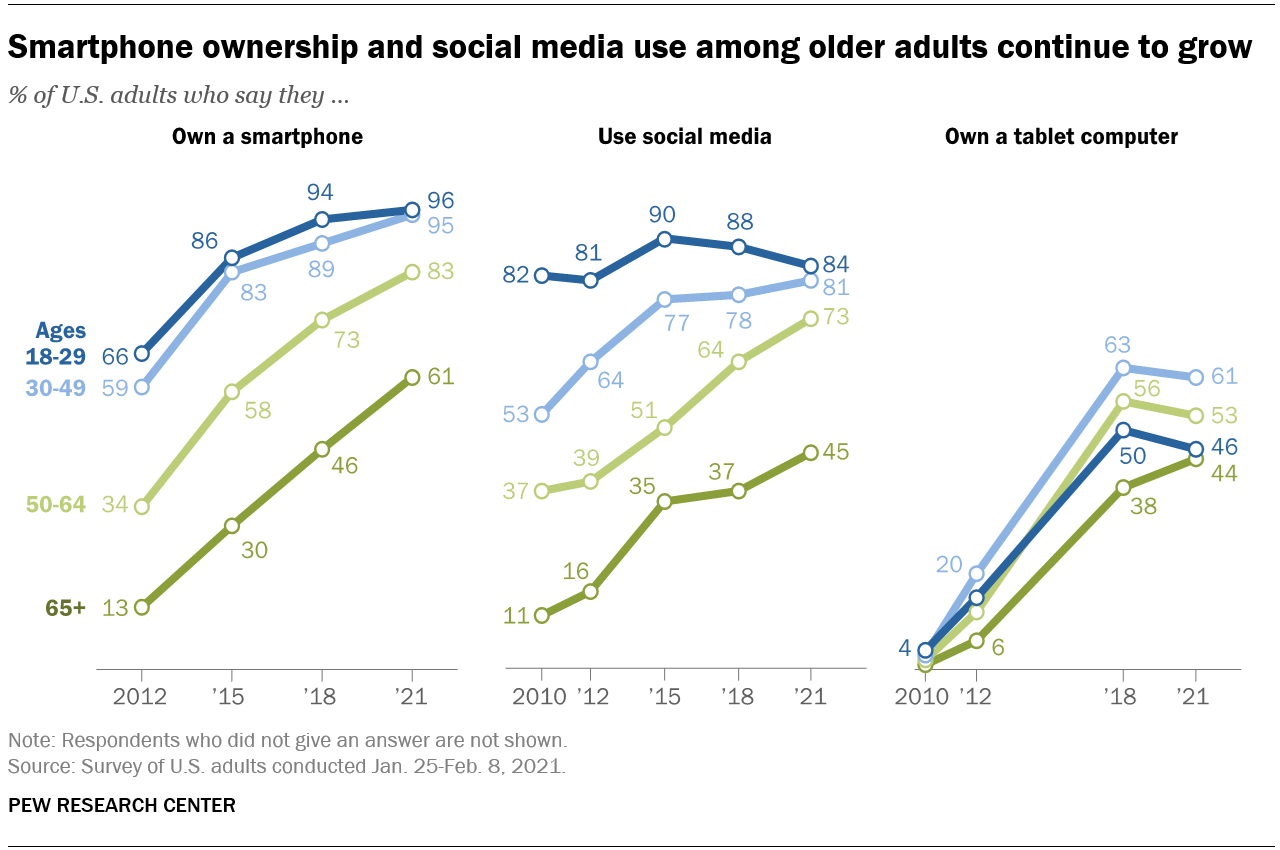
Image credit: Pew Research Center, survey conducted January 25 to February 8, 2021
Phone ownership runs way ahead of health app use. In the University of Michigan National Poll on Healthy Aging’s August 2021 survey, 28% of adults 50 to 80 currently used at least one health app, 16% had used one and stopped, and 56% had never used one.
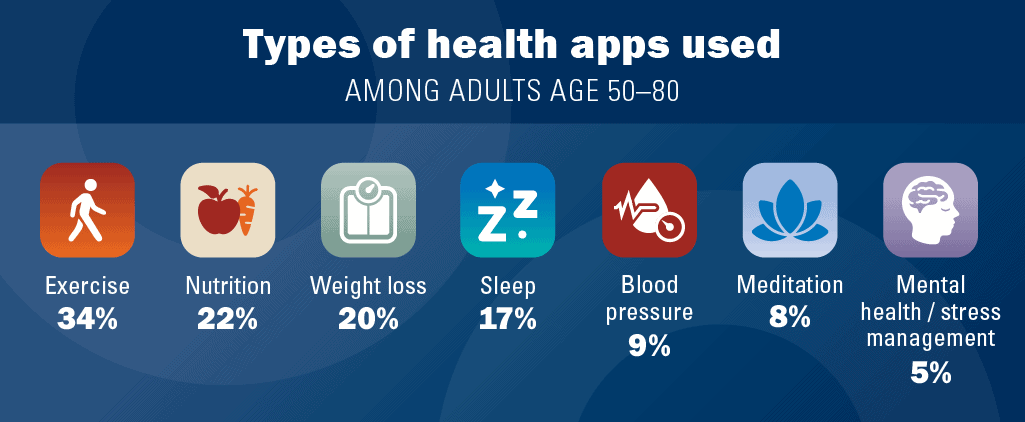 Share of all adults 50 to 80 who use or have used each type of health app. Image credit: University of Michigan National Poll on Healthy Aging, February 2022 report, survey fielded August 2021
Ask non-users aged 50 to 80 why, and discomfort with technology comes last:
- 51% weren’t interested in health apps
- 32% had never thought about using one
- 20% weren’t sure an app could help them
- only 14% were uncomfortable with technology
So the barrier is interest, and providers are the ones with standing to move it. That puts elderly healthcare app development on the buying agenda of provider organizations and home-care agencies.
Search “caregiver” in the App Store and you’ll find dozens of live apps: family coordination tools like Caring Village and ianacare, and home-care agency apps like AxisCare and WellSky Personal Care.
The top of the charts looks different. When we checked Apple’s US top-100 Health & Fitness and Medical charts on September 19, 2026, they carried beginner-workout apps pitched partly at seniors, hearing-aid companion apps and blood-pressure trackers, and we didn’t spot one built mainly for seniors or family caregivers. Provider-run tools like remote monitoring still reach patients through their care team, which is why the provider sale matters.
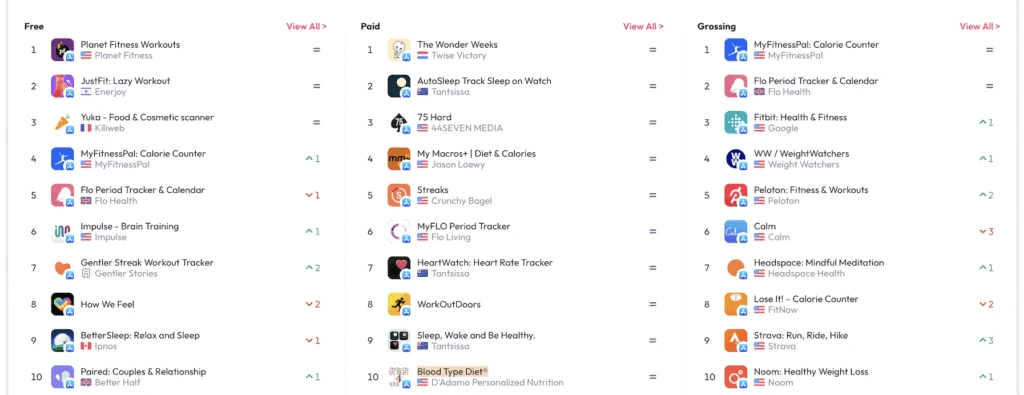
App Store Health & Fitness top charts, November 2022. Image credit: data.ai, acquired by Sensor Tower in March 2024
Why develop a senior care app?
Phones and tablets now ship with serious accessibility features, and the 65+ population keeps growing, so apps can carry more of senior care. Here’s where aged care app development helps most:
- Care accessibility improves. Seniors can send readings from home or get help without a trip. Home is also where Medicaid spends less: $17,298 per home and community-based services user against $54,462 per institutional user in 2023, across all ages and for groups with different care needs.
- Remote care models start working. Doctors see an accurate picture of patients’ everyday lives and can step in with timely help and prevention.
- Clinicians work from one patient’s own data, available remotely, so the care fits that patient.
- Intermediaries drop out. Staffing marketplaces like NurseDash, below, match nurses and CNAs directly with open shifts.
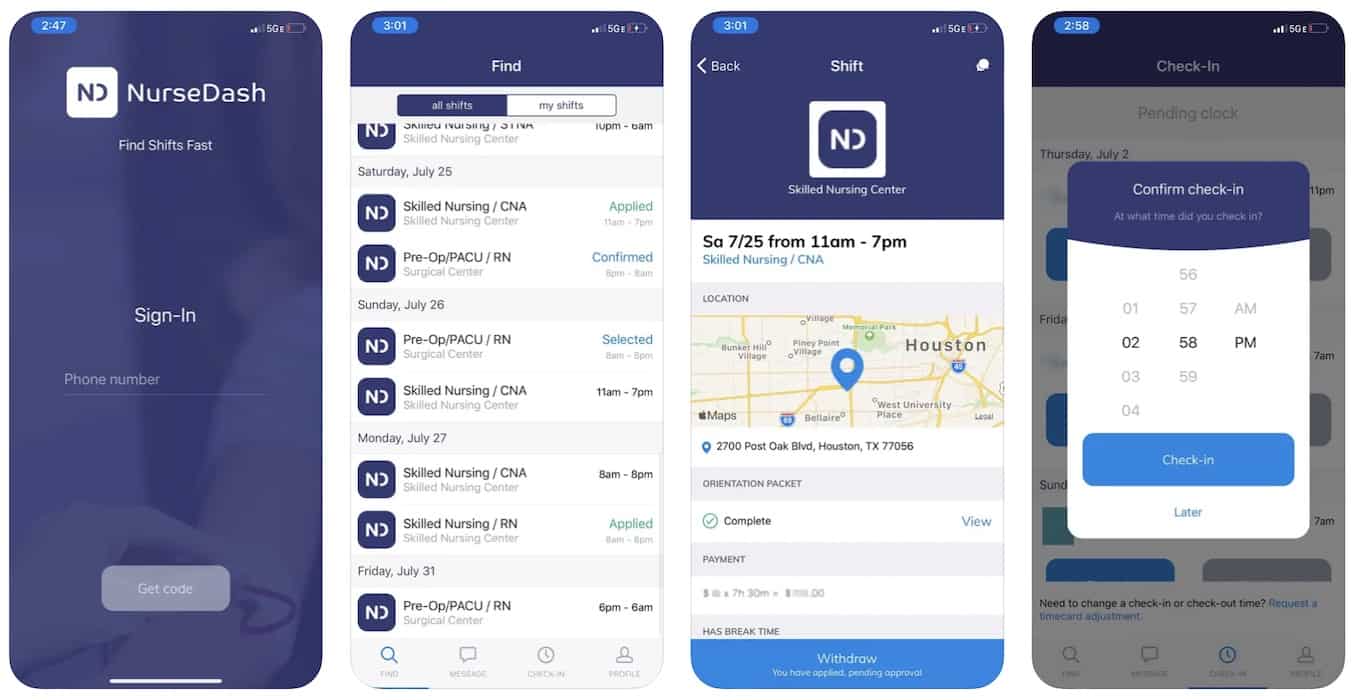 NurseDash, an on-demand staffing marketplace that matches nurses and CNAs with open shifts, including at senior care communities; image credit: App Store, NurseDash
Apps also stretch the staff you have, though they can’t close the gaps on their own: HRSA projects national shortages of about 246,000 licensed practical nurses and 71,000 primary care physicians in 2038. Location services and scheduling automation fill shifts faster. Home care platforms like AxisCare now market AI caregiver matching that weighs availability, driving distance, skills, schedule history and preferences such as pet allergies.
Types of senior care apps
Telemedicine is now a regular part of senior care, and remote patient monitoring is smaller but growing fast. You can build an app for elder care that’s focused on the following:
- telemedicine
- remote patient monitoring (RPM)
Home care agencies also run one kind of software because the law requires it. Since January 2023, federal Medicaid law has required states to use electronic visit verification (EVV) for Medicaid home health visits, on top of in-home personal care visits since 2020, and states that fall short lose part of their federal Medicaid match. If your product serves agencies that bill Medicaid for in-home care, EVV is part of the spec.
But what if the best mobile app for a retired person is no app at all? There’s software that works for doctors and aides, with nothing for the patient to install.
We built one for launch: Dedica Health, the remote patient monitoring platform we made for The Heart Medical Group, a cardiology practice. The platform pulled heart-rate, blood-pressure and step data from connected devices patients used at home and charted it for doctors in a web dashboard. Doctors could message patients from that dashboard too, and for patients it looked like texting.
Note 2 things here:
- a connected home device plus text messages can stand in for a patient app, at least at launch
- Medicare RPM doesn’t need a patient app, since a connected medical device can send readings straight to the practice; a billable telehealth visit still needs live video, or audio only in limited cases

Go zero-app for the people who’d take any excuse to shy away from a phone. Add the patient app later, once the sensor data gives it something to show.
Anyways, what other types of elderly care software can we build? Based on a feature set, these can be:
- fitness applications
- software for training cognitive functions
- lifestyle (nutrition, sleep tracking, etc.)
- create an on-demand app (à la healthcare services marketplaces)
- medication reminders and e-prescription tools
- blood-pressure tracking software
- mental health applications
- fall prevention and fall detection apps
- dementia care and tracking apps
- Parkinson’s care apps
- chronic care management tools for patients with several conditions
Mix and match features inside one app, or combine all of them into a super app if your facility actually runs a coordinated care model.
Last cut: who the elderly care software is for.
- patients
- family caregivers, the relatives who juggle medications and appointments; caregiver app development is built for them
- doctors, nurses (nursing care apps), home health aides, and the agency schedulers who assign their visits
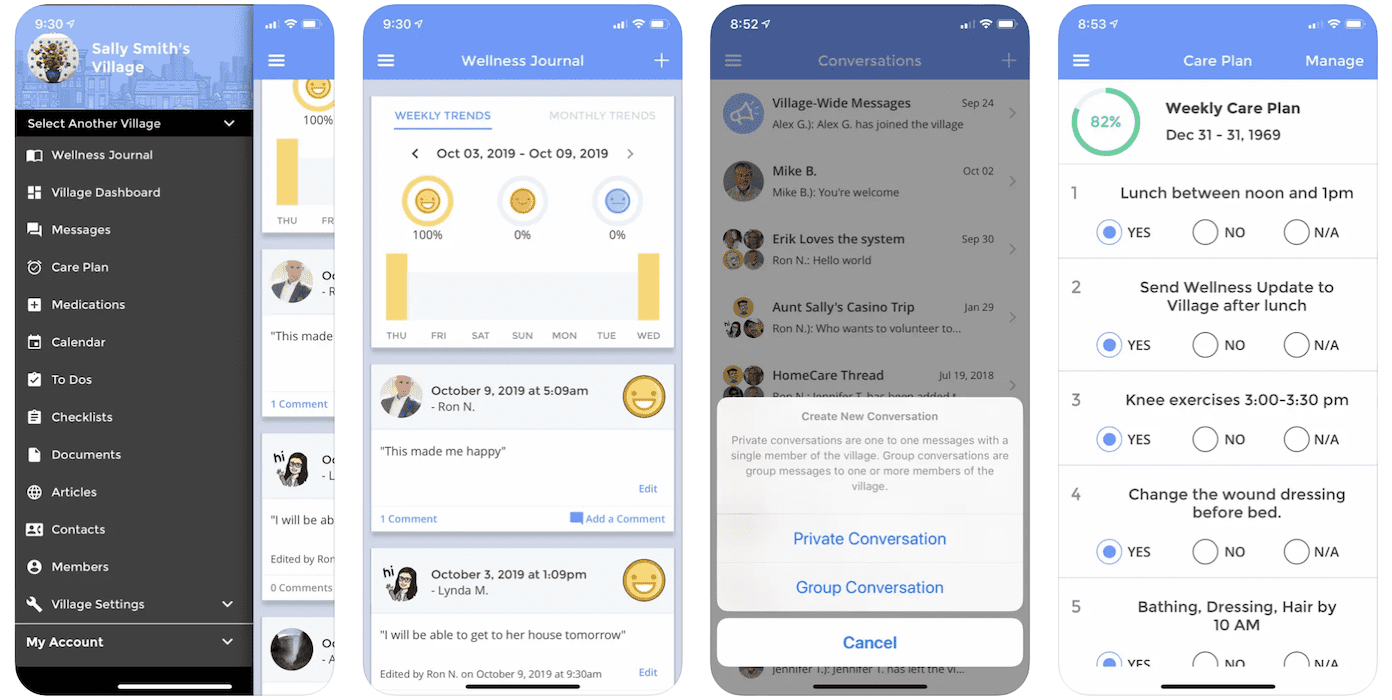
Caring Village: Caregiver App, a family-caregiver coordination app; image credit: App Store, Caring Village
Creating elderly care apps requires the support of a custom mobile application design and development team to meet specific user needs.
What’s new in senior care tech for 2026
Since 2022, 4 things have changed what a senior care product should do or who pays for it.
Medicare pays for more of the care between visits
The Medicare GUIDE model (Guiding an Improved Dementia Experience) began on July 1, 2024 and runs through June 2032. It pays participating practices a monthly per-patient fee to run dementia care for people in traditional Medicare: $68 to $409 a month in base rates for July 2026 to June 2027, depending on the patient’s tier and before CMS’s adjustments. For eligible patients with moderate or severe dementia who have a caregiver, GUIDE also pays up to $2,625 a year for respite care.
Every GUIDE program has to run:
- an interdisciplinary team with a trained care navigator
- a 24/7 support line
- training and support for family caregivers
- respite arrangements
Care navigation, the 24/7 line and caregiver training all run on software. GUIDE pays the program, so a dementia care product earns from it by selling to those programs (CMS’s mid-2026 list named 292 of them) or by contracting as a CMS-approved partner organization that delivers one of the required services. The model is closed to new applicants.
For other conditions, CMS’s ACCESS Model has paid technology-enabled care organizations per patient since July 5, 2026, for high blood pressure, diabetes, chronic musculoskeletal pain and depression. It has no dementia track.
Remote monitoring is easier to bill now. Since January 1, 2026, Medicare pays for RPM months with only 2 to 15 days of readings (CPT 99445) and for a first 10 minutes of monthly management (CPT 99470). CMS’s July 2026 proposal for 2027 would stop counting RPM work done by outsourced monitoring staff, so if it’s finalized, practices will want tools their own staff can run.
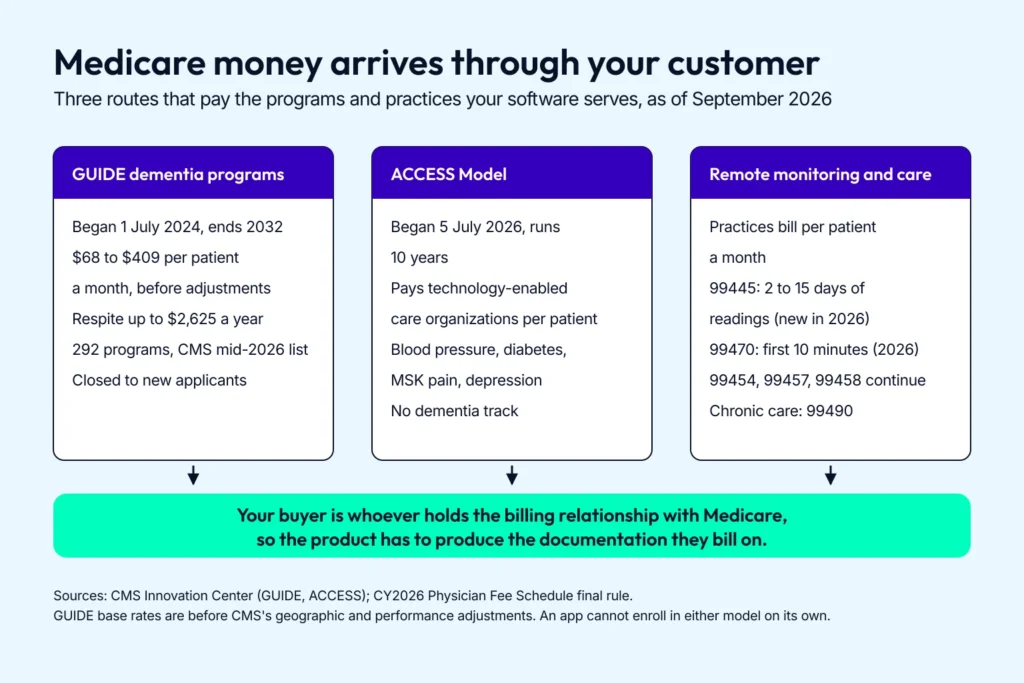
Medicare pays the program or the practice, so a senior care product sells into somebody else’s billing workflow.
AI companions got good enough to need rules
LLMs made companion software conversational, and older adults already use AI. In a February 2025 University of Michigan poll, 55% of adults 50 and older had used voice or chat AI such as Alexa or ChatGPT, and 92% wanted to know when they were dealing with AI.
New York’s State Office for the Aging has placed ElliQ, an AI companion from Intuition Robotics, in older adults’ homes since 2022. In the program’s third year, 94% of clients said they felt less lonely, according to a report Intuition Robotics prepared for the agency from client self-reports. Washington’s Medicaid program now lets case managers authorize ElliQ for some home-care clients at $99 a month, if headquarters signs off.
The controlled evidence is thinner. A 2026 meta-analysis of 8 randomized trials in older adults, covering robots, voice assistants and scripted chatbots, found they eased depressive symptoms slightly and had no significant effect on loneliness.
The law has caught up. Since November 5, 2025, New York has required AI companions to detect self-harm cues, refer users to crisis services such as 988, and remind users at least every 3 hours that they aren’t talking to a human. California’s SB 243, in force since January 1, 2026, adds disclosure and crisis-protocol rules.
So an AI companion for seniors is buildable today if it follows those rules, plus 2 design habits worth keeping everywhere:
- it says plainly that it’s AI, every session
- a real person is always one tap away
Fall detection ships in the watch, so the alert flow is your job
Falls are common enough to design around. In CDC’s latest survey data (2020), about 14 million Americans 65 and older, roughly 1 in 4, reported a fall in the previous year. Detection has moved onto mainstream wearables for seniors, and into the walls:
- Apple Watch turns Fall Detection on automatically for wearers whose age in the Health app is 55 or older, and calls emergency services if they stay still for about a minute after a hard fall.
- Google Pixel Watch and Samsung Galaxy Watch have fall detection too, but the wearer has to switch it on.
- Ambient radar sensors such as Vayyar Care flag falls in residents’ bedrooms and bathrooms in senior living communities, with no wearable and no camera.
- Pixel Watch 3 and later add Loss of Pulse Detection, FDA-cleared in February 2025, which can call emergency services if the wearer’s pulse stops and they don’t respond, though Google says it isn’t meant for people with known heart conditions.
Watches still miss falls: a 2024 meta-analysis that pooled 3 real-world studies of consumer wearables, in adults of all ages, found they caught about 82%, with low and highly uncertain specificity. Design the alert flow for misses and false alarms alike, with a quick “I’m OK” cancel and an easy manual call for help. Your own watch app gets fall events only after Apple grants it a special entitlement.
Caregivers got their own software
In 2025, 63 million Americans were family caregivers, according to AARP and the National Alliance for Caregiving, most of them caring for an older adult. Cariloop, which employers offer to staff caring for relatives, raised a $20 million Series C in 2024.
Paid caregivers are getting funded tools too: Sage, which builds a care platform for senior living and skilled nursing staff, raised a $65 million Series C in March 2026 and added a $35 million debt facility in July.
For your product, caregiver coordination means a family caregiver portal with its own logins and permissions. When the app belongs to a HIPAA-covered provider, a relative with health care power of attorney gets the same access as the patient, within that authority.
Other family members can see what’s relevant to their part in the care if the patient agrees or doesn’t object. Build those roles in from the first sprint; bolting them on later means rewriting your permission model.
9 things to consider before starting elderly care app development
The constraints in elderly caregiving app development surface late and cost more to retrofit than to design in up front. Here are 9 things our healthcare app development company keeps running into:
Accessibility
Accessibility is the first thing that comes to mind, right? Larger fonts, higher contrast, less motion and support for the screen readers built into both platforms (VoiceOver on iPhone, TalkBack on Android) are the accessibility basics that make your app easier for older people to use.
Use WCAG 2.2 Level AA as the working target:
- text contrast of at least 4.5:1
- text that scales to 200% without breaking the layout
- tap targets well above the 24×24-pixel minimum
- time limits the user can turn off or extend
Our own defaults go further: 60pt for primary actions and 80pt for critical ones like SOS. Our CEO Joe Tuan calls them “engineering defaults from clinical reasoning” in our Parkinson’s care app guide, and they still need validating with real users.
Test with Apple’s Assistive Access and the simplified Android modes (Simple View on Pixel, Easy mode on Samsung) switched on. If the app belongs to a provider that takes HHS funding, WCAG 2.1 AA is also a legal requirement with a deadline; the compliance table below has the dates.
Simple UX/UI
Strip your design down to the fewest taps per screen and the biggest tap areas your layout allows.
Also Read: 7 UX/UI Design Tips and Health App Design Guide.
Go out of your way to simplify senior care interfaces. Older users probably run fewer apps overall and aren’t used to UX tricks that keep changing. Sometimes that means breaking with trending UX patterns to keep the flows that feel logical to seniors.
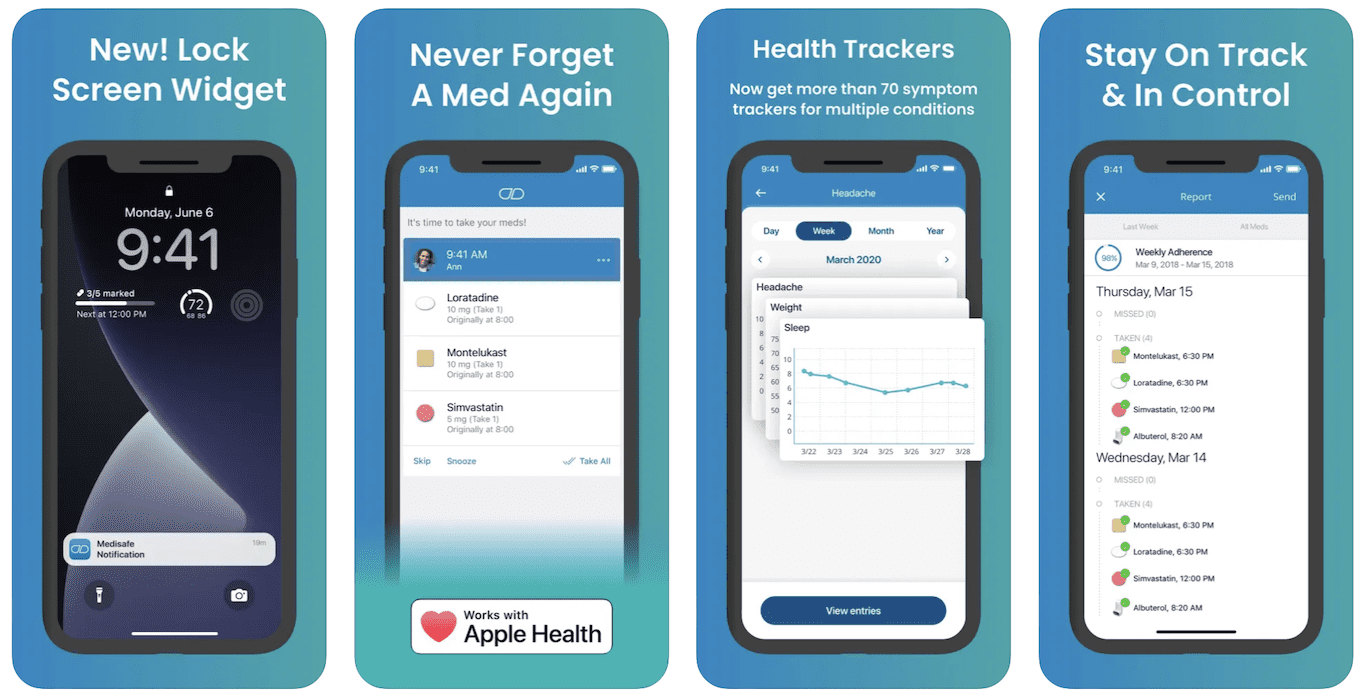
Image credit: App Store, Medisafe
Contextual help
Contextual help means visual and voice clues plus short mini-tutorials that explain how the app works. Once your user knows a feature, let them switch the help off in settings.
Support for older phone models
If your audience is still comfortable with older phone models, make sure your app works on them and respects the UX/UI patterns those phones use. Google Play requires new apps and updates to target Android 16 (API level 36) as of August 31, 2026. Your minimum SDK setting is a separate dial, and it decides how far back the app runs.
So you can meet Play’s rules and still support the older handsets many seniors keep. On iPhone, iOS 27 still runs on the iPhone 11 and the second-generation iPhone SE. For budget Android phones, add a test pass on Android (Go edition) devices.
Extra focus on edge cases
What happens when the app goes offline, and what does your user see when a request fails? Seniors abandon apps that throw confusing error messages or freeze. Budget real test time for the unhappy paths.
Voice control
Older people may prefer voice commands, as long as you explain exactly how they work. Plan voice features around Siri on iPhone and Gemini on Android. Google said that from September 4, 2026, most people would no longer be able to use or switch back to Google Assistant on phones and tablets.
On iPhone, expose key actions (log a reading, call a caregiver) through Apple’s App Intents so Siri and Shortcuts can trigger them. Google’s AppFunctions API does the same for Gemini on Android 16 and later. It’s still an experimental preview.
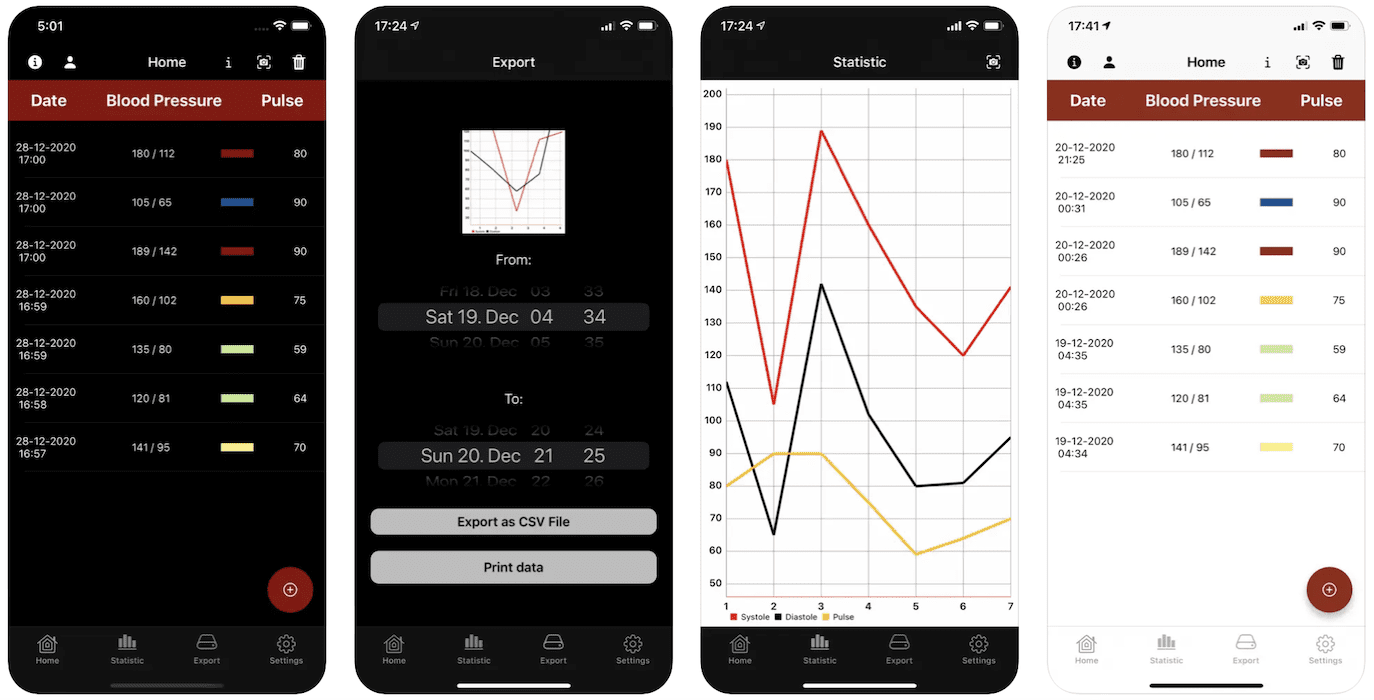
Image credit: App Store, Blood Pressure Diary
Target platform
Do you need a dedicated smartwatch app for the wrist sensors behind fall detection or ECG? Will your fitness app run better on Apple TV or Google TV? So pick the platform whose built-in capabilities match what older adults actually need.
Human support
Some say, “Give ’em chatbots!” A few years ago I said don’t. LLMs changed my mind: an AI assistant can now handle everyday questions and check-ins.
So label it as AI and keep a good old tap-to-call button, or a live chat with support staff, one tap away.
Consistent user experience
Modern apps integrate with each other pretty well (maps, contacts, weather, calendars), and you can link out to almost any other mobile app from your senior app. Handle as much of that third-party functionality as you can inside your elderly care app.
For example, if you show navigation to a medical facility, do it right inside the app instead of throwing your user into Google Maps or Apple Maps. The fewer handoffs your user hits, the longer they stay in your app.

Features of an elderly care app
Treat this table as a menu of what most senior care products end up needing:
|
Feature |
Who uses it |
Why it matters for seniors |
|---|---|---|
|
SOS and crisis button |
Senior |
One press sends an alert with location to emergency contacts or care staff. For 911, point users to the phone’s built-in Emergency SOS, because an ordinary app can’t place a 911 call without the user confirming it. Surface 988 for mental health crises: men 75 and older have the highest suicide rate of any age group of men (CDC, 2023). |
|
Fall detection |
Senior, caregiver |
Start from the watch’s built-in detection or an ambient sensor; the false-alarm flow is the hard part. |
|
Medication reminders |
Senior, caregiver |
43% of Americans 65 and older took 5 or more prescription drugs in the past 30 days (NCHS, 2017 to March 2020). |
|
Family caregiver portal |
Family caregiver |
A shared view of readings and alerts, with access set by each relative’s legal authority or the patient’s agreement. |
|
BLE medical device sync |
Senior, clinician |
Readings from blood-pressure cuffs, scales, glucose meters and pulse oximeters arrive without typing. Medicare RPM requires automatic transmission from a device that meets FDA’s device definition. |
|
Location awareness and geofencing |
Caregiver |
The Alzheimer’s Association says 6 in 10 people living with dementia will wander at least once, so geofenced alerts buy caregivers time. |
|
Telehealth video |
Senior, clinician |
Medicare covers telehealth at home anywhere in the US through December 31, 2027. Make joining a visit one tap on a big button, straight from the appointment reminder. |
|
Notifications and reminders |
Senior |
Appointments and check-ins. Keep them few and specific, or they get muted. |
|
Speech recognition and voice assistants |
Senior |
Siri actions through App Intents help users with limited dexterity or vision; Gemini actions through Google’s AppFunctions are still in preview. |
|
AI assistant or companion |
Senior |
Everyday questions and check-ins. |
|
Accelerometer and other smart sensors |
Senior, clinician |
Fall detection and sound-level measurement from the phone’s or watch’s built-in sensors, which on-device AI and ML can turn into alerts. |
|
Augmented and virtual reality |
Senior |
Early studies are promising for exercise and balance. Heavy headsets and fiddly setup make it a later-release feature for most senior products. |
|
Mobile payments |
Family caregiver, senior |
Private-pay home care and copays. |
On a watch, fall detection runs off the built-in sensors, so our wear os development tutorial walks you through the Wear OS build.
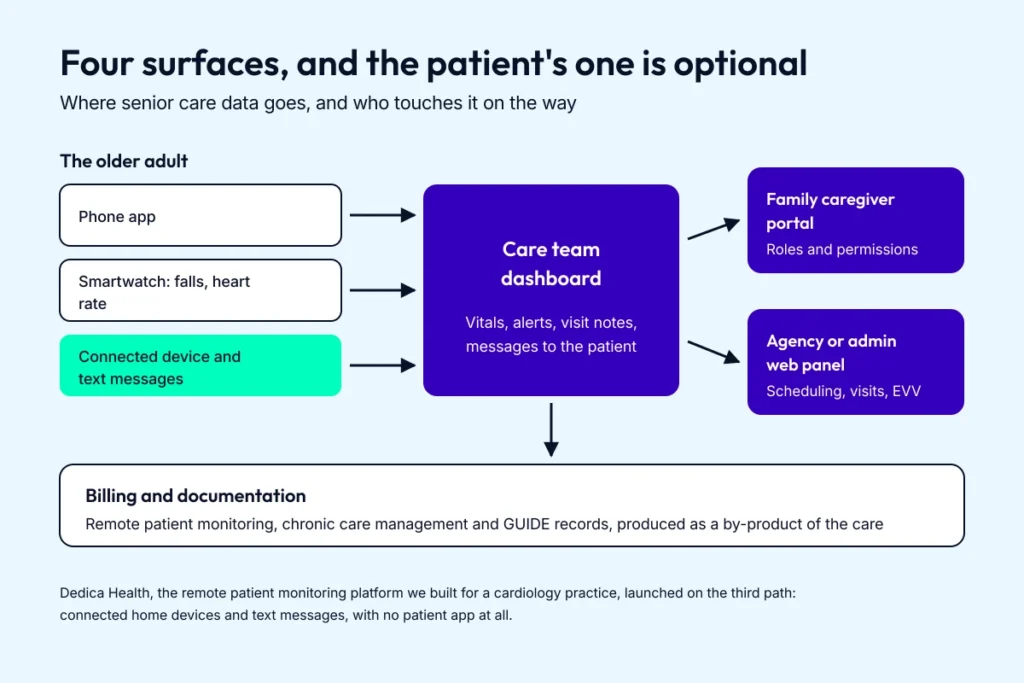
Build the caregiver portal and the admin panel in the first sprint; the patient surface is the one you can leave out.
Your providers and patients decide which rows ship first. The tech comes second.
Compliance: a senior care app answers to more than HIPAA
Which rules apply depends on who pays for the care and whose data flows through your app. These are the ones that come up on senior care builds:
|
Rule |
When it applies |
What it means for the build |
|---|---|---|
|
Your customer is a covered entity, such as a home health agency or physician practice, and PHI flows through the app |
Sign a BAA with your customer and flow it down: every subcontractor that stores or handles PHI for you, such as your cloud host, needs a written BAA with you. Many private-pay senior care operators aren’t covered entities, which puts you under the FTC and state health-data rules instead. |
|
|
FTC Health Breach Notification Rule |
A direct-to-consumer app outside HIPAA that can pull health data from more than one source, such as a wearable plus manual entries |
Unauthorized sharing counts as a breach. Notify affected users within 60 days, and the FTC at the same time when 500 or more people are affected. |
|
State consumer health data laws |
Consumer apps handling health data of residents of states such as Washington (My Health My Data Act) and Nevada |
Consent before collecting health data beyond what the requested service needs, and separate consent before sharing it. |
|
HHS Section 504 and Section 1557 rules |
The app belongs to an organization that receives HHS funding, which includes providers paid under Medicare Part B |
WCAG 2.1 AA for its websites and apps, vendor-built ones included. The Section 504 deadline is May 11, 2027 for organizations with 15 or more employees and May 10, 2028 for smaller ones. |
|
Electronic visit verification (21st Century Cures Act) |
Agencies billing Medicaid for in-home personal care or home health |
Capture the service, who received it, who provided it, the date, the location, and start and end times for every visit. |
|
The app claims to detect or manage a condition, analyzes readings to raise clinical alerts, or gives patient-specific dosing advice |
Wellness positioning stays outside device rules, and simple schedule reminders fall under FDA enforcement discretion. Clinical alerts and treatment advice make it device software, so settle the intended-use wording before the marketing copy. |
|
|
Medicare billing rules (RPM, CCM, APCM) |
Your customer bills Medicare for monitoring or care management |
The practice bills, and the app supports it: automatic device data and documentation that holds up in an audit, including time logs for the time-based RPM and CCM codes. |
|
State AI companion laws |
Companion-style chatbots used in New York or California |
AI disclosure, which in California applies when a user could mistake the bot for a human, and a self-harm crisis protocol; New York also requires a reminder at least every 3 hours. |
The 2 rows that catch founders late are the HHS accessibility rules and the FDA device rules. Accessibility shows up as a contract clause. FDA intended use rides on one line of marketing copy that can turn a wellness feature into device software.
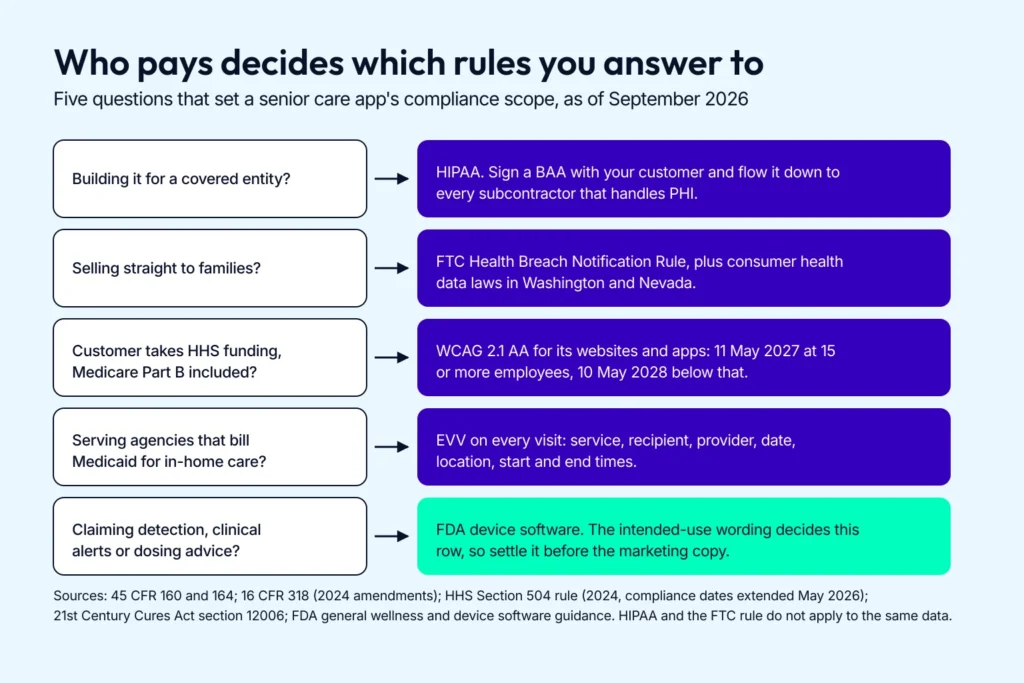
Who pays for the care and whose data you hold decide the rule set; the FDA row turns on how you word intended use.
5 steps of senior care app development
A senior care app sits inside the same healthcare app categories we covered in earlier posts.
Your users are older, which changes the design targets and the testing pool. The build sequence of elderly health care app development remains the same:
- Discovery: we kick it off with our Pre-flight Workshop
- Prototyping: creating and validating an app simulation
- Proof of concept: critical features, delivered within 3 months
- MVP: iterating on the proof of concept until it’s ready for the general public
- Maintenance: gathering stats on user engagement and app performance to guide further elderly care app development
For a senior audience, 2 of those steps need extra work. Recruit adults 65 and older for prototype testing at step 2, because, as Joe Tuan puts it, “It’s 10x cheaper to fix a design flaw while prototyping than during development.” Then run an accessibility audit against WCAG 2.2 AA before the MVP ships at step 4.
The proof of concept at step 3 looks different depending on what you’re building. A fall-detection product spends it validating the algorithm and the false-alarm flow; a simpler build spends it standing up a low-code/no-code pilot to test the idea with real users.
You can find more details in the previous blogs about e-prescription, fitness, yoga, mental health, chatbot, skincare, telehealth, pharma, meditation, on-demand physiotherapy, pill reminder, appointments, nutrition, women’s health, RPM, and IoT.
Whichever profile fits your app, the 5 steps hold. Start from the closest guide above and layer the senior-specific work on top.
Related: How to Build an On-Demand Pediatric App
How much does it cost to build a senior care app?
Senior care app development cost runs $80,000 to $160,000 for a custom build, depending on the type of software. A no-code pilot starts at $40,000. That’s enough to test a senior care app idea with real users before you commit to a custom build.
For focused, well-scoped builds, pairing AI-assisted development with our pre-built HIPAA-ready modules has brought our healthcare builds in at $25,000 to $97,000, with a $49,000 median. Sign-in and roles, secure messaging, video calls, scheduling and dashboards come ready, so the budget goes to what’s specific to your seniors and their caregivers.
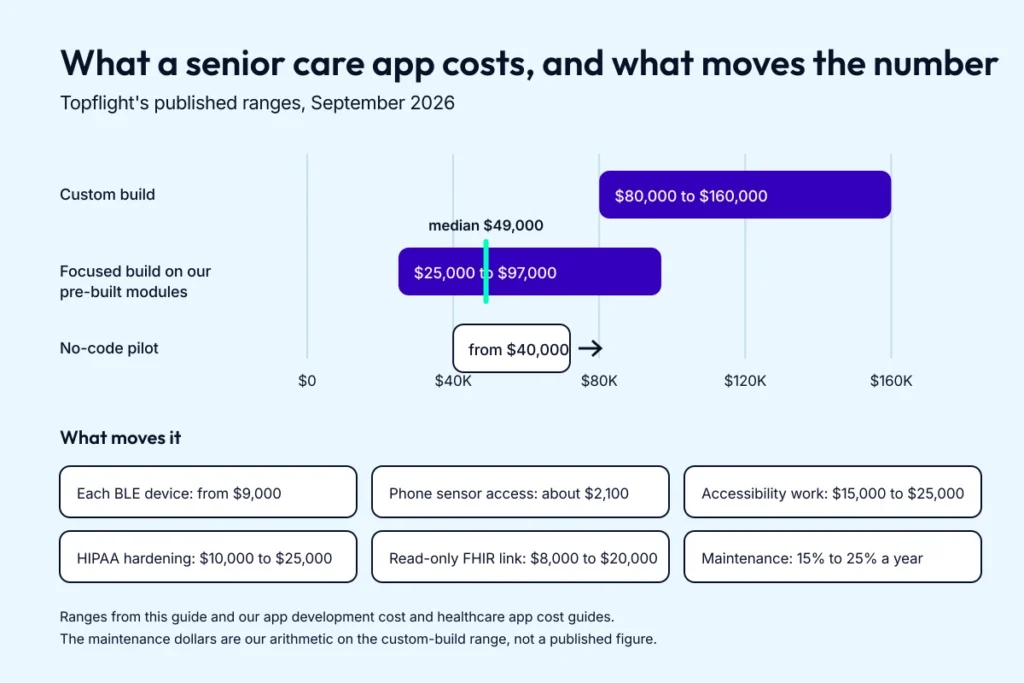
Scope and device work move a senior care budget more than the length of the feature list.
Our app development cost and healthcare app cost guides price the line items a senior care build usually runs into:
|
Line item |
Typical cost |
Note |
|---|---|---|
|
Each BLE device integration (cuff, scale, glucose meter) |
From about $9,000 |
Per device type |
|
Phone sensor access, such as the accelerometer |
About $2,100 per sensor |
Sensor access only; a validated fall detection feature costs more |
|
Accessibility compliance (WCAG AA) |
$15,000 to $25,000 |
Worth budgeting from the start for this audience |
|
HIPAA hardening |
$10,000 to $25,000 |
When you handle data for a covered entity |
|
Read-only EHR connection (FHIR) |
$8,000 to $20,000 |
Write-back costs more |
|
Maintenance and support |
15% to 25% of the build per year |
Our arithmetic: about $12,000 to $40,000 a year on an $80,000 to $160,000 build |
We price in stages, once we know what you’re building and the outcome you’re after. Current starting prices for each engagement are on our FAQ page.
Each engagement brings a full product team: an architect, product strategy, UI/UX design, full-stack and machine learning engineers, DevOps and security, and QA automation.
Topflight experience in developing senior care apps
Our flagship here is Dedica Health, the remote patient monitoring platform we built for The Heart Medical Group’s cardiology practice, whose patients were mostly seniors.
As Joe Tuan put it, “the first release deliberately skipped a consumer mobile app, taking patient reports over SMS and sensor data through an aggregation API, because that was the shortest path to billable, documented data.” The MVP reached 1,100+ patients monitored daily. More than 80% of them hit their CPT code targets under the RPM billing rules of the time, and the platform closed a $300,000 ARR SaaS deal.
Visitry, a B2B home health staffing marketplace we built for Kinesio Rehab, pairs an agency dashboard with a mobile app for field clinicians. Its short-term wins: 33% more patients receiving home health care each month, and 10% to 15% savings on contractor staffing costs.
We’ve built consumer health apps too, like Geneium, a DNA-based skincare app for ARA Genomics.
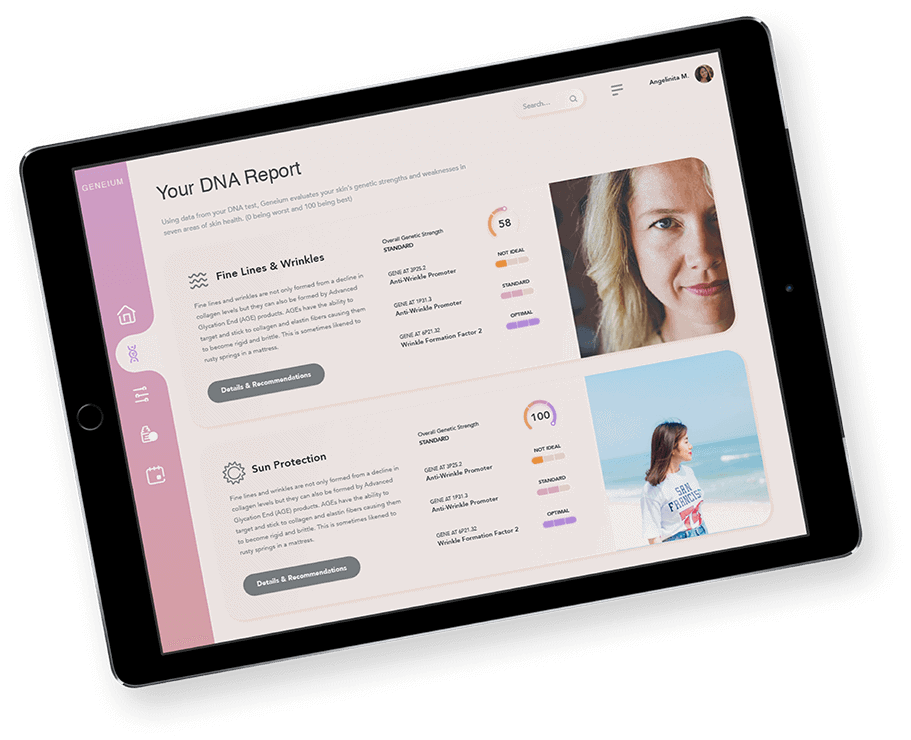 The Geneium app reads a customer’s DNA results and turns them into a skincare routine.
Two more builds sit next to senior care, and their parts carry over. For Goldie Floberg’s group-home caregivers, we built Mi-Life, a voice-and-text AI assistant that answers questions about each client’s care plan and sends medication reminders; medication errors dropped 72%.
Allheartz, a remote therapeutic monitoring platform we built for physical therapy and sports care, uses computer vision to measure joint angles and range of motion from at-home videos. It cut in-person visits by up to 50% and clerical work by up to 80%.
If you’re looking for an elderly care app development company that has shipped remote monitoring, home health staffing, caregiver tools and consumer health apps, get in touch today.
[Reviewed September 2026]
Frequently asked questions
What is the top priority when developing apps for the elderly?
Ease of use, moderate use of technologies, capped feature list, and accessibility options.
Why develop apps for senior care?
To reach people who can’t easily get to a clinic, and to cut the mistakes that happen between visits. With Mi-Life, medication errors at Goldie Floberg’s group homes dropped 72%.
What tech stack is perfect for senior care software development?
There’s no such thing. We know React Native and Flutter get the job done when working on a mobile app for patients. And React/Node is a powerful combo for creating web platforms for care providers.
How long does it take to create an elderly care application?
6 to 9 months for an MVP that’s ready to generate traction. Besides the consumer app, you’ll usually need an admin interface to manage it, and sometimes separate front ends for providers.
How much does it cost to build a senior care app?
Senior care app development cost runs $80,000 to $160,000 for a custom build. For focused, well-scoped builds, AI-assisted development on our pre-built HIPAA-ready modules has brought our healthcare builds in at $25,000 to $97,000, with a $49,000 median, and maintenance adds 15% to 25% of the build each year.
What features matter most in an app for elderly users?
An SOS button that shares location, medication reminders, fall alerts from a watch or home sensor, and a family caregiver portal with the right permissions. Large text, big tap targets and screen-reader support matter as much as any feature.
Can senior care apps bill Medicare (RPM / GUIDE model)?
The clinician or program delivering the care bills, and the app supports it. Medicare pays practices for remote patient monitoring (CPT 99453, 99454, 99457 and 99458, plus 99445 and 99470 since 2026) and chronic care management (99490 and related codes), and it pays GUIDE dementia programs a monthly per-patient fee. CMS’s ACCESS Model pays enrolled technology-enabled care organizations directly; an app on its own can’t enroll.
How do you make an app accessible for older adults?
Design to WCAG 2.2 Level AA: 4.5:1 text contrast, text that scales to 200% without breaking layouts, big tap targets, and full VoiceOver and TalkBack support. Test with older users and with Assistive Access and Android’s simplified modes switched on. If your customer takes HHS funding, including Medicare Part B, WCAG 2.1 AA is legally required from May 11, 2027 for organizations with 15 or more employees and from May 10, 2028 for smaller ones.