

Forecasts put the global telehealth market at ~$455B by 2030 (24.68% CAGR), but building in health still isn’t a gold rush—it’s an infrastructure game. In 2025, U.S. digital health funding rebounded to $14.2B (+35% YoY) while capital concentrated into fewer winners, which means buyers and investors want workflow ROI, not shiny demos. This healthcare app development guide walks through what to build (features, compliance, integrations like EHR/FHIR), how to budget, and how to launch and iterate without breaking care delivery.
Table of Contents:
- What Is a Healthcare App?
- Must-Have Features in a Healthcare App Development
- The 5 Steps to Build a Healthcare App
- How Much Does it Cost to Create a Healthcare App?
- Best Practices and Modern Capabilities in Healthcare App Development
- Monetization Models of a Healthcare Application
- How to Choose a Healthcare App Development Company
- Develop Your Healthcare App With Topflight
Key Takeaways
-
Treat “healthcare app” as a workflow product first (patients, clinicians, admins), not a UI project—your feature list should map to who does what, when, and where it breaks today.
-
Start with the boring must-haves (auth/roles, consent, audit trails, data storage, integrations) before “AI/next-gen” add-ons—otherwise you’ll ship a demo that collapses in real care delivery.
-
Budget realistically: a credible MVP usually starts around $60,000+, and costs climb fast once you add integrations, compliance hardening, and QA depth.
-
Follow a disciplined build sequence (discovery → UX → architecture → development → launch/iteration) and lock scope per phase—most “runaway” healthcare projects fail in the handoffs.
-
Pick partners like you’re hiring a long-term operator, not a contractor: prioritize healthcare domain proof, security posture, and post-launch support—not just a glossy portfolio.

What Is a Healthcare App?
A healthcare app is software that supports care delivery—not just “health tracking.” It can capture patient data, help clinicians document and make decisions, coordinate appointment scheduling, or move information between systems like EHR platforms (often via FHIR/HL7).
In practice, healthcare mobile application development lives at the intersection of workflow, data security, and regulation (HIPAA/GDPR/FDA depending on use).
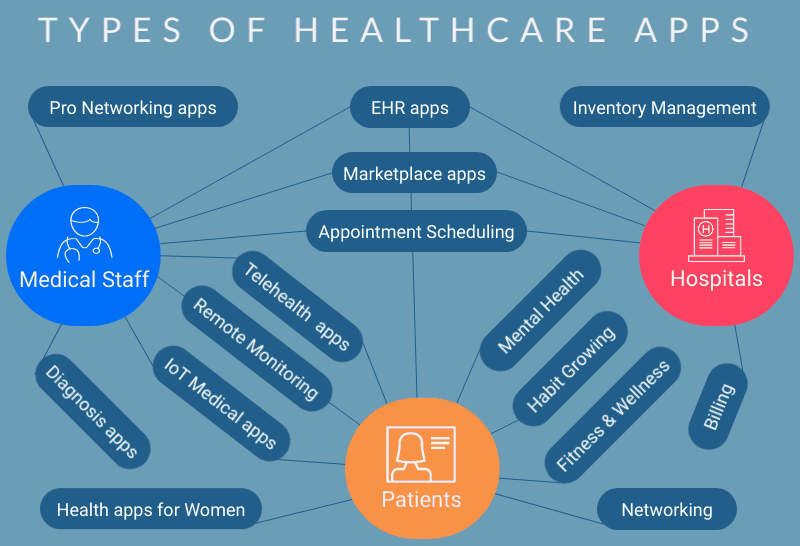
Most teams building a product in medical app development land in one (or more) of these buckets:
- Clinical workflow apps: documentation, decision support, coding support
- Patient engagement apps: telemedicine, messaging, education, adherence
- Remote patient monitoring (RPM): wearables / connected medical devices, vitals, alerts
- Care navigation + admin ops: scheduling, intake, benefits, referrals
- Condition-specific digital therapeutics: MSK, mental health, chronic disease programs
Healthcare Apps for Providers
Provider apps live inside clinician workflows: documentation, clinical decision support, and reducing admin load (burnout’s favorite food). Tools like Abridge and Ambience Healthcare are good examples: they focus on turning patient-clinician conversations into structured documentation and coding outputs that fit into real EHR workflows.
Healthcare Apps for Patients
Patient apps focus on access, self-management, and engagement—think telemedicine, reminders, and behavior change. Headspace is a classic patient-facing mental health example (guided sessions + “SOS” moments), while PatientsLikeMe shows the community + tracking model for chronic conditions.
Health Apps for Medical Administration Staff
Admin-facing apps aim at the operational bottlenecks: appointment booking, intake, insurance/eligibility checks, routing, and patient communications. In many orgs, this is where app development for healthcare quietly pays for itself—because fewer manual handoffs means fewer no-shows, fewer backlog fires, and less staff time spent playing “phone tag.”
Benefits of Healthcare Apps for Patients
- Faster access to care (telemedicine + scheduling)
- Better continuity (medical history, meds, after-visit guidance)
- Higher engagement (reminders, tracking, patient portals)
- Improved outcomes via monitoring + timely interventions (RPM / wearables)

Benefits of Healthcare Apps for Providers
- Less documentation burden (ambient AI + templates)
- Faster decisions with better data visibility (dashboards, trends, alerts)
- Better coordination across teams (secure messaging + shared plans)
- Cleaner integration into the delivery system (EHR + interoperability)
Must-Have Features in a Healthcare App Development
If you want healthcare app development to survive real-world care delivery (not just a demo day), you need a baseline that covers patient data, HIPAA compliance, data security, and integrations (EHR/FHIR/HL7) before you chase “nice-to-haves.”
Must-Have Features for Patient-Facing Apps
For many apps, the highest-ROI reminders are medication-related: prescription refills, dose schedules, and “missed dose” follow-ups (with safe defaults and clinician-approved wording).
|
Feature |
Why it matters |
Common implementation notes |
|---|---|---|
|
Secure sign-up + authentication |
Protects access to medical records / sensitive patient data |
MFA/2FA, device-based auth; role-aware sessions |
|
Patient profile + medical history |
Enables continuity of care and personalization |
Structured history, meds, allergies; data validation |
|
Appointment booking + scheduling |
Direct impact on access + staff workload |
Time slots, reminders, cancellation rules, waitlists |
|
Telemedicine + secure messaging |
Covers remote care + follow-ups (telehealth/telemedicine) |
HIPAA-ready video/messaging provider; audit trails |
|
Push notifications + reminders |
Boosts adherence and reduces no-shows |
Medications, appointments, care plan tasks |
|
Health tracking / RPM inputs |
Supports chronic care + monitoring |
Wearables (heart rate, blood pressure, glucose levels), manual logs |
|
Integrations (HealthKit/Google Fit/Samsung Health) |
Faster onboarding + richer health monitoring |
Treat as “optional” unless the use case needs it |
|
Consent + privacy controls |
Regulatory + trust baseline (HIPAA/GDPR) |
Granular consent, data export/deletion where applicable |
|
Security baseline |
Non-negotiable in mobile health app development |
Encryption, access controls, audit logging |
Related: How to Develop a Telehealth App
Related: How to Build a Patient Portal App
Must-Have Features for Provider-Facing Apps
|
Feature |
Why it matters |
Common implementation notes |
|---|---|---|
|
Role-based access control (RBAC) |
Keeps protected health information (PHI) scoped to the right medical professionals |
Roles: clinician/admin/biller; least privilege |
|
Patient search + chart view |
Core daily workflow in hospitals/clinics |
Fast lookup, filters, “last seen,” active problems |
|
Documentation + clinical notes |
Reduces admin drag; improves traceability |
Templates, voice dictation, structured fields |
|
Care team collaboration |
Smooth handoffs improve patient outcomes |
Secure messaging, tasking, escalation paths |
|
EHR integration readiness |
Providers won’t retype data forever |
APIs, HL7/FHIR mapping, Epic/Cerner considerations |
|
Order/referral support (as needed) |
Directly supports care delivery operations |
LIS, imaging, referrals routing; permissions |
|
Audit logs + reporting dashboards |
Compliance + ops visibility |
Who accessed what/when; anomaly flags; dashboards |
|
Security + compliance controls |
Required for clinical environments |
Encryption, secure session handling, device policies |
Also, read our guide on How to Create an EMR/EHR System.
The 5 Steps to Build a Healthcare App
If you’re mapping out how to develop a healthcare app, this healthcare mobile app development guide breaks the development process into five steps that keep delivery grounded in real clinical workflows, patient engagement, and compliance (HIPAA/GDPR/FDA where relevant).
Step #1: Define Your Audience (Discovery & Market Validation)
Clarify who the primary users are (patients, healthcare providers, admin staff), what moment they’re in (on the go, mid-visit, after discharge), and what “success” means (fewer no-shows, faster documentation, better patient outcomes). Validate the riskiest assumptions early with stakeholder interviews and lightweight market research before you commit to build a healthcare app.
Add these “context of use” questions before you write a single user story:
-
Where will people use the app: at home, in a waiting room, during rounds, between appointments?
-
Are they standing, sitting, walking, or juggling two things at once?
-
Do they have both hands free, or is this a one-thumb experience?
-
Are they using it while talking to a patient (i.e., interruptions are guaranteed)?
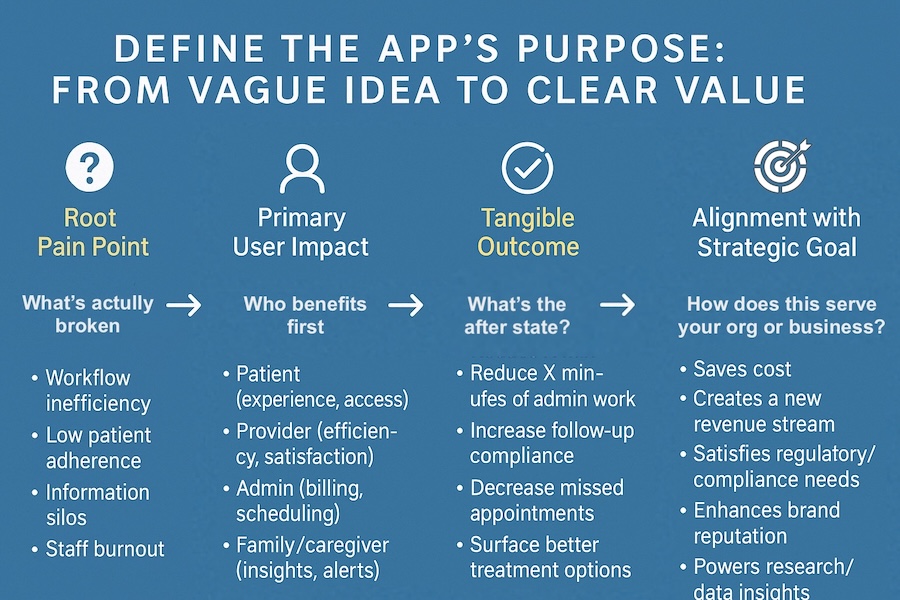
Define one pain point + one measurable win:
Pick the single problem you’re solving first, then write a sentence like: “We’ll know the app is working when…”
Examples: “no-show rate drops by X%,” “documentation time per visit drops by Y minutes,” “triage response time falls under Z.”
Fast market validation checklist:
-
Read competitor reviews (App Store/Google Play): what users hate is your roadmap.
-
Do a quick competitor teardown: features, onboarding, pricing, and friction points.
-
Validate regulatory expectations early (HIPAA/GDPR/FDA triggers).
-
Confirm the workflow with real stakeholders (patients, clinicians, admins)—not just your internal team.
Related: The Ultimate Guide to Building The Best mHealth Apps
Step #2: Establish Compliance & Privacy Strategy
Define how you’ll handle PHI/PII and design your security baseline up front: encryption, access controls, audit logging, data retention, and vendor BAAs as needed. Decide what’s in scope (HIPAA, GDPR, FDA/SaMD, SOC 2, ISO 27001) and how integrations (EHR, HL7/FHIR) will be secured.
If your app influences clinical decisions or treatment, you may be building SaMD (Software as a Medical Device)—which can change your documentation, testing, and release discipline. Also be explicit about what data you collect: PHI is only part of the story. Many health mobile products collect PII (Personally Identifiable Information) even when they don’t store clinical notes—names, contact details, identifiers, device IDs—and that still demands tight access control, retention rules, and a clear privacy model.
Treat compliance as a design constraint, not a “phase.” Default to minimum necessary access.
Security baseline you should expect from a serious healthcare build:
-
Role-based access control (RBAC) + least privilege
-
Strong auth (token-based auth, OAuth2/OIDC where applicable)
-
Session timeouts + secure device/session handling
-
Audit logs + monitoring (who accessed what and when)
-
Regular vulnerability testing / penetration testing
Common misses that cause painful rework:
-
No clear auditability (can’t prove access patterns)
-
PHI handling scattered across services without a plan
-
Insecure defaults (over-permissive roles, weak logging, leaky endpoints)
Practical rule: don’t store sensitive data or credentials on the device unless the workflow truly requires it.
Also plan vendor posture early (subprocessors + BAAs), retention/deletion expectations, and incident readiness.
Step #3: Build a Prototype (UI/UX Design & Prototyping)
Create wireframes and a clickable prototype to test user experience, edge cases, and key flows (appointment scheduling, intake, telemedicine, messaging) with real users. This is where you learn what to delete—cheaply—before “medical app development” gets expensive.
What prototyping buys you (beyond “pretty screens”):
-
You test the real experience on a phone (not in your head)
-
You can A/B test the riskiest flows early
-
You validate feasibility with developers before you lock scope
Prototype tools (pick the level that matches your stage):
-
Low-fi: Balsamiq / Proto.io for quick flow validation
-
Higher-fidelity: Adobe XD / InVision (or modern equivalents) for stakeholder-ready demos
Note: AI-assisted coded prototyping can be helpful, but keep PHI out of early demos and treat the prototype as disposable learning—not production code.
It‘s 10x cheaper to fix a design flaw while prototyping than during development.
Joe Tuan, Founder and CEO, Topflight Apps
Where “coded prototyping” really helps: a clickable prototype is perfect for validating flows and usability, but a light coded prototype lets your development team test “real app” behavior earlier—navigation, data states, permissions, and edge cases—often using synthetic data and stubbed endpoints so you’re not dragging PHI into a prototype. It’s the middle ground between UX/UI and full medical mobile app development: enough realism to estimate effort and catch feasibility issues early, without paying for production-grade engineering too soon.
Read more about Health App Design
This is especially useful in mobile healthcare application development when the app depends on device behavior (camera, biometrics, offline mode) or when “user friendly” has to hold up on an iPhone in a clinic hallway, not on a desktop monitor. If you’re building symptom checkers or triage flows, the prototype should also stress-test what happens when users enter messy, incomplete inputs—because they will.
Step #4: Polish Design and Develop (Agile Development & Tech Stack Selection)
Turn validated flows into production-ready software with iterative sprints, continuous testing, and a tech stack that fits your constraints (iOS/Android, cross-platform, backend, analytics). Build integrations deliberately (EHR connectivity, medical records access, dashboards, medical imaging, Laboratory Information System (LIS)) because they can dominate scope.
Design/UX rules that matter in healthcare (because interruptions are normal):
-
Reduce cognitive load (clinicians don’t have time for “clever”)
-
Design for interruption (autosave, drafts, clear recovery)
-
Make the next action obvious (visual hierarchy > fancy UI)
-
Match real workflows (intake → visit → follow-up; not “feature pages”)
Validation loop (keep it lightweight but real):
Run quick feedback cycles with a small group of real users (even 3–5 per audience type is useful). Tight feedback beats late “big reveal” redesigns.
And plan integration/testing early—health apps often live inside legacy systems and EHR ecosystems, so interoperability decisions (APIs, HL7/FHIR) can reshape architecture fast.
Reality check for healthcare mobile development: incumbents rarely get to “replace the old system.” More often, you develop a custom healthcare app that has to coexist with legacy tools—electronic health records, old databases, CRMs, even billing systems tied to health insurance. In those cases, a practical pattern is a HIPAA-compliant data hub that acts as a syncing link between the new app and the legacy stack.
Done right, the hub prevents double data entry for staff who still live in the EHR, while the new health application gets the data it needs for modern patient care experiences. A controlled set of APIs pushes updates from legacy systems to the new app and back again (two-way sync), with logging and access control baked in. This keeps medical application development aligned with how healthcare organizations actually modernize: gradually, without breaking day-to-day operations.
Step #5: Launch and Maintain (MVP Launch & User Feedback Loops)
Ship the MVP, instrument analytics, and run feedback loops with patients and clinicians. Plan ongoing maintenance (OS updates, security patches, performance) and iterate on features like remote patient monitoring, wearables, or telehealth only after the core workflow is stable.
Pre-launch checklist (boring, but it prevents embarrassing failures):
-
Final QA pass (core flows + edge cases)
-
Confirm push notifications, deep links, and permission prompts
-
Verify production data connections and access controls
-
Double-check app metadata/store readiness
App launch options depend on who the users are: if you’re building a consumer product, you’ll ship to the App Store / Google Play. If it’s staff-only mobile medical software, you may distribute privately (e.g., through an internal device management approach) to control rollout and support. Either way, a soft-launch to a small cohort first gives you a buffer to catch issues early—without tanking ratings or trust on Day 1.
Once you build a medical app and it’s live, the next iterations should be driven by real usage, not opinions. If you’re trying to make a medical app stick (or help users reach outcomes faster), the analytics you already have—e.g., usage metrics from Firebase or Appsee—will show where people drop off, what features they ignore, and which flows cause friction. Pair that with a lightweight feedback loop: allow users to report issues in-app (so they don’t vent in reviews) via tools like UserVoice or UserTesting, and keep an eye on store feedback. That’s how you create a health app that improves over time instead of slowly decaying after launch.
After launch: operate it like a product, not a one-time project:
-
Track usage and friction with analytics (what people do vs what they say)
-
Monitor crash/performance and prioritize fixes in an ongoing cadence
-
Capture user feedback proactively (in-app prompts + review monitoring)
-
Expect OS/platform updates to force maintenance work—plan for it, don’t “hope” it away
If the product is regulated (e.g., FDA-relevant functionality), maintenance also includes disciplined change documentation and regression testing—not just “ship and pray.”
5 steps to create a medical app summary:
|
Step |
What you do |
Tools and Technologies |
|---|---|---|
|
1. Define Your Audience |
Personas, workflow mapping, market research, validate the riskiest assumptions |
Interviews + surveys, journey maps, competitor review mining, lightweight analytics review |
|
2. Compliance & Privacy Strategy |
PHI/PII boundaries, HIPAA/GDPR/FDA posture, security baseline, vendor risk |
Threat modeling, encryption, RBAC, audit logging, BAAs, pen testing, SOC 2 / ISO 27001 targets |
|
3. Prototype |
Wireframes + clickable prototype, usability testing, iterate on flows |
Figma / Proto.io, usability sessions, A/B tests where useful |
|
4. Design + Develop |
Agile delivery, QA, integrations, interoperability planning |
iOS/Android or cross-platform, CI/CD, HL7/FHIR, EHR API strategy |
|
5. Launch + Maintain |
MVP release, monitoring, feedback loops, ongoing updates |
App Store / private distribution, analytics, crash reporting, support + iteration cadence |
How Much Does it Cost to Create a Healthcare App?
The cost of app development for healthcare depends mostly on scope (workflows + integrations + compliance), but typical ranges look like this: an IoT-enabled MVP heart rate tracker can start around $55,000, a basic telemedicine product often lands around $260,000, and a full-cycle practice management platform can run $380,000+.
Rapid prototyping protects ROI by validating user journeys (and killing bad ideas) before you pay for full-scale medical app development in code.
If you’re using Topflight’s team to create a medical app, the minimum starting budget is $60,000 for a PoC or MVP.
Best Practices and Modern Capabilities in Healthcare App Development
Best Practices Grounded in Health Care Workflows
-
User-centric design + usability testing (test patient, provider, and admin flows early)
-
Compliance-first (HIPAA/GDPR/FDA where applicable) + minimize PHI early (push PHI behind secure systems; start with de-identified flows when possible)
Related: HIPAA Compliant App Development: Everything You Need to Know
-
Security baseline (encryption, access control, audit logs) (PHI/PII handling, RBAC, tamper-evident trails)
-
Integration readiness (EHR/EHR vendors, APIs) (plan for Epic/Cerner-style constraints, OAuth, data mapping)
-
Interoperability (FHIR/HL7 when needed) (structured exchange for referrals, labs, encounters; avoid “CSV cosplay”)
-
Continuous testing + iteration + maintenance (regression testing, monitoring, OS updates, security patch cadence)
2026+ Features Worth Adding
-
AI/ML → when you have enough clean data to automate documentation, triage, coding, or evidence-based recommendations (not just “chat for the sake of chat”).
-
Telehealth → when remote consults and follow-ups are core to access (video + secure messaging + scheduling).
-
Wearables/IoT → when continuous monitoring matters (e.g., heart rate, blood pressure, glucose levels) and you can handle device variability.
-
Interoperability (FHIR) → when you must exchange data with EHRs or clinical systems (labs/LIS, medical imaging, dashboards) without manual re-entry.
-
AR/VR → when training, rehab, or patient education benefits from guided, immersive experiences (and you can measure outcomes).
-
Blockchain → when you truly need tamper-evident record integrity and shared trust across parties (otherwise it’s usually extra complexity).
Monetization Models of a Healthcare Application
How healthcare apps make money depends on who pays (patients, providers, employers, payers) and what value you deliver (access, efficiency, outcomes). In practice, most successful models blend more than one revenue stream.
- Subscription (B2C): monthly plans for premium features, content, or coaching
- Subscription (B2B): clinics or employers pay per seat / per location
- Per-visit / usage fees: telemedicine consults, messaging bundles, pay-per-session
- Licensing: sell the platform to provider orgs (often with implementation fees)
- Reimbursement / billing enablement: when the app supports billable services (e.g., RPM programs)
- Partnerships / referrals: vetted services (labs, devices, pharmacies) that fit the workflow
Avoid ad-driven monetization when the app touches sensitive patient data—it’s a fast way to lose trust and invite regulatory headaches.
How to Choose a Healthcare App Development Company
Choosing a team for healthcare app development isn’t like hiring a generic mobile dev shop. You’re buying the ability to ship a workflow product that handles sensitive data, survives integrations, and still works when real clinicians use it at 7:12 AM.
-
Proven healthcare delivery experience: ask for 2–3 comparable projects (similar users, workflows, and risk), not just “we built a wellness app.”
-
Security + compliance maturity: they should be fluent in HIPAA/GDPR basics, threat modeling, audit logs, access controls, encryption, and vendor BAAs—not learning it on your budget.
-
Integration capability (EHR + interoperability): look for experience with APIs, HL7/FHIR mapping, and real-world constraints of Epic/Cerner-like environments (auth, rate limits, data normalization).
-
Discovery discipline: they should run stakeholder interviews, workflow mapping, and scope definition before sprinting into UI polish.
-
UX for three audiences: patient, provider, and admin flows are different products sharing one database—your partner should design accordingly.
-
Engineering quality + QA: testing strategy, release process, code review standards, and measurable quality signals (crash rate, performance, security scanning).
-
Transparent estimation + change control: you want clear assumptions, milestones, and what happens when scope changes (because it will).
-
Post-launch support plan: monitoring, OS update cadence, incident response, and a realistic maintenance budget—health apps don’t “finish.”
-
Data strategy: how they model and validate patient data, handle permissions, and maintain data integrity over time.
Red flags: “We’ll figure HIPAA later,” vague answers about integrations, no QA plan, or a proposal that’s 90% UI screenshots and 10% delivery plan.
One key step in healthcare app development is choosing the right custom mobile app development company to ensure a seamless experience for patients.
Develop Your Healthcare App With Topflight
Topflight builds web and mobile healthcare products where “it works in a demo” isn’t good enough. Our portfolio spans remote patient monitoring, telehealth, mental health, lightweight EHR-style workflows, IoT, enterprise-grade platforms, and AI-powered healthcare solutions.
Today, we can boast apps from the following healthcare specialties in our portfolio:
- Remote patient monitoring
- Telehealth
- Mental health
- Super-lightweight EHRs for clinics
- Uber for lab testing
- Fitness & wellbeing
- IoT solutions
- Enterprise-grade health applications
- AI-powered healthcare solutions
- AI/AR RPM for physiotherapy
- Uber for medical outstaffing
We typically start with rapid prototyping to validate flows, edge cases, and feasibility before full development—so you don’t burn budget on the wrong build. If your app needs integrations (EHR/FHIR/HL7, devices, labs, imaging) or stronger security/compliance posture, we plan that early—because in healthcare, retrofits are where timelines go to die.
If you want, share your app concept and target users (patient/provider/admin). We’ll help you shape scope into an MVP that can launch, iterate, and scale responsibly.
[This blog was originally published on March 2, 2020 but has been refreshed to keep up with more recent updates]
Related Articles:
- Physiotherapy app development guide
- Pediatrician App Development
- Mental Health Chatbots
- Guide to Creating a Pharmacy App
- Deep Learning Use Cases in Healthcare
- How to make a women health tracking app
- How to make a hospital management software
- Medication Tracker & Pill Reminder App Development Guide
- How to Collect Healthcare Data for Your Mobile Apps
- Guide to Computer Vision in Medicine
- Chatbots in Healthcare
Frequently Asked Questions
Do all healthcare apps need to be HIPAA compliant?
No, only mhealth software dealing with PHI needs to comply.
What would you suggest if you could give a single piece of advice to help me create an outstanding healthcare app?
Start with an interactive prototype and make sure you spend enough time testing it with real users from your target audience. This approach will save you a lot of time and effort. In fact, no software project should start with app development, healthcare too.
How do I make sure my application for patients remains competitive?
Use analytics tools like Mixpanel to understand how people use the app and whether they have any issues. You could also rely on proactive solutions for gathering user feedback before they publish it in the App Store.
How long does it take to build a medical app?
I’m sure you’re fully aware, there’s no such thing as an average medical application. Each app is unique. We built healthcare software that required 6 months of development; other solutions took over a year to get ready for the market.
What is the main challenge when developing a healthcare mobile app?
Getting the workflow right while meeting privacy and security requirements. Most teams can build screens; fewer can design a system that handles sensitive data safely, fits real clinical operations, and survives integrations without turning into a maintenance fire.
Which technologies are most commonly used in healthcare mobile app development?
Typically: native iOS/Android (or cross-platform), a secure backend (APIs + database), authentication with role-based access control, encryption and audit logging, and—when interoperability is required—FHIR/HL7 to connect with EHR systems.