

Reviewed August 2026
Creating a killer app takes more than just a great idea—it’s about execution, user experience, and strategy. If you’re looking for a custom mobile app development guide, you’ve landed in the right place. Before you dive into the sea of code and design mockups, this guide will address the real-world challenges of app creation. Think of it as your app survival kit—equipped with everything you need, from validating your idea to navigating app store optimization. With this roadmap, you’ll be prepared to overcome common pitfalls, develop an app people will love, and launch a truly user-friendly, scalable product. Ready to make your app dreams a reality? Let’s get started.
How to build a custom mobile app in 2026?
Validate with a rapid prototype, ship a lean MVP, then iterate on real user feedback: the 8-step process below runs from user research through cross-platform expansion. Expect $60,000 to $250,000 and 3 to 9 months for most builds, with a typical funded v1 around $80,000. Prototype with AI app builders if you like, but switch to custom app development the moment your app touches regulated data, complex integrations, or real scale.
Top Takeaways:
- Start with Marketing in Mind: Before jumping into development, think marketing first. Your promotion strategy will dictate crucial app features, integrations, and user acquisition methods, making it the backbone of your app’s success.
- Rapid Prototyping Is Key: Build a rapid, interactive prototype to test your app idea early on. This cost-effective step lets you refine user experience based on feedback before investing in full development, speeding up your path to market.
- Leverage Continuous Delivery: Embrace continuous delivery to push updates seamlessly. This keeps your app evolving based on real-time user feedback, ensuring you stay competitive while minimizing downtime.
- Use AI to Validate, Custom to Scale: AI app builders turn a prototype into an afternoon’s work, and AI coding tools trim 10-25% off a professional build. Custom development still owns the finish line: most funded v1s land between $60,000 and $250,000, and regulated data always requires it.
Table of contents:
- Custom Mobile App Development – Think Marketing First
- Where AI-Assisted Development Fits
- 8 Steps of How to Create Custom Mobile Applications
- Step #1: Know Your Users
- Step #2: Build a Rapid Prototype
- Step #3: Develop an MVP
- Step #4: Make Your App Stand Out
- Step #5: Pick a Distribution Model
- Step #6: Listen to Your Customers
- Step #7: Educate Yourself on App Development Cost
- Step #8: Follow Your Users Cross-Platform
- Why Choose Topflight as Your Custom Mobile App Development Company?
Custom Mobile App Development – Think Marketing First
- How will my app reach customers?
- What’s the average CAC (customer acquisition cost) for my app?
- What marketing budget do I need to start getting traction?
Companies often leave these questions hanging in the air until the custom mobile app is ready. However, we recommend starting your app journey by answering them. Without users, your app will plummet to the bottom of the app stores.
That’s why first, you need to find out what budget will get you early adopters.
Starting with marketing also makes sense from the technology perspective. How you promote your app will dictate the integrations you’ll need to support.

- Will my app need deep linking?
- Do I want to include mobile ads?
- Do I make content searchable outside the app?
Deep Linking
Deep linking is now standard practice: Apple’s Universal Links and Android’s App Links ship as platform features, and any serious acquisition campaign relies on them. Put simply, deep linking brings customers to a specific place in your app where they can get immediate value.
Let’s say you’ve built a recipe app, and a customer taps on your ad of a tuna sandwich recipe. That tap should take her to the app store and once the app downloads, directly to that recipe. That’s the whole purpose of deep links.
Mobile Advertising
Mobile SDKs integrated into your app will let you furnish users with ads that you may offer to turn off with an in-app purchase. That’s a decent revenue model, and there are plenty of services to choose from, e.g., AdMob and AppLovin MAX.
Many mobile ads providers supply you with everything you need for deep links too.
Also Explore: Best Telemedicine Apps to Automate your Medical Practice
Make App Content Searchable
Both Apple and Google have tools to index your in-app content, so it becomes available through search. If we continue our example with the recipe app, a search result for make a tuna sandwich could take the user right to this recipe in your app.

Search results linking to apps appear in Google Search (on Android) or Spotlight (on iOS).
Where AI-Assisted Development Fits
“Can I just build this with AI?” has become the first question founders ask us, so let’s settle it before the eight steps.
Two very different things hide under that question. The first is AI coding assistants such as Cursor, GitHub Copilot, and Claude Code, tools that professional engineers drive: 90 percent of developers now use AI at work, per Google’s DORA research. Our team codes with them daily. They compress boilerplate, test writing, and refactoring, and clients see that as a 10 to 25 percent efficiency gain on the total budget rather than a giant discount, because coding was never the majority of a project’s cost.
The second is AI app builders, also called vibe-coding platforms:
- Lovable,
- Bolt,
- v0,
- Replit.
You describe an app, they generate one. And they’re genuinely great at what they’re built for. A clickable prototype that used to take weeks now takes an afternoon, which makes them a perfect companion for Step 2 below. Millions of founders use them, and validating an idea has never been cheaper.
The trouble starts when the prototype tries to become a product. Security researchers found 170 Lovable-built apps with databases exposed to anyone on the internet, and Replit’s agent famously deleted a customer’s production database during a live test. Across the industry, Veracode’s testing shows AI-generated code introduces security flaws in 45 percent of cases. These platforms also typically don’t sign BAAs, so anything touching PHI or payment data is disqualified from day one. Even Lovable’s CEO concedes that high-stakes apps need a human engineer reviewing the security side.
So here’s the honest 2026 dividing line. Use an AI builder to validate: prototypes, demos, internal tools that hold no regulated data. Commission custom development once your app touches regulated data, complex integrations, or real scale, because compliance has to be designed into the architecture, and retrofitting it costs more than building it right. That handoff is exactly what our Vibe to Traction Program was built for: bring the AI prototype that proved demand, and we rebuild it into a production-grade product. For a deeper comparison, see our guide to no-code and low-code vs. traditional development and our piece on AI app development.
8 Steps of How to Create Custom Mobile Applications
Developing a custom mobile application involves a series of strategic steps that ensure your app not only meets user expectations but also stands out in a competitive market. This custom mobile app creation guide will walk you through the essential steps, whether you’re working with an agency or tackling development on your own:
- Step #1. Know Your Users: Understand who your ideal users are and what they need from your app.
- Step #2. Build a Rapid Prototype: Create a quick prototype to validate your concepts and gather early feedback.
- Step #3. Develop an MVP: Focus on building a Minimum Viable Product to test your core features with real users.
- Step #4. Make Your App Stand Out: Identify and implement unique features that differentiate your app from the competition.
- Step #5. Pick a Distribution Model: Decide how you will distribute your app, whether through app stores or other channels.
- Step #6. Listen to Your Customers: Continuously gather and act on user feedback to improve your app.
- Step #7. Educate Yourself on App Development Cost: Be aware of the costs involved in app development and plan your budget accordingly.
- Step #8. Follow Your Users Cross-Platform: Ensure your app provides a seamless experience across different devices and platforms.
These steps will be explored in detail in the subsequent sections of this custom mobile app building guide, providing you with actionable insights and best practices for each phase of custom mobile app development.
Step #1: Know Your Users
Understanding your users is the cornerstone of successful custom application development. After initiating your app marketing strategy, you need to picture your ideal user. Ask yourself:
- Who are my app users?
- How often will they use the app?
- Is my app’s USP enticing enough?
These questions, along with many others about your target audience, will likely lead to numerous assumptions. It’s your job to challenge these ideas by engaging with people who match your ideal user profile. This step in our guide to create a custom mobile app emphasizes the importance of user research and validation.
To do this effectively, conduct surveys, interviews, and usability tests. Use social media platforms, forums, and focus groups to gather insights directly from potential users. Analyze their pain points, preferences, and behaviors. This process will help you refine your assumptions and build a detailed profile of your ideal app user.
As you collect data, look for patterns and trends that can inform your development decisions. Understand the context in which users will interact with your app. This level of detail is crucial—knowing when and where your app will be used can significantly influence its design and functionality.
By the end of this step, you should have a comprehensive understanding of your target audience. This knowledge will guide every subsequent phase of development, ensuring that your app meets user needs and stands out in a crowded market. Following this approach, as outlined in our guide to create a custom mobile application, sets a strong foundation for success.
Step #2: Build a Rapid Prototype
Now it’s time to really test your assumptions about how the app will serve your target audience. To do that, one of the first steps towards custom mobile app development is an interactive prototype that users can click-through in a browser or on their mobile devices.
An app prototype can be low- or high-fidelity, and its purpose is always to check if you’re creating an engaging experience for your users, which is a critical step in understanding how to build custom mobile applications.
There are plenty of tools to develop a prototype (Figma is the industry standard; ProtoPie if you need high-fidelity interactions) and to field it with customers (like Maze, UserTesting.com, or Userbrain).
We wrote at length on rapid prototyping but to give you the gist, its beauty is:
- you preserve your development budget while experimenting with UX
- it allows you to iterate based on feedback and get to market faster
- you can use it to get investors to listen
You might be thinking you need to take everyone’s feedback to heart when developing an app. That’s not true, and doing so can be downright dangerous. If people are shouting for a new feature but they still stick with your app as-is, take comfort. That means they find value in it even without the extra features.
After launching your MVP (more in the next section), you should “measure” and “learn” by listening, but listen to actions more than words. Use feedback as clues, but use data analytics tools to verify them. Analytics such as app metrics and heatmaps allow you to see where people are engaging most on your app and where they’re dropping off.
A measuring strategy which is just as educational is the simple act of watching people use the app. The best custom mobile app development companies know that if users aren’t using something, then they need to get rid of it. If it’s a poor user experience getting in the way of them converting, improve it. Again, with custom mobile app development, the key is to differentiate what users say from how they act, and to be especially careful when it comes to new feature requests. These must be viewed with different lenses than bug reports and complaints about poor user experience. Adding new features more often than not is about increasing an existing user’s lifetime value or expanding the addressable audience size, and not something you should do to placate your initial target market.
More on validating your idea first:
- Learn how to use customer feedback to iterate your app.
- Get up to speed on the perks of A/B testing.
- Take a deeper dive into learning about developer-industry relationships in healthcare.
Step #3: Develop an MVP
Once you’ve validated the UX, you’re ready to move from a prototype to developing an MVP. The MVP will include just enough features to justify releasing the app into the wild. The feedback that will follow will help you iterate your app further.
Are you ready to build an MVP? First, read our guide to how to hire someone to develop an app.
The most common misconception of first-time entrepreneurs is that they’ll succeed with their business goals because they have a great idea. The truth is, being a successful app entrepreneur or a provider of app solutions is more about having a winning strategy and executing persistently on user feedback than it is about having a great idea. This has been a constant truth in startup circles (read about the “build-measure-learn” cycle). However, we still see too many entrepreneurs commission app development companies to overbuild their MVP.
Related: Agile App Development Process: Building a Winning App
My advice? Instead of overbuilding, get to market as soon as possible with as few features as possible, test them out with real users, then nimbly make changes based on user feedback. We launch at least 10 production-ready web apps and mobile apps per year, and we can tell you that the “build” of the “build-measure-learn” development cycle is always the easiest part. The harder part is the uncertainty that comes after, where every entrepreneur has to figure out how to stay true to their vision while listening to users and adapting the MVP into something they love
Setup continuous delivery
To get into this mentality of constant change, you need continuous delivery.

Continuous delivery includes tools and methods that allow your app development team to ship updates non-stop. All features and bugs that have been verified automatically become app updates with minimal effort from developers.
As a result, users get to play with new features as soon as they have been tested.
Related: DevOps CI/CD implementation Guide
Use competitive technologies
To keep your app evolving, you want to ensure it’s backed by modern technologies that give you an edge. For instance, Android apps used to be developed in Java, but today Kotlin is a clear winner, allowing coders to create Android apps faster.
To make sure your tech stack is competitive:
- Glean from your competition by using tools like Appfigures
- Use SDKs that boost development of boilerplate features, like authentication
- Seek advice from your app developers on native vs. cross-platform vs. PWA
However, it’s also important to select compatible technologies whether that’s python in healthcare or bank level encryption for fintech app development or blockchain for medical apps. For example, let’s talk about incorporating AI.
AI is still the first feature founders ask about, but the economics have flipped since the LLM wave. You no longer need to train a model from scratch to add artificial intelligence to anything: most AI functionality today is an API call to a foundation model, so your MVP’s algorithm won’t be unintelligent on day one. The hard parts moved elsewhere: prompt and guardrail engineering, per-query costs once you scale, and compliance when regulated data flows through the model.
Related: Pose Estimation: How To Track Human Movements in Real Time
Where proprietary data used to be the entry ticket, it’s now the moat. When entrepreneurs show us a winning strategy to obtain large amounts of de-identified data, we still get excited, because that data grounds the model in your domain (through retrieval or fine-tuning) and gives you something competitors calling the same API can’t copy. During the initial months of custom mobile application development, we wire it into the product so the AI performs on your users’ reality by the time we launch the MVP.
A few extra tips on selecting compatible technologies:
- Consider a Mobile-first design and development plan.
- Weigh the benefits of choosing either a progressive web app, or a native mobile app.
- Explore which programming framework is best for your future application.
- Decide if Machine Learning is right for your enterprise.
- Learn the difference between Android and iOS UI Design for React Native.
- Founder’s Guide to Building a Mental Health Chatbot
- Guide to Building a Femtech App
See which technologies we’ve used with past clients.
Protect customer data
Whether you’re developing a healthcare app or a social media app like Facebook that shares user data with advertisers, privacy laws are becoming more stringent than ever. With certain industries like Fintech and healthcare (the areas our firm focuses on), liability is higher at the early stages. You need to set up compliance at the early stages, encrypting data in transfer as well as data at rest. Between GDPR and the growing roster of US state privacy laws now in effect, protecting personal privacy is a cost of business for startups, not something only a handful of big businesses need to deal with.
A few things you should keep on the radar when considering data security:
- Privacy legislation knowledge, e.g., HIPAA, GDPR
- Using privacy-as-a-service solutions
- Adhering to best practices (e.g., data encryption & support for https)
Related: HIPAA App Development: The Ultimate Guide
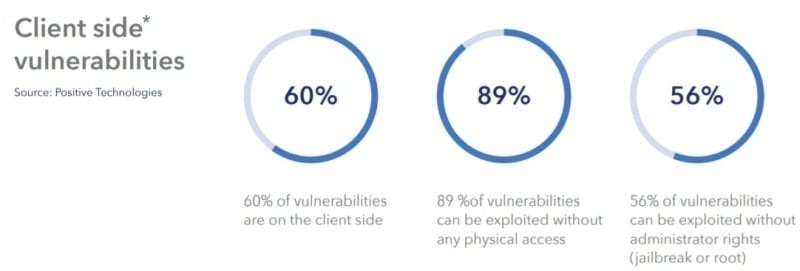
None of this means you need to become a data privacy guru and hire your own Gilfoyle. Compliance infrastructure has commoditized: AWS, Google Cloud, and Azure all sign BAAs as a standard part of their cloud offerings, and privacy-as-a-service tools cover consent, data mapping, and breach workflows on entrepreneurial budgets. Treat privacy like accounting or legal, a cost of doing business, so you can stay focused on the only thing that matters day-to-day: getting traction.
List of App Development Guides
- Pharmacy App Development Guide
- Patient Portal App Development
- Crypto Token Development Guide
- DeFi App Development Guide
- Medical Mobile App Development
- On Demand Pediatric App Development
- Mobile App Development Outsourcing
Buckle in for the long-run, building a mobile app is a journey, not a sprint.
Also Read: How Long Does It Take to Make an App for Android and iOS?
Even though this guide to custom mobile app development provides comprehensive details to get you started, I encourage you to reach out so we can discuss your specific project needs, as MVPs can vary significantly.
Step #4: Make Your App Stand Out
Despite all iterations, there always remain some core features that make your app unique. And there are many ways to make sure your app has them.
Use the full potential of a mobile OS
Successful apps always make the most of the latest features in iOS and Android. Supporting new features helps you smooth out user experience as people hop between system apps and your application.
On Android, that means surfacing your app’s core actions through widgets, rich notifications, and system shortcuts, so users can act without ever opening the app. Material You theming makes your app feel at home on each user’s device.
On iOS, App Intents plug your app’s actions into Siri, Spotlight, and Apple Intelligence, while Live Activities keep users updated right on the lock screen. Integrations like these are what make an app feel native rather than bolted on.
Also Read: How to create a cryptocurrency exchange
Integrate with other apps
Another way to beef up your app is to integrate it with third-party apps. That way, users can access your app’s content, e.g., photos, from other apps, or jump straight into your app to perform some action.
For instance, if you are developing an iOS photo editing app, you can make your photo filters available in the native photo app. The idea is to make your app’s main feature accessible from other apps.
Log issues and user actions
As you keep iterating your app, it may help to have logging functionality in place. App logs help identify bugs and expedite the whole QA process. And analytics (like Google Analytics) services give you a decent picture of how people use the app.
Check out our portfolio
Step #5: Pick a Distribution Model
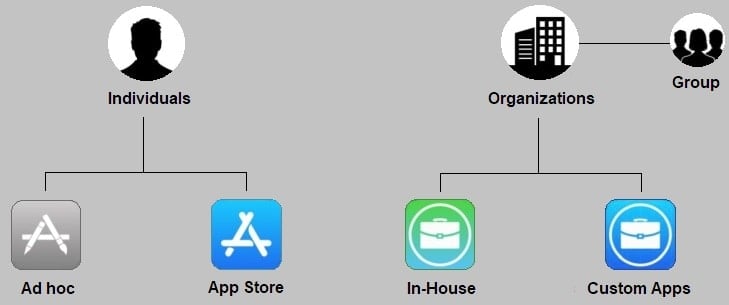
Depending on whether you’re developing an app for the general public or for internal use or even just building a chatbot, it will have a different distribution model. You can develop an app by uploading it to an app store or make it available as a download from your server. In the EU, the Digital Markets Act has pried the platforms open, so iOS now also permits alternative app marketplaces and web distribution, though for most apps the official stores remain the default channel.
App Store distribution: ASO
One thing you should remember when making your app available via an app store is ASO. App Store Optimization is a huge topic. Let’s just say there are quite a few things that influence your app visibility in the app stores:
- screenshots and videos
- description and keywords
- icon and the name of the app
We’re barely scratching the surface of ASO here. You may opt for one of the app store tracking services, like Sensor Tower or Appfigures, to track the competition and execute on your app marketing strategy.
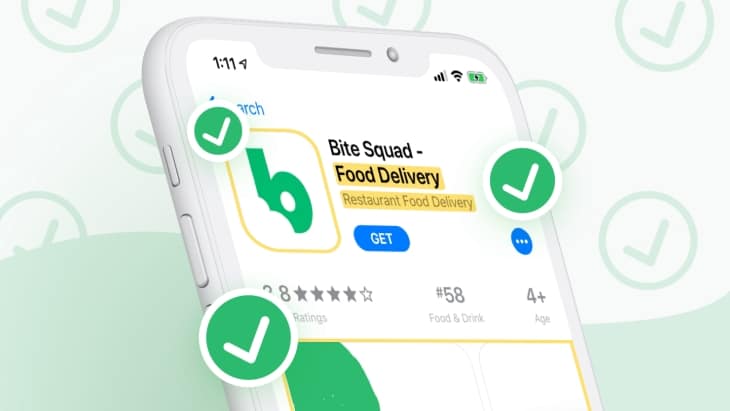
Some of the services for app store analytics will also allow you to A/B test the description and other elements of your app store listing to drive conversions.
In-house app distribution
If the app targets only your employees and doesn’t have a demo account, you can still make the app available via a link.
You will need to procure enterprise licensing for such in-house apps and make sure the app has periodic access to the internet. Plus, you will need to set up an MDM (mobile device management) solution at your place.
Ad-hoc and custom apps
These distribution models are for app testing and for some advanced in-house app management. In 99 percent of the cases, you’ll be distributing your app via an app store.
Step #6: Listen to Your Customers
Once the app is out and people start using it, you need to be ready to handle reviews. It certainly helps if you’ve hooked the app with a user feedback SDK during development. There’s plenty to choose from: Braze, Alchemer Mobile (formerly Apptentive), UserVoice.
These platforms help you answer your customers’ concerns before they voice them through app reviews. You can also help customers better understand your product by setting up a knowledge base with one of these solutions.
Step #7: Educate Yourself on Custom Mobile App Development Cost
App development cost, just like ASO, is an intimidating topic. We’ve covered that in detail in a blog post about understanding the true costs of developing an app.
Here’s the short version, so this page gives you real numbers to anchor on. Most custom apps cost $60,000 to $250,000 to build, and the typical funded v1 lands around $80,000. Complexity moves you along that range: a simple app runs $30,000-$40,000, a mid-size build $40,000-$60,000, a large one $80,000-$140,000, and complex or enterprise products climb from $160,000 to $250,000+. Timelines run from the discovery phase through launch: 2-3 months for a simple app to 8-12+ months for complex builds, with most v1s landing between 3 and 9 months.
A focused, well-scoped build that uses AI-assisted development smartly can come in from around $25,000. Just treat AI as a 10-25% efficiency gain, not a coupon: coding is only a slice of the total, and design, QA, compliance, and integration work still price like they always did.
Let’s recap what people often miss when budgeting app development:
- failure to include a web admin app into the budget
- underestimated yearly maintenance cost
- overlooked quality assurance
Admin dashboard
For modern custom mobile apps, it’s critical to be always on, serving fresh content to users. If you want to remain in control over the content and users, you need a web interface where you can review flagged content, block certain users, etc.
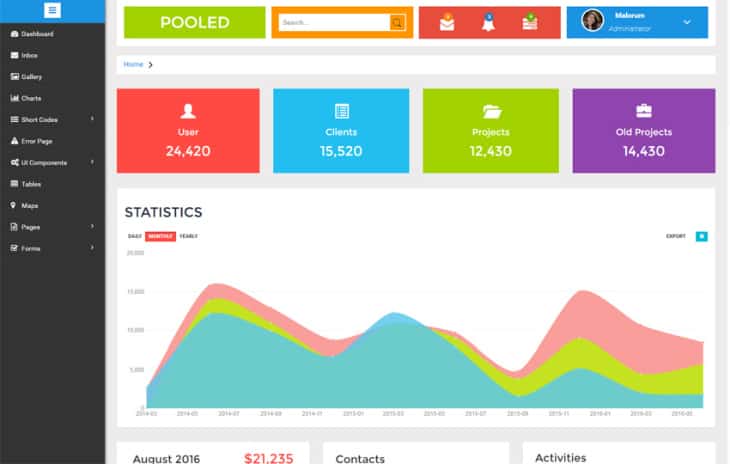
And by the way, you can use bootstrap admin dashboards to lower the app cost.
Related: How to develop a dashboard website
Maintenance cost
In our practice, yearly maintenance takes around 25% of the total app cost, and year one usually runs the heaviest. That includes fixing any issues with the app, server, hosting, etc. The problems may arise after an external library has been updated.
Testing
We’ve discovered that mobile development teams often ignore QA hours necessary to deliver a customer-ready solution. In that scenario, all testing is carried out by a client who may not be best equipped to catch all issues.
The more use cases an app has, the more mobile app testing it needs. If you have to test yourself, remember that a negative use case is also a use case. Let’s say someone is trying to sign-in with a wrong email and password. What error do you show?
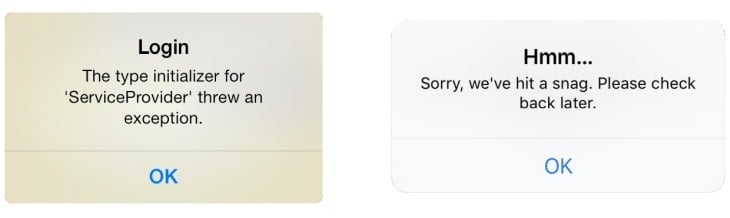
Do you let them know there’s no such email? Do you offer to restore a password?
Testing all of that tends to add up.
Some additional tips on getting to know your numbers:
- Learn from the mistakes of a fellow developer.
- To keep yourself on track and don’t waste any time (or money) doing the same job twice, it’s essential to understand how to make a custom mobile app that aligns with your budget and technical requirements.
- Review one of our favourite projects to get the low down on competitor stats.
Consider some cost-savings alternatives, like building an SPA (single page application).
Step #8: Follow Your Users Cross-Platform
Have you noticed anything particular about apps that become popular? How they become available on smartwatches, tablets, TVs, and other devices? I think it’s safe to say that this tendency has become everybody’s expectation these days:
My app should follow me to every device I use.
Look at the Continuity feature in the Apple ecosystem: you start a document on an iPhone and pick it up on a Mac or iPad.
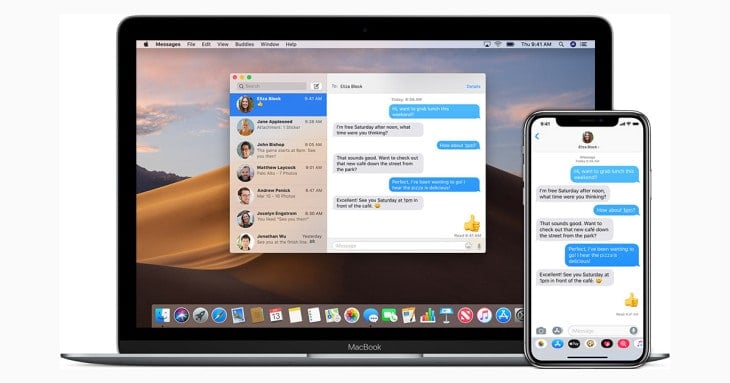
As soon as your app starts getting some traction, we recommend building separate versions of the app that support those other devices. Make sure to include only those features that make sense on each particular platform. When planning to expand, it’s crucial to create a custom mobile app that can seamlessly transition across different platforms, ensuring a consistent user experience.
There’s no use in a calendar app on Apple Watch if you expect the user to add events on a tiny interface. However, calendar notifications and even agendas make total sense.
Also Read: A Guide to App Store Optimization for Mobile Apps
Why Choose Topflight as Your Custom Mobile App Development Company?
Choosing the right partner for your custom mobile app development can make the difference between a successful launch and a project that falls short. Here’s why Topflight stands out as the ideal choice:
- Deep Expertise in Healthcare and Fintech: Our team excels in healthcare, mastering interoperability, EHR integrations, and integrating with legacy solutions. We also offer from-scratch development and have substantial experience in the fintech sector.
- AI Solutions in Healthcare: We leverage cutting-edge AI technologies, including Generative AI, Computer Vision, OCR, and general ML data analysis, to create innovative solutions that elevate the healthcare experience for patients, providers, and admin staff.
- Medical IoT Solutions: We have hands-on experience in developing connected apps for the medical Internet of Things (IoT), ensuring seamless integration and functionality.
- In-House AI Software Development Framework: Our proprietary specode.ai framework allows us to ship healthcare prototypes rapidly and cost-effectively. We automate various aspects of the development process, from spec writing to coding and testing, while maintaining meaningful human oversight.
- Proactive Approach: Unlike others, we are committed to helping you achieve real business traction. We iterate towards optimal product-market fit, adapting your original vision to meet real-world demands swiftly.
Additional Strengths from Topflight
- Rapid Prototyping: We transform your ideas into high-fidelity clickable prototypes, facilitating early validation and investor pitches.
- Agile Development: Our agile methodology ensures quick time-to-market while maximizing user feedback to shape your product effectively.
- Comprehensive EHR Integration: From data flow diagrams to integration design, we provide a thorough roadmap for seamless EHR integration.
- Proven Track Record: Our apps have raised over $200 million and reached 50 million users, reflecting our capability to deliver successful projects.
- Dedicated Team: Our team comprises experienced professionals, including ex-founders and top-tier developers, who are deeply committed to your project’s success.
When considering how to create custom mobile applications that truly make an impact, Topflight stands unparalleled as a partner. Our combination of expertise, innovative frameworks, and a proactive, iterative approach ensures your app not only meets but exceeds expectations.
Got Questions?
What you’ve read is an outline that will get you through major pitfalls of developing a mobile app. What should you expect when you actually start your app project? A myriad of nuances. Let’s say you are thinking about developing a mental health app:
- Should we support voice control to get user attention off the screen?
- What SDK should we pick for video calls?
- Should we optimize UI for seniors?
Questions like these start accumulating pretty fast. How about we start answering them together today?
Related Articles:
- Mobile App Design Guide
- Mobile App vs Website: Right One for You
- Mobile App Frameworks: The Complete Guide
- AI App Development Guide
- How to make a location based application
- How much does app design cost
- How to Build an Educational App
- Healthcare App Development Cost: The Complete Breakdown
- Conversational AI for the healthcare industry
- How to Integrate your health app with EHR
[Originally published in July 2020; substantially updated and reviewed in August 2026]
Frequently Asked Questions
How much does custom mobile app development cost in 2026?
Most custom apps cost $60,000 to $250,000 to build, and the typical funded v1 lands around $80,000. Simple apps start around $30,000, while complex and enterprise products climb past $250,000. A focused, well-scoped build that uses AI-assisted development smartly can come in from around $25,000. Budget roughly 25 percent of the build cost per year for maintenance.
How long does it take to build a custom app?
Most v1 builds take 3 to 9 months. A simple app can ship in 2 to 3 months, mid-size MVP development takes 3 to 5 months, and complex products with AI, IoT, or compliance workflows run 8 to 12+ months. Scope discipline shortens the timeline more reliably than adding developers.
Should I use AI app builders or custom development?
Use AI builders like Lovable, Bolt, or v0 to validate: prototypes, demos, and internal tools that hold no regulated data. Commission custom development once your app touches regulated data (PHI, payments), complex integrations, or real scale, because these platforms don’t sign BAAs and their output repeatedly fails security audits. Many founders do both: prototype with AI, then rebuild for production.
Native or cross-platform: which should I choose?
Cross-platform frameworks like React Native and Flutter cut the build cost by 30 to 50 percent versus two native codebases and get you to market roughly 1.5x faster, which makes them the default for most v1 apps. Go native when you need heavy hardware access (BLE, sensors, AR), top performance, or platform-specific UX depth.
What services and tools can you recommend?
Here are a few tools and services to get you started. Sensor Tower and Appfigures for researching your competition; Branch and AppsFlyer for in-app marketing (deep linking, attribution, in-app analytics); AdMob and AppLovin MAX for serving ads in your app; Amplitude and Mixpanel to understand user behavior and engagement.
How can I test an app prototype once it's built?
We recommend UserTesting, Maze, or PlaybookUX. These user testing platforms allow you to define various user criteria and test the prototype with your target audience.
Does Apple allow publishing an app to the App Store if only registered and authenticated users can access its features, and registration happens outside the app?
Yes, but you should enable a demo mode to let unregistered users explore the app’s features. Alternatively, you can opt for an ad-hoc distribution model that allows you to make the app available outside the App Store.
How do I minimize the damage from negative reviews in the app stores?
Besides offering your customers a smooth and glitch-free in-app experience, consider integrating the app with services like Alchemer Mobile (formerly Apptentive) or UserVoice. These tools offer an easy way to provide support to users inside the app and work as a database for all negative user reviews.
What are the most often overlooked app development cost factors?
App owners often forget to budget for a web admin application used to manage content inside the app, ongoing maintenance (around 25 percent of the build cost per year), and a proper QA program.